Hackit: Designing A Web Tablet For $200


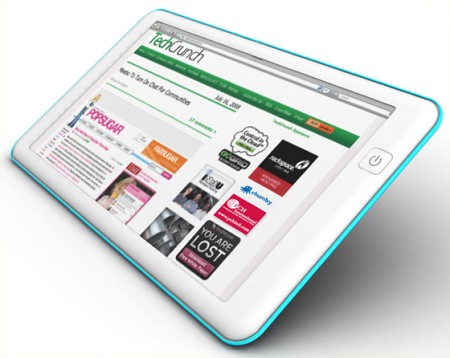
TechCrunch is asking its readers to help them design a web tablet costing just under $200. They claim that there does not yet exist a cheap and usable web tablet designed for things like browsing, web conferencing, mail, chat, and VoIP. Here are some of the specs they are asking for:

  • thin as possible
  • touch screen (except for power button)
  • WiFi
  • video camera and low-end speakers
  • 4 Gigabyte hard drive
  • 1/2 Gigabyte of RAM
  • Linux and Firefox (in kiosk mode)
  • no desktop interface

We are not completely sure that this device does not exist in some form. Tablets have been around for a while and many cover most of these features. Consider the Nokia N800 or the Pepper Pad.

We also think the TechCrunch readers, who generally concern themselves with what they can buy rather than what they can make, are not really the best crowd for this job. Considering our reader’s abilities to do things on the cheap, we thought we would pose the question ourselves with our own spin. What old and cheap hardware could you re-purpose to create this product?
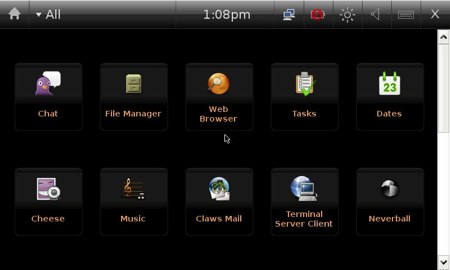
Install Debian On The Nokia N810


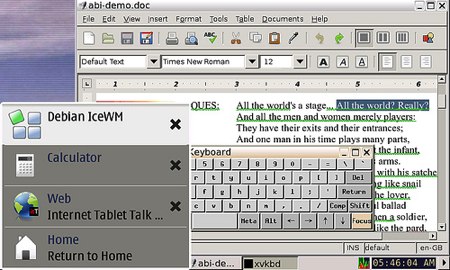
The Nokia N810 tablet is a great buy, especially for hackers. It already ships with a Linux-based operating system, called OS2008, which is based upon Maemo 4.0. However, for those who aren’t fans of OS2008, you can install Debian easily with some patience and an extra memory card. The Debian install includes OpenOffice, Firefox 3, AbiWord, and IceWM. You should be aware that there are pitfalls. Some of the applications run slowly, and you may be in danger of losing data if you run into problems.

[via Unwired View]

Nokia Haptikos Patent Application Reveals Its Technology


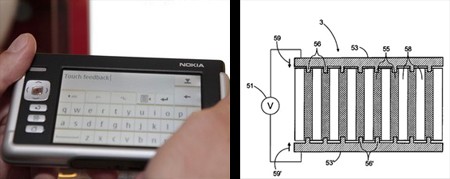
We’ve been waiting for more information on the Nokia Haptikos, the haptic feedback touchscreen announced last October and largely forgotten until now. We knew that it would be a device that could raise sections
of its touchscreen to simulate the feel of buttons or keys, we just weren’t sure how Nokia would pull that off.
Now we have a better idea, as Nokia’s recent patent filing for the Haptikos gives away some juicy details.

The secret behind the device’s feedback is a “plurality of closely spaced voltage controllable protuberances,” or in other words, several small fluid filled compartments just under the screen’s surface. Under them are several piezoelectric members that can be controlled independently; when they extend upward, they apply pressure to the fluid compartments, raising the surface of the screen in that area.

Nokia has yet to work out all the kinks, but you can see the parts that do work by downloading the Haptikos patent application (PDF file).

[via Engadget]

Ubuntu Released For MIDs


Ubuntu MID edition has been released for handheld Mobile Internet Devices. It’s targeting devices based on Intel’s A100/110 and the new Centrino Atom platforms. Successors to the UMPC, MIDs are usually small formfactor and have a touchscreen, plus a physical keyboard. UMPC portal has a examples of devices that are currently supported by this release, inluding plamtops like the Kohjinsha SH6. This release is only for x86 devices, so don’t expect it to be ported to the ARM based Nokia N800/810. The user interface is based on the Hildon framework and we’re glad people are attempting to think beyond a standard UI. We hope they plan on punching up the use of the color brown in the final though; it just wouldn’t be an Ubuntu release without it.

[via Linux Devices]

Open Source Symbian


Nokia recently announced its plans to purchase Symbian and formed the Symbian Foundation with the intention opening the software platform over the next two years. Symbian is already present on 60% of all cellphones in the world. With such a massive install base, open source Symbian has a much better chance of taking off than platforms like Android, which are starting on the ground floor.

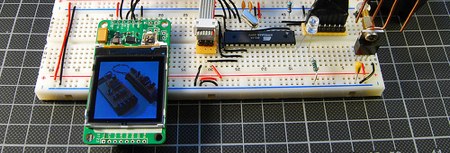
Nokia Color LCD Flickr Frame


Tinkerlog got their hands on a color LCD from SparkFun and set it up to receive images from Flickr. These color LCDs are 128×128 pixel and the include a breakout board with a separate power supply for the backlight. Communication is via a three wire SPI bus plus a reset line. [Alex] used an ATmega48 for control, which is connected to the computer using an RS232 to USB converter. The wiring schematic is here.

For the software side of things, he adapted Sparkfun’s example ATmega8 code for the microcontroller (he couldn’t get the Arduino code to work). Beej’s Python Flickr API was used to grab the images. The Python Imaging Library converted them, and finally, they were sent to the display using pySerial. SparkFun has been offering these displays for quite some time; it’s good to see a quality writeup of one in use.

[via Make Flickr Pool]

Ultraportable Laser Graffiti?


[Sittiphol Phanvilai]’s multitouch screen project was posted a couple different places today. It uses the Nokia N95 to track light pens and draws the resulting paths on the video output. We immediately saw the applications for this in laser tagging. Right now if you want to do laser tagging you need to haul a laptop with you in addition to the projector. With some modification to the NeuScreen software you could replace the laptop with just cellphone plugged directly into the projector.