Well, I did it. I conquered my childhood fear of talking bears and brought a vintage Teddy Ruxpin animatronic stuffed bear into my home. There were and still are plenty of his brethren both young and old to choose from on the auction sites, and when I saw this particularly carefree barefoot Teddy in his Hawaiian shirt and no pants, I was almost totally disarmed. Plus, the description promised a semi-working unit with a distorted voice, and who among us could resist a specimen in such condition? Maybe the tape deck motor is going out, or it just needs a new belt. Maybe the tape itself messed up, and Teddy is fine. I had to find out.
But let me back up a bit. If you don’t know what I’m talking about, Teddy Ruxpin was a revolutionary toy that dropped in 1985. It’s a talking teddy bear that reads stories aloud, all the while moving his eyes and mouth to the sounds. Along with Teddy came special cassette tapes, corresponding story books, and outfits. I wanted one when I was a kid, but was also kind of scared of them. Since they were so expensive — about $250 inflation-adjusted for the bear and a single tape / book / outfit, plus another $15 for four D cells — I never did get one in my youth.
At the risk of dating myself, I will tell you that grew up in the 80s — that decade of excess that was half drab and half brightly colored, depending on where you looked, and how much money you had for stuff like Memphis design. Technology seemed to move quickly in almost every aspect of life as the people of the Me decade demanded convenience, variety, and style in everything from their toilet paper (remember the colors?) to their telephones. Even though long distance cost a fortune back then, we were encouraged to ‘reach out and touch someone’.
A Healthy Fear of Bears
Looking back, it’s easy to see how all that advanced technology and excess filtered down to children. I may be biased, but the 80s were a pretty awesome time for toys, and for children’s entertainment in general. Not only were the toys mostly still well-made, even those that came in quarter machines — many of them were technologically amazing.
Take Teddy Ruxpin, which debuted in 1985. Teddy was the world’s first animatronic children’s toy, a bear that would read stories aloud from special cassette tapes, which moved his eyes and mouth along with the words. One track contained the audio, and the other controlled three servos in his face.
I remember watching the commercials and imagining Teddy suddenly switching from some boring bedtime story over to a rockin’ musical number a là the animatronic Rock-afire Explosion band at ShowBiz Pizza (a Chuck E. Cheese competitor). That’s the kind of night I wanted to be having.
The current lineup of the Rock-afire Explosion. Image via Servo Magazine
Which brings us to KC Bearifone, an animatronic teddy bear telephone. Honestly, part of the reason I bought the Bearifone was some sort of false nostalgia for Teddy. The main reason is that I wanted to own a Teleconcepts unit of some kind, and this one seemed like the most fun to mess around with. A robot teddy bear that only does speakerphone? Yes, please.
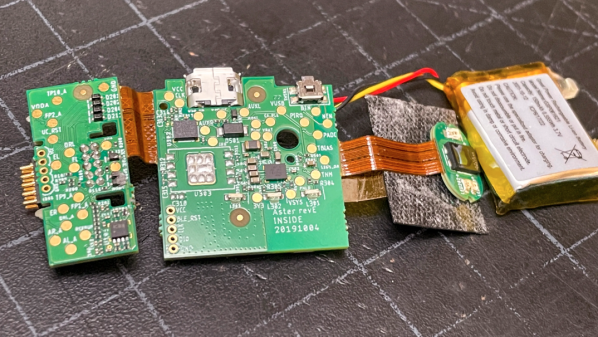
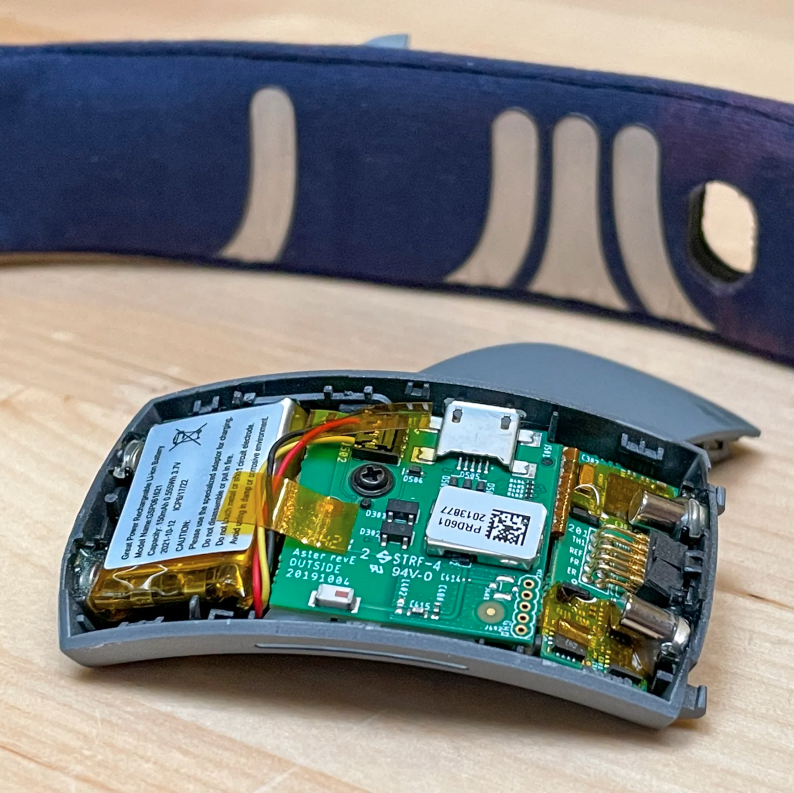
If you wonder how it’s possible to fit a fitness tracker into a ring, well, you’re not alone. [Becky Stern] sent one off to get CT scanned, went at it with a rotary tool, and then she made a video about it with [David Cranor]. (Video embedded below.)
While it’s super cool that you can do a teardown without tearing anything down these days — thanks to the CT scan — most of the analysis is done on a cut-up version of the thing through a normal stereo microscope. Still, the ability to then flip over to a 3D CT scan of the thing is nice.
We absolutely concur with [Becky] and [David] that it’s astounding how much was fit into very little space. Somewhere along the way, [David] muses that the electrical, mechanical, and software design teams must have all worked tightly together on this project to pull it off, and it shows. All along, there’s a nice running dialog on how you know what you’re looking at when tearing at a new device, and it’s nice to look over their shoulders.
Then there’s the bit where [Becky] shows you what a lithium-ion battery pack looks like when you cut it in half. She says it was already mostly discharged, and she didn’t burst into flames. But take it easy out there! (Also, make sure you take your hot xylene out on the patio.)
Discount (or even grey market) electronics can be economical ways to get a job done, but one usually pays in other ways. [Majenko] ran into this when a need to capture some HDMI video output ended up with rather less than was expected.
Faced with two similar choices of discount HDMI capture device, [Majenko] opted for the fancier-looking USB 3.0 version over the cheaper USB 2.0 version, reasoning that the higher bandwidth available to a USB 3.0 version would avoiding the kind of compression necessary to shove high resolution HDMI video over a more limited USB 2.0 connection.
The device worked fine, but [Majenko] quickly noticed compression artifacts, and interrogating the “USB 3.0” device with lsusb -t revealed it was not running at the expected speeds. A peek at the connector itself revealed a sad truth: the device wasn’t USB 3.0 at all — it didn’t even have the right number of pins!
A normal USB 3.0 connector is blue inside, and has both sets of pins for backward compatibility (five in the rear, four in the front) like the one shown here.
A USB 3.0 connection requires five conductors, and the connectors are blue in color. Backward compatibility is typically provided by including four additional conductors, as shown in the image here. The connector on [Majenko]’s “USB 3.0” HDMI capture device clearly shows it is not USB 3.0, it’s just colored blue.
Most of us are willing to deal with the occasional glitch or dud in exchange for low prices, but when something isn’t (and never could be) what it is sold as, that’s something else. [Majenko] certainly knows that as well as anyone, having picked apart a defective power bank module to uncover a pretty serious flaw.
Those of use hailing from the UK may be quite familiar with the Royal Air Force’s Tornado fighter jet, which was designed to fight in a theoretical nuclear war, and served the country for over 40 years. This flying deathtrap (words of an actual serving RAF fighter pilot this scribe met a few years ago) was an extremely complex machine, with state-of-the-art tech for its era, but did apparently have a bit of a habit for bursting into flames occasionally when in the air!
Anyway, the last fleet is now long retired and some of the tech inside it is starting to filter down into the public domain, as some parts can be bought on eBay of all places. [Mike] of mikeselectricstuff has been digging around inside the Tornado’s laser head unit, which was part of the bomber’s laser-guided missile subsystem, and boy what a journey of mechanics and electronics this is!
Pulse-mode optically pumped YAG laser
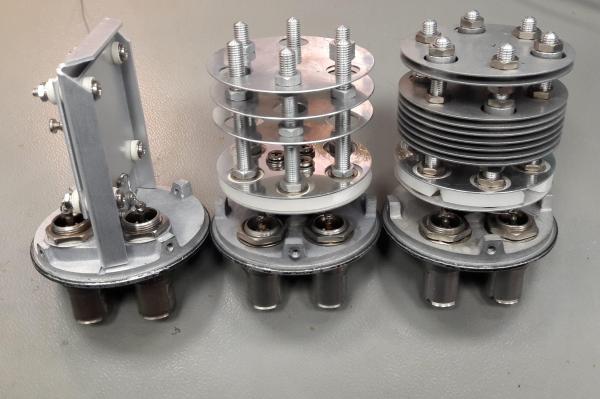
This unit is largely dumb, with all the clever stuff happening deep in an avionics bay, but there is still plenty of older high-end tech on display. Using a xenon-discharge-tube pumped yttrium aluminum garnet (YAG) laser, operating in pulsed mode, the job of the unit is to illuminate the ground target with an IR spot, which the subsequently fired missiles will home on to.
Designed for ground-tracking, whilst the aircraft is operating at speed, the laser head has three degrees of moment, which likely is synchronized with the aircraft movement to keep the beam steady. The optical package is quite interesting, with the xenon tube and YAG rod swimming in a liquid cooling bath, inside a metal housing. The beam is bounced around inside the housing using many prisms, and gated with a Q-switch which allows the beam to build up in intensity, before be unleashed on the target. Also of note is the biggest photodiode we’ve ever seen — easily over an inch in diameter, split into four quadrants, enabling the sensor to resolve direction changes in the reflected IR spot and track its error. A separate photodiode receiver forms part of the time-of-flight optical range finder, which is also important information to have when targeting.
There are plenty of unusual 3-phase positioning motors, position sensors, and rate gyros in the mix, with the whole thing beautifully crafted and wired-up military spec. It is definitely an eye opener for what really was possible during the cold war years, even if such tech never quite filtered down to civilian applications.
When we see [Ken Shirriff] reverse engineering something, it tends to be on the microscopic level. His usual forte is looking at die photos of strange and obsolete chips and figuring out how they work. And while we love those efforts, it’s nice to see him in the macro world this time with a teardown and repair of a 1960s-era solderless breadboard system.
If you’d swear the “Elite 2 Circuit Design Test System” featured in [Ken]’s post looks familiar, it’s probably because you caught his partner-in-crime [CuriousMarc]’s video on the very same unit, an eBay score that arrived in non-working condition. The breadboard, which retailed for $1,300 in 1969 — an eye-watering $10,000 today — was clearly not aimed at the hobbyist market. Truth be told, we didn’t even know that solderless breadboards were a thing until the mid-70s, but live and learn. This unit has all the bells and whistles, including three variable power supplies, an array of switches, buttons, indicator lamps, and jacks for external connections, and a pulse generator as well as a legit function generator.
Legit, that would be, if it actually worked. [Ken]’s contribution to the repair was a thorough teardown of the device followed by reverse-engineering the design. Seeing how this thing was designed around the constraints of 1969 technology is a real treat; the metal can transistor and ICs and the neat and tidy PCB layout are worth the price of admission alone. And the fact that neon lamps and their drivers were cheaper and easier to use than LEDs says a lot about the state of the art at the time.
It seems only appropriate that hot on the heels of the conclusion of Hackaday’s 555 Timer Contest that [Ken Shirriff] posts a silicon die teardown of an early version of a hacker’s favorite chip, the 555.
A Microscopic View Of the 555 Die
Starting with a mystery chip from January 1973, [Eric Schlaepfer] painstakingly sanded down the package to reveal the die, which he deemed to be a 555 timer. Why didn’t they know it was a 555 timer to start? Because the package was not marked with “555” but rather some other marks that you can see in the blog post.
In addition to a great explanation of how the 555 works in general, [Ken] has taken a microscopic look at the 555 die itself. The schematic of a 555 is easily available, and [Ken] identifies not just sections of the die but individual components. He goes further yet by explaining how the PNP and NPN resistors are constructed in silicon. There’s also a nice and juicy bit of insight into the resistors in the IC, but we won’t spoil it here.
Be sure to show your love for the winners of the 555 contest, or at the very least check out the project that took the stop spot: a giant sized 555 that you don’t need a microscope to see inside of.