Turning The Pi Zero Into A USB Gadget

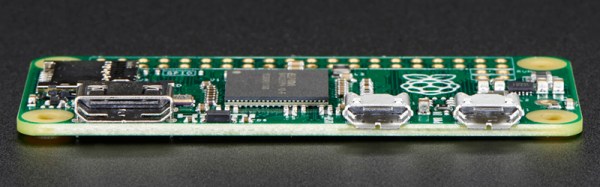
The Raspberry Pi Zero is limited, or so everyone says, and everyone is trying to cram a USB hub and WiFi adapter on this tiny, tiny board. One thing a lot of people haven’t realized is that the Raspberry Pi Zero comes with a USB OTG port, meaning it can function as a USB device rather than a USB host. This means the Raspi can become a serial device with just a USB cable, an Ethernet device, MIDI device, camera, or just about anything else you can plug into a USB port. Adafruit has your back with a tutorial for using the USB OTG port as a serial and Ethernet interface, and the possible applications are extremely interesting.

The only requirement for using the USB OTG port for device applications is an update to the kernel. This is easily installed by dumping a few files on an SD card and a employing bit of command line wizardry. The simplest example is setting up the Pi Zero as a USB serial device, allowing anyone to log into a serial console on the Pi with just a USB cable.

A slightly more interesting application is setting up the Pi as an Ethernet gadget. This effectively tunnels all the networking on the Pi Zero through a USB cable and a separate computer. The instructions are extremely OS-specific, but the end result is the same: you can apt-get on a Pi Zero to your heart’s desire with a new kernel loaded onto the SD card and a USB cable.

This experimentation is just scratching the surface of what is possible with the OTG port on the Pi Zero. MIDI devices are easy, and with a ton of GPIOs, the Pi Zero itself could become a very interesting musical instrument. Want the Pi Zero to be a storage device? That’s easy too. The USB Gadget will end up being one of the most exciting uses for the Pi Zero, and we can’t wait to see what everyone will come up with next.

USB Proxy Rats Out Your Devices’ Secrets

If you need to reverse-engineer a USB protocol on a computer running Linux, your work is easy because you control everything on the target system — you can just look at the raw USB data. If you’d like to reverse-engineer a USB device that plugs into a game console, on the other hand, your work is a lot harder. Until now.

serialusb is a side-project by [Mathieu Laurendeau], alias [Matlo]. His main project, GIMX is aimed at gaming and lets you modify your gaming controller’s performance by passing it first through your PC and tweaking the USB data before forwarding it on to the target console. Want rapid fire? You got it. Alter the steering-wheel sensitivity curves? Sure.

GIMX is essentially a USB man-in-the-middle between your controller and your console, with the added ability to modify the data along the way. For hardware that’s not yet supported by GIMX, though, either [Matlo] would need to borrow your controller, or teach you to man-in-the-middle your own USB traffic. And that’s what serialusb does.

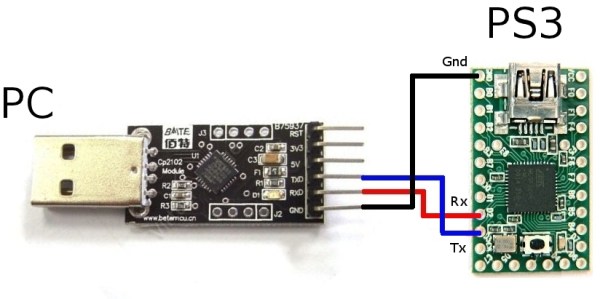
The hardware required is very modest: a USB-to-serial adapter and an ATmega32u4-based Arduino clone. Many of you could whip this together with parts on hand, and it’s the same hardware you’d need to run GIMX anyway. Data goes through your computer, is usbmon’ed and wireshark’ed, and then passed over serial to the ATmega which then converts it back into USB, plugged into the console. A very tidy little setup.

In case this seems familiar, we’ve covered a similar trick by [Matlo] before that used a BeagleBoard as the computer in the middle. That’s a sweet setup for sure, but if you don’t have a spare single-board computer lying around, now you can get it done for only around $5 in parts. Happy USB reversing!

Gutted USB Power Packs Run Your TV

With a computer in every pocket, being tethered to large mains-powered appliances is a bit passe. No longer must you be trapped before the boob tube when you can easily watch YouTube on your phone. But you might be jonesing for the big screen experience in the middle of a power outage, in which case learning to build a simple battery bank built from cheap cell-phone power packs might be a good life skill to practice.

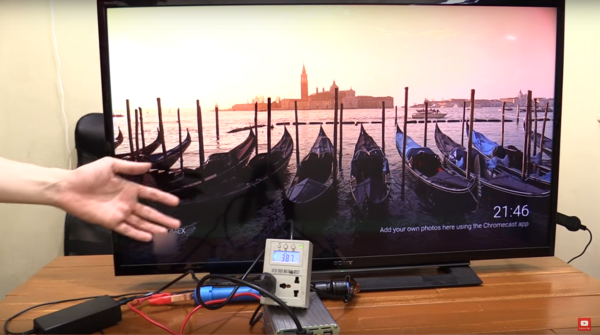
Looking more for proof of concept than long-term off-grid usability from his battery bank, [Stephen] cobbled together a quick battery bank from 18650 lithium ion batteries and a small 300W inverter. All the hardware was had on the cheap from an outfit called Cd-r King, a Phillipines-based discount gadgetorium we’d like to see in the states. He got a handful of USB power packs and harvested the single 18650 battery from each, whipped up a quick battery holder from 1/2″ PVC pipe and some bolts to connect the inverter. With four batteries in series he was able to run a flat-screen TV with ease, as well as a large floor fan – say, is that a Mooltipass on [Stephen]’s shelf in the background? And what’s nice about the gutted USB power packs is that they can still be used to recharge the batteries.

As [Stephen] admits, this is a simple project and there’s plenty of room to experiment. More batteries in parallel for longer run times is an obvious first step. He might get some ideas from this laptop battery bank project, or even step up to Tesla Li-ion battery hacking – although we doubt Cd-r King will be of much help with the latter.

Continue reading “Gutted USB Power Packs Run Your TV”

Solder More USB Ports To The Raspberry Pi Zero

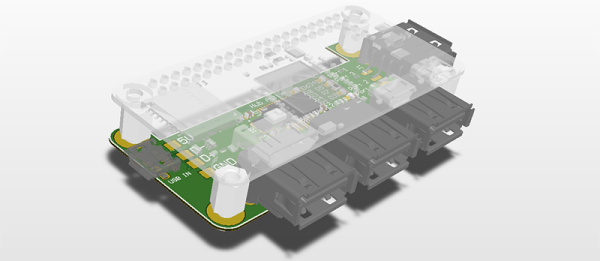
Slowly, Raspberry Pi Zeros are falling into the hands of everyone who wants one. Quickly, though, it was realized that one USB port wasn’t enough, and having a single USB OTG port was only just the most economical solution. The Pi Zero does have a lot of test points exposed on the back, and [Peter van der Walt] is clever enough to come up with a 4-port hub you can solder directly to the Pi Zero.

[Peter] has a bit of experience with USB ports on the Pi, and the test points available on the bottom of this cheap and wonderful board provide everything you need to break out the single USB OTG port to a USB hub. We’ve seen this done before with a few tenuous solder connections between the Zero and an off-the-shelf USB hub. [Peter]’s build does it by soldering a USB hub directly to the Pi through these test points. It’s the first purpose built bit of hardware designed for the express purpose of giving the Pi four USB ports while only making it a sliver thicker.

The chip [Peter] is using for the build is the TI TUSB2046B, a device that turns a single USB port into a 4-port hub. This is a part that only costs about $2 in quantity, and the USB connectors themselves are only about $0.60 if you want to build a thousand of these solderable USB hubs. Now you see why the Pi Foundation didn’t include a whole host of ports on the Pi Zero, but it does mean you should be able to pick this board up for under $10 when it’s inevitably cloned in China.

[Peter] doesn’t have this board working yet. In fact, he’s only just sent the Gerbers off to the PCB fab. There will be an update once [Peter] gets the boards back and solders up the tiny but tolerable 0603 parts.

Raspberry Pi $2 WiFi Through Epic SDIO Hack

These are the times that we live in: the Raspberry Pi Zero comes out — a full freaking Linux computer on a chip for $5 — and people complain that it doesn’t have this or that. Top place on the list of desiderata is probably a tie between audio out and WiFi connectivity. USB is a solution for both of these, but with one USB port it’s going to be a scarce commodity, so any help is welcome.

Hackaday.io hacker [ajlitt] is looking for a way out of the WiFi bind. His solution? The Raspberry Pi series of chips has a special function on a bunch of the GPIO pins that make it easier to talk to SDIO devices. SDIO is an extension of the SPI-like protocol that’s used with SD memory cards. The idea with SDIO was that you could plug a GPS or something into your PDA’s SD card slot. We don’t have PDAs anymore, but the SDIO spec remains.

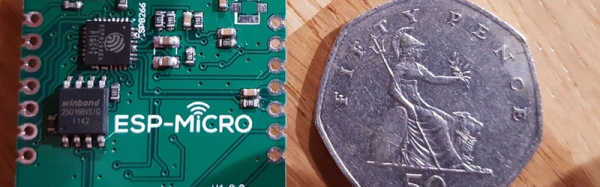
[ajlitt] dug up an SDIO driver for the ESP8089 chip, and found that you can liberate the ESP8266’s SPI bus by removing a flash memory chip that’s taking up the SPI lines. Connect the SPI lines on the ESP8266 to the SDIO lines on the Raspberry Pi, and the rest is taken care of by the drivers. “The rest”, by the way, includes bringing the ESP’s processor up, dumping new firmware into it over the SPI/SDIO lines to convince it to act as an SDIO WiFi adapter, and all the rest of the hardware communication stuff that drivers do.

The result is WiFi connectivity without USB, requiring only some reasonably fine-pitch soldering, and unlike this hack you don’t have to worry about USB bus contention. So now you can add a $2 WiFi board to you $5 computer and you’ve still got the USB free. It’s not as fast as a dedicated WiFi dongle, but it gets the job done. Take that, Hackaday’s own [Rud Merriam]!

Thanks [J0z0r] for the tip!

4 Port USB, Raspberry Pi Zero Piggy-Back Hack

[Frederick] decided his new Zero needed a USB hub. He noticed a small, on hand, USB hub was the same size as the Zero. As any good hacker would, he stripped it from its case to piggy-back it onto the Zero. What’s with the piggy-backing since we just saw that with another Zero hack that added a WiFi dongle? Is it something in the water? Nah, probably just a natural fit with the mini-sized Zero.

It certainly helps that the USB and power pads on the back of the Zero are available and of a good size to accept direct, soldered wire connections. The USB connections on the hub were a little more tricky. The wires were soldered to the surface mount pins of the mini-B connector. But [Frederick] managed to get that done, also.

A nice advantage of this hack is that a couple of soldered jumper wires let the Zero draw power from the hub’s wall-wart, eliminating one cable from those needed to work with the Pi. Using hot glue for strain relief on the wiring is a nice touch. To keep the boards from shorting he put a piece of foam between them and help them together with elastic bands. Simple and easy.

First Raspberry Pi Zero Hack – Piggy-Back WiFi.

And we have the first Raspberry Pi Zero hack! In less than 72 hours from the official release announcement [Shintaro] attached an Edimax WiFi USB Adapter directly to the USB solder pads on the Pi Zero. He couldn’t bear to disturb the small dimensions of the Pi Zero by using the USB On-the-Go (OTG). The OTG is needed to convert the micro-USB connector on the board to a full USB-A connector.

The case was removed from the Edimax and the device and Zero wrapped in Kapton to insulate the exposed solder points. Power was taken from the PP1 and PP6 points on the back of the board. These are the unregulated inputs from the USB power so should be used with caution. Some cheap USB power supplies can put out more that 5 volts when first connected and that might let the smoke out of a device.

raspberry_pi_quarter

The data wires were connected to PP22 and PP23, also on the back, and behind the USB data connector. Since USB is a differential signal these wires were carefully kept of equal length to avoid distorting the signal.

An SD card was created and edited on a Raspberry Pi B 2 to set the WiFi credentials. Inserted into the Zero it booted fine and started up the WiFi network connection.

Congratulations, [Shintaro] for the first Hackaday Raspberry Pi Zero hack. Is that a Hack-a-Zero-Day hack?