Turning A Raspberry Pi Into A Laptop With A LapDock

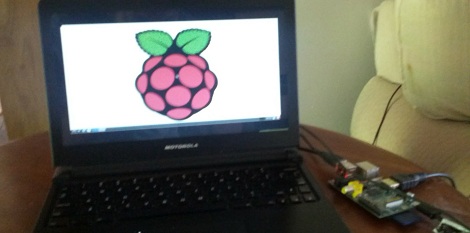
Being a $35, full-fledged Linux computer, the Raspberry Pi brings a lot to the table. There’s one problem, though: this computer doesn’t come with a keyboard, mouse, display, or even a battery. Luckily, it’s pretty easy to add these devices with the help of a Motorola LapDock and turn a RasPi into a fully portable computing platform.

The Motorola LapDock is the latest take on the dumb terminal. Consisting of only a 1366 x 768 display, keyboard, touch pad and 38Wh battery, the LapDock is meant to serve as a docking station and breakout for a few select Motorola cell phones. There are only two connections on the LapDock – a micro USB and micro HDMI port – connecting the peripherals to the cell phone. With just a few adapters, it’s possible to plug the Raspi into the LapDock, and have a Raspberry Pi-based laptop for under $100.

Interestingly, the Raspi can also be powered over the USB connection to the LapDock, meaning an external power supply isn’t required. Right now the state of a LapDock-ified Raspi is a bit inelegant, but we’ll expect someone to come up with a proper docking adapter to get rid of all the wires and add a WiFi module shortly.

via adafruit
N64 In An N64 Controller

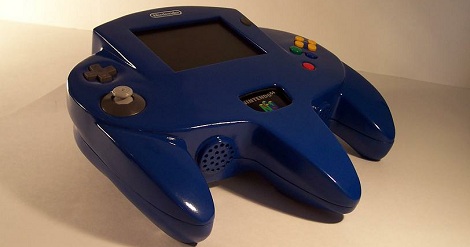
We’ve seen portable N64s before, but none were at the level of [Bungle]’s oversized N64 controller casemod.

Instead of the usual ‘sanding Bondo and gluing styrene’ method we’ve seen in other casemods, [Bungle] decided to make a silicone mold with a positive master. Not only did [Bungle] end up with a case indistinguishable from something produced in a factory, but the molding process left him with more internal room and the ability to make identical duplicates of his over sized controller.

The electronics are the standard fare – a slightly modified N64 with a PSone LCD screen. Because the rumble and memory packs are built in to the body of the gigantic controller, [Bungle] added a multifunction pak to provide ports for power, brightness controls, a/v, and a second controller.

This is an amazing build that really steps up the game for console modders. You can check out [Bungle]’s demo video after the break.

Continue reading “N64 In An N64 Controller”

NC Maker Faire 2012: Robot Hockey

nc-robot-hockey

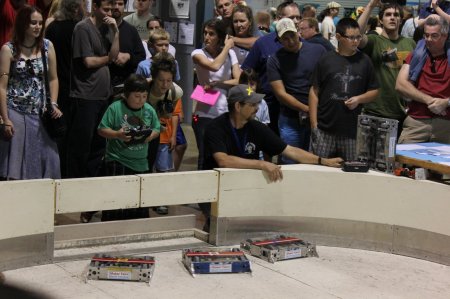
Robot combat has inspired makers probably since the first one was conceived.  Whether it’s an epic struggle between two future superpowers, or simply a friendly match of robot hockey, it’s always fun to watch. NC Maker Faire 2012 was no exception as [Carolina Combat Robots] had a small arena with remote control robots going at it. The matches were incredibly popular, and I was glad to be able to see some of it from my table next door!

Check out the video after the break for some footage of these ‘bots in action! Continue reading “NC Maker Faire 2012: Robot Hockey”

Musical Light Show Is Far Less Complex Than You Might Think

color-changing-light-tube

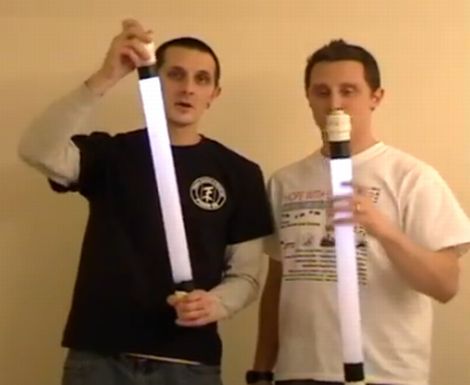
[Matt and Jason Tardy], who make up the musical performance duo known as AudioBody, were recently featured on Make: explaining how they put on one of their trademark segments. The most popular portion of their show features color changing tubes of light which the pair spin and fling around not unlike a higher-tech version of the Blue Man Group. While the visuals are pretty slick, the technique behind it is far simpler than most people initially imagine.

As you can see in video below, the tubes look to be nothing more than simple white lights. As the brothers work through their performance however, the tubes switch from white to blue and back again with a liquid-like transition between the colors.

The [Tardys] say that most people peg a microcontroller or other complex electronics as the source of their light wizardry, but the real answer is much simpler. Embedded in the end of each tube is a bright LED flashlight. A sliding blue filter positioned inside the tube provides the silky smooth transition between colors – no fancy electronics required.

If you would like to see how they were built, be sure to swing by the AudioBody web site for a how-to presentation by the [Tardys] themselves.

Continue reading “Musical Light Show Is Far Less Complex Than You Might Think”

Building A Radio Telescope For A School Science Project

The image above is a picture of  Hydrogen emissions from our galaxy. The cool thing about this picture is it wasn’t taken with millions of dollars worth of equipment; instead, only a few hundred dollars worth of ham radio gear was needed to get a picture of the Milky Way. [Shanni Prutchi], with the help of her dad [David] built this radio telescope in 5th grade, and even gave a presentation on this build at the National Radio Astronomy Observatory.

Instead of a gigantic satellite dish, [Shanni] used a loop yagi antenna to collect radio signals in the 1420 MHz band. These signals are amplified, filtered, and sent to an ICOM IC R-7000 receiver specially modified by [Shanni]’s dad for radio astronomy.

After her telescope saw first light, [Shanni] and [David] decided to use their brand new toy to detect the passage of the sun. At around 10:00 am they pointed the telescope at where the sun would be at 1:30 pm. For the next few hours, the telescope gathered and integrated radio signals to make an awesome graph. Yep, [Shanni]’s scope can detect radio waves coming directly from the sun.

Like a lot of us, [Shanni] was very much influenced by the movie Contact, something we brought up last week in a post on software-defined radio telescopes. This telescope was built in 2005, meaning [Shanni] couldn’t take advantage of any of the new advances in cheap software radios. We’re still waiting for someone to throw a Realtek SDR telescope together, so if you’ve got one send it in

Using An Android As A Webserver

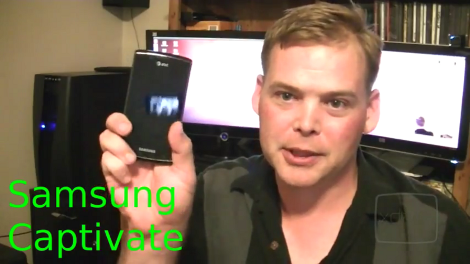
In the latest episode of XDA TV [Adam Outler] turned his Android phone into a webserver. At first this might sound comical, but the ever-increasing power of our handhelds makes it a pretty legitimate option. It’s hard to come up with concrete uses off the top of our head, but we’re sure there’s value in being able to pull the phone out of your pocket and serve some content.

The app BotBrew Basil makes the installation process nearly automatic. It gives you point-and-click access to install the lighttpd webserver package and set the daemon to run automatically at boot time. That’s it! Of course you need to supply your own HTML to be served. [Adam] used an HTML5 website template for this.

Next you also need a way to resolve the address of the phone. In this case it’s assigned a static IP from the router, and a dynamic DNS service provides a link that maps to the router’s location. But since these phones are running Linux (at least on the lowest level) it should be pretty easy to add a cron job which will send IP address updates to the service if you want to take the ‘webserver’ out in the world with you. You can watch the entire video after the break.

Ironically this is a big hardware upgrade for [Adam’s] webserver. The previous version was running from an Evalbot.

Continue reading “Using An Android As A Webserver”

A Closer Looks Helps You Build Your Own DiWire Bender

Whether or not you’re actually going to build this CNC wire bender, we think you’ll love getting a closer look at how it’s put together. The team over at PENSA got such a strong response from a look at the original machine that they decided to film a video (embedded after the break) showing how the thing was put together. They’ve also posted a repository with code, bom, etc.

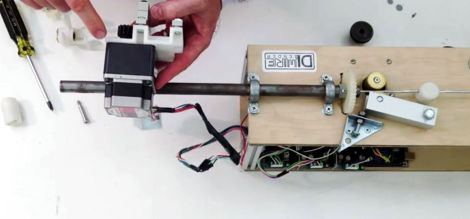
In the image above [Marco] shows off the portion that actually does the bending. It’s designed to mount on the pipe through which the straightened wire is fed. The 3d printed mounting bracket really makes this a lot easier. The assembly provides a place to attach the solenoid which moves a bearing in and out of position. That bearing presses against the wire to do the bending, but must be moved from one side of the wire to the other depending on the direction of the next bend. This is a lot easier to understand after watching the demo video which is also embedded after the break.

Continue reading “A Closer Looks Helps You Build Your Own DiWire Bender”