3D Printering: Making A Thing With SketchUp

printering

Imagine for a second it’s the mid-1980s and you’re looking in to desktop publishing setups. Those new LaserJets and LaserWriters are pretty cool, but imagine the desktop publishing world if you couldn’t create your own documents. Yes, it seems absurd to have a printing press that won’t create unique documents.

Now flash forward 30 years to the world of desktop manufacturing and rapid prototyping. There are dozens of repositories for 3D printable objects, but making something of your own design is apparently a dark art and arcane knowledge to everyone buying 3D printers for plastic octopodes and bottle openers.

This week, by popular demand, we’re going to be making a ‘thing’ in SketchUp Make. It’s free, easy, and surprisingly versatile despite its limited tool set. Common sense and Google algorithms dictate I link to previous tutorials in this series below:

And now on with the show. You’re gonna want to click the ‘read more’ link.

Continue reading “3D Printering: Making A Thing With SketchUp”

Your Mouse Is A Terrible Webcam

camera

It should come as no surprise your optical mouse contains a very tiny, very low resolution camera. [Franci] decided to take apart one of his old mice and turn that tiny optical sensor into a webcam.

Inside [Franci]’s Logitech RX 250 is an ADNS-5020 optical sensor. This three wire SPI device stuffed into an 8-pin package is a 15×15 pixel grayscale image sensor. [Franci] started this project by bringing out the Arduino and Ethernet shield. After soldering a pull-up resistor to the image sensor’s reset pin, connecting the rest of the circuit was as simple as soldering a few wires to the Arduino.

The Arduino sketch sends the image data for each pixel to a computer over a serial connection. A bit of javascript and a touch of HTML takes this pixel data and turns it into a webpage with a live view of whatever is directly under [Franci]’s mouse.

Video of the mousewebcam in action below.

Continue reading “Your Mouse Is A Terrible Webcam”

Creating PCBs With 3D Resin Printers

PCB

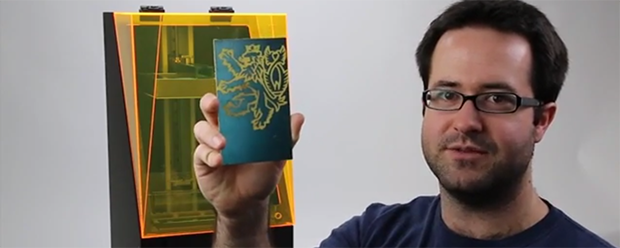
The folks over at Full Spectrum Laser are Kickstarting their own 3D printer – a stereolithography machine like the Form 1 and B9 Creator printers. During their testing, they discovered a new application for these SLA printers that should prove to be very useful for the makers and builders using machines – manufacturing PCBs with UV-sensitized copper clad boards.

Full Spectrum Laser’s printer – the Pegasus Touch – uses a near UV laser and a galvo system to build objects in UV-curing resin layer by layer. In retrospect it seems pretty obvious a UV laser would expose UV sensitive boards, but this discovery simply reeks of cleverness and is a nice ‘value added’ feature for the Pegasus printer.

The Pegasus printer has a laser spot size of 0.25mm, meaning the separation between traces on Pegasus-produced PCBs will be just under 10 mils. That’s a bit larger than the limits of laser printer-based PCB fabrication but far, far less complicated. Making a PCB on an SLA printer is as easy as removing the resin tank and putting a sensitized board on the build platform. Draw some traces with the printer, and in a few minutes you have an exposed board.

We’d really like to see if this technique can also be used with other SLA printers. if anyone out there would like to experiment, be sure to send the results into the tip line.

Video from Full Spectrum Laser below.

Continue reading “Creating PCBs With 3D Resin Printers”

Hackaday Links: January 12, 2014

hackaday-links-chain

[Kyle] teaches photography and after being dismayed at the shuttering of film and darkroom programs at schools the world over decided to create a resource for film photography. There’s a lot of cool stuff on here like mixing up a batch of Rodinal developer with Tylenol, lye, and sodium sulphite, and assessing flea market film cameras. There are more tutorials coming that will include setting up a dark room, developing prints, and playing around with large format cameras.

[hifatpeople] built a binary calculator out of LEGO® bricks or toys. It started off as a series of logic gates built out of LEGO® bricks or toys in the LEGO® Digital Designer. These logic gates were combined into half adders, the half adders combined into full adders, and the full adders combined into a huge plastic calculator. Unfortunately, buying the LEGO® bricks or toys necessary to turn this digital design into a physical model would cost about $1000 using the LEGO® Pick-A-Brick service. Does anyone have a ton of LEGO® Technic® bricks or toys sitting around? We’d love to see this built.

Think you need a PID controller and fancy electronics to do reflow soldering in a toaster oven? Not so, it seems. [Sivan] is just using a meter with a thermocouple, a kitchen timer, and a little bit of patience to reflow solder very easily.

The folks at DreamSourceLabs realized a lot of electronic test equipment – from oscilloscopes and logic analyzers to protocol and RF analyzers were all included a sampling circuit. They designed the DSLogic that puts a sampler and USB plug on one board, with a whole bunch of different tools connected to a pin header. It’s a pretty cool idea for a modular approach to test equipment.

Adafruit just released an iDevice game. It’s a resistor color code game and much more educational than Candy Crush. With a $0.99 coupon for the Adafruit store, it’s effectively free if you’re buying anything at Adafruit anytime soon. Check out the video and the awesome adorable component “muppets”.

[Bunnie]’s Open Source Laptop Is Ready For Production

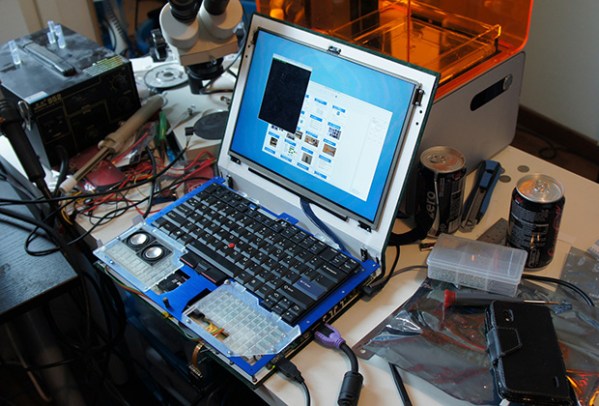
Just over a year ago, [Bunnie Huang] announced he was working on a very ambitious personal project: a completely open source laptop. Now, with help from his hardware hacker compatriot [xobs], this laptop named Novena is nearly complete.

Before setting out on this project, [Bunnie] had some must-have requirements for the design. Most importantly, all the components should be free of NDA encumbrances. This isn’t an easy task; an SoC vendor with documentation sitting around on their servers is rare as hen’s teeth, and Freescale was the only vendor that fit the bill. Secondly, the entire laptop should be entirely open source. [Bunnie] wasn’t able to find an open source GPU, so using hardware video decoding on his laptop requires a binary blob. Software decoding works just fine, though.

Furthermore, this laptop is designed for both security and hardware hacking. Two Ethernet ports (one 1Gbit and the second 100Mbit), a USB OTG port, and a Spartan 6 FPGA put this laptop in a class all by itself. The main board includes 8x analog inputs, 8x digital I/O ports, 8 PWM pins, and a Raspberry Pi-compatible header for some real hardware hackery.

As for the specs of the laptop, they’re respectable for a high-end tablet.  The CPU is a Freescale iMX6, a quad-core ARM Cortex-A9 running at 1.2 GHz. The RAM is upgradeable to 4GB, an internal SATA-II port will easily accommodate a huge SSD, the ability to use an LCD adapter board to run the 13-inch 2560×1700 LED panel [Bunnie] is using. The power system is intended to be modular, with batteries provided by run-of-the-mill RC Lipo packs. For complete specs, check out the wiki.

Despite the high price and relatively low performance (compared to i7 laptop) of [Bunnie]’s laptop, there has been a lot of interest in spinning a few thousand boards and sending them off to be pick and placed. There’s going to be a crowd funding campaign for Novena sometime in late February or March based around an “all-in-one PC with a battery” form factor. There’s no exact figure on what the price of a Novena will be, but it goes without saying a lot will be sold regardless.

If you want the latest updates, the best place to go would be the official Novena twitter: @novenakosagi


Rex, The ARM-Powered Robot Board

REX

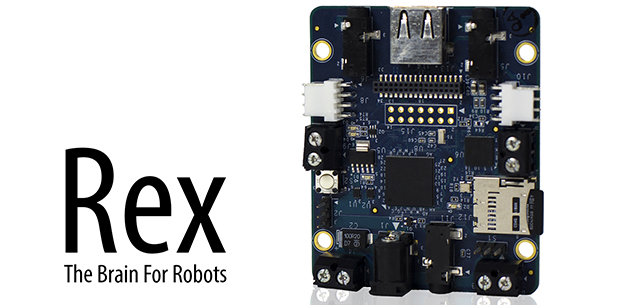
There are a million tutorials out there for building a robot with an Arduino or Raspberry Pi, but they all suffer from the same problem: neither the ‘duino nor the Raspi are fully integrated solutions that put all the hardware – battery connectors, I/O ports, and everything else on the same board. That’s the problem Rex, an ARM-powered robot controller, solves.

The specs for Rex include a 1GHz ARM Cortex-A8 with a Video SoC and DSP core, 512 MB of RAM, USB host port, support for a camera module, and 3.5mm jacks for stereo in and out. On top of that, there’s I2C expansion ports for a servo adapter and an input and output for a 6-12 V battery. Basically, the Rex is something akin to the Beaglebone Black with the hardware optimized for a robotic control system.

Because shipping an ARM board without any software would be rather dull, the guys behind Rex came up with Alphalem OS, a Linux distro that includes scripts, sample programs, and an API for interaction with I2C devices. Of course Rex will also run other robotics operating systems and the usual Debian/Ubuntu/Whathaveu distros.

It’s an impressive bit of hardware, capable of speech recognition, and machine vision tasks with OpenCV. Combine this with a whole bunch of servos, and Rex can easily become the brains of a nightmarish hexapod robot that responds to your voice and follows you around the room.

You can pick up a Rex over on the Kickstarter with delivery due sometime this summer.

The 2014 Line Of MakerBots

makerbots

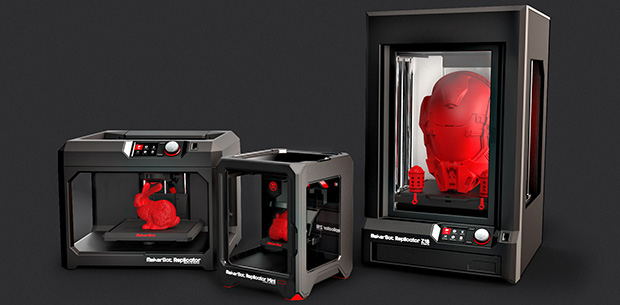
With the Consumer Electronics Show over, it’s finally time to take a look at the new line of MakerBot printers (here’s the press release). Unlike MakerBot’s previous offerings with a one size fits all business model, they’re branching out with a product line that can only be described as, ‘regular, small, and large’.

The new MakerBots include an updated Replicator that’s just slightly larger than the previous version. It includes Ethernet, an option for WiFi, an on-board camera, and a control panel with a 3.5″ LCD and rotary encoder. This new Replicator will retail for $2900, $700 more than the current Replicator (single extruder).

The other new MakerBots include the stripped down and small Replicator Mini. It’s a no-frills machine with a build volume of 10 x 10 x 12.5 cm (~4 x 4 x 5 in) with 200 micron resolution. Also in the new lineup is the Replicator Z18, an impressively large printer with a 30.5 x 30.5 x 45.7 cm (12 x 12 x 18 in) build volume, 100 micron resolution, plastic sides for a heated build volume, and all the bells and whistles on the new Replicator. The Mini will sell for $1375 and the Z18 is expected to sell for $6500.

The updated Replicator is available now, and the Mini and Z18 will be available sometime in the next few months.