A Watch For Curiosity’s Drivers

Eight long years ago, when the Martian rovers Spirit and Opportunity were steaming towards our dusty neighbor, JPL systems engineers [Julie Townsend] and [Scott Doudrick] were stuck trying to solve a very strange problem. After the twin rovers landed, the rover drivers would have to live on Mars time. Because a Martian day lasts 24 hours, 39 minutes, rover team members would have to report to work 39 minutes later than the previous day. After much cajoling, a watchmaker by the name of [Garo Anserlian] was convinced to create a mechanical watch that lost 39 minutes per day, giving the team responsible for driving Spirit and Opportunity across the Martian desert these last eight years a temporal connection to the task at hand.

Of course, a lot happens in eight years. Now we have incredibly inexpensive, fully programmable TI Chronos watch, used by [Arko] to make a wristwatch set to Martian solar time. Instead of a master watchmaker selling the slowest wristwatch ever for hundreds of dollars, staying on Curiosity time is a simple matter of reprogramming a $50 wrist-mounted computer.

The build began by taking the default firmware for the Texas Instruments EZ430 Chronos wristwatch. In its stock configuration, the Chronos takes a 32.768khz clock signal, counts out clock pulses, and increments the number of seconds every time a counter reaches 32,768.

Because a Martian Sol is 24 hours, 39 minutes and 35 seconds of Earth time, [Arko] needed to program the seconds display to change every 1.027 Earth seconds. This meant changing the seconds every 33,668.833 clock cycles, instead of the Earth-oriented 32,768 clock cycles.

There’s one small glitch with that plan: the timer in the Chronos wristwatch can’t deal with floating point numbers, meaning [Arko] had to settle for incrementing the number of seconds ever 33,668 or 33,669 clock cycles. After a bit of math, [Arko] found using a value of 33,669 would mean his Martian time watch would only lose about 2 seconds a day, a minute after 78 Martian Sols, or 8.57 Martian minutes after one Martian year.

The build only took [Arko] five hours in front of his computer, and he doesn’t consider this to be a finished product. He plans on adding a few bells and whistles such as being able to display both Earth and Mars time. Still, an awesome build if your job description includes driving a rover across the Martian plains.


3D Games For The Arduino With Raycasting

For all the Arduino-based video game builds we’ve seen, we’re really only left with a bunch of 2D platformers and other sprite-based games. [Reimecker] wasn’t satisfied with this level of computational complexity, so he ported the 3D game engine made famous by Duke Nukem 3D to the Arduino (German, Google translation).

[Reimecker]’s project is based on the very popular Build Engine written by [Ken Silverman] and used in games such as Duke Nukem 3D,  Shadow Warrior,  Blood, and TekWar. The Build Engine can be used to make a first person shooter, but more on the level of Wolfenstein 3D instead of Half-Life.

The hardware [Reimecker] used is a regular ‘ol 8-bit Arduino with an attached LCD touch screen displaying 320×240 pixels of a ray cast environment. From the videos of the build (available after the break), [Reimecker] has a fairly decent game engine capable of displaying a 2.5D environment. The frame rate might not be very high, but it’s still an amazing build considering the hardware [Reimecker] is working with.

Continue reading “3D Games For The Arduino With Raycasting”

It Was Only A Matter Of Time Before We Saw Nixie Modules For The Arduino

The Nixie tube, a neon-filled tube with a series of 10 cathodes shaped like numerals, is a classic display for any build wanting a unique, vintage, or steampunk aesthetic. We shouldn’t be surprised a factory in China is now turning out Arduino-compatable Nixie modules (English translation, but don’t get your hopes up), but there it is.

The modules are based on the QS30-1 Nixie tube capable of displaying the digits 0 through 9, and include an RGB LED behind the tube for some nice additional illumination. According to the manual, the modules themselves are based on a pair of 74HC595 shift registers, and are ‘stackable.’ By applying 12 volts to a pair of pins and connecting another 5 wires to an Arduino, it’s possible to drive as many of these Nixie modules as you’d like.

[Paul Craven] got his hands on a quartet of these modules and is planning on building a steampunk style alarm clock as a personal project. [Paul] was able to get the modules up and running fairly quickly, as seen after the break.

While they’re most certainly not the cheapest option, if you’re planning a build with Nixies, this probably is the easiest way to get a vintagey, steampunkey numerical display.

Continue reading “It Was Only A Matter Of Time Before We Saw Nixie Modules For The Arduino”

The Easiest Way To Dive In To ARM Programming

[Brad] has been very excited about an ARM Cortex-M0 chip released by NXP; it’s a fully featured ARM microcontroller, and is, quite amazingly, stuffed into a hobbyist and breadboard-friendly DIP-28 package. After finding a supplier for this chip, [Brad] dove in and put together a great tutorial for programming an ARM on the breadboard using open source tools.

The chip in question is NXP’s LPC1114FN28, a 28-pin breadboard friendly chip we’ve posted about before. After finding a single supplier for this microcontroller (only $1.26 for one chip!), [Brad] pulled out his breadboard and started wiring things up.

Because this microcontroller has an on-board oscillator, wiring up a breadboard and putting in a breakout for an FTDI cable was a snap. After configuring a toolchain and writing a bit of code, the only issue was uploading the code to the chip. This was handled by the lpc21isp programming tool, slightly modified and configured by [Brad] to support his favorite microcontroller.

The LPC1114FN28 is an impressive bit of kit, and with free tools to program the damn thing, we can’t wait for a homebrew ARM dev board to show up.

Building A Very Low Power, Full Featured Desktop

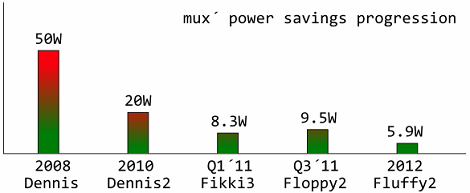
For a few years now, [mux] has been playing around with extremely efficient computation. In 2010, he built a fully featured MiniITX / Core 2 duo computer that only consumed 20 watts. Last year, [mux] managed to build an Intel i3-powered desktop that was able to sip a mere 8.3 watts at idle. He’s back at it again, and now his sights are set on a fully featured Intel i5-powered build with a built-in monitor that will draw less than 6 watts of power.

Like his previous 8 watt i3 build, [mux] reduces the power requirement of his build by carefully measuring the power draw of every component on his board. The power savings come from a simple fact of any power supply; when converting from AC to DC, or from one DC voltage to another, there’s always a little bit of power lost in the process.

[mux] reduces these power losses by removing a few voltage regulators and re-routing power lines across his motherboard. So far, the power draw on [mux]’s computer is more than half of what it was when the parts were stock, and we can’t wait for the finished build that includes a built-in monitor, UPS, and a proper case.

Building The Best Homebrew Computer Ever

A few days ago when I posted a homebrew Motorola 68000 computer spectacular, I briefly mentioned a truly spectacular homebrew computer built by [Simon Ferber]. When I posted a link to a Youtube demo of his 68k board, he was working on a website to document the architecture  design, hardware, and software. That website is now up (cache if you need it) and now we can all get a good look at the best homebrew computer ever built.

Built around the 68008 CPU – slightly less capable than the 68000 found in the original Macs, Amigas, and the TI-89 – [Simon]’s Kiwi computer has peripherals out the wazoo. A Yamaha V9990 Video Display Processor provides a 640×480 display with 32k colors. Two SID chips taken from a Commodore 64 provide stereo chiptune audio, and a floppy disk controller, IDE/ATA bus, and CS8900A Ethernet controller provide all the practical functionality you’d expect from an awesome computer.

On the software side of things, [Simon] is running Enhanced Basic 68k, but of course he can’t just use BASIC to fiddle around with all the cool chips on the Kiwi. With that in mind, he came up with a C-based toolchain that included porting libc to the Kiwi.

Like any good homebrew computer project, all the schematics, a bit of code, and a BOM are provided. [Simon] is currently working on (slightly) redesigning the PCB layout of the Kiwi, and we’ll be happy to see those files released. Anyone up for a Kiwi PCB group buy?

Researching Cosmic Rays With Cloud Chambers

In the late 1940s, the US Naval Research Laboratory used a few German-built V2 rockets to study cosmic rays from above Earth’s atmosphere. To do this, a nitrogen-powered cloud chamber was fitted inside the nose cone of these former missiles, sent aloft, and photographed every 25 seconds during flight. When [Markus] read about these experiments, he thought it would be an excellent way to study cosmic rays from a high altitude balloon and set about building his own Wilson cloud chamber.

Cloud chambers work by supersaturating the atmosphere with water or alcohol vapor. This creates a smoky cloud inside the chamber, allowing for the visualization of radiation inside the cloud. Usually the clouds in these chambers are made in a very cold environment using dry ice, but rapidly decreasing the air pressure in the chamber will work just as well, as [Markus] discovered.

[Markus]’s small cloud chamber uses a CO2 cartridge to provide the pressure in the cloud chamber before dumping the CO2 out of the chamber with the help of a solenoid valve.

In the video after the break, [Markus] demonstrates his cloud chamber by illuminating the cloud with a laser pointer and introducing a few alpha particles with a sample of Americium 241. It looks very cool, and seems to be useful enough to count cosmic rays aboard a balloon or amateur rocket.

Continue reading “Researching Cosmic Rays With Cloud Chambers”