Rebuilding The Electronics In A Remote Control Car

Inspired by the many autonomous rovers such as Curiosity and the self-driving Google car, [Rohit] decided to build his own by taking an off-the-shelf remote control car and adding his own electronics. Unfortunately, he couldn’t find the datasheet for the chip used to receive radio signals and drive the motors, so he ended up building his own electronics and putting them in the car.

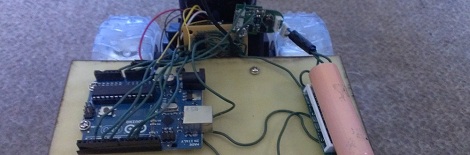
[Rohit]’s car – the Thunder Rumbler RC Car – is driven by applying power to two motors. This is an easy system to control, as only two channels are needed to make the car go forward, left, right, or backwards. To drive these two motors, [Rohit] found an SN754410 quadruple half-H bridge driver chip lying in his box of assorted electronic components. Thanks to a helpful instructable, this chip was easily controlled with an Arduino.

That left the problem of sending a wireless signal to the Arduino. [Rohit] accomplished this by relying on an Android phone to provide the remote control.

[Rohit] whipped up a small program running on his desktop that allows him to send ‘L’, ‘R’, ‘U’, or ‘D’ to the Android phone to dictate if the car should go left, right, forward, or reverse. The Android phone receives these commands via the Internet and sends an audio signal through the headphone port. This audio signal is connected to two analog pins of the Arduino. With a little bit of software and a bit of reading up on frequency shift keying, [Rohit] was able to make his car move in any direction.

Even though [Rohit] realized his goal of controlling a remote control car on his own terms, the build is far from done. He plans on adding some ultrasonic sensors and using the Android’s camera for object detection.

Building A Driver For Absurdly High Power LEDs

A few years ago, the highest power LEDs you could buy capped out around three watts. Now, LED manufacturers are taking things to ridiculous power ratings with 30, 40, and even 90 watt LEDs. Getting these high-power LEDs are no longer a problem, but powering them certainly is. [Thomas] built a LED driver capable of powering these gigantic LEDs and creating a light show that is probably bright enough to cause bit of eye damage.

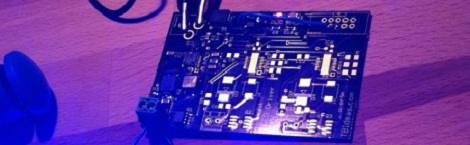
[Thomas]’ LED driver is based on Linear Technology’s LT3518 LED driver. This driver is part of a project to build a huge WiFi controlled RGB LED, so the driver has outputs for three separate LEDs capable of sourcing 700 mA each.

Because [Thomas] is dealing with crazy amounts of heat and power required to light up these huge LEDs, the driver board features a temperature sensor next to each LED driver. When the board gets too hot, the driver automatically shuts down, preventing bad things from happening.

You can check out a few pictures of [Thomas]’ LED driver over on the build page for his WiFi LED project. A truly awesome amount of lighting power here, that also makes it impossible to get a good picture of the board in operation.

Etching Your Own PCBs At Home

Etching your own PCBs from copper clad board is nothing new, but the ability to make your own circuit boards at home is so useful it should be part of every maker’s repertoire of skills. The folks over at Hub City Labs in Moncton, NB, Canada put together a workshop covering the basics of home PCB manufacturing, allowing any maker to put a circuit board in their hands in under an hour.

The process starts just like any PCB design – laying out traces, parts, and vias in a PCB designer such as Eagle. When making your own boards, it’s a good idea to make the traces and pads extra large; the folks at Hub City Labs follow the 50-50 rule: 50 mil wide traces with 50 mils of seperation.

The PCB design is printed out with a laser printer (in mirror mode) onto a piece of paper from a glossy magazine or inkjet photo paper. After the copper board is scrubbed to remove any oxidation or oils present, the design is laid face down on the copper and heated with a clothes iron or sent through a laminator.

After the laser printer toner is transferred to the copper, the recipe calls for etching the board with a solution consisting of a half cup of 3% Hydrogen Peroxide and a quarter cup of muriatic acid.

The folks at Hub City Labs put together a great tutorial for one of the most useful skills the home electronics wizard can have, but etching your own PCBs is an art unto itself. There’s a lot of ways this process can be improved, from using Kapton tape to secure the printed art to the copper board, to getting high-strength peroxide from a beauty supply store.

If you’ve got any tips on making your own PCBs at home, drop a line in the comments below.

EDIT: Good job killing Hub City Lab’s web server, everybody. They’re working on getting something up.

Turning On PC Speakers Whenever There Is Music Playing

If you’re like a lot of people, most of the time your computer speakers are on without actually playing any music. This wastes a bit of power, and [Bogdan] thought he could create a circuit to cut down on that wasted electricity. The result is a very tiny auto-on circuit able fit inside a pair of speakers.

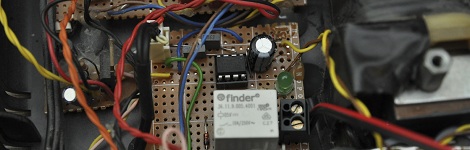
The circuit is built around the ATtiny13, very nearly the smallest microcontroller available with an on-board ADC. When music is played on the computer, the ATtiny senses a bit of voltage in the audio line and switches a relay to power the speaker.

Of course, there is always the problem of music with a high dynamic range; if the sound played from the computer has too low of a volume, the ATtiny might turn the speakers off even if music is playing. [Bogdan] solved this problem by adding a timer to his code; if nothing is detected by the ADC for three minutes, the speakers turn off.

Robo Doc Reads Children’s Pulses Without Scaring Them

[Markus] recently took his 14-month-old daughter to the pediatrician for a routine checkup. During the examination, the doctor needed to measure her pulse and quickly clamped an infrared heart rate monitor onto her finger. Between the strange device clamped to her finger and incessant beeping of machines, [Markus]’ daughter got scared and started to cry. [Markus] thought these medical devices were far too scary for an infant, so he designed a funny robot to read an infant’s heart rate.

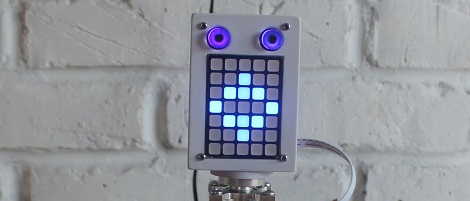
[Markus] liked the idea the Tengu, a robot with a LED matrix for facial expressions, and used it as inspiration for the interface and personality of his RoboDoc. To read a child’s pulse rate, [Markus] used a photoplethysmography sensor; basically an IR LED and receiver that reflects light off a finger bone and records the number of heartbeats per minute.

The build is tied together with a speaker allowing the RoboDoc to give the patient instructions, and a servo to turn the head towards the real, human doctor and display the recorded heart rate.

We think the RoboDoc would be far less disconcerting for an infant that a huge assortment of beeping medical devices, and we can’t wait to see [Markus]’ next version of non-scary doctor’s tools.

Learning The Ins And Outs Of USB With A Simple Dev Board

We can’t count the number of projects we’ve seen on Hackaday with a USB port.  Unfortunately, most of these builds – from RepRap controllers to wireless data loggers – don’t use the full capabilities offered to them with USB. [Ben] came up with a very cool USB breakout board that allows you to explore the USB protocol with just a single inexpensive ATtiny.

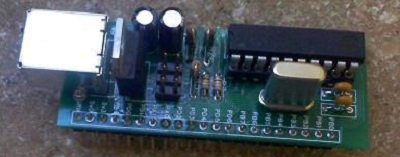
Instead of relying on an FTDI chip or otherwise sending serial data down a USB pipe, [Ben]’s project is meant to be the hardware compliment to his book on programming USB devices. His hardware board is exceedingly simple, just an ATtiny 2313, a USB port, and a handful of other components, but allows [Ben] to receive data on eight pins on a breadboard and send them over USB to a computer.

[Ben] had sent in his USB figure eight controller, a board that displays the numbers 0 through 9 according to what data is received via USB, a while ago. It’s a truly useless build aside from learning how USB works, but an excellent tool if you’d like to program your own USB device.

There’s Trouble Brewin’ On The ‘ol Kickstarter Site

This Kickstarter campaign, the AmbioLight, brings RGB LED strips to the masses. The only problem is that some of the backers discovered this RGB LED strip is already on the market. Internet denizens are now frothing at the mouth, complaining the designers of the AmbioLight, “haven’t designed anything,” and are, “just reselling parts which [AmbioLight] put together at a higher cost than other products on the market.”

A few backers of the AmbioLight have found what they think to be the original product, an RGB LED strip produced by ELCO Lighting. Comparing the picture of the ‘ballast’ on the AmbioLight Kickstarter to the ELCO controller raises even more suspicions about how involved the AmbioLight team was involved in the design of their product.

Even if the AmbioLight is simply a repackaging of an already existing product, that doesn’t make it against the rules of Kickstarter. I’ve even contributed to Kickstarter campaigns just to get a difficult-to-source component. Still, given the vitriol of the AmbioLight’s comments page, Kickstarter contributors don’t seem to appreciate taking an already available product and reselling it as your own.

What say you, Hackaday reader? Is it right for the AmbioLight team to do this?

EDIT: Kickstarter suspended the funding of AmbioLight a few hours after this was posted.