Homebrew Computer Is 16 Bits Of Awesome

We’ve seen our share of homebrew computers over the years. Usually, these bare-bone systems use a small, early 80s-era microprocessor such as the Z80 or 6502. These little 8-bit machines are awesome, but somewhat limited in their capability. [BigDumbDinosaur] sent in a computer he’s been working on for a few years now featuring the infamous 65816 CPU – the same CPU found in the Apple IIgs, the Super Nintendo, and [Jeri Ellsworth]’s C-ONE computer.

The 65816 is a direct descendant of the venerable 6502 CPU found in the Commodore 64, Apple II, and just about every 80s microcomputer of note. [BigDumbDinosaur] chose the 65816 for its backwards-compatibility with the fun to program 6502 and the ability to use high clock rates and tons of address space for a very cool design.

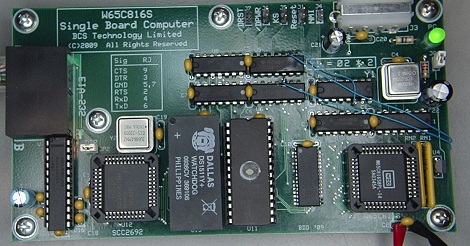
After a ton of careful design and consideration, [BigDumbDinosaur]’s computer included a real-time clock, a watchdog timer, a serial port, 256kB of ROM, and 128kB of RAM.

It’s a really wonderful build, but [BigDumbDinosaur] isn’t done with this project yet. He’s working on version 2 of a 65816 computer that will use programmable ‘glue’ logic, a lot more RAM, have a SCSI interface (for a hard drive), and have preemptive multitasking.

An awesome job, and it’s wonderful to see the wonderful 65816 make its way into another homebrew computer. Now if only we could find a 68000-based homebrew computer…

RC Plane Made Specifically For UAVs

We’ve seen our fair share of remote-controlled planes turned into UAVs and FPV platforms, but the Techpod is the first airplane we’ve seen specifically designed to be used as a camera-equipped robotic airplane.

The Techpod is the brainchild of [Wayne Garris]. He has been flying camera-equipped FPV airplanes for a while now, but recently realized the current offerings of remote control planes didn’t match his needs. [Wayne] decided to design his own plane specifically designed with a pan/tilt camera mount in the nose.

[Wayne]’s prototype was designed with some very fancy aeronautical design software packages and milled out of foam. From the videos after the break, we can see the Techpod flies beautifully, but needs the Kickstarter community to bring his model to the masses.

The specs for the Techpod put it up there with other high-performances FPV and UAV models; with its 102 inch (2590 mm) wingspan and a pair of batteries wired in parallel, the Techpod can stay aloft transmitting video for up to one hour.

Video of the plane in action after the break.

Continue reading “RC Plane Made Specifically For UAVs”

Propeller Turned Into Chiptune Player With A Software SID

If there wasn’t reason enough to love the Parallax Propeller, now you can listen to chiptunes with your own pocket SID audio player.

This chiptune audio player uses the very unusual and very cool eight-core Parallax Propeller microcontroller. After soldering a few caps and resistors to a Propeller dev board to allow for audio out, the only thing necessary to play SID music files is a bit of code and an SD card breakout.

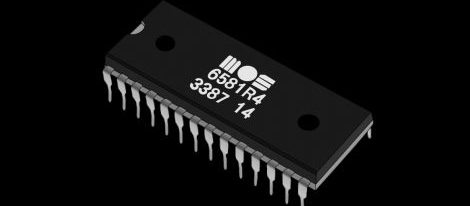
The key piece of code for this build would be the SIDcog object written by [Johannes Ahlebrand] this piece of code turns one of the eight cores in the Propeller into a virtual version of the classic Commodore 64 sound chip.

Since the SIDcog object only takes up one core on the eight core Propeller, it could be possible to turn this SID player into an all-inclusive chiptune audio source; the addition of an Atari POKEY or FM synthesis cog would allow for just about any conceivable chiptune sound to be carried around in a pocket.

No Hackaday post about chiptunes or SIDs would be complete without an audio demo, so you can check out the Propeller-powered SID after the break.

Continue reading “Propeller Turned Into Chiptune Player With A Software SID”

Raspberry Pi Synth Gives A Softsynth Dedicated Hardware

For all the musicians out there, here’s a great use for your Raspberry Pi. All the features you would expect from a nice analog synth are implemented in a Raspberry Pi-based polysynth – dual oscillators, LFOs, and phasers – and it looks like there will be a few more features added before the Raspi synth is released.

Even though the ‘synthesis’ part of the Raspi synth already sounds wonderful, getting MIDI on the Rasberry Pi leaves much to be desired. The creator of the Raspi synth thought about using the GPIO pins as a MIDI interface, but because the GPIO pins cannot run natively at 31250 bps (the MIDI spec), the Raspberry Pi has to waste most of its CPU cycles just listening for MIDI traffic.

Right now the Raspberry Pi synth is controlled by a USB-connected MIDI interface, and as you can hear after the break, sounds wonderful. We can’t wait to hear what this synth will be able to do in a few months’ time.

Continue reading “Raspberry Pi Synth Gives A Softsynth Dedicated Hardware”

Dual Core Arduino For More Pins

There are easy ways of getting more I/O pins for any project; shift registers, I2C expanders, or ADCs will give you plenty of pins for whatever project you have in mind. All these require extra components, though. Enter the ExtraCore library for Arduino, a software library that turns two or more Arduinos into a multi-core microcontroller with more pins than you’ll ever need.

The ExtraCore library comes from [Dustin Andrews], and allows anyone to control the input and output pins of two Arduinos with the same ease as a single Arduino.

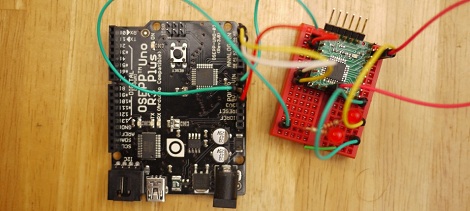
The hardware setup is fairly simple – just connect A4, A5, power, and ground on both Arduinos together. After installing the ‘client’ sketch on the second Arduino, you can modify the ‘manager’ sketch to suit whatever project you’re building. From there you’ve nearly doubled the number of Arduino pins your project can control.

It may not be the most practical use of two Arduinos, but it’s certainly impressive. You can pick up [Dustin]’s code over on GitHub.

Portable Radio Station Gets A Beautiful Case

[Martin] put together a simple portable radio unit to take some MP3s with him while he’s out and around. The build was simple; just a no-name Chinese MP3 player, a battery, and an FM radio transmitter. To give his project a little more pizzazz, he came up with a very handsome laser cut wooden case to turn what would be a bunch of wires and components into an attractive build.

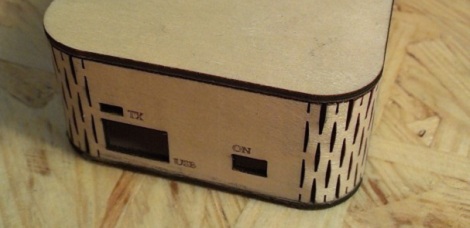
[Martin]’s case makes wonderful use of the kerf bending technique. By cutting small staggered lines in a piece of plywood, [Martin] was able to bend his laser cut enclosure into a surprisingly tight radius. With the help of a pair of laser cut forms and a bit of hot water and glue, he was able to make the shape of his case permanent.

The top and bottom of his case are also laser cut plywood, but [Martin] included a translucent plexiglas logo on the top. When his radio unit is activated a LED inside his project box lights up, illuminating his personal logo.

Kerf bending is something we’ve seen before, and we’re looking forward to seeing more project boxes use it in the future, hopefully with the application of a veneer to cover the diamond-shaped holes.

AVR Fuse Bits Explained

Every AVR microcontroller, from the ATtiny in your thermostat to the ATMega in your Arduino, stores its configuration in a series of fuse bits. These fuse bits control settings such as the multiplier of the internal oscillator (and thus the speed of the chip), or if the reset pin can be used as a GPIO pin. [YS] just put up an awesome tutorial for understanding these fuse/lock bits, and it’s just the reference guide you’ll need when you find your AVR is running 8 times slower than you would like.

As an example, [YS] uses the ATMega48 default settings. From the factory, the ‘Mega48 ships with it’s fuse bits set to use an 8MHz internal RC oscillator with the CKDIV8 bit set. This results in the chip operating at 1MHz, a bit slow for [YS]’ liking.

By looking at the datasheet for the ATMega48, [YS] found the CKDIV8 fuse was the 7th bit in the low fuse byte. From the factory, the default value for this byte is 0b01100010. To remove the ‘divide clock by 8’ bit, [YS] needed to change the low byte to 0b11100010, or 0xE2. This is done via AVRdude by appending lfuse:w:0xE2:m to the commands entered when programming.

Fuse bits don’t need to be scary. As long as you can convert between binary and hex, can remember there are 7 bits in a byte (remember to start counting from 0), and have access to an easy to use fuse calculator, it’s possible to change all the settings on any AVR you have on hand.