More Small Radio Modules For Your Wireless Needs

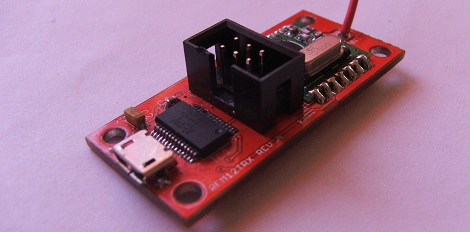
In the never-ending pursuit of cheap wireless communication for your microcontroller projects, [kiu] came up with a small board that allows for serial communication via a 433MHz radio link.

[kiu]’s transceiver uses an RFM12 wireless module available online for just a few dollars. Alongside this module is an ATMega8 and a USB to serial FTDI chip. When [kiu] plugs this board into his computer, he’s able to run a terminal, connect to this board, and receive and transmit hex values at 115,200 bps from another one of these boards.

According to [kiu]’s BOM, 10 boards only cost him 180 Euros, or about $225 USD. Considering off-the-shelf solutions such as an XBee could easily cost twice as much, we’re thinking [kiu] did a very nice job here.

[kiu] put all the board files, schematics, and code up on his GitHub, ready for your perusal. A very cool build, and very useful for a high altitude balloon, rocket, or wireless sensor build.

Programming The ATtiny10 With An Arduino

The ATtiny10 – along with its younger siblings that go by the names ATtiny 4, 5, and 9 – are the smallest microcontrollers Atmel makes. With only 32 bytes of RAM and 1 kB of Flash, there’s still whole lot you can do with this tiny six-pin chip. [feynman17] figured out a way to program this chip using an Arduino, allowing him to throw just about anything at this absurdly small microcontroller.

The ATtiny10 doesn’t use the familiar ISP programming header found on other Atmel-based boards. Instead, it uses the exceedingly odd Tiny Programming Interface to write bits to the Flash on the chip. [feynman17] realized he could use the Arduino SPI library to communicate with this chip and built a small programming shield with just a few resistors and a 8-pin DIP socket to mount an ATtiny10 breakout board.

After writing a sketch to upload a .hex file from the Arduino serial console, [feynman] had a programmed ATtiny10, ready to be dropped into whatever astonishingly small project he had in mind.

As for what you can do with this small microcontroller, chiptunes are always an option, as is making a very, very small Simon clone. It may not be a powerhouse, but there’s still a lot you can do with this very inexpensive microcontroller.

Controlling A Quadcopter With A Homebrew Remote

When [Matt] started building his multirotor helicopter, he was far too involved with building his craft than worrying about small details like how to actually control his helicopter. Everything worked out in the end, though, thanks to his homebrew RC setup built out of a USB joystick and a few XBees.

After a few initial revisions and a lot of chatting on a multirotor IRC room, [Matt] stumbled across the idea of using pulse-position modulation for his radio control setup.

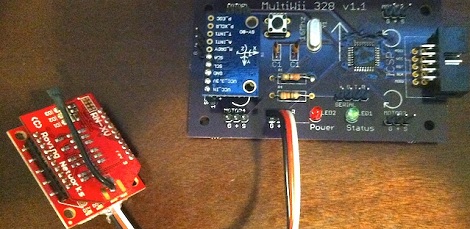
After a few more revisions, [Matt] settled on using an Arduino Pro Mini for his flight computer, paired with a WiFly module. By putting his multicopter into Ad-hoc mode, he can connect to the copter with his laptop via WiFi and send commands without the need for a second XBee.

Now, whenever [Matt] wants to fly his multicopter, he plugs the WiFly module into his MultiWii board, connects his laptop to the copter, and runs a small Python script. It may not be easier than buying a nice Futaba transmitter, but [Matt] can easily expand his setup as the capabilities of his copter fleet grows.

Video of [Matt]’s copter in flight after the break.

Continue reading “Controlling A Quadcopter With A Homebrew Remote”

Network Time Clock For A Home Media Center

[Derek] wanted a clock for his media center. A simple wish, but he had a few requirements: he didn’t need an alarm, wanted it to automatically set its time after a power outage, needed a big display, and also wanted it to look good. After shopping around [Derek] couldn’t find a clock that would fit his requirements so he decided to build one.

[Derek]’s project is called the SNTP clock. As you might expect, it gets its name from the protocol used to automatically synchronize the clock in your computer with other network time servers. The clock itself is built around an ATMega168 gathering time data from the Internet with the help of a Lantronics XPort. One inch seven segment LEDs serve as the display for the clock, and everything, from the time offset from UTC, the brightness of the display, and whether the clock displays 12 or 24-hour time is controlled by an infrared Apple remote.

A bare PCB or bundle of wires would look out of place in [Derek]’s media shelf, so he used a metal picture frame and smoked acrylic to dress up his clock. Now he’s got a beautiful and elegant clock that fits right in to his media servers and receiver.

Cloning A Water-based Light Wall Project

A few weeks ago, we featured this water-based LED graffiti art installation that allows anyone to paint in light using only a bottle of water. When one of [Chris]’ friends saw the video of this build, he immediately asked him how it worked. One thing led to another, and now [Chris] and a few other members at the BUILDS hackerspace at Boston University are building their own water LED installation.

The basic premise of this build is allowing water to serve as a conductor between the anode and cathode of a LED. Without spraying or painting water on the circuit [Chris] whipped up, there is an infinite resistance between the two pins of the LED and current cannot flow. After applying water to the anode and cathode pads, a small amount of current is conducted through the water and the LED lights up.

Right now, [Chris] is working on a test board with different sizes of pads and spacing to get the best water graffiti LED effect for his future build. The plan is to build a single one-meter panel out of one hundred 10 cm x 10 cm boards connected together with jumpers.

All of [Chris]’ work is up on GitHub, and even though [Chris] hasn’t begun designing the production boards, it’s more than enough to get you started if you’d like your own water LED painting panel.

Control Raspi GPIO Pins In The Browser

Now instead of wrangling Python or PHP to do your bidding, [Eric] came up with a way to control the GPIO pins on his Raspberry Pi in a browser.

[Eric] calls his project WebIOPi, and it’s the perfect tool if you’d just like to blink a LED or control a relay over the internet. Simply by pointing his browser to the IP of his Raspi, [Eric] can turn GPIO pins on and off, directly from his desktop browser.

All the code for WebIOPi is available on [Eric]’s Google code page. The UI of [Eric]’s project is fully customizable, so it’s entirely possible to control your garage door from a smart phone simply by loading up a web page hosted on your Raspi and pressing a button.

Right now WebIOPi is only able to turn GPIO pins on and off. That will change as [Eric] implements UART, SPI, and I2C in his project, making it possible to do a lot of cool stuff without having to write much – if any – code.

One Dimensional PONG Is A Great Use For LED Strips

[Jason] has had a five meter addressable RGB LED strip lying around for a while, and only recently came up with a good idea of what to use it for. He came up with One Dimensional PONG, and it looks like it’s a blast to play. Instead of moving a paddle up and down, [Jason]’s 1D PONG game requires the players to stomp on a switch to send the ball back to the other player.

The LED strip [Jason] used has an SPI interface, but needed to be PWM clocked to a microcontroller to operate. After whipping up an Arduino library for his LED strip, [Jason] built an ATMega328-based controller board and a pair of seven segment display boards to keep track of the score. There’s a technical overview in another one of [Jason]’s videos.

[Jason] will be taking his 1D PONG game to the Brighton Mini Maker Faire on September 8th. We’re sure his game will be very popular there, so if you see him, tell him Hackaday sent you.

Continue reading “One Dimensional PONG Is A Great Use For LED Strips”