Turning A DS Into A Game Boy Advance

The venerable Game Boy is dead – and has been for a long time – after being replaced by the DS, DSi, DSi XL, and the 3DS. That doesn’t mean there’s nothing of value to the old Game Boy catalog; Pokemon Red/Blue is still as much fun as it was 15 years ago, and the game play of Advance Wars is still superb.

[Maarten] over at Bureau voor Gamers decided to put a modern twist on our old friend by taking a first-gen DS and converting it to a proper single screen Game Boy (Dutch, Google translation).

The donor machine was a broken first gen DS with a broken top screen. [Maarten] removed the top screen, did a tiny bit of Bondoing, moved the speaker, and gave his new toy a bright orange paint job.

Now [Maarten] has a modern version of the best portable system ever created, packed full of more powerful hardware and a much more capacious battery. Sure, it’s not a build that requires rewiring everything, but it’s still an awesome build for GBA aficionados.

Arduino WiFi Shield Available, Costs $85 USD

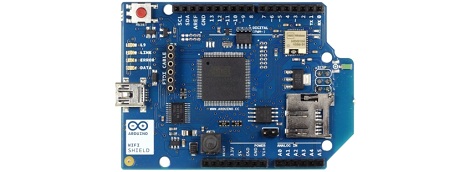
Over on the Arduino blog, the release of the official Arduino WiFi shield was just announced. On the spec page for this WiFi shield. we can see this new board isn’t a slouch; it’s powered by a 32-bit ATMega 32UC3 microcontroller, has provisions for WEP and WPA2 encryption, and supports both TCP and UDP with the Arduino WiFi library. It also costs €69/$85/£55 from the Arduino store.

Now that the announcement of the Arduino WiFi shield is over with, we’ll take this opportunity to go through a few other WiFi adapters for the Arduino that don’t cost an arm and a leg.

The WiFly shield – available from Sparkfun – is a WiFi adapter with the same form factor as the ever popular XBee modules. Of course, it’s possible to make your own breakout board; the WiFly only needs a TX, RX, power and ground connection to connect your Arduino project to the Internet.

We’ve seen a few projects use the WiShield from async labs. It’s a WiFi module packaged in the familiar Arduino shield form factor, and costs $55 USD.

For the hardcore hackers out there, you could always get a bare Microchip WiFi module and get it to work with an AVR as [Quinn Dunki] attempted to. In all fairness, [Quinn] was trying to de-Arduinofy the WiFi library; if you’re cool with Arduino code swimming around in your project, this method will probably work.

There’s also the very, very cool Electric Imp. Basically, it’s an SD card with a built-in WiFi module. After configuring the Imp by holding it up to patterns flashing on your smartphone screen, this device serves as a transparent bridge to the magical ‘cloud’ we’ve been hearing about. The Electric Imp was supposed to have been released in late July/early August, and we’ll put a post up when this cool device actually launches.

Of course we’re neglecting the simplest solution to getting WiFi running on an Arduino project: just use a wireless router. Really, all you need is a pair of TX and RX pins and a copy of OpenWRT. Easy, and you probably have the necessary hardware lying around.

We’re missing a few methods of Arduinofying a WiFi connection (or WiFying an Arduino…), but we’ll let our readers finish what we started in the comments.


Making Sure A Baby Is Still Breathing With Lasers And A Wiimote

[Gjoci] just became a father, and to make up for not having to carry a baby to term he decided to make himself useful in another way. He developed a sensor to detect a baby’s breathing, allaying the fears of nervous parents who are wondering why their child is so quiet.

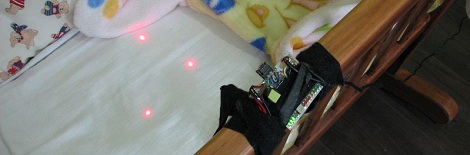
Unlike similar builds and products that rely on microphones or capacitive sensors, [Gjoci]’s build uses the camera from a wiimote to triangulate points of light and detect motion.

The build started off with infrared LEDs, but the batteries were big and there is always the possibility of the baby swallowing electrical components. [Gjoci] finally hit upon the idea of using small 1mW laser diodes to project points of light. This worked beautifully, and since newborns don’t move much there’s no danger of shining a laser into a baby’s eye.

The rest of the build is just querying the camera every few milliseconds and seeing if the position of the reflections captured by the wiimote camera have changed. In two weeks of operation, [Gjoci] only had to respond to a few false alarms, and the hardware hasn’t crashed at all.

After the break are three videos [Gjoci] put up for us that show a test of the breathing detection system, a demo of the alarm, and an example of the build in full operation. A very awesome build, and we look forward to this post being used as evidence of prior art in a patent dispute a few years down the line.

Continue reading “Making Sure A Baby Is Still Breathing With Lasers And A Wiimote”

Eradicating Invasive Species With Quadcopters

That right there is Sydney Golden Wattle, a fast-growing invasive species native to Eastern Australia that has the possibility of covering 20 percent of the bushland in Western Australia by the year 2020. [John Moore], a researcher at the Department of Food and Agriculture, wants to put an end to this infestation by destroying large swaths of wattle with a quadcopter armed with weed killer.

The plan for the robotic plant assassins is simple; take aerial photographs of the bushland in Western Austraila and identify stands of individual weeds. [Moore]’s robots are then dispatched to these stands of weeds to spray them down with weed killer.

The quadcopters are armed with a camera, allowing the operator to make sure the robot is hovering directly over the invasive weeds. Considering these weeds are found in somewhat inaccessible places – and the fact that just about everything in Australia is poisonous – these robotic weeders will kill more wattle than what could be done on foot.

We couldn’t find a video of the robot in action, or a demo of the herbicide spay system of [John]’s copter. If you can find one of those, send it in and we’ll put it up.

Thanks to [Michal] for sending this in.

Making A Gigantic 18 Pole 16 Throw Switch

When you’re building something that hasn’t been done before, sometimes the parts you need just don’t exist.

[Bacteria] over on the Made by Bacteria forum is building a huge all-in-one video game machine, combining hardware from 16 different consoles released through the years. This build requires a way to switch the video output between consoles, so [Bacteria] made a gigantic 18 pole 16 throw switch.

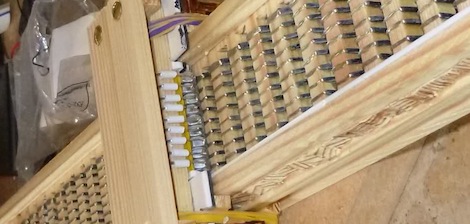
The build began with [Bacteria] sourcing a few 8-pole switches. Of course this switch was too small to toggle between the 16 output lines for each system, so these switches were doubled up and activated by a single button. This system worked, but the results weren’t ideal.

[Bacteria] gave in to the temptation of building his own switch by using spring-loaded metal nuts as the contacts for each part of the switch, allowing him to switch between consoles with a simple sliding contact.

So far, it looks like [Bacteria]’s Project Unity is shaping up nicely. We’ve seen a bit of the controller portion of [Bac]’s build, and already it’s shaping up to be a wonder of retro gaming.

You can check out [Bacteria]’s breakdown of his switch after the break and his Instructable here.

Continue reading “Making A Gigantic 18 Pole 16 Throw Switch”

Raspberry Pi As An AVR Programmer

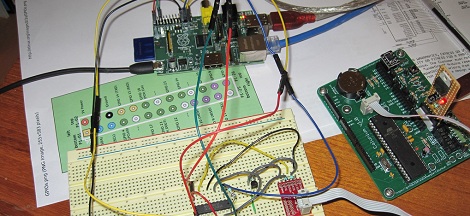
AVR programmers can be bought for just a few dollars on the Internet, but if you’re building an expansion board with an AVR for your Raspi, this is the build for you. It’s a safe way of programming an AVR via the Raspi’s GPIO pins that uses an extremely minimal circuit.

The AVR ISP interface looks a lot like an SPI interface, and the easiest way to program an AVR with a Raspi would be to bitbang all the commands from the GPIO pins. Sometimes, though, the logic of the AVR and Raspi would be at different levels, so while bitbanging may work in a pinch it’s not something anyone should use regularly.

To get the Raspi and AVR talking to each other safely, [Steve] built a small circuit from a 74244 buffer and a FET. With the added support for Linux GPIO avrdude programming, it’s a snap to program an AVR with a Raspi.

A few days ago we ran across a hugely overwrought PIC programmer for the Raspi, so we’re glad to see another round in the PIC/AVR holy war go to the AVR camp.

Thanks [Mateusz] for sending this one in.

Rendering OpenSCAD In The Browser

If you haven’t heard of it, OpenSCAD is a really wonderful tool for 3D modeling.  While it doesn’t have the traditional graphical interface of AutoCAD – it’s basically a programming language for 3D models – OpenSCAD is able to create very complex parts with only a few lines of code.

That’s all well and good, but what if you wanted to edit OpenSCAD parts in your browser? Enter OpenJsCAD, an OpenSCAD interpreter written entirely in Javascript and able to be embedded in a web page.

OpenSCAD allows for two types of modeling – constructive solid geometry, or taking 3D primitives and stretching, scaling, and intersecting them to create a 3D shape, or extrusion from a 2D outline. Quite a few RepRap parts were designed in OpenSCAD, and the lightweight interface and open source nature means it’s perfect for designing stuff to print on your Makerbot.

Tip ‘o the hat to [Gordon] for sending this one in, and we really have to commend him for writing his own online scriptable CAD exporter before finding out about OpenJsCAD. He may be a little late to the online OpenSCAD party, but we have to agree with him that an online 3D solid editor would be an awesome feature for Thingiverse to roll out.