Checking Out The Temperature Of A Raspberry Pi

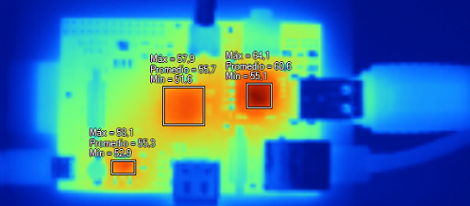
[Remy] has access to a very nice Fluke thermal camera, so when his Raspberry pi came in he pointed the thermal camera at the Raspi (Spanish, Google translation) to see how far this neat computer could be pushed before it overheated.

There are three main sources of heat on the Raspberry Pi: the voltage regulator, the USB/Ethernet controller and the Broadcom SoC. At idle, these parts read 49.9° C, 48.7° C and 53° C, respectively; a little hot to the touch, but still well within the temperature ranges given in the datasheets for these components.

The real test came via a stress test where the ARM CPU was at 100% utilization. The Broadcom SoC reached almost 65° C while the Ethernet controller and regulator managed to reach the mid-50s. Keeping in mind this test was performed at room temperature, we’d probably throw a heat sink on a Raspberry Pi if it’s going to be installed in an extreme environment such as a greenhouse or serving as a Floridian or Texan carputer.

Thanks [Alberto] for sending this in.

Amateur Radio Field Day Is Upon Us

Looking for something to do this fine Saturday morning? For the US and Canadian readers out there, the fourth weekend in June is amateur radio field day, a day when all the amateur radio and ham geeks get together, string up a few antennas, and do their yearly community outreach/contact as many other radio heads as possible.

This weekend, there are more than 1600 field day events taking place all across the US and Canada. Odds are, you’re not more than a half hour drive from a field day event; you can find the closest one with the AARL’s handy Google Map of field day locations.

Since last year, we’ve seen a whole host of cool stuff to do with radio including a $20 software defined radio. If getting your license is too big of a step for you right now, you could at least plug a USB TV tuner dongle into your computer and see what is possible with radio. As a neat little bonus, you don’t even need a license for SDR. You might need a better antenna, and the ham guys at field day will be more than happy to point you into the right direction.

Hackaday Links: June 22, 2012

For when you want something huge machined

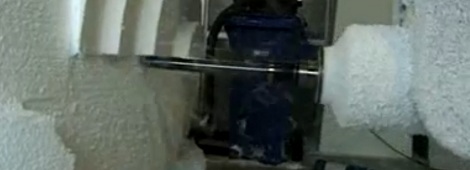
Turn your volume down for this video. It’s the HSM-Modal CNC mill carving a full-sized car out of styrofoam, applying clay to the foam core, and machining the clay at 50 meters per minute. Yes, we’ve seen this machine before, but never in action. It only took a little over 24 hours to make this full-size model car.

Microscope into a drill press

If you need to drill some PCBs, [wotboa] has a neat build for you. He built a micro drill press out of a microscope. It’s a damn good idea if you can find a quality microscope base; those things usually have exceptionally high precision. The ‘hack’ part is a $7 Harbor Freight rotary tool, some PVC pipe, and a PWM control for the motor – home-made, natch.

I’m telling you, they need to get [River] out of the library. Work on it [Moffat].

[Alan] made a TARDIS book case, and he decided to share the plans with us. Just the build to combat the severe lack of woodworking and Whovian stuff on Hackaday. Vashta Nerada hopefully not included.

Money can’t buy happiness, but you sure can sell it

[Greg] sent in some info on Disney’s ‘glow with the show’ hats they sell at the California Adventure park. For $25, you get a hat with RGB LEDs in the mouse ears that synchronize with the World of Color show every night. There’s a better description of the hats here, but we’re thinking these are very similar to the Coldplay Xylobands we saw at this year’s Grammys. Anyone want to tear some mouse ears apart?

An exceptionally low-tech radio telescope

[Impulse405] found a poor man’s radio telescope on Instructables and decided to share it with us. [Z0rb] found a 10-foot dish in the garbage and quickly absconded with this retro hardware. After adding a power supply and a meter-based total power receiver, [Z0rb] had a radio telescope that covered wavelengths from 850 to 2200 MHz.

Gooseberry Is The Latest ARM Linux Board

It looks like we’re finally seeing the proliferation of single board computers take off. The latest is called the Gooseberry. While it will cost about £40/$62 USD at release, it greatly outperforms the current crop of tiny Linux boards.

As the latest in what will be a long line of these ARM-ified single board computers, the Gooseberry hugely outperforms the VIA APC and Raspberry Pi with a Allwinner A10 CPU running at 1.2 GHz, 512 MB of RAM, and built-in WiFi. Basically, the Gooseberry has all the features you would expect from an Android tablet; the reason for this is because the Gooseberry actually is the board found in a few Chinese tablets.

There’s a few very nice features like an LVDS output to add LCD displays without hogging the HDMI output, and the form factor is incredibly thin making it perfect for building a small portable device.

After the break you can check out a walkthrough of the Gooseberry board along with evidence of it running Ubuntu.

Continue reading “Gooseberry Is The Latest ARM Linux Board”

Bringing Chromium To The Raspberry Pi

If you’re in possession of a Raspberry Pi, you may want to check out the new Chromium support for your tiny pocketable computer. With its terrifically minimal hardware requirements, the Chromium OS seems like just the thing for this $35 computer.

The new Raspberry Pi supported Chromium build comes from the fruitful desktop of [Hexxeh], a.k.a. [Liam McLaughlin]. In the world of Chromium devs, [Hexxeh] has already made a name for himself by getting Chromium working on a Macbook Air, putting it in a VirtualBox, and generally being the resident wizard of the Chromium project

The Chromium OS should provide a much faster computing experience for the Raspi compared to the current Debian and Arch Linux-based builds.   Right now, the Chromium support for the Raspberry Pi is very much a work in progress but a slimmed-down, browser-only operating system may be just what the underpowered but useful 700 MHz ARM computer with 256 MB of RAM needs.

Building A Clutch For Vim

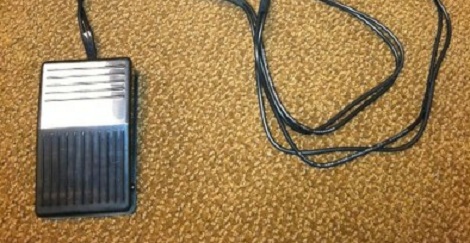
Whether you’re using emacs, vi, or vim, your fingers will be performing acrobatics on your keyboard because of the mouseless interface. [alevchuk] thought his feet could be used as a way to reduce the amount of keystrokes, so he built the vim clutch. It’s a USB-enabled foot pedal that will insert characters before the cursor in vim.

Vim requires the user to type the letter ‘i’ to insert text before the cursor. [alevchuk] thought this function could be easily replicated by a foot pedal, so he found an extremely cheap USB foot pedal to serve as his vim clutch. Ideally, the pedal should send ‘i’ when it is pressed and Esc when it’s released. [alevchuk] took two pedals, programmed one to send ‘i’ and the other to send Esc, and put them in the same enclosure.

The result is a working clutch for inserting before the cursor in vim. [alevchuk] is looking into a three-pedal model to add inserting at the beginning and end of the line to his vim clutch, so we’ll keep an eye out for when he posts that build.

Turning A Raspberry Pi Into A Laptop With A LapDock

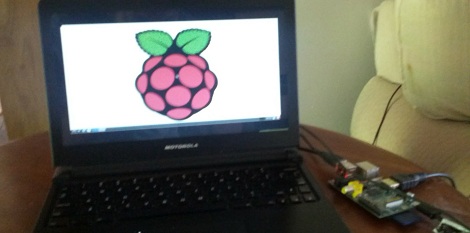
Being a $35, full-fledged Linux computer, the Raspberry Pi brings a lot to the table. There’s one problem, though: this computer doesn’t come with a keyboard, mouse, display, or even a battery. Luckily, it’s pretty easy to add these devices with the help of a Motorola LapDock and turn a RasPi into a fully portable computing platform.

The Motorola LapDock is the latest take on the dumb terminal. Consisting of only a 1366 x 768 display, keyboard, touch pad and 38Wh battery, the LapDock is meant to serve as a docking station and breakout for a few select Motorola cell phones. There are only two connections on the LapDock – a micro USB and micro HDMI port – connecting the peripherals to the cell phone. With just a few adapters, it’s possible to plug the Raspi into the LapDock, and have a Raspberry Pi-based laptop for under $100.

Interestingly, the Raspi can also be powered over the USB connection to the LapDock, meaning an external power supply isn’t required. Right now the state of a LapDock-ified Raspi is a bit inelegant, but we’ll expect someone to come up with a proper docking adapter to get rid of all the wires and add a WiFi module shortly.

via adafruit