Free Linux Computer From A Printer’s WiFi Card

Whether it’s building a 3D scanning system with a Kinect, or using a USB TV tuner dongle for software defined radio, there are a lot of interesting off-schedule uses for commodity hardware. The latest comes from the fruitful mind of [sjMoquin] and a Lexmark N2050 WiFi card that runs Linux.

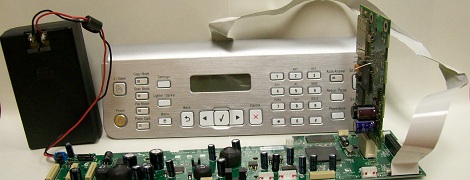
This build started off with a Lexmark X6570 all-in-one printer available for about $100 USD on eBay. This printer comes packaged with a Lexmark N2050 WiFi card running BusyBox. After soldering a few wires to the USB/UART pins on the N2050, [sjMoquin] had a very cheap but highly useful single board computer running Linux.

There is still a little more work to be done – the WiFi and USB on the N2050 aren’t currently supported. [sjMoquin] and [Julia Longtin] are working on that, so a fully functional embedded Linux board based on a printer’s WiFi card should be available soon. It might be time to hit up eBay for a few of these cards, you know.
Autonomous Robot Uses An IPhone For Its Brain

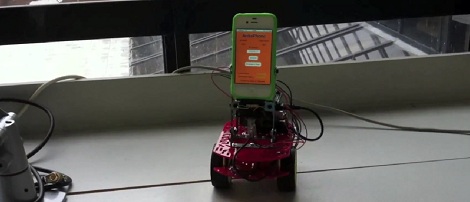
At the beginning of the school last year, [Ryan] needed to come up with a project for his master’s thesis. Having a bachelor’s in mech. engineering and doing his graduate work in software engineering allowed [Ryan] to do something really cool for his thesis; he decided to turn an iPhone into an autonomous robot with live video streaming, remote control, and  object detection.

[Ryan] started building his ArduiPhone last October with an Arduino,  motor shield, and a Magician Chassis. The software is based on an iPhone network programming tutorial that opens a socket connection to a desktop PC and relays commands to an Arduino serial port.

One of the more interesting features of [Ryan]’s ArduiPhone is the ability to stream video directly from the phone to a Java application. Instead of FaceTime, [Ryan] streams videos by converting an image from the front-facing iPhone camera to a byte array, sends it over the network, and decodes the image in a Java app. It’s low-level stuff, but the video quality is excellent and something we’ll probably be seeing more of in the future.

As always, videos after the break.

Continue reading “Autonomous Robot Uses An IPhone For Its Brain”

Theremin Takes The Touch Out Of Multitouch

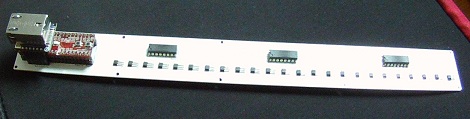
Multitouch builds are all the rage now, so it’s not surprising someone would come up with a multi-touchless interface sooner or later. [Hanspeter] did just that; his Multi-touchless ribbon controller, a.k.a. Polymagnetophonic Theremin is multi-touch without the touch.

[Hanspeter]’s touchless ribbon controller uses an array of 24 Hall effect sensors that activate whenever a magnet mounted on a thimble is placed near a build. These sensors go to an ARM-equipped Maple Mini to record multitouch events and send them out over Ethernet.

Even though [Hanspeter] is only using his “multi-touchless ribbon sensor” as a theremin, there’s no reason why it couldn’t be put to other uses. It’s entirely possible to place several of these magnetic sensors in an array and build a real Minority Report interface where the user interacts with a computer without touching anything.

After the break is a video demo showing off how much control [Hanspeter] can get with the thimble/magnet setup. There’s also a few demo songs made with SuperCollider showing off a trio of sitar/Moog/harpsichord synths.

Continue reading “Theremin Takes The Touch Out Of Multitouch”

A Quick Kludge To View The Transit Of Venus

[Justin] is a bit of an astronomy geek, but that doesn’t mean he’s always prepared for celestial phenomena. When he realized the May 20th annular eclipse was only a few days away, [Justin] dropped everything, built a pinhole solar viewer, and drove three hours for the best view of the eclipse. He learned something watching the eclipse; these sort of things sneak up on you, and you really need to plan ahead if you want to truly enjoy the music of the celestial spheres. After the eclipse, [Justin] set to work building a filter to watch a Venusian eclipse with his telescope.

If [Justin] pointed his 8 inch Schmidt–Cassegrain directly at the sun, he would most likely damage the optics in his ‘scope, burn several retinas, and other very, very bad things. The best way to view the Sun with a telescope is with an expensive Hydrogen alpha or a general solar filter, but these are expensive and the clock was rapidly ticking down to the transit of Venus. After reading that blocking most of the light from coming into the ‘scope, [Justin] built an aperature reducer out of a few bits of foam board, foil, and dark fleece.

How did viewing the transit with a telescope turn out? Well, if you don’t compare [Justin]’s pictures to the multi-million dollar toys NASA and astronomers have, pretty good. It’s a very good job considering the entire foam-core aperture reducer was built in the course of an evening.

While it may be a little early to be planning for the next Venusian transit in the year 2117, there will be a transit of Mercury on May 9, 2016. All [Justin] has to do is remember when it will happen.

Building A 1980s Microcomputer With A Parallax Propeller

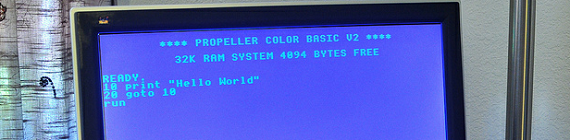
The folks over at Gadget Gangster put up an Instructable to build a retro 80s 8-bit microcomputer. Even though they’re using modern components, it still hearkens back to a time when 10 year olds learned 6502 assembly, PEEKing and POKEing was the best way to program, and using a mouse was a novelty.

The build uses a Parallax Propeller dev board to provide an amazing amount of horsepower for a simple microcontroller. After hooking the Propeller up to a TV via an RCA jack and adding an infrared keyboard, Gadget Gangster had a simple computer that can load programs off an SD card.

Because a microcomputer is useless if you can’t program it, Gadget Ganster ported BASIC  to the Propeller. With VGA and sound output, along with the ability to add a PS/2 keyboard and Wii controller, this modern take on a classic paradigm is more powerful than dozens of Commodore 64s.

As a small aside, we don’t see nearly enough builds using a Propeller. A parallel processing microcontroller having 10 times the computational ability of a low-end ARM processor is interesting to say the least; we’re honestly puzzled by the dearth of Propeller projects. If you’ve got a Propeller project, send it into the tip line.

555 Business Card

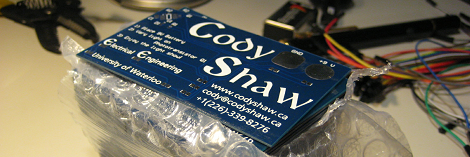
After checking out a few beautiful business cards while working at his engineering co-op, [Cody] realized he would soon need his own. Instead of a card with subtle off-white coloring, a tasteful thickness to it, and even a watermark, [Cody] decided to make a 555 timer business card.

[Cody] started his business card project by going through a few design iterations while figuring out what he wanted his business card to do. There were a few designs not chosen – one with a microcontroller, a few with just LEDs, and some with no circuitry at all. After checking out a few project from the EEV blog 555 contest, [Cody] decided to go with a simple 555 timer circuit.

Being a business card, [Cody] kept the circuit very simple; it’s just a 555, phototransistor, and a few SMD LEDs. When a 9 Volt battery is placed on the contact points of the card, the 555 lights up the LEDs. When a laser is shone on the phototransistor, the LEDs start blinking. A very neat and sufficiently interactive circuit that is perfect for keeping component costs down.

After the break you can check out [Cody]’s business card in action.

Continue reading “555 Business Card”

WISP Adds Wifi To The Internet Of Things

The guys over at embdSocial sent in a project they’ve been working on for a while. It’s a small wifi module for an Arduino or other microcontroller called Wisp. Unlike the many, many other wifi breakout boards we’ve seen, the Wisp has a truly incredible amount of potential. With an API that allows an Arduino to post to Twitter, sending text messages, and even has remote admin capabilities, the embedSocial team came up with something really cool.

We’ve seen our fair share of projects that use wifi, but the Wisp is amazingly clever as to how projects can be controlled. Each Wisp is administered through the Internet. Once a Wisp is registered to your online embdSocial account you can upload new code without ever physically connecting a microcontroller to your computer.

To demonstrate the remote administration capabilities of the Wisp, the embdSocial guys put an Arduino and Wisp inside an electrical junction box. With their setup, the guys have the simplest and smallest Internet connected power outlet we’ve ever seen.

After the break, you can see a demo of a Wisp opening a garage door and a remotely operated, web enabled airsoft turret. We’re loving that the turret sends video from the gun to any device on the Internet, and it’s impressive that [Chris] and [Art] whipped up both these projects in a single weekend. There’s also a Kickstarter for the Wisp, so here’s to hoping we can pick one of these up soon.

Continue reading “WISP Adds Wifi To The Internet Of Things”