Measuring The Capacities Of Different Battery Brands

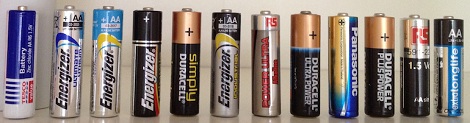
Being the smart consumer he is, [Denis] usually looks at the price per pound when comparing similar products at the grocery store. When it came time to buy a few AA batteries, he didn’t have any data to go on. To solve his little conundrum, [Denis] decided he would test several brands of batteries and see which one gives him the most bang for the buck.

After bringing home a haul of a dozen different brands of AA cells, [Denis] broke out the Arduino and starting designing a circuit. To test how much energy each brand provides, the Arduino measures the voltage across a load every second until the battery reaches 0.2V. The elapsed time, as well as the voltage, Watt hours, Joules, and ambient temperature are logged on an attached LCD screen and sent over a USB serial link to automate the data collection process.

What’s the verdict? Unsurprisingly, words like ‘super,’ ‘max,’ and ‘ultra’ didn’t connotate a better battery. The best bang for the buck came from an off-brand called RS Power Ultra. The worst battery was the Panasonic Evolta cells that came in at about $1.50 USD per watt-hour.

If you’d like to verify [Denis]’ work, all the code is up on Github along with the schematic.
Projecting Video Directly Onto The Retina

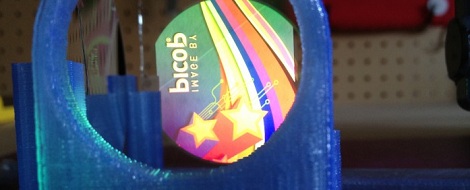
With the head-mountable, augmented reality Google Glass capturing tons of attention in the press, it was only a matter of time before we saw a DIY retina projector. This isn’t a new build; [Nirav] has been working on it for a few months, but it might just be time for this information to be useful to someone.

A retina projector focuses laser light though beam splitters and concave mirrors to create a raster display on the back of your eye. There’s an incredible amount of research into this field, but not many DIY projects. To make this project a reality, [Nirav] picked up a SHOWWX laser video projector and mounted it in a 3D printed frame along with a few pieces of optical equipment.

[Nirav]’s build isn’t without its drawbacks, though. The exit pupil, or the apparent size of the image, is only about 1.5 mm wide and much too small to be of any real use. Also, commercial retina projectors have an output of a puny 2 microwatts, where [Nirav]’s laser projector puts out 200 millwatts. This is more than enough to permanently damage your eye.

Getting 12 Year Olds To Learn Assembly Programming

[notch], the mastermind behind Minecraft, is working on a new game. It’s called 0x10c (pronounced ‘trillek’, we think) and promises to teach an entire new generation the joys of assembly programming on a 1980s-era computer.

The setup for the game is nerdy/awesome enough to make [Douglas Adams] blush; a ‘deep sleep core’ was invented in 1988 that attached to the 16-bit computers of the day. This core was big endian, where the DCPU-16 (the computer in the game) was little endian. What was supposed to be a one-year hibernation turned into a 281 Trillion year coma, the Universe is dying, and everyone from 1988 is just waking up.

The game features a fully functional 16-bit CPU that controls every aspect of your spaceship. The specs for the DCPU-16 have been released and there are several emulators available.

Already, a few communities have been set up around the web to discuss how to program the DCPU-16: the official forum of 0x10c, the 0x10c subreddit, and another dedicated to programming the in-game computer. Already there’s a C-like language that compiles executables for the DCPU and a Game of Life implementation.

We know this isn’t a usual Hackaday post. Despite this, we’re fairly certain a good percentage of our readership will be programming a DCPU-16 in the next year. It just might be time to crack the books and learn how to build a compiler and OS. The dragon book (Compilers Principles, Techniques, and Tools, Aho, Sethi, Ullman, 1985) is very good, and [Andy Tanenbaum]’s Operating Systems Design and Implementation is how [Linus Torvalds] got his start.

One more thing: we’re going to be running a contest for the best physical implementation of the DCPU-16 in a few months. We’ll wait until the in-game hardware is nailed down, along with any peripherals [notch] plans to add. Right now the prizes are some HaD schwag, but that may change. Further info with updates pending, but you’re free to start working now.

Build An Induction Heater And Become A Metalsmith

If you’ve ever wanted to forge, cast, or smelt metal, this project is right up your alley. It’s a 30 kVA induction heater built by [bwang] over on Instructables. It gets hot enough to melt and forge steel, iron, and aluminum.

An induction heater operates by surrounding the object to be heated with a coil carrying high frequency AC current. Basically, the entire setup acts like a huge transformer with a shorted secondary. To get these currents into a workpiece, [bwang] used a TL494 PWM controller as an oscillator. The output of the TL494 is filtered and amplified a few times to generate a huge amount of AC current.

Larger versions of [bwang]’s induction heater are found in foundries and forges all across the land; even though this small version sucks down 50 A out of a dryer or stove outlet, induction heating is very efficient. We’re actually wondering why we don’t see many home blacksmiths using induction heating, so we’ll leave that for our readers to discuss in the comments.

[sessions] reminded us of this induction heater from a few years ago. A little smaller, but still usable.

Google’s Project Glass And Other Head-mounted Displays

In case you’ve been living under a rock for the past week, Google announced Project Glass, a real life head-mounted computer that’s actually useful. Glass is one of the projects being developed by Google X, the super-cool R&D department inside Google. On board are [Babak Parviz], [Steve Lee] and [Sebastian Thrun] (a.k.a. the guy you learned AI from last year).

Apart from an awesome video put up by the Google Glass team, there’s not much to go on. No hardware descriptions apart from concept pics, and nothing about software, the speech input, or even a complete list of features. Until that info is finalized it’s up to all the makers, hackers, and builders out there to figure out how to use a head-mounted display in public without getting strange looks. Here’s a few wearable computers and head mounted displays we’ve seen over the years:

Continue reading “Google’s Project Glass And Other Head-mounted Displays”

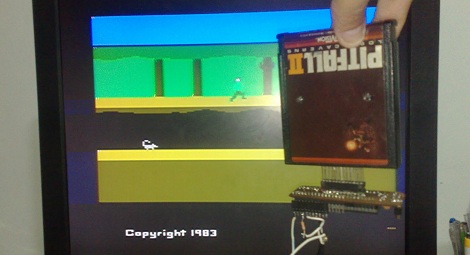
The Teensiest Atari 2600 Ever

[Dablio] sent in an awesome console mod he made. It may just be the smallest Atari 2600 ever (Portuguese, here’s the Google translation).

The build began with a Dynacom MegaBoy, from the same company that put out many less-than-legal 2600 clones. The MegaBoy PCB is an exercise in parsimony consisting of only a single IC, a crystal, and some resistors and caps. [Dablio] made a new PCB board based on the schematic he reverse engineered and this thing is tiny. It’s much smaller than even the smallest [Ben Heck] 2600 console build.

[Dablio] now needed a case for his new console. He had originally planned to mount the whole thing in an Atari controller like this commercial product. Serendipity intervened and he realized the entire system (sans cartridge port) fit inside a plastic tube of m&m minis.

Currently, [Dablio] has two ports on his ‘Atari tube of m&ms’ – the largest is the cartridge slot, and a small VGA port sits in the lid of the tube. This VGA port carries the power supply, controller, sound and video signals to and from the console.

[Dablio] sent in a bunch of pictures of his build which are in a gallery after the break. Now for the million-dollar question: anybody know where to buy one of these Dynacom MegaBoys?

Continue reading “The Teensiest Atari 2600 Ever”

Hackaday Links: April 7, 2012

Need some gears? Got a timing belt?

[filespace] sent in a neat build he stumbled upon: making gears with plywood and a timing belt. Just cut out a plywood disk and glue on a section of timing belt. There’s some math involved in getting all the teeth evenly placed around the perimeter, but nothing too bad. Also useful for wheels, we think.

We’re on a chess kick now.

Huge chess sets are cool, right up until you try to figure out where to store the pieces when they’re not being used. [Jayefuu] came up with a neat solution to this problem. His pieces are cut out of coroplast (that corrugated plastic stuff political campaign signs are made of), making it relatively inexpensive and just as fun as normal giant chess pieces on a tile floor.

<INSERT MARGINALLY RELEVANT PORTAL QUOTE HERE>

[Randy]’s son is in the cub scouts. Being the awesome father he is, [Randy] helped out with this year’s pinewood derby build. It’s a car shaped like a portal gun with the obligatory color-changing LED. The car won the ‘Can’t get more awesome’ award, but wheel misalignment kicked it out of the competition during qualifying rounds. Sad, that. Still awesome, though.

These people are giving you tools for free

Caltech professor [Yaser Abu-Mostafa] is teaching a Machine Learning class this semester. You can take this class as well, even if the second lecture started last Thursday.

Turning an Arduino into a speech synthesizer

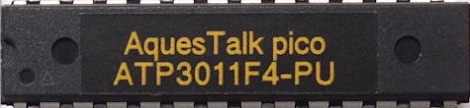
[AlanFromJapan] sent in this product page for an Arduino-powered speech synthesizer. We’re probably looking at a relabeled ATmega328 with custom firmware here; to use it, you replace the micro in your Arduino Uno with this chip. The chip goes for about $10 USD here, so we’ll give it a week until someone has this proprietary firmware up on the Internet. There are English morphemes that aren’t in Japanese, so you can’t just ‘type in English’ and have it work. Here’s a video.

Six things in this links post. We’re feeling generous.

What would you build if you had a laser cutter? [Doug Miller] made a real, working fishing reel. No build log or files, but here’s a nice picture.