Finally, LaTeX In HTML Files

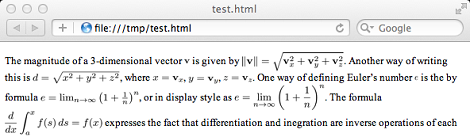
Writing a paper in LaTeX will always result in beautiful output, but if you’d like to put that document up on the web you’re limited to two reasonable options: serve the document as a .PDF (with the horrors involves, although Chrome makes things much more palatable), or relying on third-party browser plugins like TeX The World. Now that [Todd Lehman] has finally cooked up a perl script to embed LaTeX in HTML documents, there’s no reason to type e^i*pi + 1 = 0 anymore.

For those not in the know, LaTeX is a document typesetting language that produces beautiful output, usually in PDF form. Unfortunately, when [Tim Berners-Lee] was inventing HTML, he decided to roll his own markup language instead of simply stealing it from [Don Knuth]. Since then, LaTeX aficionados have had to make do with putting TeX snippets into web pages as images or relying on the [; \LaTeX ;] generated from the TeX The World browser extension.

[Todd Lehman]’s perl script generates the PDF of his LaTeX file and pulls out all the weird font and math symbols into PNG files. These PNG files are carefully embedded into the HTML file generated from the normal text pulled from the LaTeX file. It’s a ton of work to get these document systems working correctly, but at least there’s a reasonable way to put good-looking LaTeX on the web now.
Overbuilding An ITunes Rating System

Even though iTunes and it’s song rating system has been around for over a decade now, [Steve] still hasn’t gotten around to assigning ratings to his vast library of MP3s. We can’t blame him – who wants to pull up iTunes every four minutes and assign a star rating to each song individually? To solve this interface problem, [Steve] set out to design a hardware song rating interface that fell down the rabbit hole into development hell.

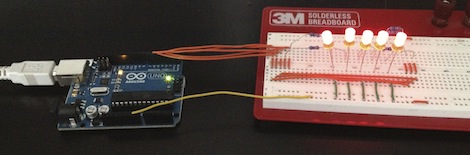
The build started off simply enough – just an Arduino attached to a few buttons that sends data to a Cocoa app which rates the current song. Everything was working wonderfully until [Steve] restarted his mac and the COM ports went to pot. Wanting a ‘plug-and-play’ solution, he did away with the Arduino-based build and started designing a USB device that would display the current iTunes track and provide hardware buttons for rating the current song.

The current build is based around a very capable PIC 18F4550 micro. After looking up the USB HID protocol, [Steve] had some boards fabricated. He’s keeping us waiting on a final build report, but with the amount of work that went into this project, we’re sure it’ll be a winner.

Variable Pitch Quadrocopter Flies Upside Down

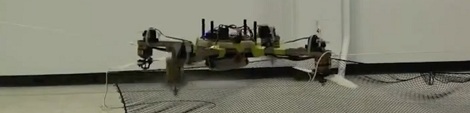
Straight from the Aerospace Controls Laboratory comes a variable-pitch quadrocopter designed by [Mark Cutler] and [Jonathan P. Howe]. While real, full-sized helicopters always have variable pitch rotors, changing the pitch of the blades on remote control aircraft is a fairly uncommon modification. When it’s done right, though, being able to easily change the thrust direction of a propeller leads to very cool flights, like having an airplane hover nose down.

[Mark] and [Jonathan] identified two interesting techniques that a variable pitch quadrotor can bring to the table. The first is trajectory generation  – because of the added maneuverability, their quadrotor can perform more aggressive banking turns when following a preprogrammed path. The second benefit to their design is quick deceleration. In the first video after the break, you can compare the deceleration rates of a variable pitch and fixed pitch quadrocopter. While the fixed pitch quad continues climbing after being commanded to stop, the quadrocopter outfitted with variable pitch rotors can stop on a dime.

We’re still waiting for the equivalent of the Red Bull Air Races for quadrocopter builds, but when it comes we know what would win the slalom event.

Continue reading “Variable Pitch Quadrocopter Flies Upside Down”

Multicolor RepRap Prints The Really, Really Hard Way

[Adrian Bowyer] just posted his progress with multicolored printing to the RepRap blog.

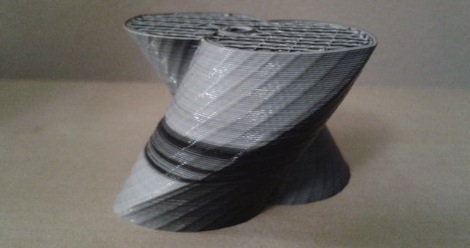
The new developments are a continuation of [Adrian]’s experiments with a mixer extruder that squirts four different colored filaments out of the same nozzle. [Myles Corbett] took this idea and ran with it producing the two-color print seen above. To squirt two different colored filaments out of the nozzle, [Myles] used two Bowden extruders mounted near the apex of the RepRap with tubes leading to the nozzle. Right now, the color of a print is controlled by loosening the grip screws of the extruder, but there are plans for moving that task over to electronic control of the extruders.

While it may be only black and white now, it’ll be a very interesting development once five extruders are loaded up with cyan, magenta, yellow, black, and white filament. Yes, it is now theoretically possible to print full-color 3D objects on a RepRap. While we’re not looking forward towards having to upgrade our one-motor extruder to a four- or five-motor model, the possibilities for desktop fabrication are becoming amazing.

Checking The Accuracy Of Fake Watches

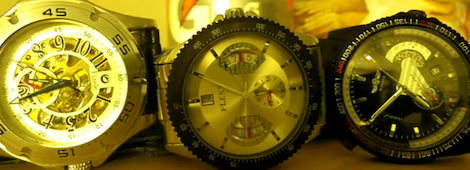
Since [th3badwolf] realized a wrist watch is the ultimate men’s fashion accessory, he’s been trolling around eBay looking for a nice looking, but still inexpensive wearable chronometer. The Fauxlex brand isn’t normally regarded for accurate time keeping, so he decided measure the accuracy of his off-brand watches in a really clever way.

[th3badwolf] had a camera with a built-in intervalometer lying around and figured if the camera was set to take one picture a minute, the second hand would stay still while the minute and hour hands moved. An hour-long test confirmed his theory and he pointed his cameras towards his knock-off watches.

In the resulting time-lapse video available after the break, [th3badwolf] calculated that the first and third watches lose about 24 seconds a day. He attributes this fact to the watches having the same clockworks. The second watch gains nearly three minutes a day, and he’s trying to send that one back to the supplier. We’re not sure how that will end up, but at least [th3badwolf] has two reasonably accurate watches now.

Continue reading “Checking The Accuracy Of Fake Watches”

Control MIDI With An Android Device

[Lewis] wanted to control MIDI devices with the huge touch screen that is his Android phone. After he couldn’t find a simple hardware implementation of MIDI out, he turned to an IOIO board to send MIDI notes to just about any imaginable musical hardware. It’s a clean build and fills a gap in the abilities of the Android platform.

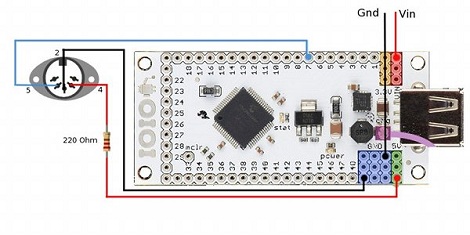
Because of the woeful support of MIDI in Android, [Lewis] couldn’t find a good way to push MIDI notes from his phone to other devices. While there are a few high-overhead options like MIDI over wi-fi or a Bluetooth connection, there wasn’t much in the way of a straight-up hardware connection to other MIDI devices. [Lewis] got around this limitation by using an IOIO board and the right software to send MIDI notes though a DIN-5 connector.

Although the project works as intended, [Lewis]’ build could be made more permanent by building one of these MIDI interfaces and wiring that to the IOIO. All the Android code is up and available, along with a neat demo of [Lewis] controlling the delay time of an effects unit in his guitar rig. You can check that video out after the break.

Continue reading “Control MIDI With An Android Device”

Doing It Right With A Morse Code Keyboard

Hackaday has seen dozens of Morse code keyboards over the years, but [Hudson] at NYC Resistor finally managed to give that idea the justice it deserves. He built a USB Morse code keyboard with the same type of telegraph key the pros use.

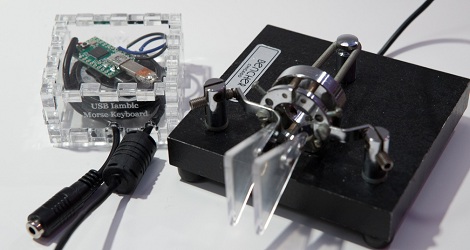
For his project, [Hudson] got his hands on a wonderful iambic paddle that is usually hooked up to CW rigs. Unlike previous Morse keyboards we’ve seen, [Hudson] used iambic paddles, a telegraph key with one lever for dits and another for dahs. Because the dits and dahs are separate electrical connections, it’s extremely easy for the microcontroller – a Teensy – to parse the Morse code and send the correct letter to the computer.

[Hudson] also added some audio feedback for the dits and dahs, and designed a laser-cut enclosure for the Teensy and speaker. Check out the video of the iambic keyer keyboard in action after the break.
Continue reading “Doing It Right With A Morse Code Keyboard”