Snow Blower Robot

For those of us who are stuck in the middle of a cold and snowy winter, this project will seem like a stroke of genius. [Jimmy Bui] has put together this robotic pushing platform. While it is seen in the video (on the linked page) pushing a snow blower, it seems to be simply bolted on. This means it could push pretty much anything, such as a lawn mower. The platform itself looks like a common layout. He’s using the base of a motorized wheel chair, and some scavenged bits to protect the circuitry.  He says that he built it after seeing elderly people having a hard time shoveling their driveways in his neighborhood.  They don’t say if he loans it out to them now, but we suspect that he does.

[via Robots Dreams]
Hacking A Digital Bathroom Scale

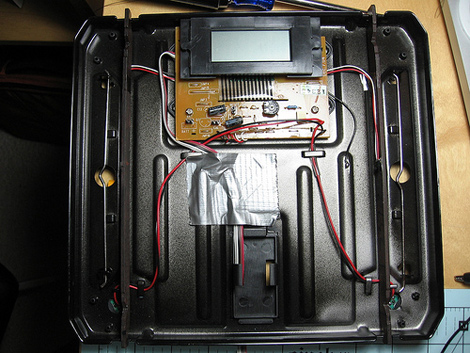
[Micah] was inspired by projects he had seen of people using the Wii balance board as an input. He realized the balance board was overkill, and pricey for many applications. Since it is basically just 4 weight sensors, he thought, why not just use a scale? Often, only one sensor is needed and they’re really cheap from big box stores. He picked up a digital scale and cracked it open. As he moved forward, he wanted to keep this pretty simple. There are other ways of getting the information from a scale, but they have been generally more complicated than what he had in mind. He ended up bypassing the internal unknown microcontroller and just connecting the analog sensors to his parallax setup. You can read all about the process an download some source code on his site.

[via Flickr]

5 Legged Locomotion

[youtube=http://www.youtube.com/watch?v=X2Rxo6B4EQQ]

When designing legged robots, we generally see an even number of legs. Mainly, we think, it is due to us modelling things after nature. But with robotics, you’re free to do whatever you want. [Iketomu-san] has built this unsettling 5 legged robot out of parts he had lying around. The gait is fairly interesting. He mentions that it could be used for robot fighting, where the odd leg would serve as a prop from behind and the two legs up front could be weapons. What kind of gait or use can you come up with for this thing?

Nanotouch: A Tiny AVR Media Thing

[youtube=http://www.youtube.com/watch?v=qLOQOTa4-aY]

[Rossum] is at it again. This time, he has created a super tiny media device to get us drooling. You might recall him from the 8-bit device we showed you before. The Nanotouch is roughly the dimensions of a 96×64 OLED screen(slightly larger than a quarter), with about 1/3 to 1/2 of an inch of stuff packed behind it.  The screen itself is mounted atop 4 buttons. This allows you to depress the screen edges for navigation.  He does mention that this design needs a little work to prolong the life of the screen, but we really like the intuitive way of navigating.  At its heart is an ATmega32u4.

We thought his last version was fantastic, but this one has us enamored. He states he’ll publish schematics and code, as he did before. We just didn’t want to wait to share.

[thanks Joakim]

Android G1 Serial To Arduino

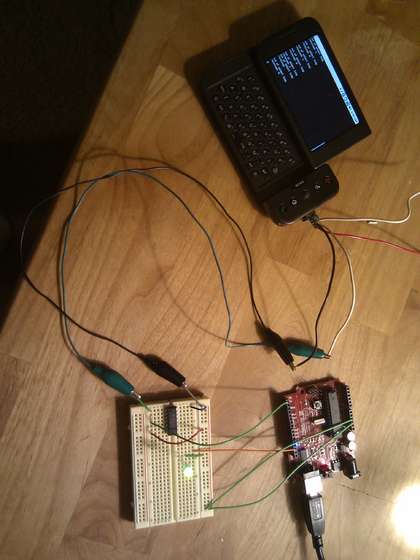
With the ability to get root access to some of these new powerful pieces of hardware we call cell phones, we’re a bit surprised we haven’t seen more interfacing with external hardware. Here’s an example of some rudimentary connections between an Android G1 and an Arduino. To do this, you must have your G1 rooted, have the Android SDK installed, and then a custom python program running.  There is also a simple level shifter from 3.3v to 5v necessary for the connection to the Arduino.  You can get all the details from the instructable. They’ve documented the process quite well adn we’re excited to see what kinds of stuff people come up with.

Face Tracking With X10

If you are looking to do some face tracking and don’t know where to start, this explanation of how to do it with X10 modules could be pretty helpful. Aside from having, what some could consider to be, the absolute most annoying website ever for a company, X10 also makes modular systems for home automation. X10 also refers to the industry standard for home automation, so sometimes just saying you did something with X10 can get confusing.   He is using the SDK to write custom code for the tracking, which you can download from the project page.

[via HackedGadgets]