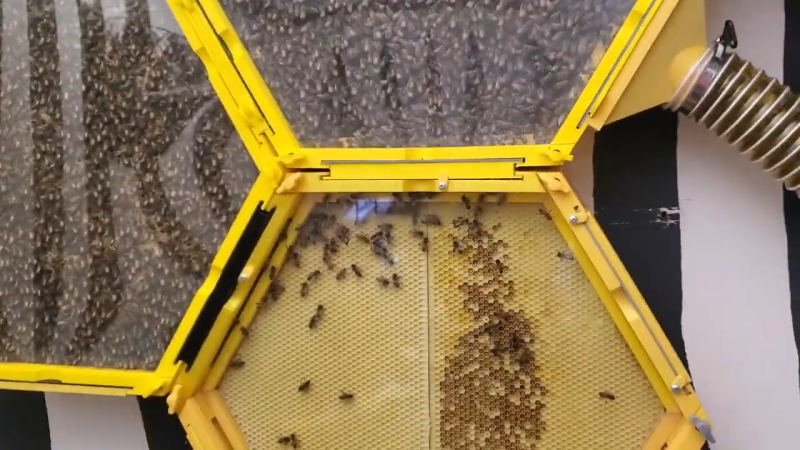
3 yellow modules are connected with bees filling 2 out of 3

View A Beehive Up Close With This 3D Printed Hive

Bees are incredible insects that live and die for their hive, producing rich honey in complicated hive structures. The problem is as the average beekeeper, you wouldn’t see much of these intricate structures without disturbing the hive. So why not 3D print an observation hive? With [Teddy Hatcher]’s 3D printing creativity, that is exactly what he did.
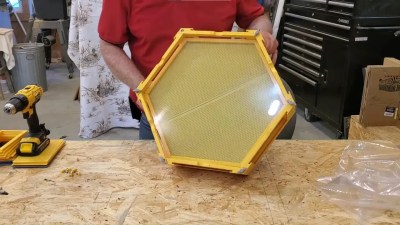
A yellow 3D printed hexagonal panel

Hexagonal sections allow for viewing of entire panels of hexagonal cells, growing new workers, and storing the rich syrup we all enjoy. Each module has two cell panels, giving depth to the hive for heat/humidity gradients. The rear of a module has a plywood backing and an acrylic front for ample viewing. [Teddy] uses three modules plus a Flow Hive for a single colony, enough room for more bees than we here at Hackaday would ever consider letting in the front door.

As with many 3D printed projects involving food or animals, the question remains about health down the line. Plastic can bio-accumulate in hives, which is a valid concern for anyone wanting to add the honey to their morning coffee. On the other hand, the printed plastic is not what honey is added to, nor what the actual cell panels are made from. When considering the collected honey, this is collected from the connected Flow Hive rather than anything directly in contact with 3D printed plastic.

Beehives might not always need a fancy 3D printed enclosure; the standard wooden crates seem to work just fine for most, but there’s a time and place for some bio-ingenuity. Conditions in a hive might vary creating problems for your honey production, so you better check out this monitoring system dedicated to just that!

Continue reading “View A Beehive Up Close With This 3D Printed Hive”
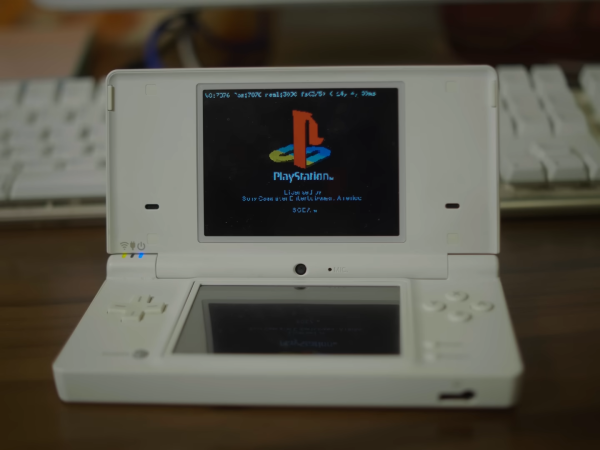
PS1 logo on the top screen of a white DS

Running An Entire PS1 Emulator In A DS Cartridge

Gaming on a Nintendo DS can bring back great memories of long car trips from the past. But looking back, we remember wishing to play more than the DS could ever hope to handle. [fami] looks into the SuperCard DSTWO in her recent video, a solution to our past sorrows.

Able to play anything from the very games designed for the DS to emulated PS1 games, the DSTWO is more than capable of surpassing the abilities of the DS itself. More impressively, all games are run directly from the cartridge itself rather than on the DS’s hardware. While this emulated console within a handheld is impressive, it is far from simple to get running.

The DSTWO runs with an Ingenic JZ4732 as the CPU, completely different from any native architecture of the DS. Pair this with the unhelpful SDK made for the cartridge, and the aging hardware is held together by the community development behind any improvements. This is aided by the CPU similarities of another widely modded game console, the Dingoo A320.

When not having a fit, and after going through hours of troubleshooting, you might find the DSTWO running a game of SimCity 2000 or even Spyro the Dragon inside a DS. Even with the difficulties of use, the fact that these games run at all is impressive. If you want to try the DSTWO emulation yourself, check out the forums.

This is far from the only example of extreme care going into emulation. Here at Hackaday, we have covered similarly impressive projects such as this completely DIY handheld made for any retro game emulation you throw at it.

Continue reading “Running An Entire PS1 Emulator In A DS Cartridge”

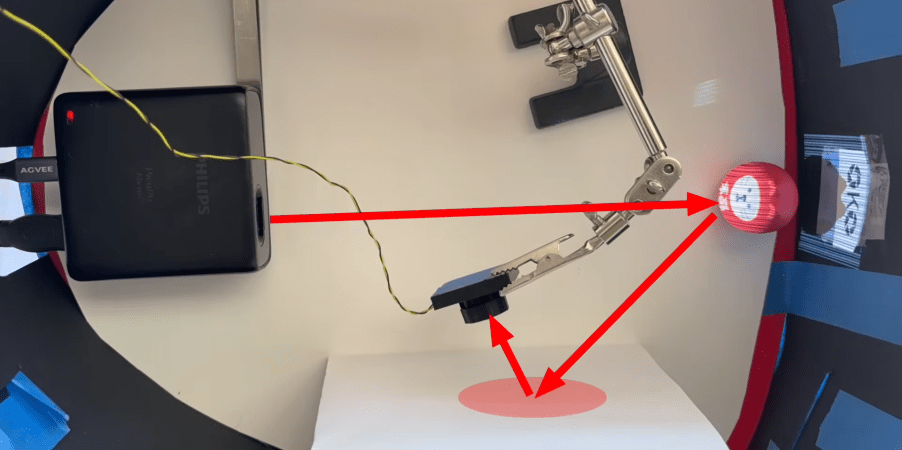
Projector on left with red arrow pointing towards object, another red arrow points towards a piece of paper and then camera.

Pictures From Paper Reflections And A Single Pixel

Taking a picture with a single photoresistor is a brain-breaking idea. But go deeper and imagine taking that same picture with the same photoresistor, but without even facing the object. [Jon Bumstead] did exactly that with compressed sensing and a projector. Incredibly, the resulting image is from the perspective of the projector, not the “camera”.

This camera setup is very similar to one we’ve seen before, but far more capable. The only required electronics are a small projector and a single photodiode. The secret sauce in this particular design lies in the pattern projected and the algorithm to parse the data.

Continue reading “Pictures From Paper Reflections And A Single Pixel”

Visual Code Generator To End All Generators

QR codes are something that we all take for granted in this day and age. There are even a million apps to create your own QR codes, but what if you want to make a barcode? How about making a specific kind of barcode that follows UPC-E, CODE 39, or even the infamous… CODABAR? Well, it might be more difficult to find a single app that can handle all those different standards. Using “yet-another-web-app”, Barcode Tool – Generator & Scanner, you can rid these worries, created by [Ricardo de Azambuja].

When going to [Ricardo]’s simple application, you will find a straightforward interface that allows you to make far more different strips and square patterns than you’ve ever imagined. Of course, starting with the common QR code, you can create custom overlaid codes like many other QR generators. More uniquely, there are options for any barcode under the sun to help organize your hacker workspace. If you don’t want to download an app to scan the codes, you can even use the included scanner function.

If you want to use the web app, you can find it here! In-depth solutions to rather simple problems are something we strive to provide here at Hackaday, and this project is no exception. However, if you want something more physical, check out this specialized outdoor city cooking station.

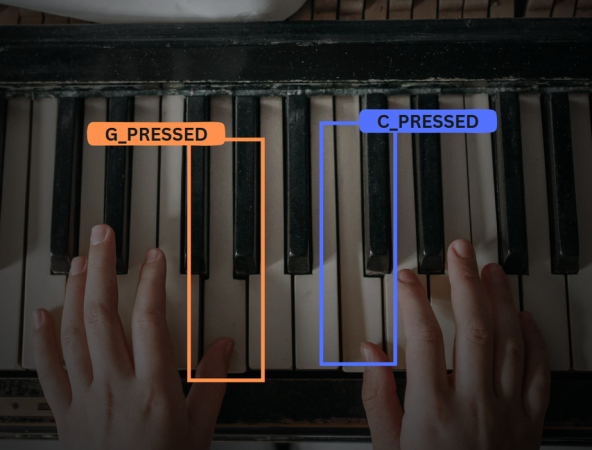
A piano is pictured with two hands playing different notes, G outlined in orange and C outlined in blue.

AI Piano Teacher To Criticize Your Every Move

Learning new instruments is never a simple task on your own; nothing can beat the instant feedback of a teacher. In our new age of AI, why not have an AI companion complain when you’re off note? This is exactly what [Ada López] put together with their AI-Powered Piano Trainer.

The basics of the piano rely on rather simple boolean actions, either you press a key or not. Obviously, this sets up the piano for many fun projects, such as creative doorbells or helpful AI models. [Ada López] started their AI model with a custom dataset with images of playing specific notes on the piano. These images then get fed into Roboflow and trained using the YOLOv8 model.

Using the piano training has the model run on a laptop and only has a Raspberry Pi for video, and gives instant feedback to the pianist due to the demands of the model. Placing the Pi and an LCD screen for feedback into a simple enclosure allows the easy viewing of how good an AI model thinks you play piano. [Ada López] demos their device by playing Twinkle Twinkle Little Star but there is no reason why other songs couldn’t be added!

While there are simpler piano trainers out there relying on audio cues, this project presents a great opportunity for a fun project for anyone else wanting to take up the baton. If you want to get a little more from having to do less in the physical space, then this invisible piano is perfect for you!

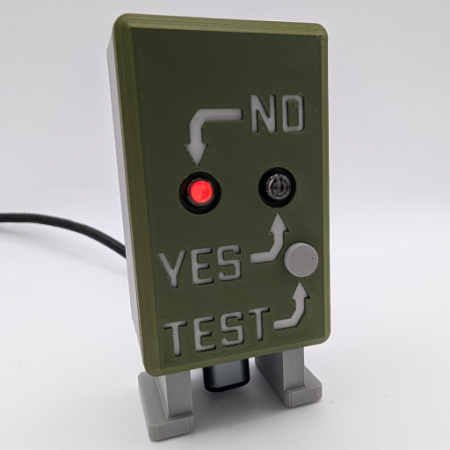
A green box with the answer to if a nuke has gone off with red neon lights

Has A Nuke Gone Off? Indicator

Look out of a window, ask yourself the question, “Has a nuke gone off?”. Maybe, maybe not, and all of us here at Hackaday need to know the answer to these important questions! Introducing the hasanukegoneoff.com Indicator from [bigcrimping] to answer our cries.

An ESP32 running a MicroPython script handles the critical checks from hasanukegoneoff.com for any notification of nuclear mayhem. This will either power the INS-1 neon bulb, indicating “no” or “yes” in the unfortunate case of a blast. Of course, there is also the button required for testing the notification lights; no chance of failure can be left. All of this is fitted onto a custom dual-sided PCB and placed inside a custom 3D-printed enclosure.

Hasanukegoneoff.com’s detection system, covered before here, relies on an HSN-1000L Nuclear Event Detector to check for neutrons coming from the blast zone. [bigcrimping] also provides the project plans for your own blast detector to answer the critical question of “has a nuke gone off” from anywhere other than the website’s Chippenham, England location.

This entire project is open sourced, so keep sure to check out [bigcrimping]’s GitHub for both portions of this project on the detector and receiver. While this project provides some needed dark humor, nukes are still scary and especially so when disarming them with nothing but a hacksaw and testing equipment.

Thanks to [Daniel Gooch] for the tip.

Bento showing fully assembled device and XR glasses

Bento – VR/XR From A Keyboard

XR may not have crashed into our lives as much as some tech billionaires have wished, but that doesn’t stop the appeal of a full display that takes up no physical space. At that point, why not get rid of the computer that takes up living space as well? That is what [Michael] tries to do with Bento, the form factor of an Apple Magic keyboard and the power of a Steam Deck. 

Continue reading “Bento – VR/XR From A Keyboard”