Battery Tester Gets An App Upgrade

Do you have a ZKETECH EBC-A20 battery tester? Perhaps you don’t like the default software used to control the device. In that case, you might like the alternative whipped up by [Kazhuu.]

A reverse-engineering effort targeted at the EBC-A20 served as the basis for the work. The battery tester is ultimately controlled by a simple serial interface, running at 9600 bps, 8 bits, with odd parity. Armed with a relatively complete understanding of the commands used to control the device, [Kazhuu] was able to whip up a simple web app to control the device instead, using WebUSB to access the device over a USB-to-serial converter, though a desktop version for Linux and Windows is also available. If you’ve got one of these battery testers sitting on your bench, using the app is as simple as pointing your browser here with the device plugged in via USB. Then you can run basic load tests on battery cells and graph the results right on your computer without having to deal with the proprietary software.

Of course, if you don’t like the EBC-A20 battery tester, you could always build your own. If you’re whipping up your own test hardware on the lab bench, don’t hesitate to notify us on the tipsline.

Visual Code Generator To End All Generators

QR codes are something that we all take for granted in this day and age. There are even a million apps to create your own QR codes, but what if you want to make a barcode? How about making a specific kind of barcode that follows UPC-E, CODE 39, or even the infamous… CODABAR? Well, it might be more difficult to find a single app that can handle all those different standards. Using “yet-another-web-app”, Barcode Tool – Generator & Scanner, you can rid these worries, created by [Ricardo de Azambuja].

When going to [Ricardo]’s simple application, you will find a straightforward interface that allows you to make far more different strips and square patterns than you’ve ever imagined. Of course, starting with the common QR code, you can create custom overlaid codes like many other QR generators. More uniquely, there are options for any barcode under the sun to help organize your hacker workspace. If you don’t want to download an app to scan the codes, you can even use the included scanner function.

If you want to use the web app, you can find it here! In-depth solutions to rather simple problems are something we strive to provide here at Hackaday, and this project is no exception. However, if you want something more physical, check out this specialized outdoor city cooking station.

A persons handing holding a pile of generative, laser cut snowflake ornaments

Laser-Cutting A Flurry Of Generative Snowflakes

It’s the holiday season, and what better way to celebrate than to carve out some generative snowflakes on your laser cutter? [Bleeptrack] has developed a web-based tool that creates generative snowflake ornaments which can be exported to SVG files ready-made for laser or vinyl cutting.

True to their namesake, each generated snowflake ornament is (very likely to be) unique, with multiple layers created that can be stacked on top of each other. [Bleeptrack] has showcased a few realizations, using semitransparent paper sandwiched between two top layer cutouts, made out of wood or cardboard.

The snowflakes are a great balance of minimal design while still being beautiful and rich in detail. They can be easily produced on any laser cutter or vinyl cutter that you might have handy. Source code is available on GitHub for those wanting to dive into the details of the web tool. Cutting one of your own would make a perfect addition to a Neodriver ornament or a tiny DOOM playing ornament. Video after the break!

Continue reading “Laser-Cutting A Flurry Of Generative Snowflakes”

Open Source Electric Vehicle Charging

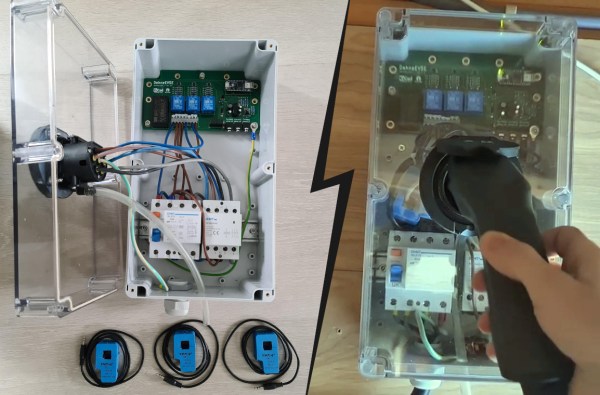
Electric vehicles are becoming more and more common on the road, but when they’re parked in the driveway or garage there are still some kinks to work out when getting them charged up. Sure, there are plenty of charging stations on the market, but they all have different features, capabilities, and even ports, so to really make sure that full control is maintained over charging a car’s batteries it might be necessary to reach into the parts bin and pull out a trusty Arduino.

This project comes to us from [Sebastian] who needed this level of control over charging his Leaf, and who also has the skills to implement it from the large high voltage switching contactors to the software running its network connectivity and web app. This charging station has every available feature, too. It can tell the car to charge at different rates, and can restrict it to charging at different times (if energy is cheaper at night, for example). It is able to monitor the car’s charge state and other information over the communications bus to the vehicle, and even has a front-end web app for monitoring and controlling the device.

The project is based around an Arduino Nano 33 IoT with all of the code available on the project’s GitHub page. While we would advise using extreme caution when dealing with mains voltage and when interfacing with a high-ticket item like an EV, at first blush the build looks like it has crossed all its Ts and might even make a good prototype for a production unit in the future. If you don’t need all of the features that this charging station has, though, you can always hack the car itself to add some more advanced charging features.

Continue reading “Open Source Electric Vehicle Charging”

Automate Your Life With Node-RED (Plus A Dash Of MQTT)

For years we’ve seen a trickle of really interesting home automation projects that use the Node-RED package. Each time, the hackers behind these projects have raved about Node-RED and now I’ve joined those ranks as well.

This graphic-based coding platform lets you quickly put together useful operations and graphic user interfaces (GUIs), whether you’re the freshest greenhorn or a seasoned veteran. You can use it to switch your internet-connected lights on schedule, or at the touch of a button through a web-app available to any device on your home network. You can use it as an information dashboard for the weather forecast, latest Hackaday articles, bus schedules, or all of them at once. At a glance it abstracts away the complexity of writing Javascript, while also making it simple to dive under hood and use your 1337 haxor skills to add your own code.

You can get this up and running in less than an hour and I’m going to tackle that as well as examples for playing with MQTT, setting up a web GUI, and writing to log files. To make Node-RED persistent on your network you need a server, but it’s lean enough to run from a Raspberry Pi without issue, and it’s even installed by default in BeagleBone distributions. Code for all examples in this guide can be found in the tutorial repository. Let’s dive in!

Continue reading “Automate Your Life With Node-RED (Plus A Dash Of MQTT)”

Modular Music Synthesis On The Web

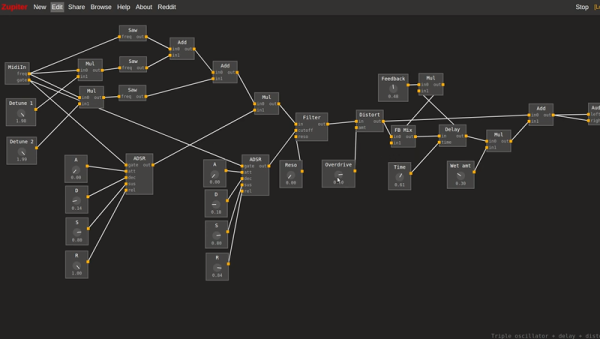
It is hard to imagine how the electronics hobby survived without the Internet. You found like-minded people and projects in magazines. And it is even harder to imagine what projects were in the magazines before the widespread availability of CPU chips. Think about it, there are only so many things you can build with a handful of tubes, transistors, and small ICs. But before the computer revolution took over the hobby, there were always a lot of articles about music synthesis. Coming full circle, you can now build a virtual synthesizer on the web using Zupiter, a modular synthesizer that runs in your browser.

That link is actually about Zupiter, but you can go straight to it if you just want to play. However, we had to do a little reading and try some of the examples, too. You can see a video about the synthesizer, below.

Continue reading “Modular Music Synthesis On The Web”

Race Conditions Exploit Granted Free Money On Web Services

[Josip] has been playing around with race conditions on web interfaces lately, finding vulnerabilities on both Facebook and Digital Ocean. A race condition can occur when a piece of software processes multiple threads using a shared resource.

For example, [Josip] discovered that he was able to manipulate page reviews using just a single Facebook account. Normally, a user is permitted to leave just one review for any given Facebook page. This prevents a single user from being able to skew the page’s overall ranking by making a bunch of positive or negative reviews. The trick to manipulating the system was to intercept the HTTP request that submitted the page review. The request was then replayed over and over in a very short amount of time.

Facebook’s servers ended up processing some of these requests simultaneously, essentially unaware that multiple requests had come in so close together. The result was that multiple reviews were submitted, artificially changing the pages overall ranking even though only one review actually showed up on the page for this user. The user can then delete their single review, and repeat this cycle over and over. It took Facebook approximately two months to fix this vulnerability, but in the end it was fixed and [Josip] received a nice bounty.

The Digital Ocean hack was essentially the exact same process. This time instead of hacking page reviews, [Josip] went after some free money. He found that he was able to submit the same promotional code multiple times, resulting in a hefty discount at checkout time. Digital Ocean wasted no time fixing this bug, repairing it within just ten days of the disclosure.