From Cans To Sheet Metal, With Ease

Aluminium drinks cans make a great source of thin sheet metal which can be used for all manner of interesting projects, but it’s safe to say that retrieving a sheet of metal from a can is a hazardous process. Cut fingers and jagged edges are never far away, so [Kevin Cheung]’s work in making an easy can cutter is definitely worth a look.

Taking inspiration from a rotary can opener, he uses a pair of circular blades in an adjustable injection moulded plastic frame. If you’ve used a pipe cutter than maybe you are familiar with the technique, as the blade rotates round the can a few times it slowly scores and cuts through the metal. Doing the job at both ends of the can reveals a tube, which cna be then cut with scissors and flattened to make a rectangular metal sheet. Those edges are probably sharp, but nothing like the jagged finger-cutters you’d get doing the same by hand. The full video can be seen below the break, and the files to 3D print the plastic parts of the cutter can be found at the bottom of a page describing the use of cans to make a shingle roof.

Continue reading “From Cans To Sheet Metal, With Ease”

The Automatic Battery Charger You Never Knew You Needed

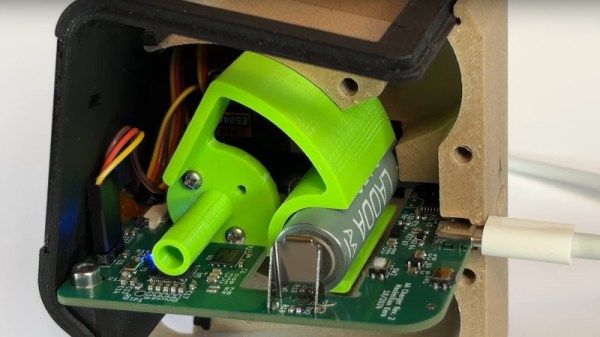
When we saw [Max.K]’s automatic NiMh battery charger float past in the Hackaday tips line, it brought to mind a charger that might be automatic in the sense that any modern microcontroller based circuit would be; one which handles all the voltages and currents automatically. The reality is far cooler than that, a single-cell charger in which the automatic part comes in taking empty cells one by one from a hopper on its top surface and depositing them charged in a bin at the bottom.

Inside the case is a PCB with an RP2040 that controls the whole shop as well as the charger circuitry. A motorized cam with a battery shaped insert picks up a cell from the bin and moves it into the charger contacts, before dumping it into the bin when charged. What impresses us it how slick this device is, it feels like a product rather than a project, and really delivers on the promise of 3D printing. We’d want one on our bench, and after watching the video below the break, we think you will too.

Continue reading “The Automatic Battery Charger You Never Knew You Needed”

A Free Speed Boost For Your Pi 5

The world of the overclocker contains many arcane tweaks to squeeze the last drops of performance from a computer, many of which require expert knowledge to understand. Happily for Raspberry Pi 5 owners the Pi engineers have come up with a set of tweaks you don’t have to be an overclocker to benefit from, working on the DRAM timings to extract a healthy speed boost. Serial Pi hacker [Jeff Geerling] has tested them and thinks they should be good for as much as 20% boost on a stock board. When overclocked to 3.2 GHz, he found an unbelievable 32% increase in performance.

We’re not DRAM experts here at Hackaday, but as we understand it they have been using timings from the Micron data sheets designed to play it safe. In consultation with Micron engineers they were able to use settings designed to be much faster, we gather by monitoring RAM temperature to ensure the chips stay within their parameters. Best of all, there’s no need to get down and dirty with the settings, and they can be available to all with a firmware update. It’s claimed this will help Pi 4 owners to some extent as well as those with a Pi 5, so even slightly older boards get some love. So if you have a Pi 5, don’t wait for the Pi 6, upgrade today, for free!

When Transistor Count Mattered

Many Hackaday readers have an interest in retro technology, but we are not the only group who scour the flea markets. Alongside us are the collectors, whose interest is as much cultural as it is technological, and who seek to preserve and amass as many interesting specimens as they can. From this world comes [colectornet], with a video that crosses the bridge between our two communities, examining the so-called transistor wars of the late 1950s and through the ’60s. Just as digital camera makers would with megapixels four or five decades later, makers of transistor radios would cram as many transistors as they could into their products in a game of one-upmanship.

A simple AM transistor radio can be made with surprisingly few components, but for a circuit with a reasonable performance they suggest six transistors to be the optimal number. If we think about it we come up with five and a diode, that’s one for the self-oscillating mixer, one for IF, an audio preamplifier, and two for the audio power amplifier, but it’s possible we’re not factoring in the relatively low gain of a 1950s transistor and they’d need that extra part. In the cut-throat world of late ’50s budget consumer electronics though, any marketing ploy was worth a go. As the price of transistors tumbled but their novelty remained undimmed, manufacturers started creating radios with superfluous extra transistors, even sometimes going as far as to fit transistors which served no purpose. Our curious minds wonder if they bought super-cheap out-of-spec parts to fill those footprints.

The video charts the transistor wars in detail, showing us a feast of tiny radios, and culminating in models which claim a barely credible sixteen transistors. In a time when far more capable radios use a fraction of the board space, the video below the break makes for a fascinating watch.

Continue reading “When Transistor Count Mattered”

Arduino VGA, The Old Fashioned Way

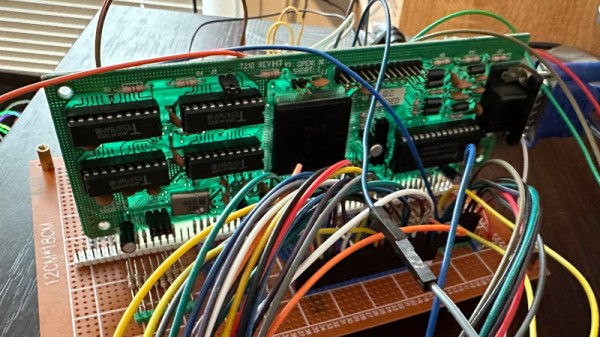
Making a microcontroller speak to a VGA monitor has been a consistent project in our sphere for years, doing the job for which an IBM PC of yore required a plug-in ISA card. Couldn’t a microcontroller talk to a VGA card too? Of course it can, and [0xmarcin] is here to show how it can be done with an Arduino Mega.

The project builds on the work of another similar one which couldn’t be made to work, and the Trident card used couldn’t be driven in 8-bit ISA mode. The web of PC backwards compatibility saves the day though, because many 16-bit ISA cards also supported the original 8-bit slots from the earliest PCs. The Arduino is fast enough to support the ISA bus speed, but the card also needs the PC’s clock line to operate, and it only supports three modes:  80 x 25, 16 colour text, 320 x 200, 256 colour graphics, and 640 x 480, 16 colour graphics.

Looking at this project, it serves as a reminder of the march of technology. Perhaps fifteen years or more ago we’d have been able to lay our hands on any number of ISA cards to try it for ourselves, but now eight years after we called the end of the standard, we’d be hard placed to find one even at our hackerspace. Perhaps your best bet if you want one is a piece of over-the-top emulation.

It’s Like LightScribe, But For Floppies!

Back when CD-Rs were the thing, there were CD burner drives which would etch images in the unoccupied areas of a CD-R. These so-called LightScribe drives were a novelty of which most users soon tired, but they’re what’s brought to our mind by [dbalsom]’s project. It’s called PNG2disk, and it does the same job as LightScribe, but for floppies. There’s one snag though; the images are encoded in magnetic flux and thus invisible to the naked eye. Instead, they can be enjoyed through a disk copying program that shows a sector map.

The linked GitHub repository has an example, and goes in depth through the various options it supports, and how to view images in several disk analysis programs. This program creates fully readable disks, and can even leave space for a filesystem. We have to admit to being curious as to whether such an image could be made physically visible using for example ferrofluid, but we’d be the first t admit to not being magnetic flux experts.

PNG2disk is part of the Fluxfox project, a library for working with floppy disk images. Meanwhile LightScribe my have gone the way of the dodo, but if you have one you could try making your own supercaps.

Hackaday Podcast Episode 298: Forbidden USB-C, A Laser Glow-o-Scope, And The Epoch Super Cassette Vision

This week’s Hackaday podcast has a European feel, as Elliot Williams is joined by Jenny List for a look at the week’s happenings in the world of cool hardware hacks. Starting with the week’s news, those Redbox vending machines continue to capture the attention of hackers everywhere, and in the race to snag one before they’re carted off for recycling someone has provided the missing hardware manual in the form of a wiki. Europeans can only look on wistfully. Then there’s the curious case of life on the asteroid sample, despite the best efforts of modern science those pesky earth bacteria managed to breach all their anti-contamination measures. Anyone who’s had a batch of homebrew go bad feels their pain.

The week provided plenty of hacks, with the team being wowed by [Bitluni]’s CRT-like laser projector, then the many ingenious ways to 3D-print a hinge, and perhaps one of the most unforgiving environments in the home for a piece of robotics. Meanwhile our appetite for cool stuff was sated by an entire family of Japanese games consoles we’d never heard of, and the little voltage reference whose data sheet also had an audio amplifier circuit. Finishing up, our colleague Arya has many unorthodox uses for a USB-C cable, and we have a frank exchange of views about Linux audio.

Give it a listen below and check out all the links, and by all means, give us a roasting in the comments!

Continue reading “Hackaday Podcast Episode 298: Forbidden USB-C, A Laser Glow-o-Scope, And The Epoch Super Cassette Vision”