A Compact SCARA Arm Plotter

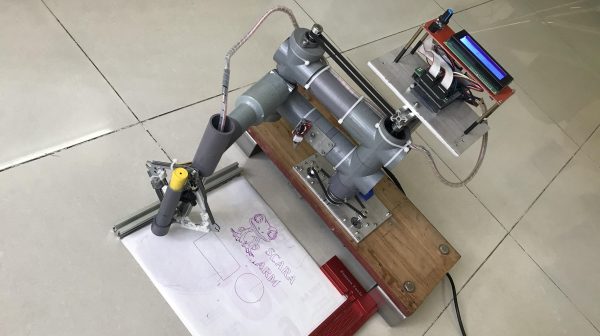
If you’re unfamiliar with SCARA robots, the acronym stands for Selective Compliance Assembly Robot Arm. This refers to the fact that the arms are rigid in the Z axis but somewhat compliant in the X and Y axes, and that they’re often used for assembly tasks. In any case, you can spend a great deal of money equipping your factory with these robots, or you can build your own for the fun of it. If you’re not endowed with a seven-figure investment for opening a production plant, consider exploring [tuenhidiy’s] project instead.

The build enlists an Arduino Mega as the brains of the operation. It’s paired with a RAMPS controller for running a pair of NEMA 17 stepper motors that actually move the arm in the X-Y plane. Additionally, a tray eject mechanism from a CD/DVD drive is enlisted to act as the Z axis. The frame is assembled from PVC plumbing components and a small amount of aluminium T-slot profile.

The resulting arm isn’t fast in the video we see of the build, but it works as a basic plotter without too much complaint. The benefit of the Z-axis in this case is obvious, as it allows the pen to be lifted off the page where necessary.

We’ve seen plenty of good plotter designs around these parts before, too. Video after the break.

Continue reading “A Compact SCARA Arm Plotter”

Playing Audio On The Pi Pico With No DAC To Speak Of

Normally, if you want to play music or other audio on a microcontroller, you need to get yourself a DAC. Or at least, that’s the easiest way to go about it and the one most likely to get you good, intelligible audio. You don’t have to go that way, though, as [antirez] demonstrates.

[antirez] decided to do this with a Pi Pico, but it’s applicable to other microcontrollers too. It’s all done with a single pin and a PWM output. The PWM output is set to a very high frequency beyond human hearing. In this case, it was 100 KHz. Then, the duty cycle of the PWM is changed to essentially output various average voltage levels at the pin. Vary the output voltage as per your desired sound file by using each sample to vary the duty cycle of the PWM. Voila! You can output whatever sound you want on that pin! [antirez] steps through the basics of doing this, including processing simple WAV files into a raw format that can be dumped into MicroPython code.

There’s no sound sample on the project page, and we’d have to assume it sounds pretty crunchy when hooked up to a speaker. And yet, it could prove a useful technique if you’re designing your own audio greeting cards or something, so keep that in mind!

CT Scan Reveals Secrets Of Heinz’s New Ketchup Cap

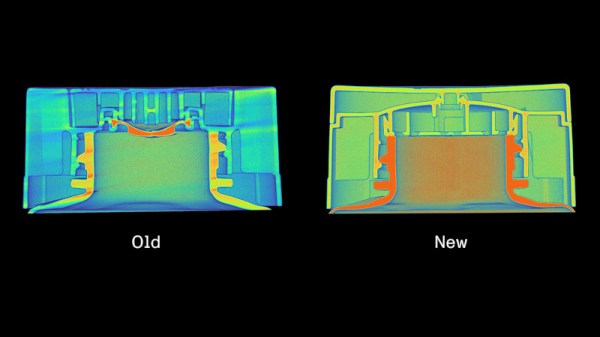
Ketchup bottles are a solved technology, right? Wrong! As it turns out, there is still great development being done in this space. Industrial imaging company Lumafield reveals to us the secrets of Heinz’s new ketchup bottle cap, reportedly the result of a seven-figure investment and eight long years of toil.

Lumafield put the cap in a CT scanner to generate three-dimensional cutaway images of the cap’s internal structure.  The trick of the new cap is in how it compares to the old design. The previous solution used multiple different plastics: likely polypropylene for the cap itself, along with a small amount of silicone for the flexible nozzle valve. The point of the valve was to regulate the flow of ketchup so the bottle squirts out the red goop in a predictable fashion.

The problem with the old cap is that the use of two materials both makes it more expensive to manufacture, and practically impossible to recycle. A solution was needed, and Heinz finally found one.

The new cap, which is fully recyclable, takes advantage of the properties of ketchup itself. As the ketchup is squeezed out of the bottle, it passes through a complicated array of channels before it gets to the nozzle outlet itself. As a sheer-thinning fluid, ketchup gets less viscous the more its under strain. Thus, as it deforms around the complex channels, it becomes less viscous and more likely to flow out at a predictable rate, rather than in thick gloopy spurts.

It’s amazing to think how much work goes into a simple ketchup cap, and yet, millions of dollars are on the line in projects like these. This isn’t the first time Lumafield used their tech to peel back the layers on a piece of common tech — last year we covered their investigation into what’s inside various AirPod knockoffs.

Stacking Solar Cells Is A Neat Trick To Maximise Efficiency

Solar power is already cheap and effective, and it’s taking on a larger role in supplying energy needs all over the world. The thing about humanity, though, is that we always want more! Too much, you say? It’s never enough!

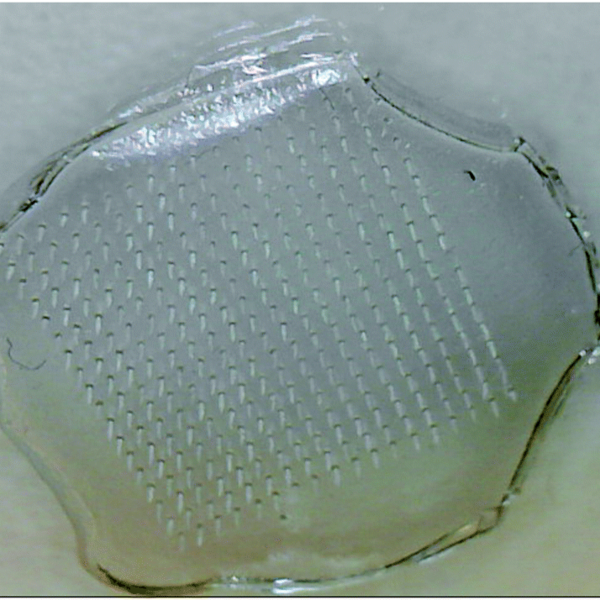
The problem is that the sun only outputs so much energy per unit of area on Earth, and solar cells can only be so efficient thanks to some fundamental physical limits. However, there’s a way to get around that—with the magic of tandem solar cells!

Continue reading “Stacking Solar Cells Is A Neat Trick To Maximise Efficiency”

Dial-Up Is Still, Just Barely, A Thing

In an era dominated by broadband and wireless cellular networks, it might come as a surprise to many that dial-up internet services still exist in the United States. This persistence is not a mere relic of nostalgia — but a testament to the diverse and uneven nature of internet infrastructure across the country.

Yes, dial-up internet, with those screechy, crackly tones, remains a useful tool in areas where modern, high-speed internet services are either unaffordable or unavailable. Subscriber numbers are tiny, but some plough on and access the Internet by the old ways, not the new.

Continue reading “Dial-Up Is Still, Just Barely, A Thing”

Automated System Keeps Camper Van Air Fresh And Warm

Air quality has become a hot topic in recent years. [Ryan Stout] was interested in improving it in his camper van, and set about doing something about it. His solution was an automated system that provided cleaner air and better comfort to boot.

The concept was simple. [Ryan]’s system is based on an Arduino clone, and uses a SparkFun SCD40 as a CO2 sensor, and an MCP9808 for temperature. When the system detects excess carbon dioxide levels, it opens the MaxxAir fan in the camper by triggering it with an infrared signal. Similarly, when it detects excessively low temperatures inside the van, it kicks on a diesel furnace for heating. In a neat addition, to avoid the fan sucking in exhaust fumes, it also closes the fan in order to avoid exhaust fumes entering the camper unnecessarily. All the hardware was then  wrapped up in a simple 3D printed enclosure.

With this setup, [Ryan] has managed to cut the buildup of CO2 in his camper at night, and he credits this with reducing morning headaches when he’s out in the camper. We’d call that a win, to say nothing of the additional comfort created by the automatically-controlled heater! If you’re interested in something similar for your home HVAC system, we’ve got you covered.

Large Language Model Can Help You Develop For The Amiga

Developing for the Amiga used to involve reading dense programming manuals and trial and error. In contrast, developing these days can be as simple as barking orders at ChatGPT to spit you out some Python code. However, that technique doesn’t work so well for Amiga languages, as ChatGPT hasn’t read much about the now-ancient platform. However, as covered by AmigaNews, there is now a ChatGPT model trained specifically on Amiga development. Enter Amiga Guru.

The work of [Cameron Armstrong], Amiga Guru was built after his early experiments with ChatGPT spat out non-functional gibberish when Amiga-compatible code was requested. The model has been trained on a corpus of official Amiga programming manuals, third-party books, and even the documentation for AmigaOS 3.2 and 4.1.

Using the model yourself requires a subscription to ChatGPT Plus, which prevents this writer from testing it directly. However, it makes sense that having been directly trained on Amiga manuals, it would be more capable at answering Amiga programming queries than conventional ChatGPT 4.

It’s easy to see the value of such a system. Learning to program for older platforms can be hard, with less resources available for new learners. Having an AI to help could be useful for some eager to develop for the 68K-based machine.

If you’d like to try Amiga Guru, you can access it via this link. Be sure to let us know how you go, and whether you think it has any value for speeding up your own Amiga development. Otherwise, if you’ve been doing anything else nifty with the platform that Commodore bought and paid for, don’t hesitate to let us know!

[Thanks to Stephen Waters for the tip!]