Writing Pretty Flux Patterns To Old Floppy Disks

Floppy disks are rapidly aging, and archivists are working hard to preserve what data is left. This has led to the development of advanced floppy controllers capable of capturing the raw flux data from disks. [bzotto] was experimenting with the Applesauce archival hardware, and had some fun with the tools.

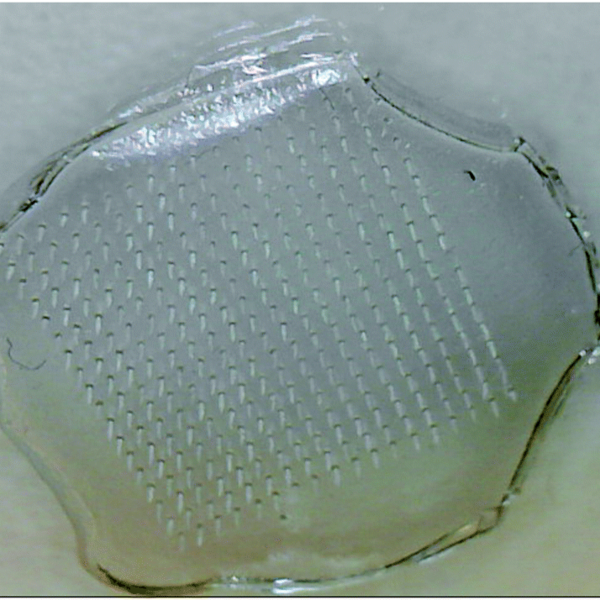
The result is a highly esoteric Easter egg. [bzotto]’s Picturedsk tool takes a bitmap image as input, and imprints that image into the magnetic flux of the disk. Thus, when viewing a dump of the disk’s magnetic flux on an archival program, the hidden image will be revealed. As an extra treat, it also writes a 1-bit version of the image to track 0, along with a barebones Apple ][ program to display the image and implore the user to investigate further.

It’s a fun hack that we could imagine being used as part of a game at a retro computing con, when we get to go back to those of course. We’ve seen Applesauce used before, too. If you’ve got your own archival projects on the go, be sure to let us know!
12-Note Polyphony On An Arduino Synth

When synthesizers first hit the scene back in the mid-20th century, many were monophonic instruments, capable of producing just one pitch at a time. This was a major limitation, and over time polyphonic synthesizers began to flood into the scene, greatly expanding performance possibilities. [Kevin] decided to build his own polyphonic synthesizer, but far from taking the easy route, he built it around the Arduino Uno – not a platform particularly well known for its musical abilities! 

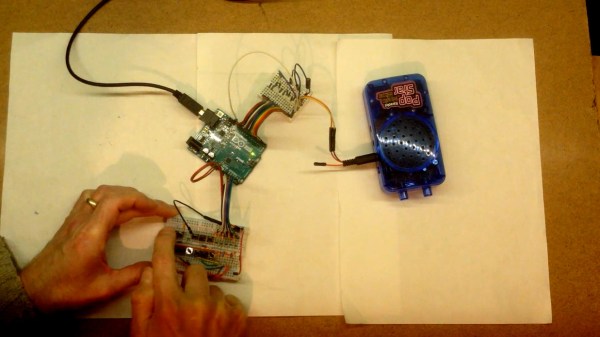
[Kevin]’s build manages 12-note polyphony, an impressive feat for the ATmega328 at the heart of the Arduino Uno. It’s done by running an interrupt on a timer at a steady rate, and implementing 12 counters, one per note. When a counter overflows, a digital IO pin is flipped. This outputs a square wave at a certain pitch on the IO pin, producing the given note. The outputs of 12 digital IO pins are mixed together with a simple resistor arrangement, producing a basic square wave synth. Tuning isn’t perfect, but [Kevin] notes a few ways it could be improved down the line.

[Kevin] has added features along the way, expanding the simple synth to work over several octaves via MIDI, while also building a small tactile button keyboard, too. It’s a project that serves as a great gateway into basic synthesis and music electronics, and we’re sure [Kevin] learned a lot along the way. We’ve seen other microcontroller synths before too, like this tiny device that fits inside a MIDI plug. Video after the break.

Continue reading “12-Note Polyphony On An Arduino Synth”

A Smart Way To Wire Smart Switches

Smart switches are fun, letting you control lights and appliances in your home over the web or even by voice if you’re so inclined. However, they can make day-to-day living more frustrating if they’re not set up properly with regards to your existing light switches. Thankfully, with some simple wiring, it’s possible to make everything play nice.

The method is demonstrated here by [MyHomeThings], in which an ESP8266 is used with a relay to create a basic smart switch. However, it’s wired up with a regular light switch in a typical “traveller” multiway switching scheme – just like when you have two traditional light switches controlling the same light at home. To make this work with the ESP8266, though, the microcontroller needs to be able to know the current state of the light. This is done by using a 240V to 3.3V power supply wired up in parallel with the light. When the light is on, the 3.3V supply is on. This supply feeds into a GPIO pin on the ESP8266, letting it know the light’s current state, and allowing it to set its output relay to the correct position as necessary.

This system lets you use smart lighting with traditional switches with less confused flipping, which is a good thing in our book. If you’re using standalone smart bulbs, however, you could consider flashing them with custom firmware to improve functionality. As always, if you’ve got your own neat smart lighting hacks, be sure to let us know!

An E-Book Reader, But Just For Haiku

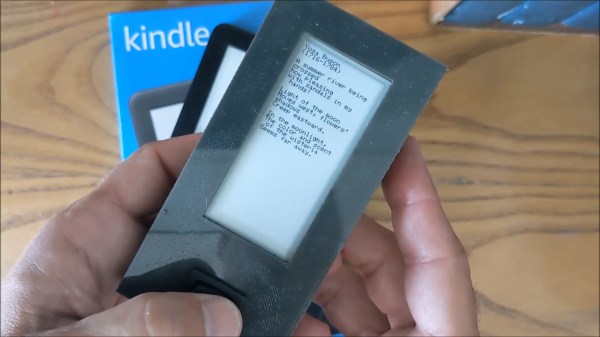
E-ink displays haven’t revolutionized the world so much as served us humbly in e-book readers such as the Kindle and its ilk. Most such readers are designed for extended sessions reading novels and the like, but [Roni Bandini] decided a haiku-sized device was in order. 

The diminutive device runs off an ESP32, which has plenty of clock cycles for easily driving displays. It’s paired with a 2.9 inch Waveshare e-ink display, upon which it delivers poetry in the popular Japanese haiku format – 5 syllables, 7 syllables, 5 syllables. Writing to the display is easy with the GxEPD library, which is compatible with a variety of common e-ink displays. Presently the poetry is hardcoded in the program, and there’s plenty that could be included with the ESP32’s roomy program storage. However, [Roni] notes it would be simple to have the reader pull poems from an SD card instead.

It’s a fun project, and a great way to get familiar with the basics of working with e-ink displays. We’d love to see a WiFi-enabled version that pulls down the hottest daily haikus fresh from the web, too. Funnily enough, our own archives only feature one other reference to the famous Japanese art, which has little to do with poetry. If you fancy changing that, make something relevant and drop us a line. Video after the break.

Continue reading “An E-Book Reader, But Just For Haiku”

Coding A Dynamic Menu For Character LCDs On Arduino

These days, there’s a huge variety of screens on the market for use with microcontrollers. OLEDs and graphic LCDs abound, while e-ink devices tempt the user with their clean look and low energy consumption. However, for many purposes, the humble HD44780 character LCD does the job just fine. If you’re using such a device, you might want to implement a simple menu system, and in that case, [MyHomeThings] has you covered.

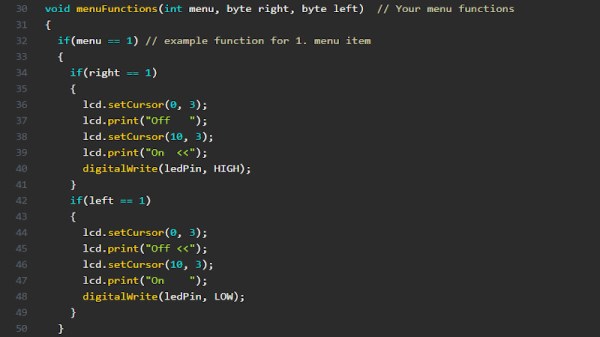
The menu code is simple to modify and implement. It allows the user to define a certain number of menu items, along with button labels and functions to be executed with button presses. By default, it’s set up to work with  left and right function buttons, with up and down buttons to toggle through the menu’s various entries. This suits the commonly available Arduino shields which combine a 16×2 character LCD with a set of four tactile buttons in a cross formation. However, modifying the code to use an alternate button scheme would be simple for those eager to tweak things to their liking.

For the absolute beginner to programming, it’s a great way to put together a simple interface for your microcontroller projects. It’s the sort of thing you might use if you’d built a do-everything Arduino handheld device, as we’ve seen built before. If you find text menus too archaic for your purposes, though, be sure to sound off with your favourite solutions in the comments.

A 3D Printed Camera Arm For Great 3D Print Timelapses

If you’re a maker that publishes projects online, you’ll be well across the production values arms race that’s been raging over the past decade. For those in the 3D printing space, this means that you’ll need to be producing slick timelapse videos of your prints. [BuildComics] is now doing just that, with a custom camera arm to help do the job. (Video, embedded below.)

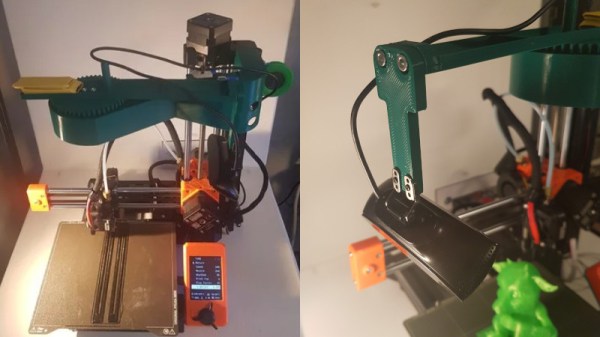
The arm relies on a 3D-printed gear train that allows a stepper motor to turn it slowly throughout the print’s duration. It’s controlled by an Arduino that receives commands via Firmata. The arm is mounted on top of the printer, holding a webcam above the build plate for a good view. It’s setup via Octolapse to take images as each layer is finished, giving that haunting look of a model materialising on the print bed throughout the duration of the timelapse.

Files are available for those wishing to build their own. The design as used is for the Prusa Mini, but it should be adaptable to other printers without too much trouble. We’ve reported on Octolapse before, with its videos proving to be the gold standard when it comes to the art of the printing time lapse.

Continue reading “A 3D Printed Camera Arm For Great 3D Print Timelapses”

Cosmic Ray Flips Bit, Assists Mario 64 Speedrunner

We’ve all heard about cosmic rays flipping bits here and there, but by and large, it occurs rarely enough that we don’t worry too much about it on a day-to-day basis. However, it seems just such a ray happened to flip a crucial bit that assisted a speedrunner in the middle of a competition.

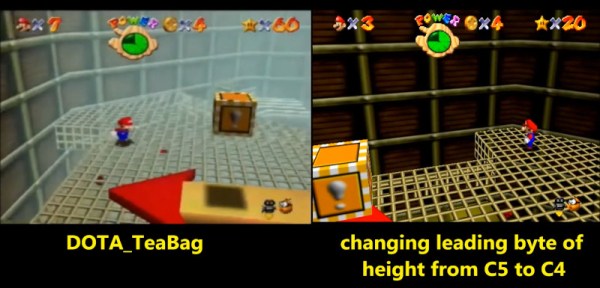
The flip happened to [DOTA_Teabag], who suddenly found Mario flying upward to a higher part of a level, completely unexpectedly. Testing by [pannenkoek12] seems to indicate that this may have been due to a single-bit change to Mario’s height value, from C5837800 to C4837800, leading to the plucky Italian plumber warping upwards through the level. The leading theory is that this bit flip was caused by a cosmic ray event, though the likelihood of such an event is exceedingly rare.

It’s possible that there remains another cause for the flip, though after much work from the community replicating the situation in emulation, none has been found. Other suggestions involve electrical noise or other malfunctions causing the flip, though one would rarely expect such an occurrence to change just one bit of RAM. For now, the jury remains out, but who knows – maybe in the future we’ll find out it was a hidden, undiscovered exploit all along. Of course, if Nintendo doesn’t get you going, try speedrunning Windows 95.  Video after the break.

Continue reading “Cosmic Ray Flips Bit, Assists Mario 64 Speedrunner”