How HP Calculators Communicate Over Infrared

For most people, calculators are cheap and simple devices used for little more than addition and the odd multiplication job. However, when you get into scientific and graphical calculators, the feature sets get a lot more interesting. For example, [Ready? Z80] has this excellent explainer on how HP’s older calculators handle infrared communications.

The video focuses on the HP 27S Scientific Calculator, which [Ready? Z80] found in an op-shop for just $5. Introduced in 1988, the HP-27S had the ability to dump screen data over an infrared link to a thermal printer to produce paper records of mundane high-school calculations or important engineering math. In the video, [Ready? Z80] explains the communication method with the aid of Hewlett-Packard’s own journal publication from October 1987, which lays out of the details of “the REDEYE Protocol.” Edgy stuff. It’s pretty straightforward to understand, with the calculator sending out bursts of data in six to eight pulses at a time, modulated onto a 32.768KHz square wave as is the norm. [Ready? Z80] then goes a step further, whipping up custom hardware to receive the signal and display the resulting data on a serial terminal. This is achieved with a TEC-1G single-board computer, based on the Z80 CPU, because that’s how [Ready? Z80] does things.

We’ve seen other great stuff from this channel before, too. For example, if you’ve ever wanted to multitask on the Z80, it’s entirely possible with the right techniques. Video after the break.

Continue reading “How HP Calculators Communicate Over Infrared”
Smoothie Bikes Turned Into Game Controllers

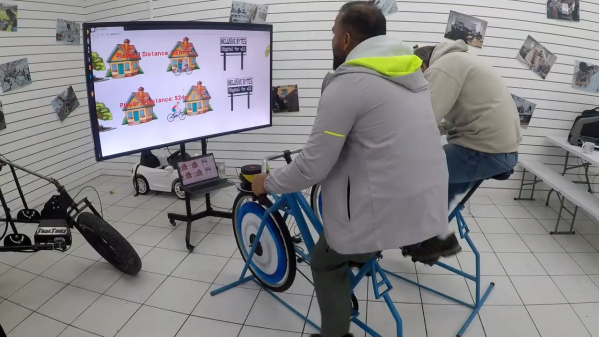
Smoothie bikes are a great way to make a nutritious beverage while getting a workout at the same time. [Tony Goacher] was approached by a local college, though, which had a problem with this technology. Namely, that students were using them and leaving them filthy. They posed a simple question—could these bikes become something else?

[Tony’s] solution was simple—the bikes would be turned into game controllers. This was easily achieved by fitting a bi-color disc into the blender assembly. As the wheel on the bike turns, it spins up the blender, with the disc inside. An ESP32 microcontroller paired with a light sensor is then able to count pulses as the disc spins, getting a readout of the blender’s current RPM. Working backwards, this can then be calculated out into the bike’s simulated road speed and used to play a basic game on an attached Raspberry Pi. Notably, the rig is setup such that the Raspberry Pi and one bike connect to an access point hosted by the other bike.  This is helpful, because it means neither bike has too many dangling cables that could get caught up in a wheel or chain.

We’ve seen many amusing game peripherals over the years, from salad spinners to turntables. Video after the break.

Continue reading “Smoothie Bikes Turned Into Game Controllers”

Regrowing Teeth Might Not Be Science Fiction Anymore

The human body is remarkably good at handling repairs. Cut the skin, and the blood will clot over the wound and the healing process begins. Break a bone, and the body will knit it back together as long as you keep it still enough. But teeth? Our adult teeth get damaged all the time, and yet the body has almost no way to repair them at all. Get a bad enough cavity or knock one out, and it’s game over. There’s nothing to be done but replace it.

Finding a way to repair teeth without invasive procedures has long been a holy grail for dental science. A new treatment being developed in Japan could help replace missing teeth in the near future.

Continue reading “Regrowing Teeth Might Not Be Science Fiction Anymore”

Running DOOM On Earbuds

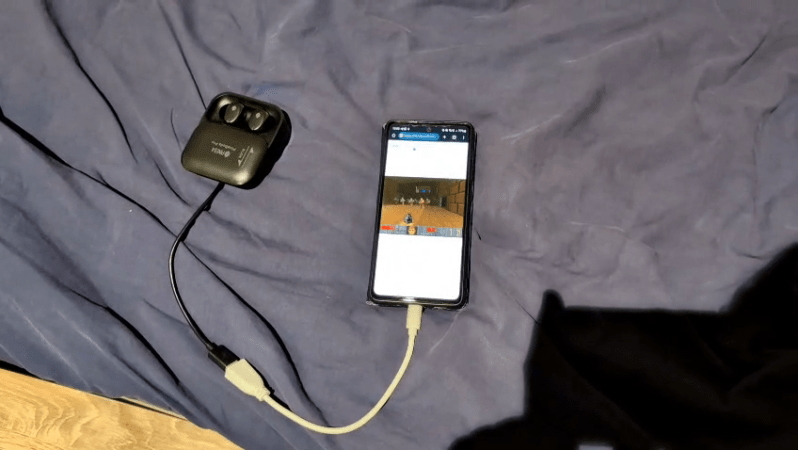
In 1993, DOOM was a great game to play if you had a 486 with a VGA monitor and nothing to do all weekend. In 2026, you can play it on a set of earbuds instead, if for some reason that’s something you’ve always dreamed of doing.

The project comes to us from [Arin Sarkisian], who figured out that the Pinebuds Pro had enough processing power to run one of the seminal FPS games from the 1990s. Inside these earbuds is a Cortex-M4F, which is set to run at 100 MHz. [Arin] figured out it could easily be cranked up to 300 MHz with low power mode switched off, which would come in handy for one main reason. See, the earbuds might be able to run the DOOM engine, but they don’t have a display.

Thus, [Arin] figured the easiest way to get the video data out would be via the Cortex-M4F’s serial UART running at 2.4 mbps. Running the game at a resolution of 320 x 200 at 3 frames per second would consume this entire bandwidth. However, all those extra clock cycles allow running an MJPEG compression algorithm that allow spitting out up to 18 frames per second. Much better!

All that was left to do was to figure out a control scheme. To that end, a web server is set up off-board that passes key presses to the buds and accepts and displays the MJPEG stream to the player. If you’re so inclined you can even play the game yourself on the project website, though you might just have to get in a queue. In the meantime, you can watch the Twitch stream of whoever else is playing at the time.

Files are on GitHub—both the earbud firmware and the web interface used to play the game. It was perhaps only a matter of time until we saw DOOM on earbuds; no surprise given that we’ve already seen it played on everything from receipt printers to cookware. No matter how cliche, we’re going to keep publishing interesting DOOM ports—so keep them coming to the tipsline.

Thanks to [alialiali] for the tip!

Zombie Netscape Won’t Die

The very concept of the web browser began with a humble piece of software called NCSA Mosaic, all the way back in 1993. It was soon eclipsed by Netscape Navigator, and later Internet Explorer, which became the titans of the 1990s browser market. In turn, they too would falter. Navigator’s dying corpse ended up feeding what would become Mozilla Firefox, and Internet Explorer later morphed into the unexceptional browser known as Edge.

Few of us have had any reason to think about Netscape Navigator since its demise in 2008. And yet, the name lingers on. A zombie from a forgotten age, risen again to haunt us today.

Continue reading “Zombie Netscape Won’t Die”

Augmented Reality Project Utilizes The Nintendo DSi

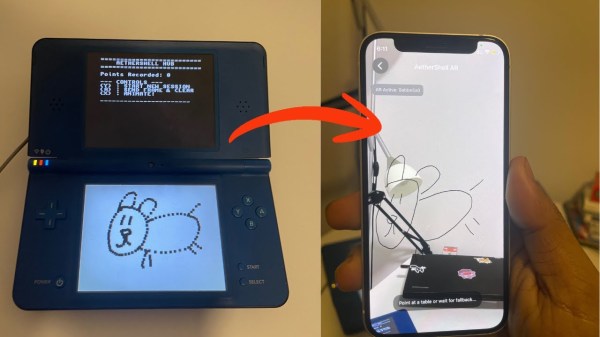
[Bhaskar Das] has been tinkering with one of Nintendo’s more obscure handhelds, the DSi. The old-school console has been given a new job as part of an augmented reality app called AetherShell. 

The concept is straightforward enough. The Nintendo DSi runs a small homebrew app which lets you use the stylus to make simple line drawings on the lower touchscreen. These drawings are then trucked out wirelessly as raw touch data via UDP packets, and fed into a Gemini tool geometric reconstruction script written in Python which transforms them into animation frames. A Gemini tool is used to classify what the drawings are in order for a future sound effects upgrade, too. These are then sent to an iPhone app, which uses ARKit APIs and the phone’s camera to display the animations embedded into the surrounding environment via augmented reality.

One might question the utility of this project, given that the iPhone itself has a touch screen you can draw on, too. It’s a fair question, and one without a real answer, beyond the fact that sometimes it’s really fun to play with an old console and do weird things with it. Plus, there just isn’t enough DSi homebrew out in the world. We love to see more.

Continue reading “Augmented Reality Project Utilizes The Nintendo DSi”

Building A Little Quadruped Robot

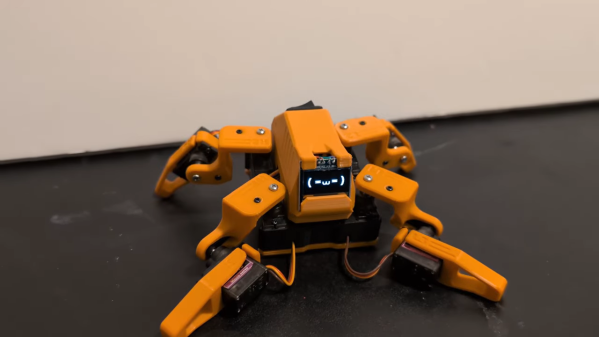
Robots don’t have to be large and imposing to be impressive. As this tiny quadruped from [Dorian Todd] demonstrates, some simple electronics and a few servos can create something altogether charming on their own.

This little fellow is named Sesame. A quadruped robot, it’s built out of 3D-printed components. Each leg features a pair of MG90S hobby servos, one of which rotates the leg around the vertical axis, while the other moves the foot. The ESP32 microcontroller controls all eight servos, enabling remote control of Sesame via its built-in wireless connectivity. Sesame also gets a 128×64 OLED display, which it uses to display a range of emotions.

Mechanically, the Sesame design isn’t particularly sophisticated. Where it shines is that even with such a limited range of motion, between its four legs and its little screen, this robot can display a great deal of emotion. [Dorian] shows this off in the project video, in which Sesame scampers around a desktop with all the joy and verve of a new puppy. It’s also very cheap; [Dorian] estimates you can build your own Sesame for about $60. Files are on GitHub for the curious.

If you prefer your quadrupeds built for performance over charm, you might consider an alternative build. Video after the break.

Continue reading “Building A Little Quadruped Robot”