Print in place board holder

Print-and-Clamp: Rubber Band PCB Stand Slides Into Duty

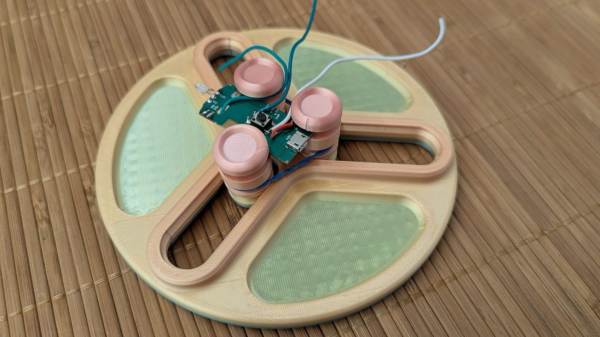
When it comes to soldering on a PCB it almost always helps to have some way to hold the board off your workbench, allowing leads to pass though with out making it unstable and keeping it level while working with tiny components. This project sent in by [Mel] was born out of necessity he was going to be teaching a soldering class and needed a way to keep boards in place, and so designed this Print-in-place PCB holder.

While there are certainly a long list of products designed to serve this function [Mel] took advantage of some idle 3D printers to turn out PCB stands that require no assembly, just the addition of a rubber band and they are ready for use. Part of the challenge of print in place 3D prints is dialing in the tolerances of your design and printer, and for this [Mel] printed some smaller slider mechanisms that were quick to print and iterate with until he was happy and could start turning out the larger design using those values.

The full PCB holder includes 3 independent sliders allowing for boards of all shapes and sizes to be held. To tension the board mounts there is a slow lower down on the uprights to allow for a rubber band to be added pulling all three towards the center. Finally [Mel] included small trays between the 3 sliders to give you a convenient place to components are you assemble your board. The 3D print falls are all available for download and [Mel] also included the small slider as a 3D print for you to check your printer tollerances before you run off the final design. Thanks [Mel] for sending in your soldering tool design, it’s a great addition to some of our other soldering assistant devices we’ve featured.

PCB Edge USB-C

Connector-Free Zone: PCB Edge As USB-C Interfaces

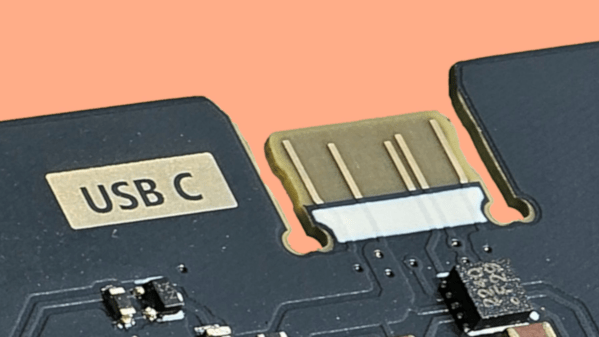
Sometimes when you’re making a PCB that you plan on programming over USB, but you only plan on plugging in a couple of times, it would be nice to make that connection without another BOM item. Over on GitHub [AnasMalas] has released a PCB edge USB-C connection symbol/footprint to do just that!

This isn’t the first PCB edge USB-C connector we’ve seen, but this one has some nice features. It’s available in both KiCad and EasyEDA formats, allowing you to easily add it into your preferred ECAD software. As well as supporting multiple software packages, there are two versions included: a 10-pin and 14-pin version. The 10-pin version has, on each side, 2 USB voltage pins, 2 ground pins, and a CC1 or CC2 pin on its respective side; this version is ideal if you’re looking to just supply power via the connector. The 14-pin version has all the pins of the 10-pin version with the addition of four data-positive and data-negative pins needed to relay information to the board, ideal if you’re planning on programming a microcontroller with this connection.

One important note is that, while most PCBs default to 1.6 mm thickness, if you use this connector you’ll need to drop that down to ~0.8 mm to properly interface with a common USB cable. [AnasMalas] also suggests using ENIG board finish to preserve the connectors on your USB cable.

For such a small and common connector, USB-C holds a ton of potential. Be sure to check out our series all about USB-C for more details.

Thanks to [Ben] for the tip.

ESPTimeCastVFD

ESP32 Invades Old TV Box: Forecast More Than Just Channels

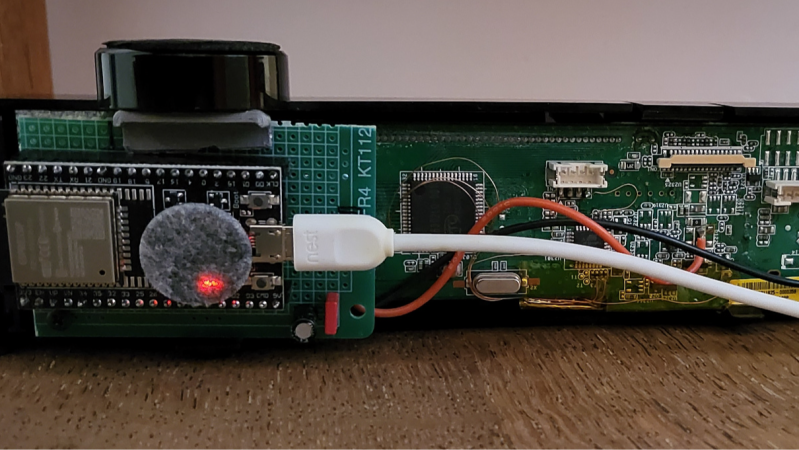
Obsolete hardware is all around us, and some of it has some pretty interesting tech buried within. One such device is an old Belgacom TV Box. Instead of using the ubiquitous LCD screen, it uses a VFD display for its user interface, and [Jean] has taken control of it with the ESPTimeCastVFD project.

Inside this box is a mix of two different 7-segment displays, which he uses to show the time and date, and 12 VFD displays, which are used to show weather data. To get the display working, the box was taken apart, and there were a few different areas [Jean] had to tap into: power for the soon-to-be-embedded ESP32-WROOM-32, as well as tying into the SPI lines to control the VFD. [Jean] also needed a 3.3V to 5V level shifter, and for this he used a 74LS125N dating all the way back to 1978.

The ESPTimeCast project, which we’ve featured here before, handles a lot of the time display and weather forecast shown on the front panel. However, [Jean] did have to add support for the VFD display, as well as adding wind speed to the display—as one of his uses for this is to judge the day’s suitability for flying RC planes. Once powered up, the ESP32 hosts a WiFi access point, allowing you to connect to it and set the configuration of the device, such as location, WiFi credentials, what displays you want to see, and many more. Thank you [Jean] for sending in your hack, saving this device from a landfill by turning it into a personalized display! Be sure to check out some of our other weather displays we’ve featured!

Continue reading “ESP32 Invades Old TV Box: Forecast More Than Just Channels”

Chicken Squisher 3000

Chicken Squisher 3000: Squish-Proof Security

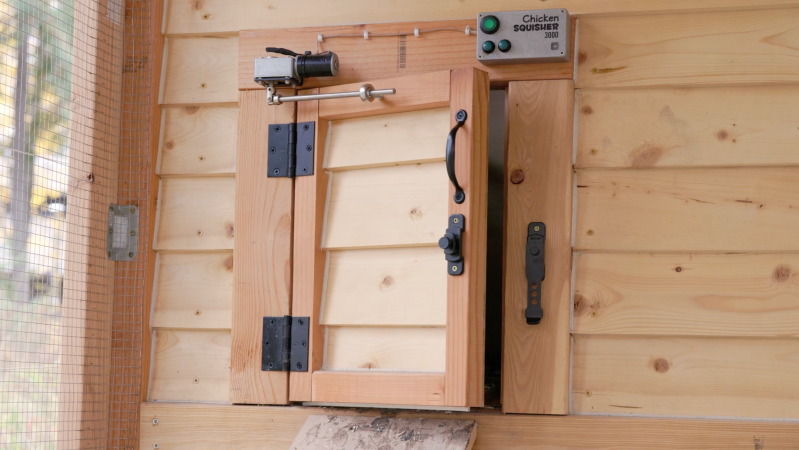
Keeping chickens in predator-prone areas demands serious fortifications, but even the most robust coop can become a hassle without automation. That’s where [lcamtuf] steps in with his Chicken Squisher 3000, a clever DIY automatic door mechanism that opens and closes based on ambient light levels.

The chicken coop he previously built did not include a mechanism to automatically close the inner door at night, meaning that arrangements would have to be made should [lcamtuf] want to leave town for a couple of days. Not wanting to go with a commercial option for this door as that would require a good deal of modifications to the original door setup, the Chicken Squisher 3000 adds minimal parts to the existing door to now open and close the door at dawn and dusk.

Using a 12 V DC motor with a gear reduction, he was able to generate more than enough torque to open and close the thick wooden door. Instead of a complex geared rack and pinion setup, [lcamtuf] has the motor mounted to a smooth rod that then applies force across the swing of the door attached with a rod end bearing. Driving the door’s automation is an AVR16DD14 microcontroller which is used to read the NSL-A6009 light sensor. [lcamtuf] uses a DRV8231 motor driver for controlling power going to that 12 V motor with the added benefit of being able to adjust stall torque to dial in a value strong enough to overcome the wooden door’s friction, but weak enough to not endanger any of his birds. There are also buttons on the metal enclosure used to override the light sensor should he want to override it manually.

Thanks, [lcamtuf], for sending in your latest weekend project; we love the resourcefulness of using just a handful of cheap parts to make a robust solution for your coop. If you haven’t seen them yet, be sure to check out some of our other chicken coop door hacks featured before.

RFIDisk

RFIDisk: When Floppy Drives Go Contactless

Not too long ago, part of using a computer was often finding the correct disk for the application you wanted to run and inserting it into your machine before you could start. With modern storage, this is largely a thing of the past. However, longing for some of that nostalgia, [ItsDanik] has been developing the RFIDisk, a 3D printed floppy drive that can kick off applications when their disk is inserted.

The desktop enclosure is printed to look like a standalone floppy drive, allowing use with either desktops or laptops. There’s the familiar 3.5 inch slot ready for your floppy disk, and there’s also a 1.3 in. OLED display on the front giving you feedback on the status of the RFIDisk — including telling you what’s currently inserted. Inside the enclosure is an Arduino Uno and an MFRC522 RFID reader. As the name would suggest, the way the RFIDisk enclosure reads its media is via NFC, not the traditional magnetic reader. Due to being RFID-based, the disks printed for the RFIDisk are solid without moving parts, but enclose a 25 mm NTAG213 NFC tag.

On the software side, [ItsDanik] has developed the RFIDisk Manager Python application, which is used to tie specific NFC tag IDs to commands to run when that tag is read. The application includes some nice features, such as being able to adjust the commands for both when the disk is first read and when it’s removed from the RFIDisk. You can also change what shows up on the OLED screen when the cartridge is inserted.

Using NFC to simulate physical media is a clever trick we’ve seen before, but if you’re looking for something with a bit more physical engagement, you could always put your USB devices into 3D printed cartridges.

waverider

Waverider: Scanning Spectra One Pixel At A Time

Hyperspectral cameras aren’t commonplace items; they capture spectral data for each of their pixels. While commercial hyperspectral cameras often start in the tens of thousands of dollars, [anfractuosity] decided to make his own with the Waverider.

To capture spectral data from every pixel location in the camera, [anfractuosity] first needed a way to collect that data — for that, he used an AFBR-S20M2WV, a miniature USB spectrometer he picked up second-hand. This sensor allows for the collection of data from 225 nm all the way up to 1000 nm. Of course, the sensor can only do that for one single input, so to turn it into a camera, [anfractuosity] added a stepper-driven x-y stage controlled by a Raspberry Pi Pico and some TMC2130 stepper drivers.

Continue reading “Waverider: Scanning Spectra One Pixel At A Time”

BenchVolt PD

BenchVolt PD: USB PD Meets Benchtop Precision

USB power has become ubiquitous — everything from phones to laptops all use it  — so why not your lab bench? This is what [EEEngineer4Ever] set out to do with the BenchVolt PD USB adjustable bench power supply. This is more than just a simple breakout for standard USB PD voltages, mind you; with adjustable voltages, SCPI support, and much more.

The case is made of laser-cut acrylic, mounted to an aluminum base, not only providing a weighted base but also helping with dissipating heat when pulling the 100 W this is capable of supplying. Inside the clear exterior, not only do you get to peek at all the circuitry but there is also a bright 1.9-inch TFT screen showing the voltage, current, and wattage of the various outputs. There is a knob that can adjust the variable voltage output and navigate through the menu. Control isn’t limited to the knob, mind you; there also is a Python desktop application to make it easy changing the settings and to open up the possibility to integrate its control alongside other automated test equipment.

There are five voltage outputs in this supply: three fixed ones—1.8 V, 2.5 V, and 3.3 V—and two adjustable ones: 0.5-5 V and 2.5-32 V. All five of these outputs are capable of up to 3 A. There are also a variety of waveforms that can be output, blurring the lines between power supply and function generator. While the BenchVolt PD will be open-sourced, [EEEngineer4Ever] will soon be releasing it over on CrowdSupply for those interested in one without building one themselves. We are big fans of USB PD gear, so be sure to check out some other USB PD projects we’ve featured.

Continue reading “BenchVolt PD: USB PD Meets Benchtop Precision”