phyphox

Smartphone Sensors Unlocked: Turn Your Phone Into A Physics Lab

These days, most of us have a smartphone. They are so commonplace that we rarely stop to consider how amazing they truly are. The open-source project Phyphox has provided easy access to your phone’s sensors for over a decade. We featured it years ago, and the Phyphox team continues to update this versatile application.

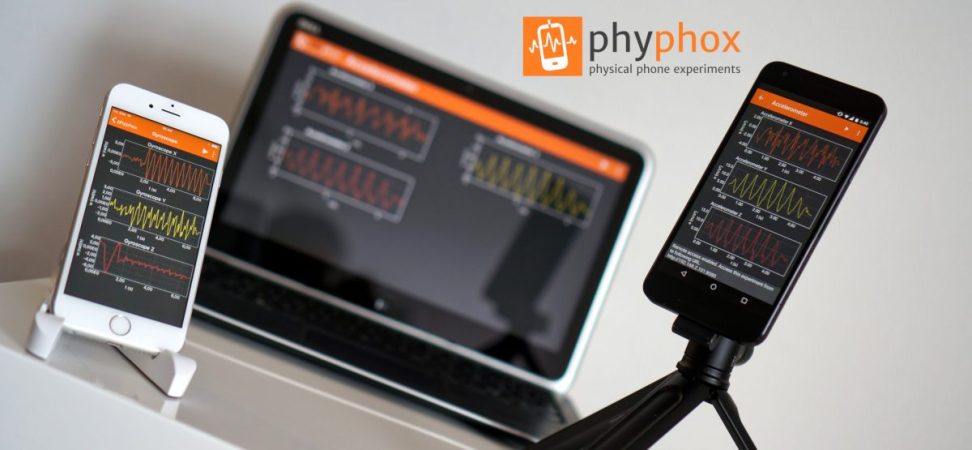
Phyphox is designed to use your phone as a sensor for physics experiments, offering a list of prebuilt experiments created by others that you can try yourself. But that’s not all—this app provides access to the many sensors built into your phone. Unlike many applications that access these sensors, Phyphox is open-source, with all its code available on its GitHub page.

The available sensors depend on your smartphone, but you can typically access readings from accelerometers, GPS, gyroscopes, magnetometers, barometers, microphones, cameras, and more. The app includes clever prebuilt experiments, like measuring an elevator’s speed using your phone’s barometer or determining a color’s HSV value with the camera. Beyond phone sensors, the Phyphox team has added support for Arduino BLE devices, enabling you to collect and graph telemetry from your Arduino projects in a centralized hub.

Thanks [Alfius] for sharing this versatile application that unlocks a myriad of uses for your phone’s sensors. You can use a phone for so many things. Really.

Continue reading “Smartphone Sensors Unlocked: Turn Your Phone Into A Physics Lab”

Knob over display

Dialing It In: A 3D-Printed Knob With Touchscreen Flair

Knobs are ubiquitous in technology user interfaces, but touchscreens are increasingly replacing them for interface controls. The latest project from [upir] combines a rotating knob with a touchscreen for a stunning result. The knob-over-display design features a touchscreen where you can place and remove a spinning knob, creating an interface reminiscent of Microsoft’s Surface Dial but at a fraction of the cost.

The core functionality of this device relies on the MT6701 magnetic encoder, which precisely tracks the orientation of the surrounding magnetic field. This encoder is held in place with a 3D-printed jig behind the small touchscreen, hiding the encoder without blocking the magnetic field generated by the magnet above the display. Most circular magnets are axially magnetized, meaning their larger face is one pole. However, diametrically magnetized magnets, where opposite sides of the smaller face are the poles, are used here.

To avoid scratching the screen and ensure smooth turning, [upir] designed a knob that holds the diametrically magnetized magnet slightly above the screen, with a ball bearing connecting the outside of the knob to the center resting on the screen. All the design files needed to recreate this are available on [upir]’s GitHub page; be sure to check them out. Also, browse through our back catalog for other knob-related projects.

Continue reading “Dialing It In: A 3D-Printed Knob With Touchscreen Flair”

Open source mute button

Silent No More: Open-Source Fix For Mic Mishaps

“Sorry, my mic was muted…” With the rise of video calls, we’ve all found ourselves rushing to mute or unmute our mics in the midst of a call. This open-source Mute Button, sent in by [blackdevice], aims to take out the uncertainty and make toggling your mic easy.

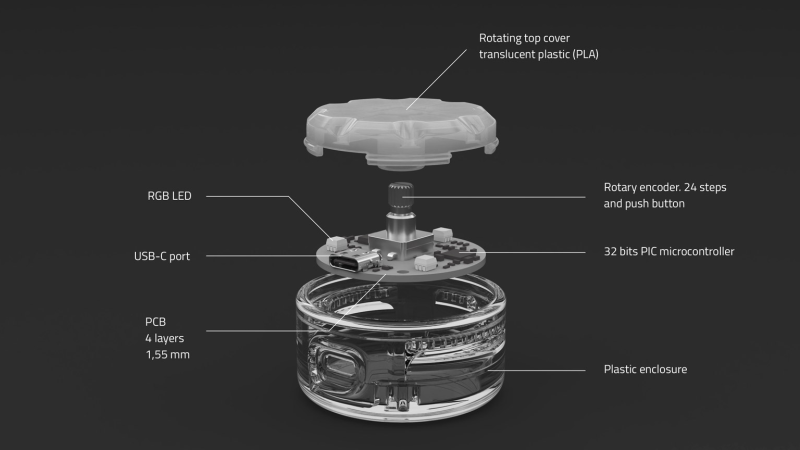
It’s centered around a small PIC32MM microcontroller that handles the USB communications, controls the three built-in RGB LEDs, and reads the inputs from the encoder mounted to the center of this small device. The button knob combo is small enough to easily move around your desk, yet large enough to toggle without fuss when it’s your turn to talk.

To utilize all the functions of the button, you’ll need to install the Python-based driver on your machine. Doing so will let you not only toggle your microphone and volume, but it will also allow the button to light up to get your attention should you be trying to talk with the mic muted.

Although small, it’s also quite rugged, knowing it will spend its life being treated much like a game of Whac-A-Mole—slapped whenever needed. The case is designed to be 3D printed by any FDM printer, with the top knob section printed in translucent material to make the notification light clearly visible.

All of the design files, firmware, and parts list are available over on [blackdevices]’s GitHub page, and they are open-source, allowing you to tweak the design to fit your unique needs. Thank you for sending in this well-documented project, [blackdevices]; we look forward to seeing future work. If you like this type of thing, be sure to check out some of our other cool featured desk gadgets.

Continue reading “Silent No More: Open-Source Fix For Mic Mishaps”

telescope mount

DIY Telescope Mount For Stellar Tracking

Pointing at stars may seem easy on the surface—just mount a telescope to a tripod and you’re done, right? As anyone who’s spent time with a telescope can tell you, it’s not that simple, given that the Earth is always spinning. [Sven] set out to make his own mount to compensate for the rotation of the Earth, which led to some pretty amazing results.

In this project, [Sven] designed a GoTo mount, which is a telescope equatorial mount capable of being pointed at specific parts of the sky and tracking them to allow for long-exposure photos with minimal blur due to the Earth’s movement. He first went down the path of finding the correct harmonic gearbox for the steppers used. A harmonic drive system would allow smooth, precise movement without backlash, and the 100:1 stepdown would provide for the slightest of adjustments.

The steppers are controlled by a custom PCB [Sven] designed around an ESP32-S3. The first PCB had a mistake in the power delivery circuit. After a small tweak, V2 boards arrived and work great. The PCB runs OnStepX, a great open-source project centered around pointing telescopes, cutting down a lot of the software workload on this project.

After all the work put in, you may be wondering how well it works. [Sven] was able to get a pointing accuracy of 1-2 arcseconds from his mount. To get an idea of how great that is, 1 arcsecond is about the same as pointing at a penny from 4 km (2.5 miles) away. Fantastic results, [Sven], and thank you for sending in this great project—be sure to head over to his site and read all the details of this impressive build. If you found this interesting, be sure to check out some of our other telescope-related projects.

ESP32 bus pirate

ESP32 Sets Sail As A Modern Bus Pirate Powerhouse

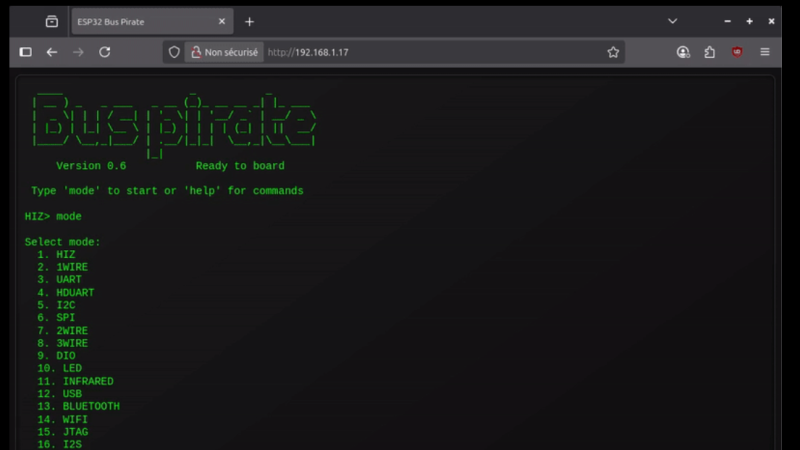
Bus Pirate is nearly a household name in the hardware hacking world. The first version came out way back in 2008, and there have been several revisions since then. You can buy pre-built Bus Pirate devices, but there’s also the option now to build our own. The ESP32 Bus Pirate project has everything you need to turn an ESP32 device into a protocol sniffing/decoding powerhouse—all on a board you may have sitting around from another project.

There are a ton of solutions when it comes to talking to different buses —I2C, UART, JTAG, you name it, there’s a purpose-built device for it. Over a decade ago, Dangerous Prototypes released the Bus Pirate, offering a Swiss Army knife of a tool to interface with this ever-expanding list of communications standards. The ESP32 Bus Pirate project is open-source firmware for ESP32s that gives them the ability to be the multi-tool that lets us communicate with a long list of protocols.

It supports a wide variety of devices, from the straightforward ESP32 S3 Dev Kit available from a long list of suppliers to the more specialized M5 Cardputer equipped with its own keyboard. The original Bus Pirate required plugging the board into a PC to use it; with this being ESP32-based, that’s no longer a limitation. So long as you can supply power to the ESP32, you can connect and control it via WiFi and a web browser. In addition to the Bus Pirate protocols, the project allows us to directly control the pins on the ESP32 board, should you want to do more with it besides interfacing with one of the supported protocols. Be sure to check out some of our other articles about Bus Pirate, as it’s been a fantastic tool for the hacker community over the years.

Flip card

LEDs That Flow: A Fluid Simulation Business Card

Fluid-Implicit-Particle or FLIP is a method for simulating particle interactions in fluid dynamics, commonly used in visual effects for its speed. [Nick] adapted this technique into an impressive FLIP business card.

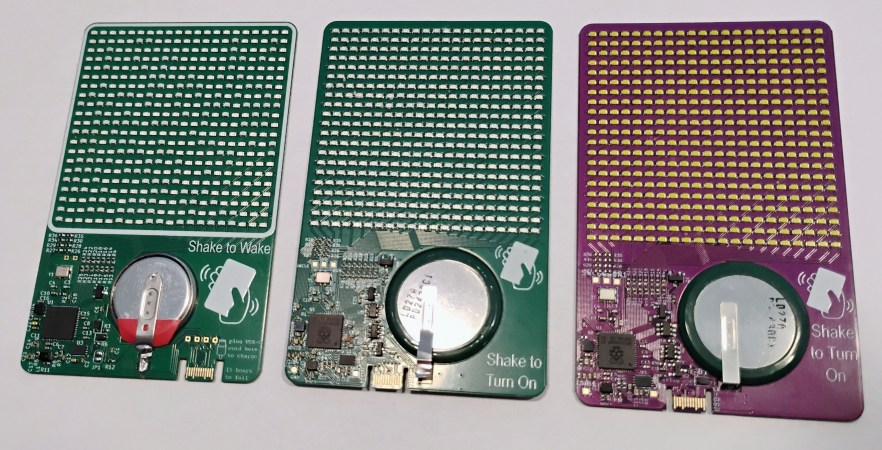
The first thing you’ll notice about this card is its 441 LEDs arranged in a 21×21 matrix. These LEDs are controlled by an Raspberry Pi RP2350, which interfaces with a LIS2DH12TR accelerometer to detect card movement and a small 32Mb memory chip. The centerpiece is a fluid simulation where tilting the card makes the LEDs flow like water in a container. Written in Rust, the firmware implements a FLIP simulation, treating the LEDs as particles in a virtual fluid for a natural, flowing effect.

This eye-catching business card uses clever tricks to stay slim. The PCB is just 0.6mm thick—compared to the standard 1.6mm—and the 3.6mm-thick 3.7V battery sits in a cutout to distribute its width across both sides of the board. The USB-C connection for charging and programming uses clever PCB cuts, allowing the plug to slide into place as if in a dedicated connector.

Inspired by a fluid simulation pendant we previously covered, this board is just as eye-catching. Thanks to [Nick] for sharing the design files for this unique business card. Check out other fluid dynamics projects we’ve featured in the past.

door spring

Compliant Contacts: Hacking Door Locks With Pen Springs

As you may have guessed given our name, we do love hacks around here, and this one is a great example of making some common, everyday things work in uncommon ways. [Nathan] sent in his hack to detect the door lock position in his basement.

Having a house that dates back to the 1890s, much of it was not very conducive to using off-the-shelf home automation devices. [Nathan] wanted a way to check the status of the basement deadbolt. He went about putting together a custom sensor using some spare parts, including a spare BeagleBone Black. Going full MacGyver, [Nathan] used springs from a ballpoint pen to craft a compliant contact for his sensor.

The pair of springs sat in the door frame and came in contact with the deadbolt; given they are springs, the exact position of the sensor was not very sensitive, as if too close it would just compress the springs slightly more. The springs were wired to the BeagleBone Black’s GPIO, acting as a switch to sense when there was conductivity between the springs through the deadbolt.

This wasn’t just a plug-it-in-and-it-works type of project, mind you; the BeagleBone Black was over 15 ft away from the sensors, lending plenty of opportunity for noise to be introduced into the lines. To combat this, [Nathan] created an RC filter to filter out all the high-frequency noise picked up by his sensor. Following the RC filter, he added in some code to handle the debounce of the sensor, as the springs have some inherent noise in them. Thanks [Nathan] for sending in your resourceful hack; we love seeing the resourcefulness of reusing things already on hand for other purposes. Be sure to check out some of the other repurposed components we’ve featured.