Programming The 6502 One Nibble At A Time

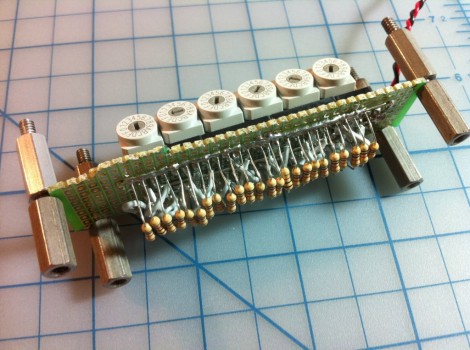
[Quinn Dunki] keeps rolling with her 6502 based computer build. This time around she’s added some memory to store the programs, but needed a way to get that code into the device. Above is her solution, a bank of hex switches used to program the 8-bit command and 16-bit address for each line of machine code.

This is a continuation of her Veronica project. The last time we saw it she had hardwired the logic levels for the data bus, but that’s no fun since nothing can actually be computed. [Quinn] picked up an SRAM chip which will store the program. It’s compatible with the 6502’s memory bus, but needs a bit of extra circuitry for her to be able to hand program it with this switch bank. She used some tri-state buffers to switch between connections to the processor, and to the hex switches. This way, she disconnects the RAM from the processor using the buffers, uses the switches and push button to clock in the program, then patches the RAM back into the computer.

Seeing this process in the video after the break certainly gives you an appreciation for what an improvement the punch-card system was over this technique. Still, seeing this is a delight that we’d like to try! Continue reading “Programming The 6502 One Nibble At A Time”
I2C Level Converter

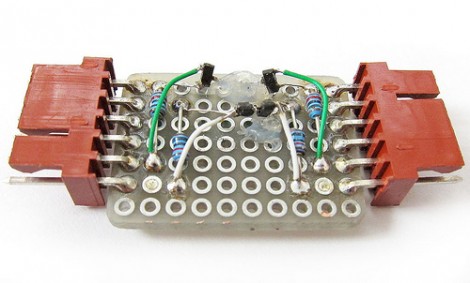
You’ve got several devices which communicate via the I2C protocol, but some of them can only operate at 3.3V while the rest are hungry for a 5V connection. What to do? [Linux-works] built this I2C level converter to solve the problem.

The circuit comes from an NXP app note (PDF) on the issue. You can take a quick peek at the suggested schematic from that document. The design uses two MOSFETS for each side of the adaptor. Perhaps a better way to explain this is that you need one for the higher voltage and one for the lower voltage on each of the two data lines for a total of four parts. This allows for both of the buses to communicate as one, while still having their own 3.3V and 5V pull-up resistors.

[Linux-works] concedes that there are chips designed to do this for you, but he was able to source the BSS138 MOSFETs locally and for about ten cents a piece. Not a bad alternative to putting in a parts order.

Laser Cutting Technique Makes Plywood Bendable

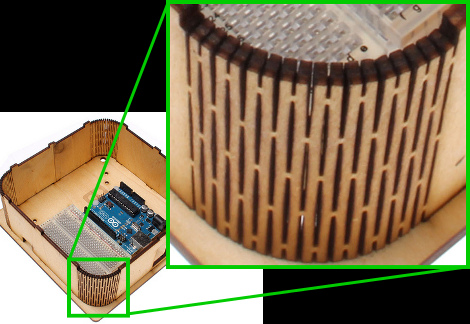
Here’s a laser cutting technique that makes thin plywood bendable. By cutting away elongated diamond shapes from the material, a lattice of strips connected minimally by alternating tabs is left over. The wood is then bendable, and it must be somewhat durable since the idea came from a product that uses the technique as a hinged notebook enclosure.

We don’t have much interest in it as an often used pivot point as surely it must be a problem with long-term use. But we love the look of it as a rounded corner on an enclosure like the Arduino project box seen above. The side walls are one continuous piece, with identical top and bottom sections which receive the alignment tabs. The whole thing is held together with just four bolt/washer/nut combinations.

But if you don’t have access to a laser cutter, we guess you’ll have to stick to altering pre-made enclosures for now.

Exterior-grade Electrical Box As Project Enclosure

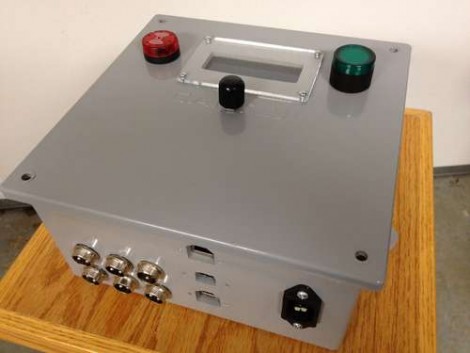
The quest for a project box is always a balance between cost, complexity, and style. We think [Pcmofo] really finds the mark with his exterior electrical box enclosures. He took the time to document his fabrication process for those that want to replicate his look.

These grey plastic boxes are meant to keep the elements away from home and commercial electrical systems. They’re easy to find and come in many different sizes (this one is 8″ square and 4″ deep). The plastic is very rigid, but still easy enough to work with simple tools.

[Pcmofo] starts by eyeballing the placement of his components. Once he has a good idea of where each should be located he grabs a caliper and uses Adobe Illustrator or Inkscape to design a template. This is attached with painter’s tape, and rough openings are made using a drill press. The holes are brought to the final size by hand using files for a nice finished edge. When it comes time to mount hardware, the plastic is strong enough to hold threads if you are careful when using the tap to cut them.

The example enclosure houses a temperature controller for fermenting beer. You can see some video of the enclosure embedded after the break.

Continue reading “Exterior-grade Electrical Box As Project Enclosure”

Echo Box Shakes Itself To Make Sound

The echo box performs exactly as its name implies. If you tap out a rhythm on the lid, it will tap the same thing back to you. Except it isn’t tapping to make the sound, but vibrating.

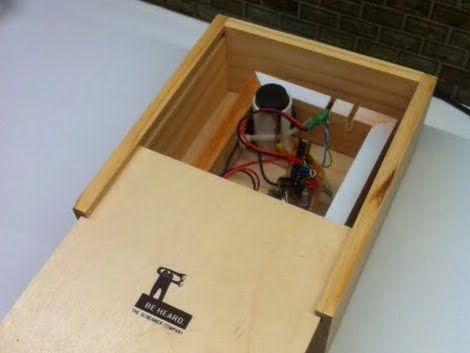
The concept is similar to the Knock Block. In that hack, a piezo element detected a rapping on the wooden enclosure and repeated the rhythm by striking the lid with a solenoid. This iteration also uses a piezo element as the sensor. In the image above you can see a segment of PVC pipe in the upper corner. That houses the element, sandwiched between two pieces of wine bottle cork. That cork just touches the lid of the box, transferring the vibrations to the element.

The sound is created by a motor with an offset weight on its spindle. When the motor spins, it causes vibrations. The enclosure is one wood box inside of another, so the vibrating motor cause the inner box to shake against the outer one to make noise. Hear it for yourself in the clip after the break.

Continue reading “Echo Box Shakes Itself To Make Sound”

Reverse Voltage Protection With A P-FET

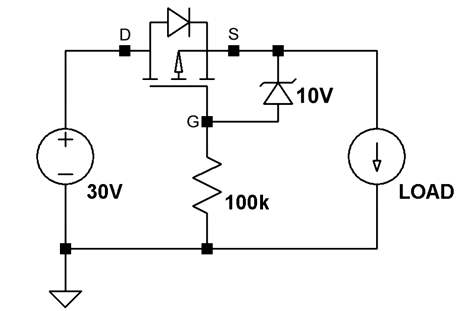
[Afroman’s] latest video shows you how to add reverse voltage protection with minimal power loss. At some point, one of your electronic concoctions will turn out to be very useful. You want to make sure that a battery plugged in the wrong way, or a polarity mistake with your bench PSU doesn’t damage that hardware. It’s easy enough to plop in a diode for protection, but as [Afroman] points out, that wastes power in the form of heat when the circuit is working correctly. His solution is to add a P channel MOSFET which only allows power to flow when the polarity of the source voltage is correct.

The schematic above shows the P-FET on the high side of the circuit. The gate is hooked to ground, allowing current to move across the DS junction when the battery is connected. This design also uses a clamping diode to keep the gate voltage within a safe range. But there are P-FETs out there that wouldn’t need that diode or resistor. This method wastes ten times less power than a simple diode would have.

We’ve embedded the video after the break where [Afroman] shares the math and reasoning behind his component choices.

Continue reading “Reverse Voltage Protection With A P-FET”

AVR External Memory Interface (XMEM) Reads Input Matrix

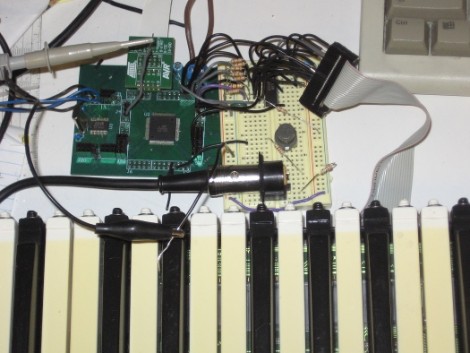
Reading from a large number of inputs, like this piano keyboard, can be tedious. Even when multiplexing there’s a lot to keep track of. But if you choose the right microcontroller, you may have hardware assistance. Here’s an ATmega640 is using it’s external memory interface to read the key matrix.

You may remember the Open Music Labs article about reading from a shift register using just one pin of a microcontroller. This time around a shift register is still used, but instead of pulling in a long line of parallel inputs, the switches are multiplexed to reduce the number of I/O pins used to read them.

A 74HC573 is used to facilitate the multiplexing. We won’t go into how that part is accomplished; there’s a separate post that explains the process. What’s unique here is that the XMEM peripheral of the AVR microcontroller is used to grab the data. This is intended for external memory chips, but if you get the timing just right, it greatly simplifies reading in a matrix of up to 128 inputs.