Amazing Pipe Organ Desk Features Secret Compartments And An All-wood Logic Board

wood_organ_desk_with_secret_compartment

Feeling pretty good after putting together your brand new standing computer desk? Step aside please, [Kagen Schaefer] has something he’d like to show you.

His Pipe Organ Desk is undoubtedly one of the coolest pieces of furniture we have seen in a long time. The project took [Kagen] over three years to complete, which sounds about right once you see how much attention was put into every last detail.

This desk is amazing in several ways. First off, the entire desk was constructed solely from wood. The drawers, the supports, knobs, screws, and even the air valves – all wood. Secondly, when one of the desk’s drawers are pushed in, air is directed to the organ pipes at the front of the desk, which plays a note.

A small portion of the air is also directed into the desk’s pneumatic logic board, which keeps track of each note that has been played. When someone manages to play the correct tune, a secret compartment is unlocked. The pneumatic logic board is an unbelievable creation, consisting of well over 100 wooden screws which can be tuned to recognize any number of “secret tunes”.

Sure a well-placed axe can open the compartment too, but who would destroy such a fine piece of work?

[via Make]
Roomba Used To Map Indoor Air Quality

roomba_based_air_quality_tester

The next time you set off for a long day in the coal mines, forget the canary – bring your Roomba along instead!

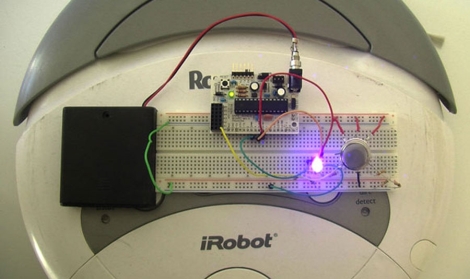
While we are pretty sure that canaries are no longer used in the mining industry, this Roomba hack could make a suitable replacement if they were. A team from the Public Laboratory for Open Technology and Science (PLOTS) recently showed off a Roomba which they modified to test an area’s air quality. Using an Arduino and a volatile organic chemical (VOC) detecting air quality sensor, the Roomba goes about its normal business, lighting an LED any time it encounters overly contaminated air. When captured via a long exposure image, the process creates a “bad air” map of sorts, with the polluted areas highlighted by the glow of the LED.

While the Roomba currently only detects VOCs, the team plans on adding additional sensors in the near future to expand its functionality. The Roomba is merely a proof of concept at the moment, but we imagine that similar technology will be adapted for use in unmanned explorations of chemically hostile environments, if that hasn’t happened already.

[via DVice] [Image via TechnologyReview]

Beat707 LE: A Button Pad-based Standalone MIDI Sequencer

sparkfun_button_pad_midi_controller

[Guilherme] picked up a SparkFun Button Pad and was taking a closer look at the device when he noticed that it was based off the ATMega328 microcontroller. Since he loves working with MIDI, he thought that the Button Pad would make a slick yet compact standalone MIDI controller.

Since his ultimate goal was to create a completely standalone controller aside from the power plug and MIDI interface, it forced him to work quite closely with the ATMega chip. He and his partners spent a good deal of time working through some serial communications issues so as not to block the LEDs or MIDI block timer during operation. Ensuring that the Arduino doesn’t block any other functions is obviously important when you are building a MIDI timer, and it seems [Guilherme] was successful in his quest.

The MIDI controller works quite nicely as you can see in the videos below, great job!

Continue reading “Beat707 LE: A Button Pad-based Standalone MIDI Sequencer”

Hacking Your MacBook Air Restore Drive To Install OSX Lion

macbook_air_restore_media_unlocker

[Josh Wright] wrote in with a handy little hack just in time for today’s release of Mac OSX Lion. If you’re not familiar with the new version of the OS, Apple has decided to change things up this time around, completely eliminating physical distribution media.

In the event that you need to run a factory restore, this becomes an issue for some users. Computers with DVD drives can run a burned copy of the previously downloaded Lion installer, but MacBook Air owners are left hanging. Their restoration process is more time consuming, requiring a system restore and the download of OSX Lion, followed by the subsequent upgrade process. [Josh] thought it would be great if you skip the initial restore step and jump straight to installing Lion, so he hacked his USB restore media to do just that.

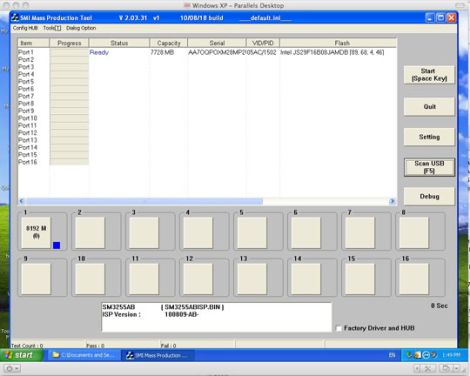
While copying the OS to a USB drive might sound trivial, the process is not as straightforward as it sounds – not surprisingly, Apple has put measures in place to prevent mere mortals from altering the contents of the drive. [Josh] put together an easy to follow tutorial that walks you through removing the drive’s protection and copying your brand new OSX Lion restore image to it.

While you might be asking, “Why jump through all these hoops when a normal flash drive would suffice?”, we think that his writeup is quite helpful. We see no reason to tie up a usable flash drive to store your restoration disc when you already have a perfectly good (albeit locked) drive at your disposal.

♦The only caveat to the process is that you need a Windows machine, virtual or otherwise, to complete the first step – a requirement that elicited a hearty chuckle from us.

Chilean Teen Builds Automatic Earthquake Alarm

chilean_teen_earthquake_alarm

When an earthquake is about to strike in Chile, who do you think is first to sound the alarm? You might be surprised that it’s not the government, but rather a 14 year old boy.

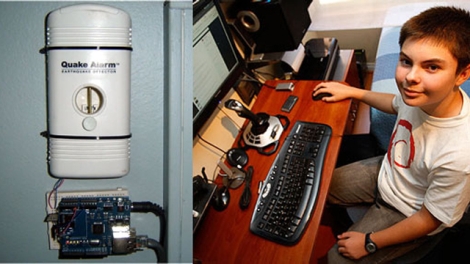
After living through an earthquake in 2010 and seeing the devastation this spring in Japan, Chilean teenager [Sebastian Alegria] decided that he wanted to construct something similar to Japan’s earthquake warning system. He purchased an off the shelf earthquake detector for less than $100, and connected it to his computer via an Arduino.

Now, whenever seismic activity is detected, his sensor tweets an alert letting his 29,000+ followers know that a perceptible earthquake is 5 to 30 seconds away. Apparently the Chilean government is working on a similar system that is still at least a year away, so in the meantime his fellow citizens rely on [Sebastian] instead.

While it might seem like a relatively easy hack to pull off compared to other earthquake detectors, we’re impressed by [Sebastian’s] creativity, and his will to help others. He’s been pounding away at computers since he was about 4 years old and has several other popular Twitter-based projects under his belt already, so we won’t be surprised if we hear from him again in the future.

word_clouds_from_broacast_television

Analyzing TV’s Talking Heads With Processing

[Michael] from Nootropic Design wrote in to share an interesting and fun project he put together using one of the products his company sells. The gadget in question is their “Video Experimenter” shield which was designed for the Arduino. It is typically used to allow the manipulation of composite video streams via overlays and the like, but it can also serve as a video analyzer as well.

When used for video analysis, the board lets you decode closed captioning data, which is exactly what [Michael] did here. He decided it would be fun to scrape the closed captioning information from various shows and commercials to do a little bit of content analysis.

Using a Processing sketch on his Arduino, he reads the closed captioning feed from his cable box, keeping a count of every word mentioned in the broadcast. As the show progresses, his sketch dynamically constructs a cloud that shows the most commonly used words in the video feed.

The results he gets are quite interesting, especially when he watches the nightly news, or some other broadcast with a specific target audience. We think it would be cool to run this application during a political debate or perhaps during a Hollywood awards ceremony to discover which set of speakers is the most vapid.

if you’re interested in learning more about the decoding process, [Michael] has put together a detailed explanation of how the closed captioning data can be pulled from a video stream. For those of you who just want to see the decoder in action, keep reading to see a quick video demonstration.

Continue reading “Analyzing TV’s Talking Heads With Processing”

Bringing An IWallet Back To Life

iwallet_bluetooth_hack

The iWallet is a slick little device if you’ve got a big wad of cash burning a hole in your pocket. The $600 price tag was a little much for [cmw] to swallow, so he bought a water damaged iWallet on eBay with hopes of repairing it. Once took a close look, he knew that repairing it was a lost cause, so he decided to hack it instead.

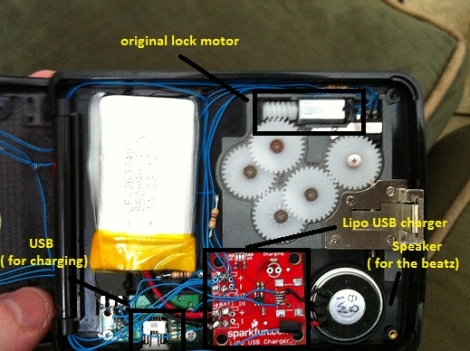
He pulled out most of the wallet’s electronics save for the motor that opens the device, and replaced the damaged parts with his own. He installed an Arduino pro as well as a Bluetooth module, powering the pair with a small rechargeable LiPo battery. The iWallet’s fingerprint reader was then replaced with a series of LEDs that show the device’s Bluetooth connectivity status.

[cmw] can now connect his wallet to his phone, issuing unlock commands via Bluetooth. If you don’t want to fork out the cash, his version is nearly as good as the real thing.

Continue reading to see a quick video of [cmw’s] iWallet hack in action.

Continue reading “Bringing An IWallet Back To Life”