Juggling With Kinect

kinect_juggling

Some of the Kinect hacks we have featured here are quite useful in the realm of assisted living, others showcase what can be done with the clever application of video filters. Some…are just plain fun.

This pair of Kinect hacks are not necessarily going to win any awards for usefulness, but they are big on fun. [Tom] put together a neat juggling application that watches for your hands to disappear behind your back, generating a glowing ball once they return to the camera’s field of vision. The balls can be tossed away or juggled as you can see in the video below. It looks like it could be pretty fun and most definitely easier than chasing balls around while learning to juggle.

[Tom’s] hack was based off code he saw demonstrated in a video by YouTube user [hogehoge335]. His application for the Kinect allows him to replicate the Kamehameha attack from Dragonball Z, flowing hair and all.

Check out the videos below for a demonstration of both Kinect hacks, and swing by the respective Google Code sites if you want to give them a try.
Continue reading “Juggling With Kinect”

A Friendly Spiderbot Named Chopsticks

chopsticks_the_spiderbot

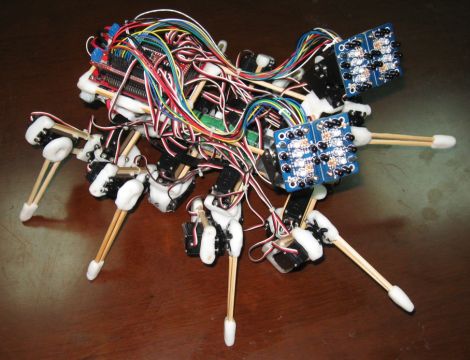
After seeing his fair share of hexapod-style bots on the Internet, [Russell] decided he wanted to build one of his own. One of the downsides to building these robots is the cost. He often saw them constructed from laser cut parts and very expensive servos. Rather than blow hundreds upon hundreds of dollars on the bot, [Russell] decided he could a lightweight bot on the cheap using chopsticks and polymorph modeling plastic.

His octopod robot is aptly called “Chopsticks” and utilizes 28 different servos to control its motions. 24 servos are used for its legs, 3 more are reserved for head movements, while a single additional servo manipulates the robot’s mandibles. The robot’s legs and main structure are composed of chopsticks, while the polymorph is used for feet, servo mounts, and pretty much anywhere else chopsticks just wouldn’t do.

[Russell] even added a set of eye stalks to complete the spider theme, arming them with IR compound eyes for object tracking. The robot is quite interactive as you can see in the video below.

Keep reading to see a video of Chopsticks, or swing by his Let’s Make Robots site if you get a chance – he has a pretty detailed construction journal as well as plenty of videos showing his spider bot in action.

Continue reading “A Friendly Spiderbot Named Chopsticks”

Roll Your Own Capacitors

diy_caps

Rolling your own electronics components can be fun, but can also help in explaining how certain items actually work. [Addie] from The Toymakers recently set off to figure out how capacitors work, by making her own.

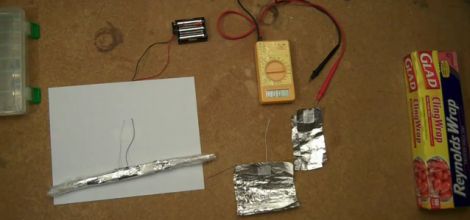
She understood the general concept behind capacitors and how they are constructed, but she wanted to see how it was done first-hand. To construct her capacitor, she selected aluminum foil as her conductor, and saran wrap as the dielectric. She admits that her first attempt was a failure, but undaunted, she carried on. Friends suggested that her conductors were a bit too small to hold any reasonable charge, so she tried larger sheets of aluminum foil to no avail.

She kept at it and found success after using several feet of foil to construct her capacitor. She charged it with a handful of AA batteries and was excited to see her multimeter come to life when she touched the leads to the cap.

While you likely wouldn’t use a hand-made capacitor in your next build, it is a fun experiment to do with children interested in learning about electronics.

[via Adafruit blog]

Continue reading “Roll Your Own Capacitors”

Learning Electronics Concepts Step By Step

arduino

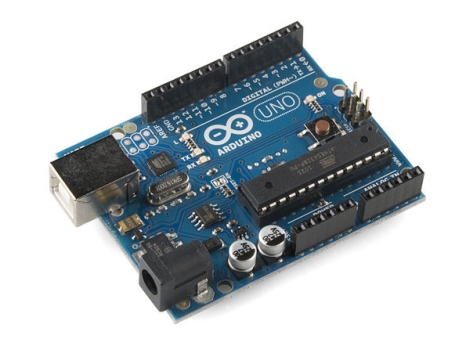
We realize that not everyone out there holds a degree in electrical engineering or has the ability to tell NPN transistors apart from PNP transistors by taste alone, so we occasionally like to mention things that appeal to the beginners in the crowd. While there is a clear division between Arduino supporters and detractors, it is hard to deny that the devices have their place, and can be quite useful when exploring certain electronics concepts.

For the supporters out there, [John Boxall] has put together a site jam-packed with Arduino tutorials covering a wide array of concepts and techniques. We have covered his work before in relation to specific topics, but we felt that his site deserved mention as a whole. His tutorials cover some of the most basic concepts such as lighting LEDs with the Arduino, and work their way to more advanced subjects, lesson by lesson.

He is not satisfied with simply introducing a concept and handing out a sketch that does the work. He takes the time to expand on the concepts, giving the reader enough detail to use their new-found knowledge in later projects. If you were to follow his tutorials from beginning to end, you would be exposed to LCD screen control, shift registers, real-time clocks, I2C bus communications, and more. These skills and concepts can be carried on to future projects as well as other micro controllers, making his tutorials a very valuable learning tool worth checking out.

Generating Music With Credit Cards

mozarts_credit_card

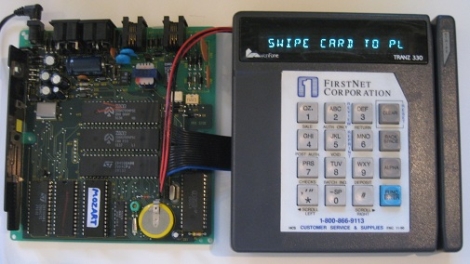
[Steve] was browsing around at a local electronics surplus store when he spotted an old Tranz 330 point-of-sale terminal that seemed pretty interesting. He took it home and after disassembling it, found that it contained a Z-80 based computer. Because the 330 shares the same processor as other hobbyist-friendly devices such as the TRS-80, he figured it would be quite fun to hack.

While the Z-80 processor is pretty common, [Steve] still had to figure out how it was interfaced in this particular device. After spending some time reverse engineering the terminal, he had free reign to run any program he desired. After thinking for a bit, he decided it would be cool to use the terminal to generate music based on whatever card was swiped through the reader – he calls his creation “Mozart’s Credit Card”.

He found that just playing sounds based on the raw contents of the mag strips didn’t produce anything coherent, so he wrote a small application for the terminal based on the Melisma Stochastic Melody Generator. Music is generated somewhat randomly using various card characteristics, as you can see in the video below.

We think it’s pretty cool, but [Steve] says he’s always open to suggestions, so let us know what you think in the comments.

Continue reading “Generating Music With Credit Cards”

Digital Picture Frame Reverse Engineering

coby_frame_hack

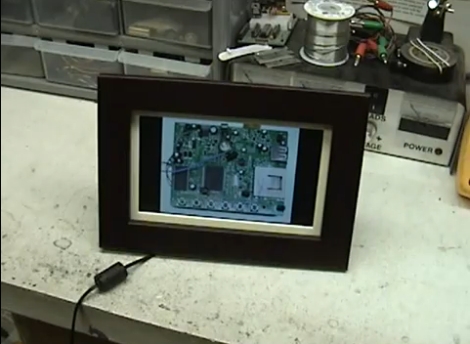
A few months ago [Jason] got his hands on a free Coby DP700WD digital picture frame and thought it would be fun to hack. After realizing that the frame did not run any sort of Linux-based OS he figured his options were pretty limited, but he gave it a shot anyways.

The frame came with a set of built in images, and his goal was to swap them out for pictures of his own. He started by trying to read data from the frame’s serial flash chip, but found that the processor was preventing him from doing so. He de-soldered the chip from the frame, mounted it on a makeshift breakout board, and started reading up on SPI.

He was eventually able to read the device’s flash chip and swapped out the built-in images with his own. After a bit of trial and error, he was able to replace the frame’s boot screen with his own custom image as well.

If you are looking to do something similar, be sure to swing by his site – all of the tools and code he used to hack his frame are available for the taking.

Continue reading to see his modified picture frame in action.

Continue reading “Digital Picture Frame Reverse Engineering”

raspberry_pi

Miniature PC Packs A Big Punch

We are always looking out for smaller yet capable computers for our projects, and this newest offering by [David Braben] is looking mighty nice. [David] is the head of a UK-based games studio, but has recently been focusing on bringing small, affordable PCs to classrooms around the world.

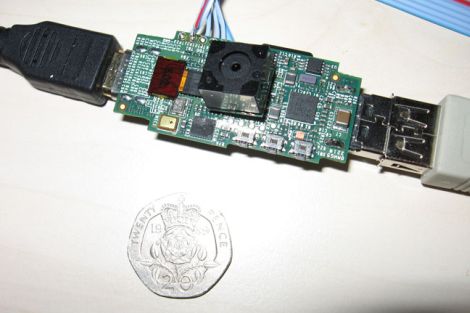
The computer, called Raspberry Pi,  is about the size of your standard USB thumb drive and contains a 700 MHz ARM 11 processor as well as 128 MB of memory. It has an HDMI port which can display 1080p video on any compatible screen, along with a USB port for input peripherals. Mass storage is provided courtesy of an on-board SD card slot, and it looks like the ability to utilize add-on modules will be available as well.

There is sure to be no shortage of willing buyers if [David] is able to bring these computers to market within a reasonable timeframe. With a projected cost of about $25, this will certainly give the OLPC and others a run for their money.

Thanks to everyone who sent this story in… all of you. You can stop now… please. (don’t stop sending us tips, we’re just joking around)