Raspberry Pi Tablet — The PiPad

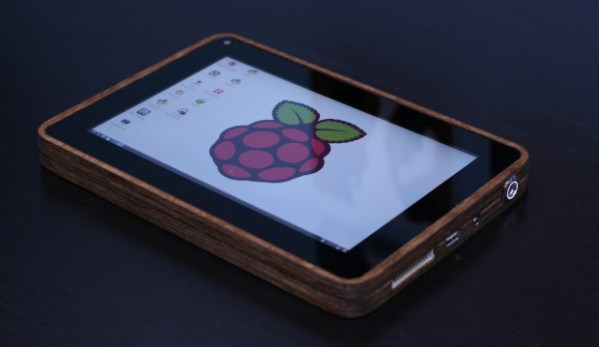
[Michael Castor] wanted a tablet, but not just any tablet. He wanted an all-in-one system running Linux, and he wanted it to look good. So he made himself a wooden PiPad.

He started the project at the beginning of 2013, and like many of our projects, it took a little while to get some momentum going. He bought most of the components early on but then it got pushed to the back burner. Two weeks before the Maker Faire Bay Area 2013, [Michael] decided he wanted to show it off, and thus began the mad dash to finish it in time.

The build consists of a very nice piece of 1/2″ Baltic birch plywood which was cut to shape using a CNC router. A scrap piece of carbon fiber makes for a stylish but not too flashy back cover — He even managed to get [Eben Upton] to sign it! Inside is a 10,000mAh lithium ion battery, a Raspberry Pi, a cellphone battery charging system and a capacitive touchscreen LCD. Almost all touchscreens run off 12V, but [Michael] managed to find a 5V HDMI to LVDS converter, which works perfectly. The device gets about 6 hours of battery life, which is more than enough for [Michael]. The device looks great, and he’s even made it through airport security with it!

We love seeing unique projects like this — don’t forget to submit your own projects through our Tip line!
Christmas Tweetball

photo

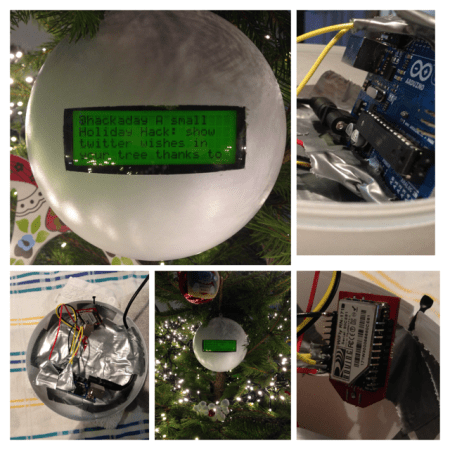
The holidays are long over, but we’re still getting a smattering of holiday themed hacks. For this one, the [Han’s] family decided to make a Christmas bauble that relays their tweets to them!

They call it the Tweetbal which is Dutch for — well — Tweetball! Whenever someone tweets with the hashtag #tweetbal it gets displayed on the 20×4 serial LCD display. They’re using an Arduino Uno with an RN-XV WiFly module to receive and send the tweets to the display. A large white plastic ornament ball houses it all secured very firmly with our favorite adhesion method — duct tape. It’s a pretty simple project, but a great holiday hack if we do say so ourselves — plus it could be easily used for non-holiday purposes — like a desktop trinket twitter feed!

Stick around after the break to see its tweeting capabilities in action.

Continue reading “Christmas Tweetball”

OliveR The Programmable Cooking Robot

IMG_2465-1024x768

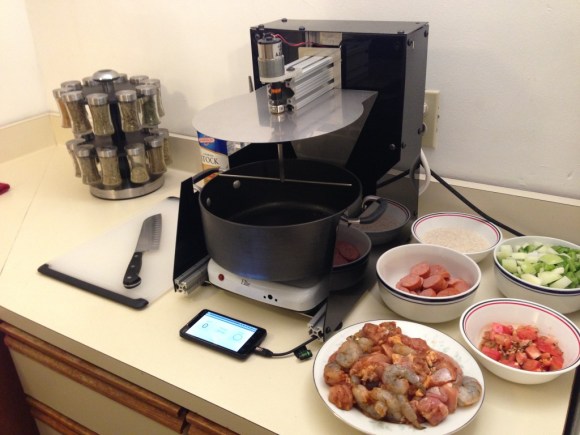
[Oak Robotics] is putting the finishing touches on their programmable cooking robot named OliveR.

It’s not about to make you a souffle (but where did it get the milk?), but it does aim to take the boring parts out of cooking — namely the tedious stirring, adjusting temperatures and the timing of ingredients. While that does make it significantly less impressive than the original title suggests, the team has a blog running of successful recipes — They’ve made some excellent chicken curry, Korean beef, and even Jambalaya!

The team is currently looking for beta testers, and while we’re not too sure what this even entails, you can certainly send them an email and find out! To see a demonstration of OliveR’s cooking skills, hang around after the break.

Continue reading “OliveR The Programmable Cooking Robot”

Clever Reed Switch Catches Thief

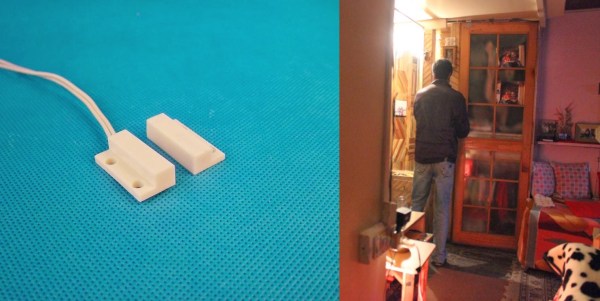
When [Abhimanyu Kumar] noticed money going missing from his small bookshop, he decided to set up a little trap to catch the thief.

The problem was that the bookshop’s money was stored inside a cupboard in their house (back end of the shop), which meant that the culprit was likely one of their own employees. They already have a CCTV system installed in the actual store, and although he could simply add another camera in the house, [Abhimanyu] didn’t really want to do that.

He instead devised a simple security trap: dubbed the Jugaad Security System. In Hindi, Jugaad quite literally means “hack”. He added a small magnetic reed switch to the cupboard where the money is stored—well, was stored—which is then linked directly to an intervalometer. This then connects to an inconspicuous DSLR sitting on one of the work benches. He aimed the camera at the cupboard and, in case the lights are out when the system is tripped, set it to an extremely high ISO.

Continue reading “Clever Reed Switch Catches Thief”

Paintball Pistol Turned Sniper Rifle

OBXP6G7

There’s a huge price discrepancy between paintball pistols and paintball sniper rifles. So the [Fresh-Prints-of-3D] decided to print himself an sniper upgrade kit.

He started with the classic Tippman 98 Custom pistol , which is a tried and true industry standard when it comes to reliable paintball guns. Using Sketchup he designed a side loading hopper adapter, a fixed stock, a magazine adapter, various brackets, and even a bipod fore-grip. He then printed the parts out at his local hackerspace; Innovatrix Labs, which is in Northeastern Pennsylvania. A Portabee 3D printer was used for some of the first prototypes but the final parts were all printed on a large MendleMax2 which has a build area large enough for the entire fixed stock!

The best part? He’s only been using SketchUp for a few months. Once the design and build is completely finalized he might release it under a CC license. 

It just goes to show that 3D printers are really breaking down various markets of overpriced plastic components — 3D printers only print trinkets? Pfft.

[Via Reddit]

Homemade Polariscope Is Super Easy To Make

polariscope

[Abhimanyu Kumar] was watching YouTube videos one day when he came across something called a Polariscope — After learning how it worked, he discovered you can make your own using household items!

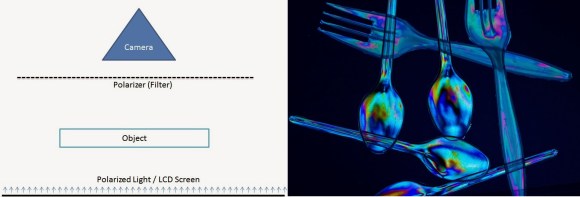
First off, what is a Polariscope? Well, put simply, it is a device that can show you the photoelasticity of a clear specimen, which can reveal the stress distribution in the material! And it is actually really easy to make one.

All you need to build your own is:

  • A polarized light source (any modern LCD monitor)
  • A transparent specimen (plastic cutlery, glass statues, plastic you can bend, etc)
  • A circular polarizing filter (the cheap 3D glasses you didn’t return at the theater)

Then just place the objects in the order shown in the diagram and start snapping some photos. This would be really cool for checking stress concentrations in a project — provided you are using some Lexan or acrylic!

Delta Laser Engraver Uses Inkscape For G-Code

lazer

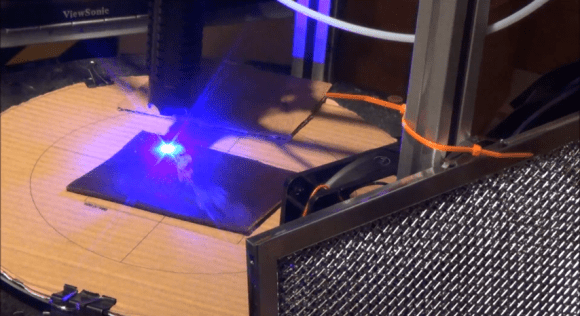
[Z LeHericy] has a SeeMe CNC Rostock Max 3D printer, and a 2W WickedLasers Spyder Artic blue laser. Naturally, he had to try strapping them together.

Most of our homemade laser engravers featured here use recycled DVD burner diodes, and while they certainly work, they leave a bit to be desired… Well, if you want more power, let us introduce the Class 4 Artic Spyder 2W blue laser from WickedLasers — a company that sells super high-powered lasers to anyone who can afford them — because that’s a great idea!

Safety concerns aside — wear your darn laser goggles! This pair can etch wood and leather quite well. He’s been using it to etch celtic knots onto pieces of leather. To do this he’s used Inkscape to convert a .BMP of the knot into a vector image, and then using the G-Code tools included with Inkscape he can create a tool path for the printer.

The finished leather looks awesome — Stick around after the break to see the laser in action!

Continue reading “Delta Laser Engraver Uses Inkscape For G-Code”