Building A One Wheel With Tracks

One-wheels use motion-tracking hardware and fine motor control to let you balance on a single wheel. That’s neat and all, but [Michael Rechtin] had another idea in mind—what if a one-wheel used a track instead?

The idea behind the track was to make the one-wheel more capable on surfaces where wheels simply can’t compete. The tracked drivetrain was largely 3D printed, including some massive gears that are supplemented by a big old 150 mm ball bearing which sits around the drive motor itself. If you love planetary gear trains with a 4:1 reduction, this project is for you. Carbon-fiber reinforced filament was used for many of the parts to give them some additional strength. Control is a little different than a traditional one-wheel, since the flat-bottomed track means lean controls won’t work. Instead, a wireless hand throttle was constructed to enable the rider to command the direction of travel.

It’s not easy to ride, but the one-track does actually work. It’s capable of crawling its way around on grass and snow quite well. There were some issues with the printed tracks and rollers, particularly when turning, but tweaks to round out the track profile helped solve that issue to a degree. There’s a reason we often use wheels instead of tracks, but somehow tracks are still just cool.

Continue reading “Building A One Wheel With Tracks” →

3D Print Yourself A Split Flap Display

Split flap displays! They’re mechanical, clickety-clackity, and largely commercially irrelevant in our screen-obsessed age. That doesn’t mean you can’t have a ball making one of your own, though! [Morgan Manly] did just that, with tidy results.

An ESP32 C3 SuperMini serves as the boss of the operation, running the whole display. The display is designed to be modular, so you can daisy chain multiple characters together to spell longer words. Each module has 37 characters, so it can display the alphabet, numerals 0 to 9, and a blank. Each module contains a 28BYJ-48 stepper motor for controlling the flaps, and a ULN2003 driver board to run it and a PCF8575 IO expander to handle communciation. An A3144 hall effect sensor is also used for positional feedback to ensure the display always shows the right character. The flap mechanism itself is relatively straightforward—a drum with all 37 flaps is until the correct character is reached, with the blank flaps hosting a magnet to trigger the aforementioned hall effect sensor. The flaps themselves are 3D-printed, with filament changes used to color the characters against the background.

If you’ve ever dreamed of building a flap-display clock or ticker, you needn’t dream of finding the perfect vintage example. You can just build your own! The added bonus is that you can make it as big or as small as you like. We’ve seen some interesting variations on the split flap concept recently, too. If you’re cooking up your own kooky electromechanical displays, don’t hesitate to let us know!

DIY Yagi Antenna Sends LoRa Signals Farther

LoRa gear can be great for doing radio communications in a light-weight and low-power way. However, it can also work over great distances if you have the right hardware—and the right antennas in particular. [taste_the_code] has been experimenting in this regard, and whipped up a simple Yagi antenna that can work at distances of up to 40 kilometers.

The basic mathematics behind the Yagi antenna are well understood. To that end, [taste_the_code] used a simple online calculator to determine the correct dimensions to build a Yagi out of 2 mm diameter wire that was tuned for the relevant frequency of 868 MHz. The build uses a 3D printed boom with holes for inserting each individual wire element in the right spot—with little measuring required once the wires are cut, since the print is dimensionally accurate. It was then just a matter of wiring it up to the right connector to suit the gear.

The antenna was tested with a Reyas RYLR998 module acting as a base station, with the DIY Yagi hooked up to a RYLR993 module in the field. In testing, [taste_the_code] was able to communicate reliably from 40 kilometers away.

We’ve featured some other unique LoRa antenna builds before, too.

Continue reading “DIY Yagi Antenna Sends LoRa Signals Farther” →

Microwave Motion Detector Notifies Your Smart Phone

Your garden variety motion detector uses IR, but these days, there are fancier technologies for achieving similar goals. If so desired, you can source yourself a microwave-based presence sensor instead. Indeed, like [N-08 Labs], you might like to whip one up into a basic intrusion detection system.

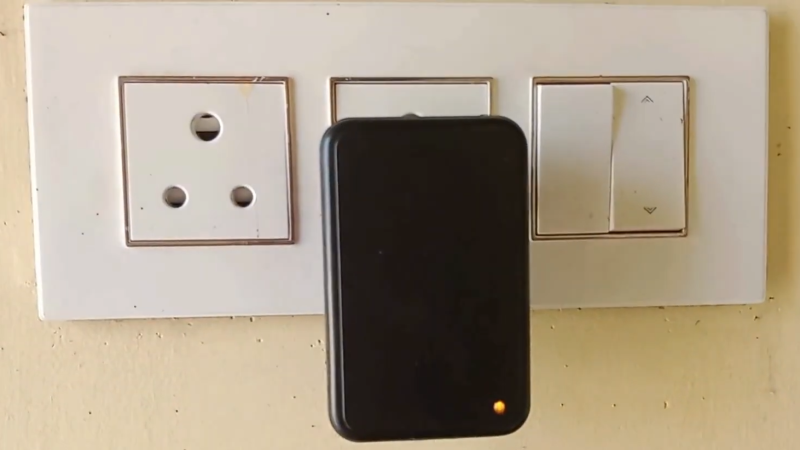
The idea is simple enough—take a RCWL-0516 microwave presence sensor, and set it up to detect motion and warn you when it happens. It’s a simple part to use—it simply drives a 3.3 volt logic output high if it detects someone or something. It basically just emits a microwave signal and detects a change in phase when someone or something—usually something fleshy—is in front of it. [N-08 Labs] simply hooked one up to an IO pin on an ESP8266, with the microcontroller board set up to communicate wirelessly with a Blynk IoT app, which then in turn fires off a smartphone notification that the sensor picked something up. The whole thing is built inside the shell of an AC adapter that provides power and let it easily hide in plain sight.

A project like this doesn’t just have to be for security purposes. You might even just use it to determine when your pet (or a racoon) is using the cat door, or similar. Indeed, we’ve seen great solutions to that particular problem, too. Video after the break.

Continue reading “Microwave Motion Detector Notifies Your Smart Phone” →

You’ve Got All Year To Print This Marble Machine Ornament For Your Christmas Tree

Most Christmas ornaments just hang there and look pretty. [Sean Hodgins] decided to whip up something altogether fancier and more mechanical. It’s a real working marble machine that hangs from the tree!

The build is simple enough, beginning with a translucent Christmas ornament shell readily available from most craft stores. Inside, a small motor spins a pinion, which turns a larger gear inside the body. As the larger gear spins, magnets embedded inside pick up steel balls from the base of the ornament and lift them up to the top. As they reach their zenith, they’re plucked off by a scoop, and then they roll down a spiral inside. As for power, [Sean] simply handled that with a couple of wires feeding the motor from a USB power bank. Just about any small battery pack would do fine.

The build is beautiful to watch and to listen to, with a gentle clacking as the balls circulate around. Files are on MakerWorld for the curious. We’ve featured some great Christmas decorations before, too. Video after the break.

Reconstructing 3D Objects With A Tiny Distance Sensor

There are a whole bunch of different ways to create 3D scans of objects these days. Researchers at the [UW Graphics Lab] have demonstrated how to use a small, cheap time-of-flight sensor to generate scans effectively.

Not yet perfect, but the technique does work…

The key is in how time-of-flight sensors work. They shoot out a distinct pulse of light, and then determine how long that pulse takes to bounce back. This allows them to perform a simple ranging calculation to determine how far they are from a surface or object.

However, in truth, these sensors aren’t measuring distance to a single point. They’re measuring the intensity of the received return pulse over time, called the “transient histogram”, and then processing it. If you use the full mathematical information in the histogram, rather than just the range figures, it’s possible to recreate 3D geometry as seen by the sensor, through the use of some neat mathematics and a neural network. It’s all explained in great detail in the research paper.

The technique isn’t perfect; there are some inconsistencies with what it captures and the true geometry of the objects its looking at. Still, the technique is young, and more work could refine its outputs further.

If you don’t mind getting messy, there are other neat scanning techniques out there—like using a camera and some milk.

Continue reading “Reconstructing 3D Objects With A Tiny Distance Sensor” →

Water Jets Will Carve Your Pumpkin

Carving pumpkins by hand is hot, sweaty, messy work, and a great way to slice your way into a critical artery. Why not let a water jet do it for you? It’ll be cleaner and more precise to boot, and [Jo_Journey] is here to show us how. 

So sharp!

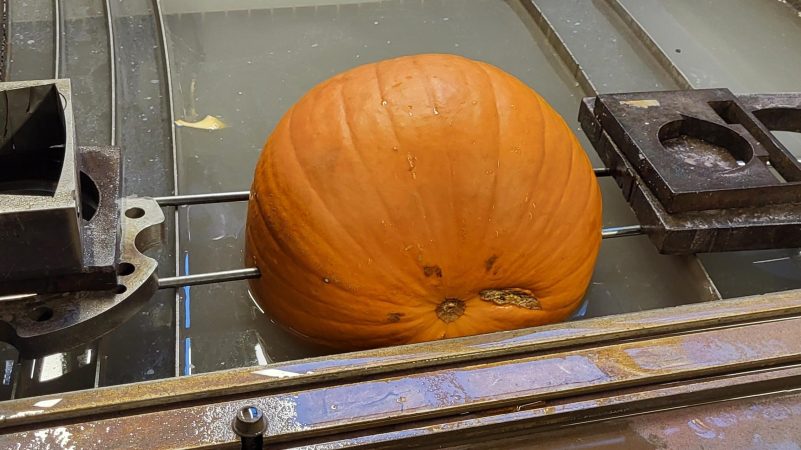
Obviously, you’ll need a water jet machine, there’s no getting around that. You’ll also still have to do the basic preparation of the pumpkin yourself—cutting a porthole into the top and mucking it out is your job. With that done, you must then mount the pumpkin on two metal rods which will be used to mount it in the water jet machine’s working area.

You can then create a vector file of your design, and use your chosen software to generate the G-code to run the water jet. [Jo_Journey] uses Scribe, and recommends cutting at a speed of around 200 in/min at low pressure. Remember, it’s pumpkin you’re cutting, not high-strength steel.

There is some inaccuracy, of course—your pumpkin’s surface is not a flat plane, after all—but the results are good enough for most Halloween-related purposes. Even despite the geometrical issues, though, [Jo_Journey] shows us that you can get pleasantly sharp edges on your design. That’s very hard to achieve by hand!

We do love a good holiday hack around these parts, even if it’s out of season. If you’ve been cooking up your own pumpkinous plans, don’t hesitate to let us know! Earlier is sometimes better—after all, who has time to hack together a project if you’ve just read about it on October 29?