The “Unbreakable” Beer Glasses Of East Germany

We like drinking out of glass. In many ways, it’s an ideal material for the job. It’s hard-wearing, and inert in most respects. It doesn’t interact with the beverages you put in it, and it’s easy to clean. The only problem is that it’s rather easy to break. Despite its major weakness, glass still reigns supreme over plastic and metal alternatives.

But what if you could make glassware that didn’t break? Surely, that would be a supreme product that would quickly take over the entire market. As it turns out, an East German glassworks developed just that. Only, the product didn’t survive, and we lumber on with easily-shattered glasses to this day. This is the story of Superfest.

Continue reading “The “Unbreakable” Beer Glasses Of East Germany” →

Magnetic Vise Makes Positioning Your Workpiece Easier

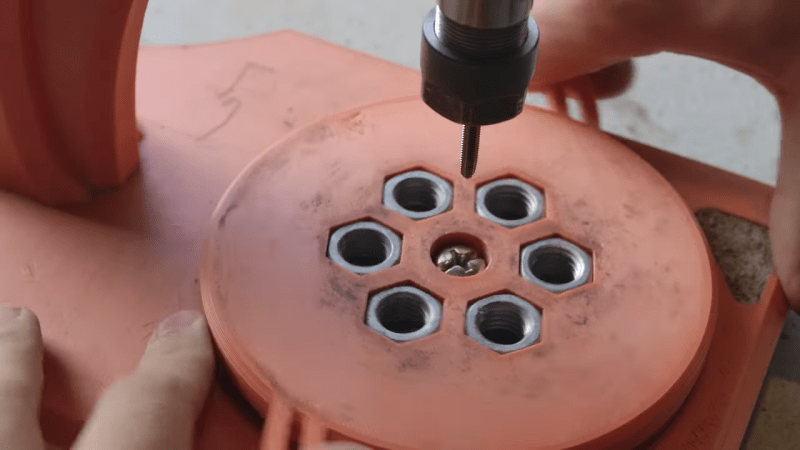
[Chris Borge] was doing some fine tapping operations, and wanted a better way to position his workpieces. This was critical to avoid breaking taps or damaging parts. To this end, he whipped up a switchable magnetic vice to do the job.

The key to the build is that the magnetic field can be switched on and off mechanically. This is achieved by having two sets of six magnets each. When the poles of both sets of magnets are aligned, the magnetic field is effectively “on.” When the poles are moved to oppose each other, they effectively cancel each other out, turning the field “off.” [Chris] achieved this functionality with 12 bar magnets, 12 M12 nuts, and a pair of 3D-printed rings. Rotating the rings between two alignments serves to switch the set up on or off. The actual switching mechanism is handled with a cam and slider setup which allowed [Chris] to build a convenient vice with a nice large working area. He also took special effort to ensure the device wouldn’t pick up large amounts of ferrous swarf that would eventually clog the mechanism.

It’s a neat build, and one you can easily recreate yourself. [Chris] has supplied the files online for your printing pleasure. We’ve featured some other types of magnetic vise before, too. Video after the break.

Continue reading “Magnetic Vise Makes Positioning Your Workpiece Easier” →

Home Depot Lamp Gets A Rainbow Upgrade

Home Depot has at times sold a neat spiral lamp that relies on LEDs to supply its soothing white glow. When [Craig Lindley] saw some modified versions on YouTube he decided he had to build one himself. The result is a charming rainbow lamp that really lights up a room (pardon the pun).

[Craig] first set about stripping the lamp of its white LED strips, replacing them with addressable WS2812B LEDs. No more would the lamp just output white light—any color in the RGB gamut was now on the table.

A powerful 10 amp 5 volt power supply was then installed to provide the necessary juice. A Wemos D1 Mini was pressed into service as the controller, which was also hooked up to an HC-SR04 infrared motion sensor. This provided the capacity to trigger the lamp when it detects someone moving nearby.

Alternatively, the lamp was given a time-activated mode as well. Either way, when activated, the lamp displays a range of colorful patterns on its elegant spirals, all with the aid of the popular FastLED library.

The final result is impressive—it looks almost stock, except it’s far more colorful and interesting to look at than the original. It’s also amusingly hard to display in our usual image formats because it’s so tall and narrow. In any case, we’ve seen some great lamp builds before, too. If you’re working on your own charming illuminations, don’t hesitate to drop us a line!

3D Printed Air Raid Siren Sounds Just Like The Real Thing

Air raid sirens have an important job to do, and have been a critical piece of public safety infrastructure in times of geopolitical turmoil. They sound quite unlike anything else, by virtue of their mechanical method of generating an extremely loud sound output. They’re actually remarkably simple to build yourself, as [MarkMakies] demonstrates.

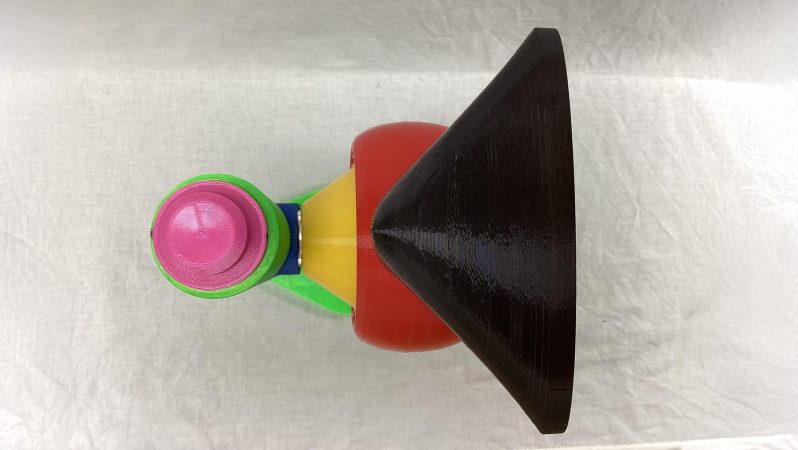
[Mark’s] build relies almost entirely on 3D printed components and ex-RC gear. The sound itself is generated by a rotor which spins inside a stator. Each is designed with special slots, such that as the rotor turns at speed, it creates spikes of air pressure that generate a loud wail. The rotor and stator are fitted inside a housing with a horn for output, which helps direct and amplify the sound further.

To spin the rotor, [Mark] used a powerful brushless motor controlled by a common hobby speed controller. The actual speed is determined by a potentiometer, which generates pulses to command the speed controller via a simple 555 circuit. By ramping the speed of the motor up and down, it’s possible to vary the pitch of the siren as is often done with real air raid sirens. This action could be entirely automated if so desired.

If you do decide to build such a siren, just be wary about how you use it. There’s no need to go around agitating the townsfolk absent an actual air raid. It’s worth noting that sirens of this type aren’t just used for air raids, either. They’re often used for tornado warnings, too, such as in Dallas, for example. But why not for music?

Continue reading “3D Printed Air Raid Siren Sounds Just Like The Real Thing” →

Cute Face Tells You How Bad The Air Quality Is

You can use all kinds of numbers and rating systems to determine whether the air quality in a given room is good, bad, or somewhere in between. Or, like [Makestreme], you could go for a more human visual interface. He’s built a air quality monitor that conveys its information via facial expressions on a small screen.

Named Gus, the monitor is based around a Xiao ESP32-C3. It’s hooked up with the SeeedStudio Grove air quality sensor, which can pick up everything from carbon monoxide to a range of vaguely toxic and volatile gases. There’s also a THT22 sensor for measuring temperature and humidity. It’s all wrapped up in a cute 3D-printed robot housing that [Makestreme] created in Fusion 360. A small OLED display serves as Gus’s face.

The indications of poor air quality are simple and intuitive. As “Gus” detects poor air, his eyelids droop and he begins to look more gloomy. Of course, that doesn’t necessarily tell you what you should do to fix the air quality. If your issue is pollution from outside, you’ll probably want to shut windows or turn on an air purifier. On the other hand, if your issue is excess CO2, you’ll want to open a window and let fresh air in. It’s a limitation of this project that it can’t really detect particulates or CO2, but instead is limited to CO and volatiles instead. Still, it’s something that could be worked around with richer sensors a more expressive face. Some will simply prefer hard numbers, though, whatever the case. To that end, you can tap Gus’s head to get more direct information from what the sensors are seeing.

We’ve seen some other great air quality projects before, too, with remarkably similar ideas behind them. Video after the break.

Continue reading “Cute Face Tells You How Bad The Air Quality Is” →

The Nokia 3310 Finally Gets A USB-C Upgrade

The Nokia 3310 has a reputation of being one of the most indestructible devices ever crafted by humanity. It’s also woefully out of date and only usable in a handful of countries that still maintain a GSM network. It might not be easy to bring it into the 5G era, but you can at least convert it to work with modern chargers, thanks to [Andrea].

[SGCDerek] whipped up their own solution for USB-C charging.
If you don’t want to buy the parts, you can just DIY the same mod. [SGCDerek] did just that a few years ago. From what it looks like, you likely don’t even need to worry about doing any fancy charger handshaking. The 3310 will happily grab a charge from a low-current 5V supply straight off the USB pins.

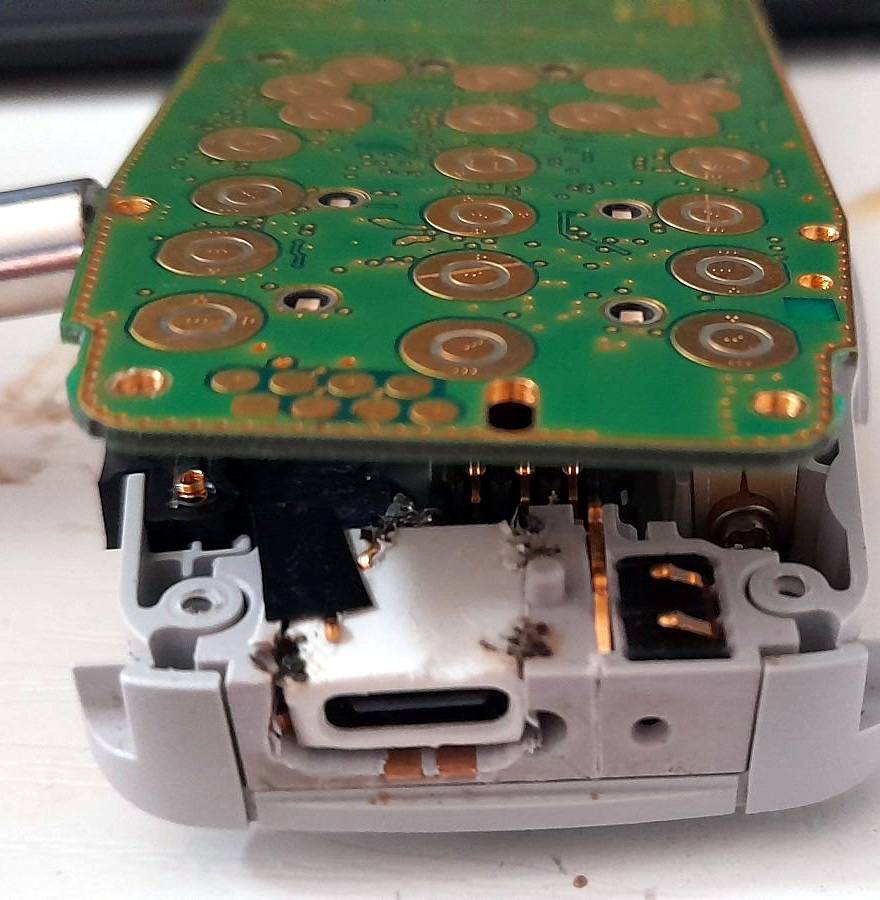
You might think this is a messy, complicated mod, but [Andrea] engineered it as a drop-in upgrade. He’s combined a USB-C port with a small plastic adapter that enables it to sit in place of the original phone’s charge port module.  Contact between the port and the rest of the phone is via spring-loaded contacts. The only additional step necessary is popping out the mic from the original charge module and putting it in the new one. You need only a screw driver to disassemble the phone, swap out the parts, and put it all back together.

If you want to upgrade your own handset, [Andrea] is more than happy to provide the parts for a reasonable price of 25 euros. It’s almost worth it just for the laughs—head around to your friend’s house, ask to borrow a charger, and then plug in your USB-C 3310. You’ll blow some minds.

Once upon a time, it was big news that someone hacked a USB-C port into the iPhone. Video after the break.

Continue reading “The Nokia 3310 Finally Gets A USB-C Upgrade” →

Tiny Typing Tutor Tuts At Your Incorrect Shift Usage

There are a wide range of typing tutors out there that will educate you in the glorious skill of touch-typing. Many just focus on the basics, ranking you on accuracy and speed. However, there’s a nifty little online tutor that can help you with one skill specifically—it’s aim is to teach you to use the Shift keys “properly.”

The tutor is the work of [KaarelP2rtel]. The unnamed tool is intended to guide you into instinctively using both the left and right Shift keys as you type. Many typers default to using one or the other. This can lead to fumbles and slowdown when one hand is trying to hit both the Shift key and a letter.

[KaarelP2rtel]’s belief is that the “correct” method is to press the Shift key with the opposite hand to the one typing the letter, and this typing tutor enforces that practice. You must type repeated capitalized words one after the other, and you’ll only progress quickly if you’re hitting the opposite Shift key each time. Unconventional keyboardists fear not—you can convert the tool to work with Dvorak or Colemak layouts if necessary.

Is this a crucial tool for the fast typist? The jury’s out on that one. It’s entirely possible to hit in excess of 120 wpm without this technique for most normal passages of text, using dynamic finger reassignments when hitting Shift with the same hand. Still, the diligent may find it a useful upgrade to their existing typing abilities.

Source code is on GitHub for the curious. Notably, it’s a very small website that weighs in at just a few kilobytes; it would be a rather fitting part of the Small Web, which we’ve explored before!