SCARA Arm Finally Prints Plastic Parts

SCARA

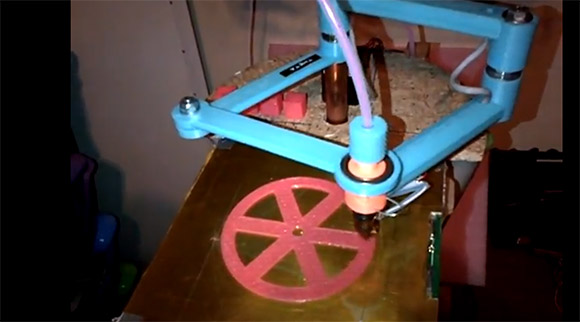
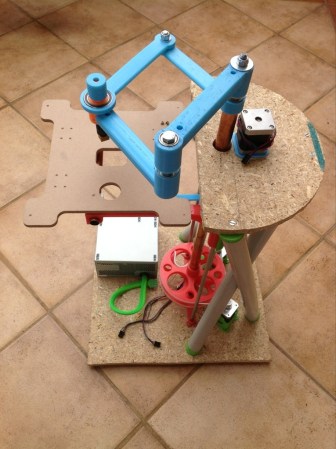
Here’s a neat alternative to the usual gantry setup you see on 3D printers. [Quentin] designed and build a SCARA arm 3D printer that just saw its first print.

We caught wind of [Quentin]’s SCARA arm a few weeks ago when it was still just a few plastic parts and a glimmer of ambition in its creator’s eye. Most of the parts are 3D printed, including the blue arms for the x and y axes that are driven by stepper motors. The z axis is controlled by two lead screws, and judging by the height of [Quentin]’s machine, he has a pretty big printable volume – at least as large as some of the delta bot 3D printers we’ve seen.

So far [Quentin] has printed a handful of calibration cubes and a wheel with a fairly impressive print resolution. You can check out a video of the SCARA arm printer after the break.

Continue reading “SCARA Arm Finally Prints Plastic Parts”

An Industrial RepRap

rep

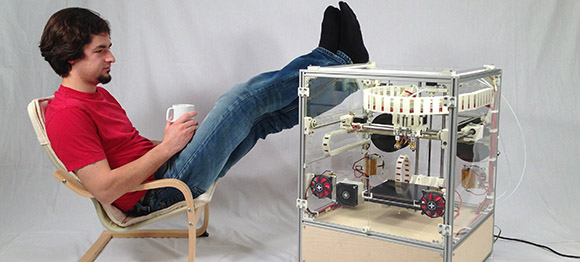
It may just be another 3D printer, but [Jonas] and [Simon]’s Kühling & Kühling RepRap Industrial is a cross between a work of art and a beautiful machine tool. It also looks to be a pretty nice 3D printer, to boot.

The Kühling RepRap is built out of 20mm t-slot aluminum with plastic sides that keep the machine’s internals at a toasty 70° C, just about the optimal temperature for making large, complex prints. The machine has two extruders with all the cables tucked away in 3D printed cable carriers. One really interesting bit of innovation is the tool less belt t tensioning system.

On the list of upcoming features, [Jonas] and [Simon] say they want to add a touch screen controller powered by a Raspberry Pi, and a controller that’s even more capable than RAMPS electronics boards. No word on how much a Kühling & Kühling RepRap will cost, but like any quality-looking tool, we don’t expect it to be cheap.

3Doodler, A 3D Drawing Pen

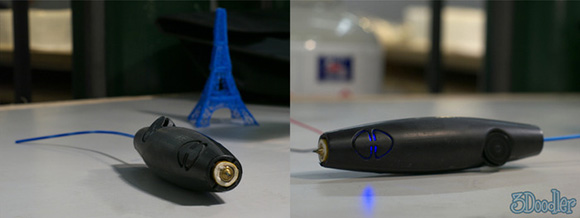
Here’s something that’s making its way to the top of our, “why didn’t we think of that” list. It’s called 3Doodler, a device based on the plastic extrusion technology found in 3D printers stuffed into a pen that fits in the palm of your hand.

If you’re familiar with 3D printers, the design of the 3Doodler should come as second nature to you. Inside this electronic plastic-melting pen is a small motor that forces 3mm ABS or PLA filament through a heated nozzle. With the 3Doodler, you can draw in three dimensions by simply lifting the tip of the 3Doodler into the air.

While 3Doodler is obviously aimed at creating plastic objects by hand, we’re wondering if this device could be successfully adapted to work with 3D printers. The 3Doodler team put a very, very small and inexpensive extruder and hot end inside the 3Doodler, and they’ve got something on their hands we’d love to tear apart just to see how it ticks.

You can see the 3Doodler introduction video after the break.

Continue reading “3Doodler, A 3D Drawing Pen”

Custom 3D Printed Designs With Makerbot’s Customizer

custom

Although having a 3D printer means you can create custom object of your own design, that doesn’t change the fact that most object printed on Makerbots and RepRaps are copies, or slight derivations, of already existing object. If you need a gear, just go grab an OpenSCAD file for a gear, and a custom smart phone case can be easily made by modifying an already existing one. The problem with this approach, though, is you’ll need to learn OpenSCAD or another 3D design tool. Enter the Makerbot Customizer, a web app that allows you to create custom versions of other people’s work right in your browser.

The idea behind Customizer is simple: someone creates an OpenSCAD file with a few variables like the number of teeth on a gear or the number of turns on a screw. Customizer takes this OpenSCAD file, puts sliders and radio buttons on a web page, and allows you to create custom objects based on user-created templates.

Already we’ve seen a lot of Hackaday readers send in some pretty cool customizable things, like [Bryan]’s coil form for DIY inductors and [Greg]’s customizable PVC pipe couplers. If you already know OpenSCAD, it’s easy to create your own objects that are customizable by anyone on the Internet.

Help Hackaday Build A Custom Gaming Controller For A Good Cause

jstick-R-1

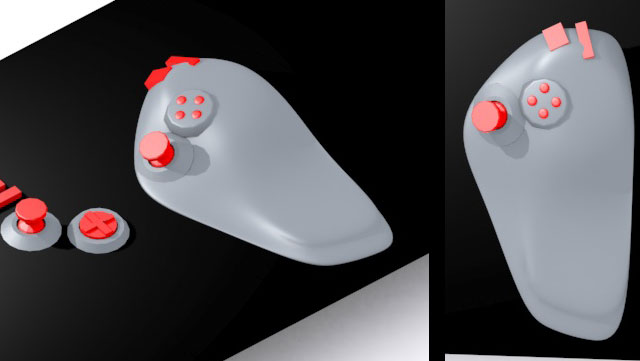
We are going to make a custom gaming controller for a child with Muscular Dystrophy. His name is Thomas and he loves minecraft. This is a project that I have been wanting to do for years.  I’m just beginning now, and you can join in on the project and offer your thoughts in our forums.  We’re starting with Thomas, but ultimately, we’d like to develop a collection of fairly simple to construct open source game controllers.

For people who have a physical disability, gaming can have a profound psychological impact. Sometimes it is the only place where they can go and be on a level playing ground with their peers.  Often custom gaming controllers are quite expensive, especially when you start to leave the standard xbox/playstation form factor.

Continue reading “Help Hackaday Build A Custom Gaming Controller For A Good Cause”

Adventures In 3d Printing: Our First Week With The LulzBot AO-100

Lulzbot-3D-printer-RT

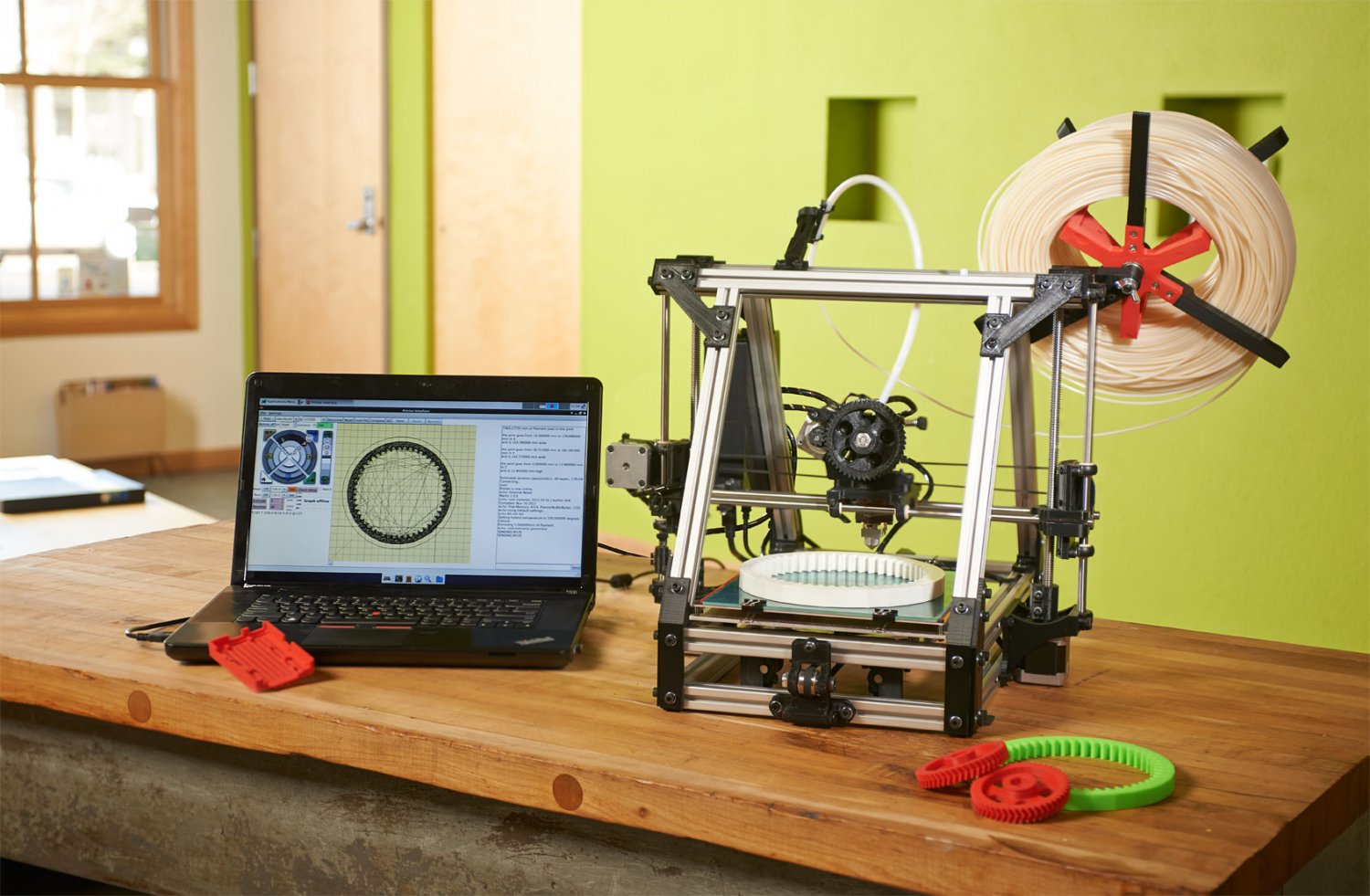
Recently, we acquired a LulzBot AO-100. It was given to us, free of charge.  After having it for about a week, I’ve figured out enough that I feel I can finally share my thoughts, impressions, and experiences.  I will be completely honest about the machine. It was given to us, which is insanely awesome, but hey, I have to share the real information with the readers.

When we first started looking for a printer, we decided we didn’t want to build one from scratch. While that might seem initially to be the opposite of Hack a Day, there is a reason. I simply can’t build every tool I use from scratch.  I have projects in mind that could benefit from a 3d printer, and I want to work on those.  This meant that I was looking for a pre-assembled unit. Many people asked for an article on getting a reprap going, so we started to consider reprap based kits as well.

When LulzBot contacted us, I was initially skeptical. I mean, the name is lulzBot. Is this an internet troll? Is this somehow connected to Lulzsec, the hacking group? Did they seriously name their printer LulzBot? Well, as it turns out, they are legitimate. Not only that, we’ve seen them before, they are also AlephObjects, who sent in the video of the wall o’ printers working. Why did they name it LulzBot? The answer was basically, for the lulz. It is worth noting that [Jeff] has been a strong proponent for free software for a long time and that Lulzbot is built from the ground up to be completely open and shareable. You can go to the website right now and download the list of parts as well as all source code and configurations.

As you read further, please remember that the model they sent me was not their newest. They don’t even sell this model any more. Technically speaking, it is roughly 2 generations behind.

Continue reading “Adventures In 3d Printing: Our First Week With The LulzBot AO-100”

SCARA Arm 3D Printer

scara-3d-printer

[Quentin Harley] must really have wanted to test his snuff when it comes to mechanical engineering. He’s been hard at work for a couple of years now designing his own SCARA arm 3D printer. That link leads to a recent summary article in which he shows off the build as seen above. It’s not fully functional yet, but he’s at the point where it’s time to develop the driver circuitry and firmware so he’s close. His blog is dedicated to this single project so click around and see what he went through along the journey.

The SCARA arm is seen in blue, using a couple of stepper motors to move the extruder mount along the x and y axes. The bed itself moves along the Z axis via two precision rods with a threaded rod in the center. As you can see, some of the parts are made of wood, and he used PVC for the cross supports between the upper and lower base platforms. But the majority of the build uses 3D printed parts, including the arms, drive gears, and mounting brackets.

[Thanks Peter]