ESPer-CDP Plays CDs And Streams In Style

What do you get when you combine an ESP32, a 16-bit DAC, an antique VFD, and an IDE CD-ROM drive? Not much, unless you put in the work, which [Akasaka Ryuunosuke] did to create ESPer-CDP, a modern addition for your hi-fi rack.

It plays CDs (of course), but also can also scrobb the disks to Last.fm, automatically fetch track names and lyrics for CDs, and of course stream internet radio. It even acts as a Bluetooth speaker, because when you have an ESP32 and a DAC, why not? Of course we cannot help but award extra style points for the use of a VFD, a salvaged Futaba GP1232A02.  There’s just something about VFDs and stereo equipment that makes them go together like milk and cookies.

close up of front of machine showing VFD.
Between the panel and the VFD, this could almost pass as vintage Sony.

In terms of CD access, it looks like the IDE interface is being used to issue ATAPI commands to the CD-ROM drive to get audio out via S/PDIF.  (Do you remember when you had to hook your CD drive to your sound card to play music CDs?) This goes through a now-discontinued WM8805 receiver — a sign this project has been in the works for a while — that translates S/PDIF into an I2S stream the ESP32 can easily work with.

Work with it it does, with the aforementioned scrobbing, along with track ID and time-sinked lyrics via CDDB or  MusicBrainz. The ESP32 should have the computing power to pull data through the IDE bus and decode it, but we have to admit that this hack gets the job done — albeit at the expense of losing the ability to read data CDs, like MP3 or MIDI. [Akasaka Ryuunosuk] has plans to include such functionality into v2, along with the ability to use a more modern SATA CD-ROM drive. We look forward to seeing it, especially if it keeps the VFD and classic styling. It just needs to be paired with a classic amplifier, and maybe a DIY turntable to top off the stack.

Thanks to [Akasaka Ryuunosuke] for the tip. If you also crave our eternal gratitude (which is worth its weight in gold, don’t forget), drop us a tip of your own. We’d love to hear from you.

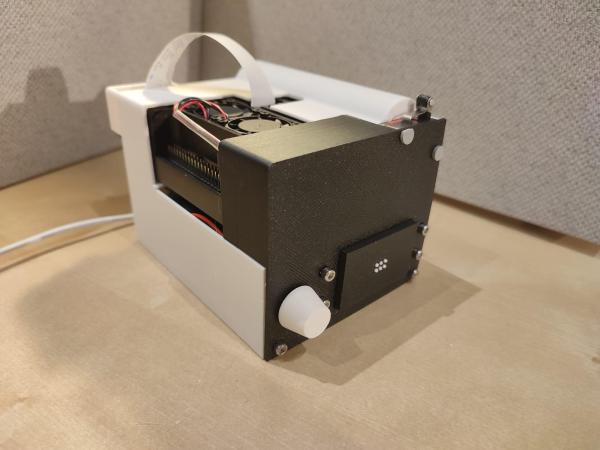
Camera is seen on the left with an Arduino connected to the right

Look To The Sky With This Simple Plane Tracker

Do you ever get tired of stressing your neck looking for planes in the sky? Worry not! Here is a neat and cheap Arduino/Ras Pi project to keep your neck sore free! [BANK ANGLE] presents a wonderfully simple plane tracking system using an affordable camera and basic microcontrollers.

The bulk of the system relies on a cheap rotating security camera that gets dissected to reveal its internals. Here stepper control wires can be found and connected to the control boards required to allow an Arduino nano to tell the motors when and where to spin. Of course, the camera system doesn’t just look everywhere until it finds a plane, a Raspberry Pi takes in data from local ADS-B data to know where a nearby plane is.

After that, all that’s left is a nifty overlay to make the professional look. Combining all these creates a surprisingly capable system that gives information on the aircraft’s azimuth, elevation, and distance.

If you want to try your hand at making your own version of [BLANK ANGLE]’s tracker, check out his GitHub page. Of course, tracking planes gets boring after a while so why not try tracking something higher with this open-source star tracker?

Continue reading “Look To The Sky With This Simple Plane Tracker”

Intercepting And Decoding Bluetooth Low Energy Data For Victron Devices

[ChrisJ7903] has created two Ardiuno programs for reading Victron solar controller telemetry data advertised via BLE. If you’re interested in what it takes to use an ESP32 to sniff Bluetooth Low Energy (BLE) transmissions, this is a master class.

The code is split into two main programs. One program is for the Victron battery monitor and the other is for any Victron solar controller. The software will receive, dissect, decrypt, decode, and report the data periodically broadcast from the devices over BLE.

The BLE data is transmitted in Link-Layer Protocol Data Units (PDUs) which are colloquially called “packets”. In this particular case the BLE functionality for advertising, also known as broadcasting, is used which means the overhead of establishing connections can be avoided thereby saving power.

Continue reading “Intercepting And Decoding Bluetooth Low Energy Data For Victron Devices”

The Mouse Language, Running On Arduino

Although plenty of us have our preferred language for coding, whether it’s C for its hardware access, Python for its usability, or Fortran for its mathematic prowess, not every language is specifically built for problem solving of a particular nature. Some are built as thought experiments or challenges, like Whitespace or Chicken but aren’t used for serious programming. There are a few languages that fit in the gray area between these regions, and one example of this is MOUSE, which can now be run on an Arduino.

Although MOUSE was originally meant to be a minimalist language for computers of the late 70s and early 80s with limited memory (even for the era), its syntax looks more like a more modern esoteric language, and indeed it arguably would take a Python developer a bit of time to get used to it in a similar way. It’s stack-based, for a start, and also uses Reverse Polish Notation for performing operations. The major difference though is that programs process single letters at a time, with each letter corresponding to a specific instruction. There have been some changes in the computing world since the 80s, though, so [Ivan]’s version of MOUSE includes a few changes that make it slightly different than the original language, but in the end he fits an interpreter, a line editor, graphics primitives, and peripheral drivers into just 2 KB of SRAM and 32 KB Flash so it can run on an ATmega328P.

There are some other features here as well, including support for PS/2 devices, video output, and the ability to save programs to the internal EEPROM. It’s an impressive setup for a language that doesn’t get much attention at all, but certainly one that threads the needle between usefulness and interesting in its own right. Of course if a language where “Hello world” is human-readable is not esoteric enough, there are others that may offer more of a challenge.


Image Credit: Maxbrothers2020

Speed Up Arduino With Clever Coding

We love Arduino here at Hackaday; they’ve probably done more to make embedded programming accessible to more people than anything else in the history of the field. One thing the Arduino ecosystem is rarely praised for is its speed. That’s where [Playduino]  comes in, with his video (embedded below) that promises to make everyone’s favourite microcontroller run 50x faster.

You might be expecting an unstable overclocking setup, with swapped crystals, tweaked voltages and a hefty heat sink, but no! This is stock hardware. The 50x speedup comes from one simple hack: don’t use digitalWrite();

If you aren’t familiar, the digitalWrite() function is one of the key functions Arduino gives you to operate its boards– specify the pin and the value (high or low) to drive it. It’s very easy, but it’s also very slow. [Playduino] takes a moment to show just how much is going on under the hood when you call digitalWrite(), and shows you what you can do instead if you have a need for speed. (Hint: there’s no Arduino-provided code involved; hardware registers and the __asm keyword show up.)

If you learned embedded programming in an earlier era, this will probably seem glaringly obvious. If you, like so many of us, got started inside of the Arduino ecosystem, these closer-to-the-metal programming techniques could prove useful tools in your quiver. Big thanks to [Stephan Walters] for the tip.

Of course if you prefer to speed things up by hardware rather than software, you can overclock an Arduino– with liquid nitrogen, even.

Continue reading “Speed Up Arduino With Clever Coding”

Trekulator: A Reproduction Of The 1977 Star Trek Themed Calculator

A recent project over on Hackaday.io from [Michael Gardi] is Trekulator – Where No Maker Has Gone Before.

This is a fun build and [Michael] has done a very good job of emulating the original device. [Michael] used the Hackaday.io logging feature to log his progress. Starting in September 2024 he modeled the case, got his original hardware working, got the 7-segment display working, added support for sound, got the keypad working and mounted it, added the TFT display and mounted it, wired up the breadboard implementation, designed and implemented the PCBs, added some finishing touches, installed improved keys, and added a power socket back in March.

Continue reading “Trekulator: A Reproduction Of The 1977 Star Trek Themed Calculator”

Programmer’s Macro Pad Bangs Out Whole Functions

Macro pads are handy for opening up your favorite programs or executing commonly used keyboard shortcuts. But why stop there?

That’s what [Jeroen Brinkman] must have been thinking while creating the Programmer’s Macro Pad. Based on the Arduino Pro Micro, this hand-wired pad is unique in that a single press of any of its 16 keys can virtually “type” out multiple lines of text. In this case, it’s a capability that’s being used to prevent the user from having to manually enter in commonly used functions, declarations, and conditional statements.

For example, in the current firmware, pressing the “func” key will type out a boilerplate C function:

int () { //
;
return 0;
}; // f 

It will also enter in the appropriate commands to put the cursor where it needs to be so you can actually enter in the function name. The other keys such as “array” and “if” work the same way, saving the user from having to enter (and potentially, even remember) the correct syntax.

The firmware is kept as simple as possible, meaning that the functionality of each key is currently hardcoded. Some kind of tool that would let you add or change macros without having to manually edit the source code and flash it back to the Arduino would be nice…but hey, it is a Programmers Macro Pad, after all.

Looking to speed up your own day-to-day computer usage? We’ve covered a lot of macro pads over the years, we’re confident at least a few of them should catch your eye.