Getting Started With Blinking Lights On Old Iron

If you ever go to a computer history museum, you’ll be struck by how bland most modern computers look. Prior to 1980 computers had lights and switches, and sometimes dials and meters. Some had switchboard-like wiring panels and some even had oscilloscope-like displays. There’s something about a machine with all those switches and lights and displays that gets your hacker juices flowing. Have you ever wanted to get started in retrocomputing? Is it difficult? Do you need a lot of money? That depends on what your goals are.

There are at least three ways you can go about participating in retrocomputing: You can pony up the money to buy actual antique computers, you can build or buy old computers recreated with anywhere from zero to one hundred percent of period-authentic components, or you can experiment with emulators that run on a modern computer. As a hybrid of the second and third option there are also emulations in FPGAs.

You can see that the first option can be very expensive and you will probably have to develop a lot of repair and restoration skills. Watching [Mattis Lind] twiddle the bits on an actual PDP-8 in the clip above is great, but you’ll need to work up to it. The two techniques which get you going without the original hardware don’t have to break the bank or even cost anything presuming you already have a PC.

Although some sneer at emulation, for some machines it is almost the only way to go. You couldn’t buy the original EDSAC, for example. It is also a good way to get started without a lot of expense or risk. But regardless of how you do it, there’s one thing in common: you have to know how to operate the thing.

Continue reading “Getting Started With Blinking Lights On Old Iron”

DIY VT220 Keyboard

There’s always been interest in the computers of old, and people love collecting and restoring them. When [peterbjornx] got his hands on a DEC VT220 video terminal, it was in good shape – it needed a bit of cleaning, but it also needed a keyboard. [Peter] couldn’t afford to buy the keyboard, but the service manual for it was available, so he decided to convert a modern keyboard to work with his new terminal. (Editor’s note: Link rot. Try the Internet Archive’s Wayback Machine link instead.)

The original keyboard for the VT220 is the LK201. This keyboard communicates with the terminal using 8-N-1 (eight data bits, no parity, one stop bit) over RS232 at 4800 baud. This meant that it would be pretty simple to implement this on microcontroller in order to communicate with the terminal. [Peter] chose the Arduino Nano. However, the LK200 was more than just a keyboard for communicating with the terminal, it also housed a speaker and LEDs which the terminal used to communicate with the user. Rather than put these into the adapter unit, [Peter] decided to put these into the keyboard – a few holes and a bit of wiring, and they were in.

[Peter]’s write-up includes a description of some of the issues he encountered as well as a picture of the keyboard. He’s put the schematic online and the code up on GitHub. In case you were wondering, he used Vim on the VT220 to write his article. You could also use a Raspberry Pi to help out your dumb terminal, or just hook the terminal directly to your Linux box and go from there.

A New Battery For A Potted Clock Module

If you did much dismantling of PCs back in the 1980s and 1990s, you might be familiar with the Dallas Semiconductor range of potted real-time clock modules. These were chunky dual-in-line devices containing clock and non-volatile RAM chips, a crystal, and a lithium battery. The battery was good for about a decade, which was fine for most PCs of the day because the majority of desktop computers are replaced long before that deadline.

[Glitch], however has an industrial single-board computer with a 486 processor that has had a life much more prolonged than its desktop siblings due to its application. The battery in the onboard Dallas DS1387 has long ago expired, and since these devices are so long out of production to be unavailable, he’s had to improvise.

Improving on some previous documented projects he found through an internet search, he carefully ground away the potting compound to reveal a couple of the battery conductors, cut them with a PCB drill, and mounted a lithium cell holder on the top of the device with some tidily soldered Kynar wires to bring in the power. A CR1225 cell was used rather than the ubiquitous CR2032, as space was at a premium in the width of the ISA card form factor.

The potted RTC module is something of a rare device these days, but if you have a retro computer containing one this seems to be a very useful piece of work to bring it back to life. We’ve covered another similar one with a slightly larger battery in the past.

3D Printed Curta Gets Upgrades

It is amazing how makers can accomplish so much when they put their mind to something. [Marcus Wu] has uploaded a mesmerizing video on how to build a 3D printed Curta Mechanical Calculator. After nine iterations of design, [Marcus] presents a polished design that not only works but looks like a master piece.

For the uninitiated, the Curta is a mechanical calculator designed around the time of World War II. It is still often seen used in time-speed-distance (TSD) rallies to aid in the computation of times to checkpoints, distances off-course and so on. Many of these rallies don’t allow electronic calculators, so the Curta is perfect.  The complex inner workings of the contraption were a key feature and point of interest among enthusiasts and the device itself is a highly popular collectible.

As for the 3D printed design, the attention to detail is impeccable. The current version has around 80 parts that need to 3D printed and a requires a few other screws and springs. Some parts like the reversing lever and selector knobs have been painted and digits added to complete the visual detail. The assembly took [Marcus Wu] around 40 minutes to complete and is one of the most satisfying builds we have ever seen.

What is even more amazing is that [Markus Wu], who is a software engineer by profession has shared all the files including the original design files free of cost on Thingiverse. A blog with written instructions is also available along with details of the iterations and original builds. We already did a post on a previous version so check it out for a little more background info.

Thanks for the tip [lonestar] Continue reading “3D Printed Curta Gets Upgrades”

Eye Tube Tests Capacitors

Most component testers require removal of a component to test it. [Mr Carlson] recently restored an old Paco C-25 in-circuit capacitor tester. He does a very complete video tearing it down and showing how it works and why.

The tester uses an eye tube (sometimes called a magic eye tube) as an indicator. A 40 MHz oscillator produces a signal that finds open and shorted capacitors. You can also measure resistance, although you have to wonder how accurate it would be in circuit. If you want to read the original manual, there are a few copies online.

Continue reading “Eye Tube Tests Capacitors”

KIM-1 To COSMAC Elf Conversion — Sort Of

In the mid-1970s, if you had your own computer, you probably built it. If you had a lot of money and considerable building skill, you could make an Altair 8800 for about $395 — better than the $650 to have it built. However, cheaper alternatives were not far behind.

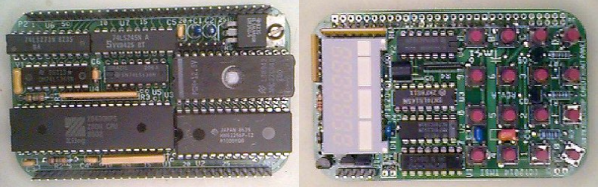
In 1976, Popular Electronics published plans for a computer called the COSMAC Elf which you could build for under $100, and much less if you had a good junk box. The design was simple enough that you could build it on a piece of perf board or using wire wrap. We featured the online archive of the entire Popular Electronics collection, but hit up page 33 of this PDF if you want to jump right to the article that started it all. The COSMAC Elf is a great little machine built around a 40-pin RCA 1802 processor, and for many was the first computer they owned. I lost my original 1802 computer in a storm and my recent rebuild in another completely different kind of storm. But there is a way to reclaim those glory days without starting from scratch.  I’m going to repurpose another retro-computing recreation; the KIM-1.

I’ll admit it, Rewiring a real KIM-1 to take an 1802 CPU would be difficult and unnecessary and that’s not what this article is about. However, I did have a KIM UNO — [Oscar’s] respin of the classic computer using an Arduino mini pro. Looking at the keyboard, it occurred to me that the Arduino could just as easily simulate an 1802 as it could a 6502. Heck, that’s only two digits different, right?

The result is pretty pleasing. A “real” Elf had 8 toggle switches, but there were several variations that did have keypads, so it isn’t that far off. Most Elf computers had 256 bytes of memory (without an upgrade) but the 1802 UNO (as I’m calling it) has 1K. There’s also a host of other features, including a ROM and a monitor for loading and debugging programs that doesn’t require any space in the emulated 1802.

Continue reading “KIM-1 To COSMAC Elf Conversion — Sort Of”

Simulating Snakes And Ladders For Fun, Not Profit

A great many of you will remember the game of Snakes and Ladders from your youth. It’s a simple game, which one grows to realise involves absolutely no skill – it’s purely the luck of the dice. [Alex Laratro] noticed that without player decisions to effect the outcome, the game was thus a prime candidate for simulation. 

[Alex] wanted to dive into the question of “Who is winning a game of Snakes and Ladders?” at any given point in the gameplay. A common approach would be to state “whoever is in front”, but the ladders might have something to say about that. [Alex] uses Markov analysis to investigate, coming to some interesting conclusions about how the game works, and how this compares to the design of more complex games like Mario Kart and Power Grid.

Overall, it’s a breakdown of a popular game that’s simple enough to really sink your teeth into, but has some incredibly interesting conclusions that are well worth considering for anyone designing their own board games. We love seeing math applied to novel and fun problems – and it can solve important problems, too.