Open Source Art Encourages Society To Think Inclusively

Kate Reed has a vision for elevating the less talked about parts of ourselves, and of society. Through her art, she wants people to think about a part of themselves that makes them feel invisible, and to anonymously share that with the community around them. The mechanism for this is Invisible, a campaign to place translucent sculptures in public places around the world. The approach that she has taken to the project is very interesting — she’s giving the art away to empower the campaign. Check out her talk from the Hackaday SuperConference.

Continue reading “Open Source Art Encourages Society To Think Inclusively”

In Defense Of The Electric Chainsaw

Here at Hackaday we are a diverse bunch, we all bring our own experience to the task of bringing you the best of the hardware scene. Our differing backgrounds were recently highlighted by a piece from my colleague [Dan] in which he covered the teardown of a cordless electric chainsaw.

It was his line “Now, we’d normally shy away from any electric chainsaw, especially a cordless saw, and doubly so a Harbor Freight special“. that caught my eye. I’m with him on cordless tools which I see as a cynical ploy from manufacturers to ensure 5-yearly replacements, and I agree that cheap tools are a false economy. But electric chainsaws? Here on this small farm, they’re the saw of choice and here’s why.

Continue reading “In Defense Of The Electric Chainsaw”

Ken Shirriff Takes Us Inside The IC, For Fun

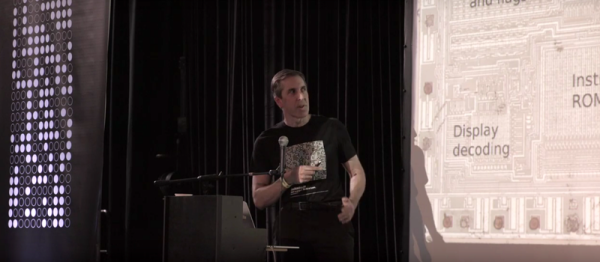
[Ken Shirriff] has seen the insides of more integrated circuits than most people have seen bellybuttons. (This is an exaggeration.) But the point is, where we see a crazy jumble of circuitry, [Ken] sees a riddle to be solved, and he’s got a method that guides him through the madness.

In his talk at the 2016 Hackaday SuperConference, [Ken] stepped the audience through a number of famous chips, showing how he approaches them and how you could do the same if you wanted to, or needed to. Reading an IC from a photo is not for the faint of heart, but with a little perseverance, it can give you the keys to the kingdom. We’re stoked that [Ken] shared his methods with us, and gave us some deeper insight into a handful of classic silicon, from the Z80 processor to the 555 timer and LM7805 voltage regulator, and beyond.

Continue reading “Ken Shirriff Takes Us Inside The IC, For Fun”

Liar’s 3D Printing: Multiple Colors With One Extruder

Good 3D printers now have multiple hot ends. You ought to be able to print in different colors or print support material. However, a lot of us don’t have multiple hot ends. Turns out, you don’t have to have multiple hot ends to print in multiple colors. To accomplish that you need a lot of patience and the willingness to tell bald-faced lies. Don’t worry, though, you’ll only be lying to some computer hardware and software, so that doesn’t count.

You may have seen people talk about putting a pause between layers to switch from one color to another. That works, but it limits your options. For example, if you want to put some colored text on a different colored background, you have to either have the text poke out, or it has to be “under” the background. It can’t be flush if you only have a single extruder and hot end. My method is a lot more trouble, but it can generate good results.

Keep in mind, with hobby-grade printers, multiple color printing has a lot of problems even if you do have multiple extruders. This isn’t a panacea. But you can get results on par with a similar printer that has multiple heads.

Bottom Line Up Front

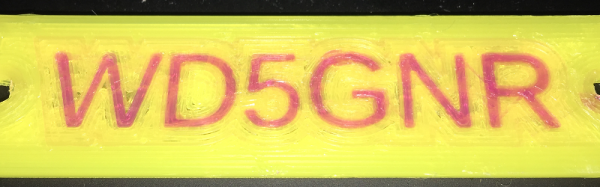
Here are a few pictures of test prints that use this technique. A Monoprice Mini printer with the stock extruder and hot end created them using different PLA filament. On the left is a test cube, with a color spot in the middle of the layers (as well as some spots on the top surface you can’t see). To the right is a plate with my call sign in a contrasting color. It is hard to tell in the picture, of course, but there is one surface. The text is at the same height as the yellow surface.

I didn’t spend a lot of time making these prints since I was more focused on perfecting the methodology. The layer heights aren’t very fine, the infill is sparse, and the print speed was fast. However, you could invest time into making better-looking prints. You can also use the usual techniques that you use with a “real” multi-extrusion printer (such as priming towers, ooze shields, etc.).

Continue reading “Liar’s 3D Printing: Multiple Colors With One Extruder”

Ask Hackaday: Computing Square Roots On FPGA?

Hackaday reader [nats.fr] wrote in with some code from a project that resizes a video stream on the fly using an FPGA. Doing this right means undoing whatever gamma correction has been applied to the original stream, resizing, and then re-applying the gamma. Making life simpler, [nats.fr] settled on a gamma of two, which means taking a bunch of square roots, which isn’t fast on an FPGA.

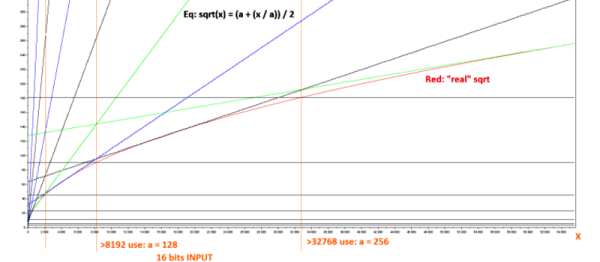
[nats]’s algorithm is pretty neat: it uses a first-stage lookup to figure out in which broad range the value lies, and then one step of Hero’s algorithm to refine from there. (We think this is equivalent to saying he does a piecewise linear interpolation, but we’re not 100% sure.) Anyway, it works decently.

Of course, when you start looking into the abyss that is special function calculation, you risk falling in. Wikipedia lists more methods of calculating square roots than we have fingers. One of them, CORDIC, avoids even using multiplication by resorting to clever bitshifts and a lookup table. Our go-to in these type of situations, Chebyshev polynomial approximation, didn’t even make the cut. (Although we suspect it would be a contender in the gamma=1.8 or gamma=2.2 cases, especially if combined with range-reduction in a first stage like [nats.fr] does.)

So what’s the best/fastest approximation for sqrt(x) for 16-bit integers on an FPGA? [nats.fr] is using a Spartan 6, so you can use a multiplier, but division is probably best avoided. What about arbitrary, possibly fractional, roots?

Hackaday Links: December 25th, 2016

You should be watching the Doctor Who Christmas special right now. Does anyone know when the Resturant at the End of the Universe spinoff is airing?

We have a contest going on right now. It’s the 1 kB Challenge, a contest that challenges you to do the most with a kilobyte of machine code. The deadline is January 5th, so get cracking.

A few years ago, [Kwabena] created the OpenMV, a Python-powered machine vision module that doesn’t require a separate computer. It’s awesome, and we’re going to have his talk from the Hackaday SuperConference up shortly. Now the OpenMV is getting an upgrade. The upgrades include an ARM Cortex M7, more RAM, more heap for less money. Here’s a link to preorder.

There ain’t no demoscene party like an Amtrak demoscene party because an Amtrak demoscene party lasts ten hours.

E-paper displays are fancy, cool, and low-power. Putting them in a project, however, is difficult. You need to acquire these display modules, and this has usually been a pain. Now Eink has a web shop where you can peruse and purchase epaper display modules and drivers.

[Kris] built a pair of STM32L4 dev boards that are easily programmed in the Arduino IDE. Now he’s putting these boards up on Kickstarter. The prices are reasonable – $15 for the smaller of the pair, and $25 for the bigger one. Remember, kids: ARM is the future, at least until RISC-V takes over.

This is how you do holiday greeting cards.

Didn’t get what you want for Christmas?  Don’t worry, Amazon still has A Million Random Digits with 100,000 Normal Deviates in stock. It’s also available on audible dot com. Sometimes we don’t have time to sit down and read a million random digits but with audible dot com, you can listen to a million random digits in audio book format. That’s audible dot com please give us money.

northkoreaThis is the last Hackaday Links post of the year, which means it’s time for one of our most cherished traditions: reviewing our readership in North Korea.

It’s been a banner year for Hackaday in the Democratic People’s Republic of North Korea. The readership has exploded in 2016, with a gain of nearly 300%. To put that in perspective, in 2015 we had thirty-six views from North Korea across every page on Hackaday. In 2016, that number increased to one hundred and forty.

That’s a phenomenal increase and a yearly growth that is unheard of in the publishing industry. We’d like to tip our hat to all our North Korean reader, and we’re looking forward to serving you in 2017.

Creating A PCB In Everything: KiCad, Part 3

This is the third and final installment of a series of posts on how to create a PCB in KiCad, and part of an overarching series where I make the same schematic and board in dozens of different software tools. A few weeks ago, we took a look at making a schematic in KiCad, and more recently turned that schematic into a board ready for fabrication.

For our KiCad tutorials, we’ve already done the basics. We know how to create a PCB, make a part from scratch, and turn that into a board. This is the bare minimum to be considered competent with KiCad, but there’s so much more this amazing tool has to offer.

In part three of this KiCad tutorial, we’re going to take a look at turning our board into Gerbers. This will allow us to send the board off to any fab house. We’re going to take a look at DRC, so we can make sure the board will work once we receive it from the fab. We’re also going to take a look at some of the cooler features KiCad has to offer, including push and shove routing (as best as we can with our very minimalist board) and 3D rendering.

Continue reading “Creating A PCB In Everything: KiCad, Part 3”