Coffee Table Puts On A Show Behind Smoked Glass

This coffee table is a real show-piece. It’s got a smoky glass surface that is hiding the LCD screen within. But what fun would it be if it could only play video? The rest of the enclosure houses all the parts necessary to make this living room centerpiece into a computer.

After the break you can see a video showing off each step of the build process. It starts by ridding the screen of its enclosure, and using what’s left to determine the size of the wood frame for the table. With the display firmly in place [Nate] sets to work position, mounting, and developing cooling solutions for the motherboard and the rest of the bits. He does nice work and ends up with a table that we’d be proud to feature in our homes.

Now he’s got a lot of computing power and a huge display, but isn’t something missing? How hard do you think it would be to add touch sensitive input to this? We’re wondering if the overlays used to make those Android touchscreens could be mounted on the underside of the glass?  Continue reading “Coffee Table Puts On A Show Behind Smoked Glass”

WiFi Garage Door Opener Makes Forgotten Keys A Thing Of The Past

wifi-garage-door-opener

[Tod’s] daughter has a habit of forgetting to take a house key along with her, so he was looking for a way to make accessing the house easier in a pinch. He had tried wireless garage door keypads in the past, but their performance was so-so at best. After scouring the market for commercial solutions and checking out the work of other hackers, he decided that he needed to craft a custom solution of his own.

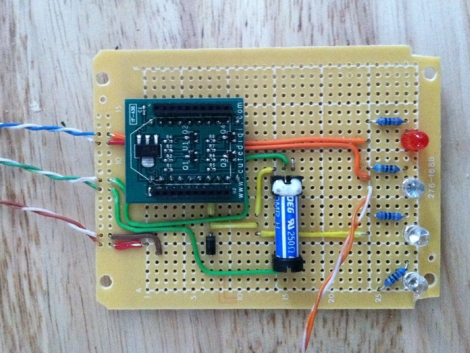
He started shopping around for wireless-enabled microcontrollers and settled on a Roving Networks RN-XV module, which is designed as a drop-in replacement for an XBee. Paired with a 5v to 3.3v power adapter, the RN-XV is nearly all he needed to interface his iPhone with his garage door opener.

The microcontroller has enough GPIO pins to control the garage door, while also monitoring the door’s status using a simple magnet/reed switch combo. A web server in [Tod’s] house takes input from any phone connected to his wireless LAN and relays the open/close commands to the opener. The opener in turn returns status messages to him via the web interface.

We really like the system’s simple design, and as long as [Tod] has turned WPS off at home, he really shouldn’t have to worry too much about unauthorized entry.

Remote Entry Via Android And Launchpad

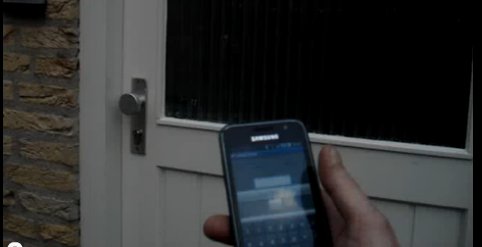
[MarkoeZ] had an issue with keys breaking off in his door lock, and while normal people might try to simply replace the lock all together, [MarkoeZ] decided to do it the “Hackaday” way by adding a bluetooth lock to his door. His door is already setup where someone can walk up to it, page an internal intercom and have someone buzz you in. From the inside the intercom was modded with a TI Launchpad with a “deal extreme” bluetooth module and relay.

Access is granted by the use of an android phone running “BT_Serial_Tester” which is a simple app that allows you to send characters over bluetooth. Just enter a pin, grab the door before the buzzer times out, and you’re in! A starting point for the MSP code and schematics are available on his blog. Join us after the break for a quick demonstration video.

Continue reading “Remote Entry Via Android And Launchpad”

Commandeer X10-based Home Automation With Your Favorite Microcontroller

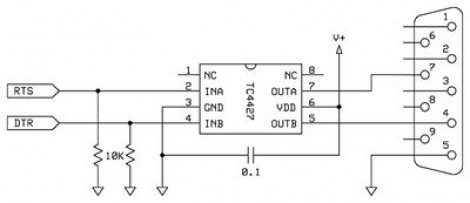
X10 has been around for a long time. It’s the brand name for a set of wireless modules used to switch electrical devices in the home. There’s all kinds of different units (bulb sockets, electrical outlets and plug pass-throughs, etc.) and they’re mass-produced which makes them really inexpensive. Whether you already have some X10 controlled devices or just plan to add them later, we think you’ll find [Jeff Ledger’s] post on controlling the system with a Propeller chip interesting. The technique is not Propeller specific and will be simple to port to your microcontroller of choice.

[Jeff] got his hands on an X10 Firecracker. This provides a DB-9 serial connection meant to be used for computer control. But the interface is so simple all you need is two I/O pins feeding the level converter circuit seen above. You can get the TC4427 for less than a dollar, and the Firecrcker module for as little as $6. Since [Jeff] has already covered adding Ethernet via a ENC28J60 he goes on to detail a web-server that lets him switch his devices, all served from the Propeller chip.

Here’s a different ENC28J60 Ethernet tutorial for those interested in webpages from microcontrollers. And then there’s also a ZigBee home automation project if you’re not warming up to the idea of using X10 modules.

Need A Hand Drying Those Gloves?

While being caught out in the rain skiing, [Andrew] was left with a pair of soaking wet gloves. Leaving them to air dry did little good, as after 3 days they were still wet, and blowing a fan at them did little to nothing to help the situation. Luckily [Andrew] had been thinking about ways to make a forced air glove drier for some time now using standard plumbing fittings.

A prototype was made similar to consumer models where the glove is fit over the end of a pipe, and while this worked great to dry the palms, it did not help the wet finger situation at all. In order to solve this issue a new design was whipped up featuring 4 fixed fingers and a movable thumb made out of copper pipe. A little drilling, and soldering was performed then the metal hand was then duct taped to the end of a hair drier, turning soaked gloves into perfectly dry ones in about three hours.

Bang-banging Your Way To A Perfect Cake

bang-bang-oven-control

[Rob Spanton’s] house is equipped with a rather cheap oven, which was discovered while his roommate tried using it to bake part of a wedding cake. If someone took a shower during the baking process, a large portion of unit’s gas pressure was diverted to the boiler, causing the oven to shut off completely. This is obviously not a good situation for baking cakes, so the housemates decided to construct a makeshift controller to keep temperatures in line.

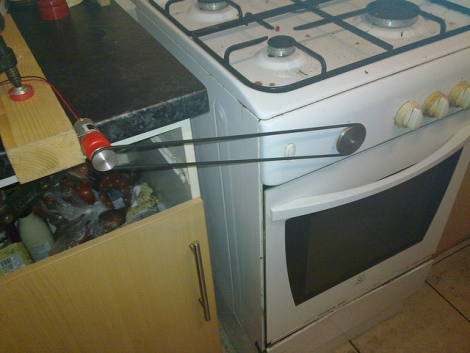
They started by installing a pulley on the oven’s knob, which is connected to a small motor via a long rubber belt. The other end of the belt connects to a small motor, which is controlled by a Pololu 18v7 motor controller. A K-type thermocouple monitors the oven’s temp, feeding the data through a MAX6675 converter to (presumably) [Rob’s] computer.

Since they were in a bit of a time crunch, [Rob] and his roommate [Johannes] decided the best way to keep the oven at a steady temperature was via bang-bang control. While you might imagine that cranking the gas knob between its minimum and maximum settings repeatedly wouldn’t be the ideal way to go about things, their solution worked pretty well. The cake came out perfectly, and the maximum temperature swing throughout the entire baking process was only 11.5°C – which is pretty reasonable considering the setup.

Pep Up Your House Cat’s Boring Wintertime Life

With winter upon us, and all the windows shut, [Garfield] and [Socks] can get a little restless. But [Dino] is determined to keep his furry friends entertained through the cold dark months. He hit the junk box, and used some interesting fabrication techniques to build the Chase-a-Mouse motorized cat toy.

The toy is popular with the cats because it incorporates two traditionally satisfying features; something to chase, and an obstacle to chase it around. The base of the unit is a long plank which is held up from the floor by a couple of inches. The loop of rope which spans the board’s length has a mouse attached to it with about six inches of string. When the motor is flipped on it bounces and jerks its way around the circuit, darting in and out of the space below the base.

As you can see in the video after the break the motor is a bit loud. [Dino] used the sweeper motor from a Roomba for this. It might freak the kitties out at first, but curiosity will get the better of them eventually. It’s a quick build, and we love the drill-turned-lathe that is used make the wooden pulley for the system.

Continue reading “Pep Up Your House Cat’s Boring Wintertime Life”