Finally, An ARM-powered Arduino

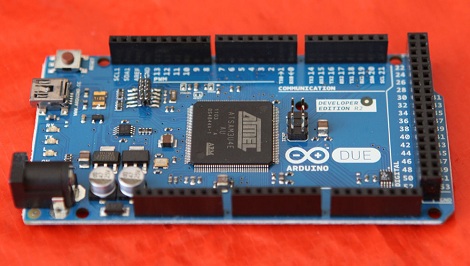
Far removed from the legions of 3D printers featured at this year’s Maker Faire in New York was a much smaller, but far more impressive announcement: The ARM-powered Arduino DUE is going to be released later this month.

Instead of the 8-bit AVR microcontrollers usually found in Arduinos, the DUE is powered by an ATSAM3X8E microcontroller, itself based on the ARM Cortex-M3 platform. There are a few very neat features in the DUE, namely a USB On The Go port to allow makers and tinkerers to connect keyboards, mice, smartphones (hey, someone should port IOIO firmware to this thing), and maybe even standard desktop inkjet or laser printers.

The board looks strikingly similar to the already common Arduino Mega. That’s no mistake; the DUE is compatible with existing shields, so connecting a RAMPS board for your 3D printer should be a snap.

Here’s a PDF the Arduino and Atmel guys were handing out at their booth. A few DUE boards have already made it into the hands of important people in the Arduino community, including 3D printer guru [Josef Prusa]. Sadly, the folks at Arduino didn’t think media personalities needed a DUE before its release, so you’ll have to wait until we get our hands on one later this month for a review.
Disassembling And Reprogramming Webkeys

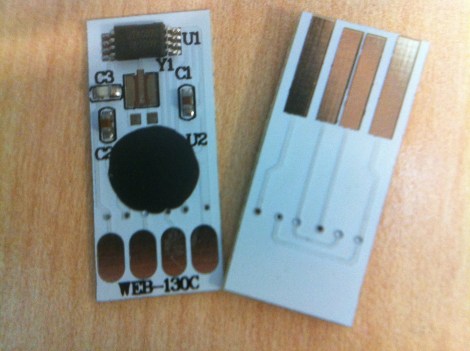
Webkeys are small, inexpensive USB devices which launch a web browser when plugged into a computer. They’re given out as a promotional item, but they can be fun to hack as well. [Brad Antoniewicz] recently got his hands on one and decided to crack it open to see what he could accomplish.

The majority of the device was packaging but it didn’t take him long to get down to the guts seen here. There are two units shown in the image above so that we can get a look at both sides of the circuit board. As you can see, there’s a chip-on-board processor (that black blob) that handles the USB connectivity. But the data which is pushed to a computer is stored in that EEPROM chip at the top. It’s got legs which are just begging to be probed. [Brad] wasn’t able to find the exact datasheet but he got some clues as to the pinout. Using his Bus Pirate he was able to establish communications and sniff the i2c traffic. With that success he went on to overwrite that data. You can see a quick demonstration of it after the break.

[Brad] hopes to do a bit more with the hardware. He thinks those four pads can be used to reprogram the MCU. We’ll keep our eyes out for updates as he moves along on that mission.

Continue reading “Disassembling And Reprogramming Webkeys”

Using A 555 Timer And ADC As A Random Seed

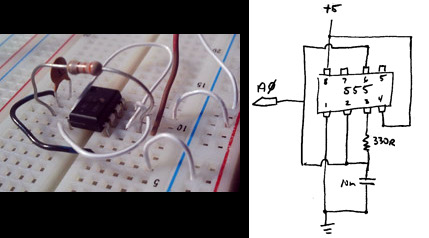
Most toolchains for embedded system include support for random number generation. But if you’ve read the manual you’ll know that this is really just pseudo random number generation (PRNG). When calling this function the same numbers will always return in the same order unless a different random number seed is supplied in advance. [Gardner] put together a simple and cheap solution for deriving better random number seeds. He reads a voltage from a 555 timer using the ADC on the microcontroller. At first glance it may not seem like a great source of randomness, but he performed some testing and the results look quite promising.

The project is aimed at Arduino-based circuits, but any chip with an ADC will work. The 555 timer is used as a free running oscillator. We know that this not be very stable when compared to even the worst of crystal oscillators, but that’s what makes it work so well as a random seed source. Add to this the low parts count and small size of the additional circuitry and you’ve got a winning combination. So keep this in mind when you need a random number but don’t necessarily need rock solid entropy.

[via Reddit and Freetronics]

Mbed And A Few Resistors Runs Console, VGA, And PS/2

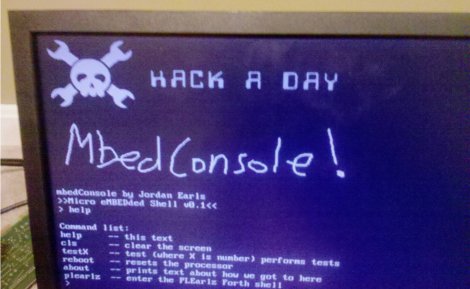
[Jordan] writes in to show us a project he has been working on called MbedConsole. Living up its name [Jordan] has managed to run a 640×480 VGA output, PS/2 port and console all from the mbed itself. We really mean from an mbed only; no extra hardware is required aside from a few resistors and connectors, a VGA monitor and PS/2 keyboard. The code is open source and links are included in the blog. There are even instructions for including your own graphics.

There are a few things to tackle still, like SD card support. Currently the PS/2 keyboard lights for caps-lock are not functional. [Jordan] would love to know what else we’d see going on something like this, with 400k of flash and 20k RAM left there certainly is a bit of room for some interesting stuff. One of his main goals is to get rid of the C interface and port an interactive shell over that could do something like BASIC or Forth (to give it that retro environment feel). We have seen the mbed in a handful of projects, what do you think?

Programming A Microcontroller One Bit At A Time

Imagine you’re stuck on a desert island, hundreds of miles away from the nearest person, and you finally have time to finish that project you’re working on. You have a single microcontroller, but you’re lacking a computer and you need to program an ATtiny13. How do you do it? [androidruberoid] figured out how to manually flash a microcontroller (Russian, surprisingly good translation) using just three switches and a lot of patience.

[androidruberoid]’s ATtiny13 – like nearly all Atmel microcontrollers – are programmed using an SPI interface. This interface requires four signals: SCK, a data clock, MOSI, the data line from master to slave, MISO, data from slave to master, and RESET. By connecting these data lines to buttons, [androidruberoid] is able to manually key in new firmware one byte at a time.

This technique of manually programming bits relies on the fact that there is no minimum speed for an SPI interface. In the video after the break, you can see [androidruberoid] manually programming an ATtiny13 with a simple program. It only lights up an LED, but with enough patience he could key in a simple ‘blink a LED’ program.

Continue reading “Programming A Microcontroller One Bit At A Time”

USBPIC Controls Just About Anything

Over the last few years, [Michael] has been developing a PIC microcontroller board. He calls his project USBPIC, and with the addition of a few FET drivers, H-bridges, and LED drivers his homemade dev board can handle just about anything thrown at it.

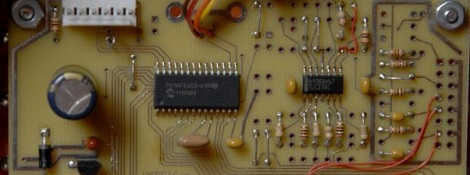
[Michael]’s board is build around a PIC18F2455 microcontroller with both an In Circuit Serial Programming header and support for a USB port included. Instead of going for a modular format where the board can expanded through shields or expansion cards, [Michael] decided to make three different versions of the USBPIC.

The TRANS USBPIC includes eight FETs for switching off high current devices totaling 32 Amps. The MATRIX board has twice as many outputs as the TRANS board, but uses ULN2803 or UDN2982 chips for driving smallish-current devices. Finally, the HBSW board takes a TRANS board and replaces four FETs with a an L298 H-bridge chip for driving two DC motors.

For what [Michael] lost in modularity, we think he gained a very tidy microcontroller board capable of driving everything from robots to LED matrix displays.

Reading Bare NAND Flash Chips With A Microcontroller

NAND flash, the same memory chips found in everything from USB thumb drives to very expensive solid state disk drives, are increasingly common. As they (partially) serve as the storage for cellphones, Wiis, routers and just about every piece of consumer electronic devices, you’re probably surrounded by dozens of NAND chips at any one time.

[Sprite_tm], hacker extraordinaire, put up a build a few years ago where he was able to read the contents of NAND Flash chips using a PC parallel port. It’s getting rather hard to find a parallel port on a PC anymore, so he updated his build to read Flash chips off of a USB port.

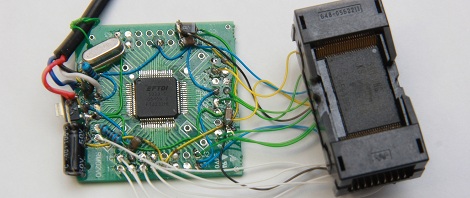
There are two main components of [Sprite_tm]’s build. First, to read the Flash chip, he needed a way to break out the pins on the very tiny TSOP48 package. [Sprite] found a neat little socket for these chips on eBay for about 10 Euros.

Communicating with the Flash chip via USB was a little harder. [Sprite] knew he needed USB 2.0, but not many microcontrollers have that implemented. Luckily, the FTDI FT2232H has USB 2.0, along with the very nice feature of being able to read data and address pins directly from the Flash chip. After a bit of soldering, [Sprite_tm] was left with the device seen above.

[Sprite_tm] found a nice library to bitbang the pins on the FTDI chip and request one page of memory from the Flash chip at a time. The device works as advertised, but it’s still a bit slow at 250 kBps. [Sprite] figures he can increase the speed of reading a Flash chip by requesting multiple pages at a time, but it’s still orders of magnitude faster than the old parallel port solution.

There’s a good bit of software [Sprite] posted to help him (and possibly others) read bare NAND flash chips via USB. This means if you have a broken USB Flash drive or SD card, it’s possible to desolder the chip and read it with your own controller. Interpreting the blocks of data recovered from a Flash drive as a file system is another story, but it’s still a fairly remarkable build.