Reverse Engineering A D-Link Backdoor

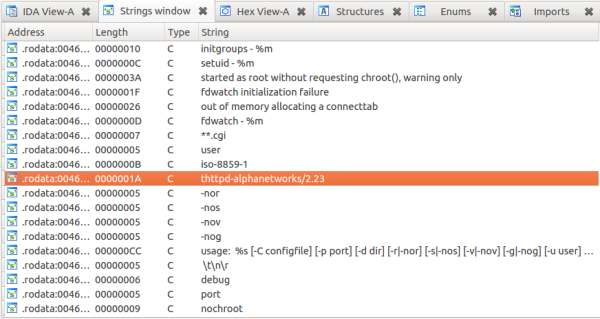
Here’s one true hack (Google cache link) for our dear Hackaday readers. On a Saturday night, as [Craig] didn’t have anything else to do, he decided to download the firmware of an old D-Link DIR-100 router (because who wouldn’t?). His goal was to see what interesting things he could find in it. He fired up binwalk to extract the SquashFS file system, then opened the router webserver on the multi-processor disassembler/debugger IDA. [Craig] discovered that the webserver is actually a modified version of thttpd, providing the administrative interface for the router. As you can see in the picture above, it seems Alphanetworks (a spin-off of D-Link) performed the modifications.

Luckily for [Craig], the guys at Alphanetworks were kind enough to prepend many of their custom function names with the string “alpha”. Looking at the disassembly of the http identification functions revealed that a backdoor is implemented on the firmware. If one malicious user has the string “xmlset_roodkcableoj28840ybtide” as his browser user agent, no authentication is required to gain access to the router. One of the comments on the reddit thread points out that reading that string backwords results in: “edit by (04882) joel backdoor”.

SNESoIP: It’s Exactly What It Sounds Like

prototype-small

Here’s a cool hack for those of you wishing to play some retro multiplayer SNES games online!

[Michael Fitzmayer] is a resident hacker at shackspace; der hackerspace in StuttgartHe’s come up with this clever little ethernet adapter network-bridge that can share local controller-inputs over the internet. The entire project is open-source, and readily available on github. It’s still in the early stage of development, but it is already fully functional. The firmware is small and will fit on an ATmega8, and by the looks of the component list it’s a fairly easy build.

He’s even integrated a switch mode (hold B and Y during boot), which avoids trying to figure out which controller will be player one! After all, don’t you remember untangling the controller cords, trying to figure out which one is which?

We know you had a favorite controller and would give the other “crappy” one to your guest.

Example video is after the break.

Continue reading “SNESoIP: It’s Exactly What It Sounds Like”

Building An Ethernet Connected RFID Reader

For the last few years, [Lt_Lemming] was the president of Brisbane’s hackerspace. Until several months ago, access to the local was done using 125KHz RFID tags and an Arduino board with a prototyping shield. As the hackerspace gained members and moved to bigger facilities, [Lt_Lemming] decided to build himself a more compact and advanced platform.

His Simple NetworkAble RFID Controller (SNARC) is a platform which can be connected to an Ethernet network and different RFID readers in order to implement smart access control functionalities. Through hole components were selected so even solder apprentices may assemble it. The PCB was designed using Fritzing, and development can even be done inside the Arduino IDE as ISP and serial headers are available on the board. Finally, an N-channel mosfet controls the door locking mechanism.

The project is open hardware and software, and all the sources can be downloaded from [Lt_Lemming]’s github repo.

Wireless Unread Email Counter Tells You How Busy You’re Not

counter

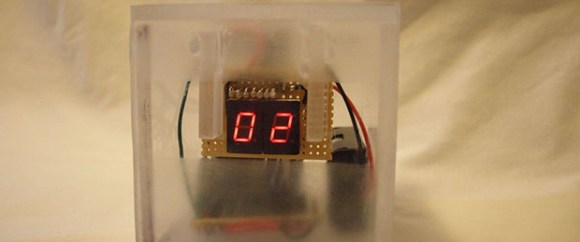
One of the marks of how busy you are – or how well your spam filters are set up – is how many unread emails you have in your inbox. [trumpkin] over on Instructables posted a great tutorial for making a wireless counter that displays the number of unread emails in your Gmail account.

[trumpkin] used a tiny and inexpensive 419 MHz transmitter and receiver combo to make this project work. On his desktop, he wired up a USB to UART bridge attached to the transmitter. For the receiver side, an ATMega328 reads the data coming off the receiver and displays the number of unread emails on two seven-segment displays.

The wireless device runs off of two AA batteries and should provide enough power to keep the email monitor running for a long time. More than enough time for your inbox to fill up and for you to become overwhelmed with the work you should be doing.

TP-Link Router Turned Into A DALI Automated Lighting Controller

dali-control-in-tplink-router

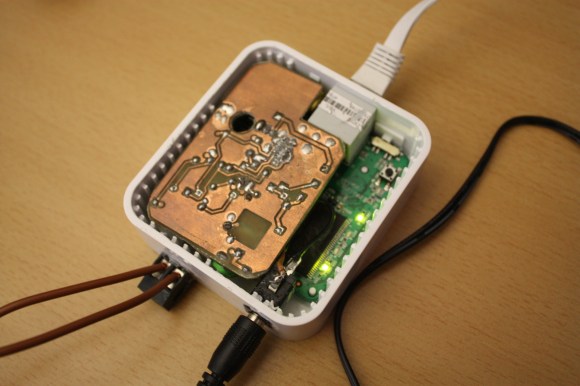
The members of Shackspace continue to put up impressive hacks based around the tiny TP-Link routers. This time around [Timm] has shoehorned a DALI controller inside the router case. This is a protocol we don’t remember hearing about before. The Digital Addressable Lighting Interface is a control network for commercial lighting. That way people responsible for taking care of large buildings can shut off all the lights at night (to name just one use). The new room at Shackspace has this style of controllers in its lights.

The two brown wires coming into the router make up the data bus for the DALI system. It connects to the add-on PCB which uses an Atmel AT90PWM316 microcontroller. The chip is specifically designed for DALI networks which made the rest of the project quite easy. It talks to the lights, the router talks to it, bob’s your uncle, and you’ve got network controlled lighting. Get this in a big enough building and you can play some Tetris.

In case you were wondering. Yes, this project has already been added to their TP-Link firmware generator.

RPi Control Your Server PSU Over The Internet

remote-server-psu-control-via-RPi

Here’s an interesting use of a Raspberry Pi to control the PSU on a server. [Martin Peres] is going to be away for a few months and still wants access to his PC. This isn’t really all that tough… it’s what SSH is made for. But he also wants lower-level access to the hardware. Specifically he needs to control and get feedback on what the PSU is doing, and even wanted to have access to the serial console without having to go through the computer’s NIC.

The image above shows one part of his solution. This is a custom Ethernet port that connects to his Rasberry Pi header breakout board. Inside the computer the jack is wired to the motherboard power LED to give feedback about the current state of the power supply. It also patches into the green wire on the PSU, which lets him turn on the power by pulling it to ground. After working out the cable routing he developed a web interface that makes it easy to interact with the setup.

As with other hacks along these lines letting an embedded computer run 24/7 is a lot less wasteful than leaving a PC on. That’s a concept we can really get behind.

Continue reading “RPi Control Your Server PSU Over The Internet”

33 Node Beowulf Cluster Built With Raspberry Pi

Not only did [Josh Kiepert] build a 33 Node Beowulf Cluster, but he made sure it looks impressive even if you don’t know what it is. That’s thanks to the power distribution PCBs he designed and etched. In addition to injecting power through each of the RPi GPIO headers they host an RGB LED which is illuminated in blue in the images above.

Quite some time ago we saw a 64-node RPi cluster. That one used LEGO pieces as a rack system to hold all of the boards. But [Josh] used stand-offs to create the columns of hardware which are suspended between top and bottom plates made out of acrylic. The only thing that’s unique about each board is the SD card and that’s why each has a label on it that identifies the node. These have been flashed with almost identical images; the host name and IP address are the only thing that changes from one to the next. They’ve been put in order physically so that you can quickly find your way through the rack. But functionally this doesn’t matter… put the card in any RPi and it will automatically identify itself on the network no matter where it’s located in the rack.

Don’t miss the demo video where [Josh] explains the entire setup.

Continue reading “33 Node Beowulf Cluster Built With Raspberry Pi”