Going Back To Our Old Commenting System!

On Friday, I announced we would upgrade our commenting system. It was tested over the weekend, and ultimately I have decided to go back to the wordpress system.  Here are the reasons why:

1. Our old comments never got transitioned over.

The intenseDebate system says I can just click a single button and it will import our old posts into the new system.  I did this Friday and the page never moved from 0%. I tried again Saturday night, with the 0% import still there this morning(Monday). Our old posts simply never imported. I don’t know if it was because our database of comments was so large (I doubt it) or what. I went to contact their support, but found them out for the weekend. That’s no big deal, but I wonder if the importer was a manual thing and no one was there to do it? If so, they should probably put a warning on the importer page.

2. It wasn’t failing gracefully.

I had many emails and comments saying that the comments were not showing when people were using script blockers, or certain android devices. The intenseDebate website claims that their system will show comments even if someone is using a script blocker. I did not personally test this, and frankly I don’t have to. Even if those people are mistaken or have peculiar setups, I simply can’t ignore complaints that our content isn’t even showing.

3. I couldn’t expand all replies by default, or maybe I’m an idiot.

I didn’t see an option anywhere to display all comment threads expanded by default. Maybe I just overlooked it. Maybe there’s some css trick to it. We HAVE to have our comments expanded. Often there is more useful information in the comments than the article itself. With replies nested you would have to go through and click every single thread just to see if there was anything useful. This is such an obvious feature that I’m convinced I just went stupid for a while and didn’t read the button that enabled it, surely they didn’t omit it.

For these 3 reasons, I removed it.  Just like they said it would, it came out with no issue.
Shocking Operation Makes Sure You Have Skin In The Game

operation-shocks-you

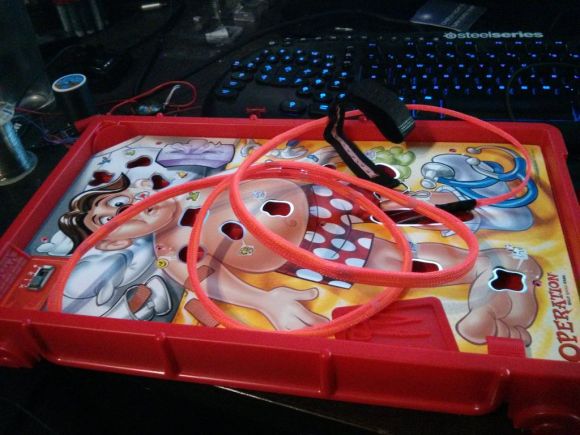
Odds are you played the game of Operation when you were a kid. The classic electronic toy challenges you to use a tethered tweezers to extract plastic pieces without touching the sides of the holes they’re hiding in. This upgrade makes the challenge more interesting for a grown-up audience. If you touch the sides you won’t hear a jarring sound, you’ll get a painful shock!

The modification starts by clipping off the melted plastic portions that hold the paperboard face plate on the game. From there the original electronics are completely removed. We think this a bit of a mistake as we’d still like spectators to hear the sound as the player gets a shock. But we digress. The circuit board from a disposable camera is patched into the game. A wrist band forms an electrical connection with your body, providing a path for the camera’s flash capacitor to discharge if you happen to touch the sides with the tweezers.

This write-up is missing one important thing: video of someone getting shocked. [Psycosisnine] promises to add some soon, but for now you’ll just have to fall back on our absolute favorite Mindflex shock project.

LulzBot Is Giving Away More Printers

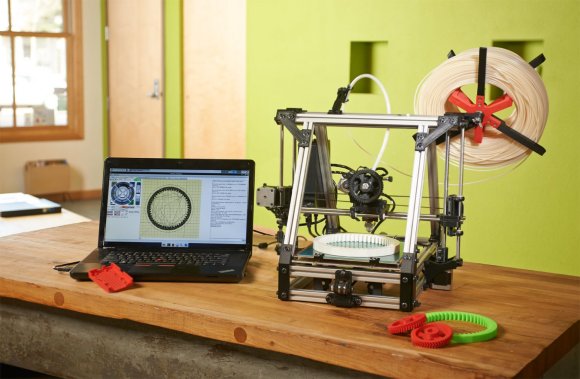
LulzBot, the awesomely named 3D printer manufacturer and parts supplier, is giving away eight of their AO-100 printers to eight lucky hackerspaces.

It’s not so much a contest, but instead a giveaway aimed at eight community-operated hackerspaces who come up with a great idea on how to use a 3D printer. If you’re part of a well-established hackerspace that doesn’t have a 3D printer yet, this is a great opportunity to get your hands on a very nice printer.

A while back, we acquired one of these LulzBot printers to print off some custom gaming controllers for gamers with physical disabilities (and to make some other cool stuff as well). Our boss man [Caleb] says the AO-100 is a great printer, and in my dealings and purchases with LulzBot, they seem like a great company with great support. We’re sure the hackerspaces that win these printers LulzBot is giving away will be able to put them to use quickly by making some really cool stuff.

Finally Upgrading Our Comment System.

intense

UPDATE: I’m working on making the visual style fit better. It really needs some work.

Yes Ladies and Gentlemen, we’re finally taking the plunge into a more robust commenting system. This one has a ton of features, but the following few have been asked for quite frequently.

  • You can now edit your comments. Yes, finally. No seriously, try it. To do this, you’ll need to log in though!
  • Subscription to a comment thread is now optional. Horay!
  • You can now “Like” or dislike comments.

IntenseDebate is converting our old comments over, so they should begin to appear soon. Please feel free to email me directly[caleb@] with any issue you encounter using the new system. I know you’ve been asking for it for a very long time, I’ll do my best to make sure that it goes as smoothly as possible.

Analog Input Expansion Boards For Raspberry Pi

analog-input-rpi-add-on

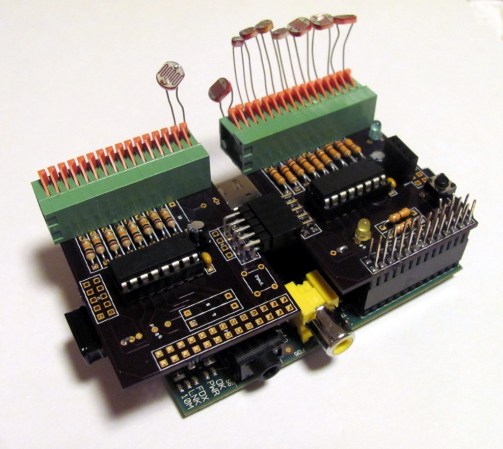
[Ken Olsen] needed a bunch of analog inputs for his model railroad project. He wanted to use the Raspberry Pi board, but alas there are no analog inputs available on the GPIO header. But there is SPI. So he used an online service to design his on Analog input expansion boards.

He mentions that Eagle can be a bit of a pain to work with. For this project he decided to give circuits.io a try. This is an in-browser PCB layout tool which we looked at in a links post some time ago. The service lets you order directly from your in-browser design without the need to run gerber files or the like (boards are made using the OSH Park service). He’s very happy with the boards he got back. They feature a footprint for a connector to interface with the RPi.

The design uses MCP3008 Analog to SPI chips. Each has eight channels but [Ken] needed more than that. Since the service provides three copies of the board he made them modular by adding end connectors which chain the SPI and power rails from one board to the next. Don’t miss his full demo in the video after the break.

Continue reading “Analog Input Expansion Boards For Raspberry Pi”

Retrotechtacular: Flying Foot-soldiers Are Coming For You (sixty Years Ago)

Hiller_VZ-1_Pawnee_(2)

Pictured above is a remarkable piece of experimental technology from the 1950’s that never ended up going anywhere. The Hiller VZ-1 Pawnee is a single-rider vehicle that was supposed to provide a tactical advantage to US forces. The Office of Naval research spent a couple of years developing the aircraft, wich uses two rotors mounted inside the base of the platform. They spin opposite each other — which removes the need for a tail rotor like you’d find on a helicopter –to lift the platform a short distance off the ground. Although six of them were made only two survive. But the good news is you can go and see them at museums on the East or West coast of the US.

Now that the serious business is behind us, let’s talk about the video clip after the break. The narrative style is a gem of the newsreel era. We can’t tell what is going on with the accent, but we’re totally convinced that at least one general meeting per year at your local hackerspace should require all presenters to use their best impression of this talented gentleman’s voice.

Continue reading “Retrotechtacular: Flying Foot-soldiers Are Coming For You (sixty Years Ago)”

Hack Removes Firmware Crippling From NVIDIA Graphics Card

If hardware manufacturers want to keep their firmware crippling a secret, perhaps they shouldn’t mess with Linux users? We figure if you’re using Linux you’re quite a bit more likely than the average Windows user to crack something open and see what’s hidden inside. And so we get to the story of how [Gnif] figured out that the NVIDIA GTX690 can be hacked to perform like the Quadro K5000. The thing is, the latter costs nearly $800 more than the former!

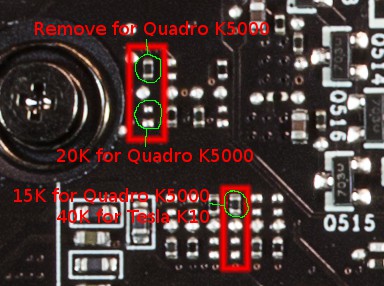
[Gnif] wanted the card for gaming and to support multiple monitors. It has no problem driving up to three screens under Windows. But the Linux drivers only allow this on the professional counterpart to the GTX690, the Quadro K5000. It turns out that the card responds to a device ID as assigned by a series of analog values. These can be tweaked by swapping, yanking, or adding resistors in just the right places. As with that Agilent multimeter unlock of his which we saw a few days ago, he somehow managed to figure out the secret sauce that unlocks the power hidden in this card.