
Finally Upgrading Our Comment System.

intense

UPDATE: I’m working on making the visual style fit better. It really needs some work.

Yes Ladies and Gentlemen, we’re finally taking the plunge into a more robust commenting system. This one has a ton of features, but the following few have been asked for quite frequently.

  • You can now edit your comments. Yes, finally. No seriously, try it. To do this, you’ll need to log in though!
  • Subscription to a comment thread is now optional. Horay!
  • You can now “Like” or dislike comments.

IntenseDebate is converting our old comments over, so they should begin to appear soon. Please feel free to email me directly[caleb@] with any issue you encounter using the new system. I know you’ve been asking for it for a very long time, I’ll do my best to make sure that it goes as smoothly as possible.

Analog Input Expansion Boards For Raspberry Pi

analog-input-rpi-add-on

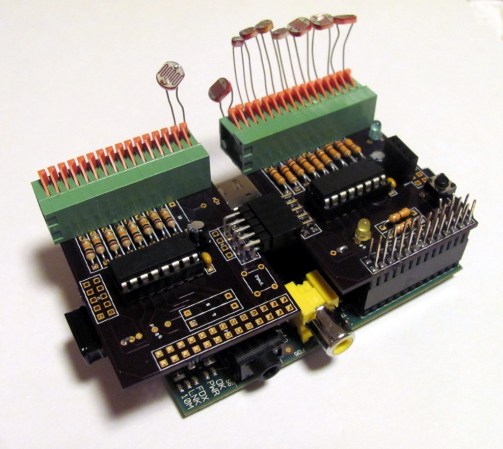
[Ken Olsen] needed a bunch of analog inputs for his model railroad project. He wanted to use the Raspberry Pi board, but alas there are no analog inputs available on the GPIO header. But there is SPI. So he used an online service to design his on Analog input expansion boards.

He mentions that Eagle can be a bit of a pain to work with. For this project he decided to give circuits.io a try. This is an in-browser PCB layout tool which we looked at in a links post some time ago. The service lets you order directly from your in-browser design without the need to run gerber files or the like (boards are made using the OSH Park service). He’s very happy with the boards he got back. They feature a footprint for a connector to interface with the RPi.

The design uses MCP3008 Analog to SPI chips. Each has eight channels but [Ken] needed more than that. Since the service provides three copies of the board he made them modular by adding end connectors which chain the SPI and power rails from one board to the next. Don’t miss his full demo in the video after the break.

Continue reading “Analog Input Expansion Boards For Raspberry Pi”

Retrotechtacular: Flying Foot-soldiers Are Coming For You (sixty Years Ago)

Hiller_VZ-1_Pawnee_(2)

Pictured above is a remarkable piece of experimental technology from the 1950’s that never ended up going anywhere. The Hiller VZ-1 Pawnee is a single-rider vehicle that was supposed to provide a tactical advantage to US forces. The Office of Naval research spent a couple of years developing the aircraft, wich uses two rotors mounted inside the base of the platform. They spin opposite each other — which removes the need for a tail rotor like you’d find on a helicopter –to lift the platform a short distance off the ground. Although six of them were made only two survive. But the good news is you can go and see them at museums on the East or West coast of the US.

Now that the serious business is behind us, let’s talk about the video clip after the break. The narrative style is a gem of the newsreel era. We can’t tell what is going on with the accent, but we’re totally convinced that at least one general meeting per year at your local hackerspace should require all presenters to use their best impression of this talented gentleman’s voice.

Continue reading “Retrotechtacular: Flying Foot-soldiers Are Coming For You (sixty Years Ago)”

Hack Removes Firmware Crippling From NVIDIA Graphics Card

If hardware manufacturers want to keep their firmware crippling a secret, perhaps they shouldn’t mess with Linux users? We figure if you’re using Linux you’re quite a bit more likely than the average Windows user to crack something open and see what’s hidden inside. And so we get to the story of how [Gnif] figured out that the NVIDIA GTX690 can be hacked to perform like the Quadro K5000. The thing is, the latter costs nearly $800 more than the former!

[Gnif] wanted the card for gaming and to support multiple monitors. It has no problem driving up to three screens under Windows. But the Linux drivers only allow this on the professional counterpart to the GTX690, the Quadro K5000. It turns out that the card responds to a device ID as assigned by a series of analog values. These can be tweaked by swapping, yanking, or adding resistors in just the right places. As with that Agilent multimeter unlock of his which we saw a few days ago, he somehow managed to figure out the secret sauce that unlocks the power hidden in this card.

AC Vs DC Human Pain Test

AC-vs-DC-human-pain-test

Ever wondered just how much being zapped by electricity hurts? Curious if AC is worse than DC? Want to know just how many volts a human body can take? Although many people might cringe at the shear thought of it, [Mehdi Sadaghdar] is an electrical engineer who decided to turn himself into a human guinea pig and find out.

[Mehdi] measured the electrical resistance of his dry skin, his wet skin, and finally his tongue.  He found that his tongue had the least resistance, so it would feel the electricity at much lower levels. Using a bench power supply, he then used his tongue as a testing ground – slowly turning the voltage up and up until he could no longer take the pain. He tested the levels at which: he could first feel the electricity, when it began to get annoying, when it felt like torture, and when he could no longer stand the pain. He tried both AC and DC, and reports that AC is much worse.

Check out the informative, yet admittedly hilarious at times, video after the break. [Mehdi] seems like one awesome engineer! Remember – don’t try this at home.

Continue reading “AC Vs DC Human Pain Test”

“Hacking The Xbox” Released For Free In Honor Of [Aaron Swartz]

Hacking the Xbox Cover

[Bunnie], the hardware hacker who first hacked into the original Xbox while at MIT, is releasing his book on the subject for free. The book was originally released in 2003, and delves into both the technical and legal aspects of hacking into the console.

The book is being released along with an open letter from [Bunnie]. He discusses the issues he faced with MIT legal and copyright law when working on the project, and explains that the book is being released to honor [Aaron Swartz]. [Swartz] committed suicide in January following aggressive prosecution by the US government.

The book is a great read on practical applications of hardware hacking. It starts off with simple hacks: installing a blue LED, building a USB adapter for the device’s controller ports, and replacing the power supply. The rest of the book goes over how the security on the device was compromised, and the legal implications of pulling off the hack.

[Bunnie]’s open letter is worth a read, it explains the legal bullying that hackers deal with from a first hand prospective. The book itself is a fantastic primer on hardware hacking, and with this release anyone who hasn’t read it should grab the free PDF.

Makerbot Shows Off 3D Scanner

scan

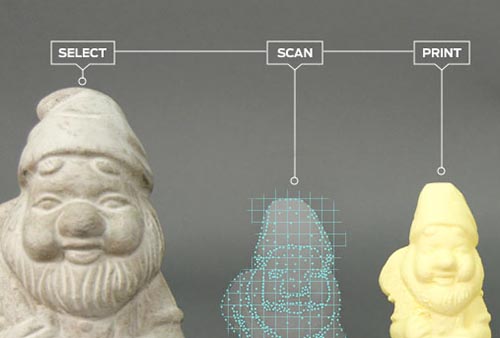
We’ve said our piece over Makerbot and their interpretation of what Open Source means, but the fact remains if you’re sourcing a 3D printer for a high school shop class or a hackerspace, you really can’t do much better than a Makerbot Replicator. Apparently Makerbot is looking to expand their 3D design and fabrication portfolio; they just announced an upcoming 3D scanner at SXSW. It’s called the Makerbot Digitizer, and it takes real, 3D objects and turns them into CAD files.

Since Makerbot and [Bre Pettis] didn’t give out much information about the 3D scanner they’re working on, the best information comes from Techcrunch. The Makerbot Digitizer uses two lasers to scan real objects and turns them into 3D CAD files. The hardware isn’t finalized, and the prototype is made of a few pieces of laser cut plywood. No details are available on how much the Digitizer will cost, when it will be available, or what its resolution is.

Of course 3D scanning of real objects to translate them into CAD files is nothing new for Hackaday readers. We’ve seen our fair share of desktop 3D scanners, including one that was built in a day out of junk. Even the Kickstarter crew has gotten into the action with a few desktop 3D scanners, some of which scan in full color.