A Doorbell Pleasing To Both The Ears And Eyes

campanello-doorbell

When [David] moved into his new house, one of the things he noticed was that his doorbell was pretty lame. Coming from a home equipped with a solenoid and chime bell, his new wireless solid state doorbell sounded terrible to him.

Crummy sound aside, the doorbell hardly ever worked properly, but alas, other projects cropped up and years went by before [David] addressed his doorbell problem. Like many things that take a long time to come to fruition, we think his resonator bell based solution was well worth the wait.

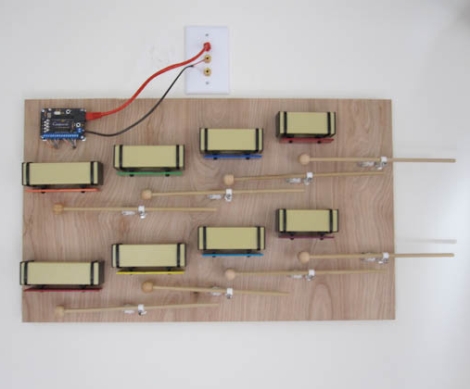
One of his main goals was to make a nice sounding doorbell that also looked great. He mounted a kid’s resonator bell toy on a sheet of wood, creating his own wooden mallets for the job. He initially had a tough time locating actuators for his doorbell, but found a solution in geared pager motors as featured in another xylophone hack on Make. With the hardware taken care of he focused on the electronics, which consist of a pair of Arduino clones – one on the display and one in his basement.

Stick around to see [David’s] Campanello doorbell in action, and be sure to check out his site for more details if this sounds like something you would like to have in your home.

[via Make]

Continue reading “A Doorbell Pleasing To Both The Ears And Eyes”
Power Strip Hack Reduces Standby Electricity Consumption

computer-standby-circuit

For years, [Rasmus] has left his computer connected directly to the mains power so that he can turn it on via Wake on Lan. While powered down, it would still continuously consume about 6W of electricity, but now that he didn’t need it to be on standby so often, he wanted to make it more energy efficient.

In Denmark, where he lives, many people use power strips that have an onboard USB cable. These strips are meant to reduce the standby power consumption of PC peripherals such as monitors by powering on the mains sockets only when the computer is active. He decided the easiest way to cut his standby energy consumption to 0W would be to power his computer via this strip as well.

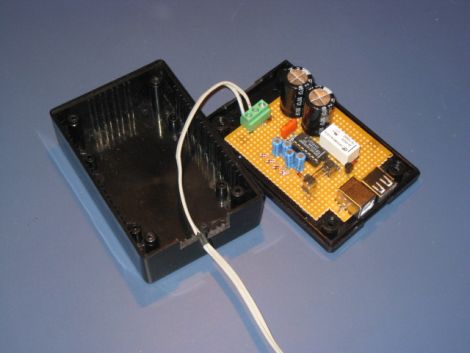
While it sounds great in theory, it presented a sort of chicken/egg problem. If the computer needs to be turned on for the power strip to recognize it, then how could he also supply power to the computer from the same strip? His solution was a small circuit that would charge up while the computer was running, and still hold enough juice to kickstart the PC’s boot process, thus turning on the power strip.

It really is an ingenious way to go about things, nice job!

Black Friday Deals And Contest Giveaways

Winter is coming, and it’s a great time to start accumulating parts and tools to keep you occupied with projects during the dark and cold days ahead.

Black Friday

We got a tip from Pololu about their planned Black Friday deals, and thought we’d check with some of the other parts suppliers that cater to the hobby market too. Here’s what we found:

  • Adafruit Industries Black Friday – Get 10% off of your purchases made any time on Friday if you use the code ‘BLACK’ (12:00am-11:59pm — we’d guess this is Eastern Time) – UPDATE: Get 10% of Monday 11/28 with the code ‘CYBER’.
  • Pololu Black Friday – many items are available at a great discount plus extra savings using their Black Friday coupons. Sales run midnight on Thursday morning through 11:59pm on Monday night (Pacific Time, 11/24 through 11/28)
  • UPDATE: Sugru – we just got an email about a special offer for this moldable material. Now through December 19th you can get your fourth pack for free using the coupon code: YAYCHRISTMAS

We did hear back from SparkFun. They don’t have a Black Friday deal planned, but they are planning on Free Day 2012 happening some time early in the year! We’ll keep our eyes open for details, but if you hear about it before we do send us a tip.

Make also got back to us. No specific details about Black Friday, but we’re told they have some type of deals in the works.

Digikey and Mouser didn’t get back to us in time for this post.

Laser Cutter Giveaways

Do you want a laser cutter to call your own? Yeah, so do we. If you come up with a really cool project perhaps you can win one. It looks like there’s two contests a contest going on right now that is giving one away to the grand prize winner.

  • Build Lounge is giving away a 40W CO2 Deluxe Hobby Laser Cutter to the best project based on light (community votes).
  • Instructables – Oops…. we waited too long to post about this one as the contest closed on the 14th, sorry. But chances are good this will come around again. For now, you’ll have to be satisfied at viewing the entries that made the finals.

This Giant Hand Made LED Matrix Must Be Ours!

giant-led-matrix

[Martin] wrote in to share a project his company has been working on for some time, a gigantic 1470 pixel LED wall. The group provides lighting for clubs, parties, etc, and their hand-built LED matrix is always certain to be the hit of the show.

The amazing matrix was designed from the ground up and built by hand in [Martin’s] living room. They designed small 32x32mm “pixel” boards, each of which features 6 PLCC6 RGB LEDs driven by a single WS2801 LED controller. The PCBs were populated by hand and each one was reflowed in a small pizza oven that [Martin] owns. After the pixels were completed, they were attached to aluminum bar and combined to build thirty 70x70cm frames which are connected together to form a giant matrix.

As you can see in the collection of videos below, the display is very impressive. We just hope that they will be compelled to release the schematics for their boards so that we can build one of these in the office.

Continue reading “This Giant Hand Made LED Matrix Must Be Ours!”

Weekly Roundup 11/19/11

In case you missed them the first time around, here are our most popular posts from the past week.

Our top contender is a post about a giant snake robot that is modeled after a snake that we know of through fossil records that was up to 50 feet long. This one is pretty interesting.

Next in line is a post about a special setup where things are being projected onto a nearly invisible mist of water that literally makes the images float in midair.

After that we have a post about another creation by [Photonicinduction]. Surprisingly, he isn’t destroying something with this one and it isn’t dangerous. Nevertheless it is still interesting. Check out his home power backup system that also (there is some debate going on with this claim) reduces his electricity bills.

In fourth place we have a post about how to make your own aerogel. For those of you who haven’t seen this stuff in person, it is the least dense solid that exists. You can literally see through it.

Finally, we conclude with one about an animatronic Horus Guard mask. If you are a fan of Stargate, this is one to check out.

Video: Interrupts On The ATmega328p

This week, we are bringing you the final video in our series where [Jack] uses the 3pi robot as a fancy development board for the ATmega328p processor. Today’s video deals with interrupts. If you have been wanting to have your programs do more than one thing simultaneously, interrupts are the solution. [Jack] discusses various ways that you can use interrupts in your programs and then shows how he created a interrupt routine that drives the 3pi’s beeper. He also shows the routines that enable, disable, and control the interrupt.

Since this is the last post for this series of videos, we are posting the code used for all of the previous videos. Click here to grab a copy.

For our next series of videos, we are going to attempt something more challenging so most likely we will be taking a couple of weeks off to do some development before presenting it here. Stay tuned folks, we’ll be back.

Video is after the break…

In case you missed any of the previous videos, check out these links:

Part 1: Setting up the development environment
Part 2: Basic I/O
Part 3: Pulse Width Modulation
Part 4: Analog to Digital conversion
Part 5: Working with the 3pi’s line sensors

Continue reading “Video: Interrupts On The ATmega328p”

DIY LED Photography Lights

led-light-box

[Markus] had been drooling over some LED panels to use as a soft light source for photography, but being a hobbyist, he didn’t want to spend a ton of money to buy them. He figured that he had enough electronics know-how to build his own panels, while saving a boatload of cash in the process.

He hoped to keep the total cost under £100, so along with new items like LED light strips, he would have to use some stuff he had sitting around, like the metal cooking containers that make up the body of the lights. While originally planned for use in a different project, it turns out that the cooking containers were ideal for his lighting setup, since they are both durable and great heatsink material.

The remainder of the build is pretty straightforward. [Markus] used a pre-made LED dimmer to control the panel’s brightness, along with some tinted plexiglas to diffuse the light while bringing the color temperature into a more usable range.

While he missed his £100 mark, the lights look great – we just might have to build a few of them ourselves.