Using A Touch Sensor As A Telegraph Key

[Sebastian] is learning Morse code and CW radio, and of course he needed a telegraph key. Instead of using the terribly unergonomic paddle style key, he built a capacitive touch iambic key over the course of a few evenings.

An iambic key usually has two switches. When one switch is closed, it will transmit a ‘dit’. When the other switch is closed, it will transmit a ‘dah’. Instead of using mechanical paddles, [Sebastian] brought his iambic key into the 21st century by using a touch sensor. An ATtiny45 measures the time it takes for a single metal plate to fully charge. It’s the same idea behind the wonderful Arduino CapSense library.

This isn’t the first capacitive-touch iambic key we’ve seen; this little guy is just a pair of metal contacts and resistors that plug right into an Arduino. With an ATtiny45, [Sebastian]’s build is a full-blown iambic telegraph key that plugs right into his CW rig. You can check out the walk through of the project along with [Sebastian] trying out his iambic key after the break.

Continue reading “Using A Touch Sensor As A Telegraph Key”

Communicating From Anywhere With A SPOT Connect

[Nate] over at Sparkfun put up a great tutorial for using the SPOT personal satellite communicator with just about any microcontroller. These personal satellite transmitters were originally intended to pair with the bluetooth module of a smart phone, allowing you to send a short 41-character message from anywhere in the world. Now, you can use these neat little boxes for getting data from remote sensors, or even telemetry from a weather balloon.

[Nate]’s teardown expands on [natrium42/a>] and [Travis Goodspeed]’s efforts in reverse-engineering the SPOT satellite communicator. The hardware works with the Globalstar satellite constellation only for uplink use. That is, you can’t send stuff to a remote device with a SPOT. After poking around the circuitry of the original, first-edition SPOT, [Nate] pulled out a much cheaper SPOT Connect from his bag of tricks. Like the previous hacks, tying into the bluetooth TX/RX lines granted [Nate] full access to broadcast anything he wants to a satellite sitting in orbit.

We’ve seen the SPOT satellite messaging service put to use in a high altitude balloon over the wilds of northern California where it proved to be a very reliable, if expensive, means of data collection. Sometimes, though, XBees and terrestrial radio just aren’t good enough, and you need a satellite solution.

The SPOT satellite service has an enormous coverage area, seen in the title pic of this post. The only major landmasses not covered are eastern and southern Africa, India, and the southern tip of South America. If anyone out there wants to build a transatlantic UAV, SPOT, and [Nate]’s awesome tutorial, are the tools to use.

Tip ‘o the hat to [MS3FGX] for sending this one in.

Playing Air Traffic Controller With Software Defined Radio

Being an air traffic controller is a very cool career path – you get to see planes flying around on computer screens and orchestrate their flight paths like a modern-day magician. [Balint] sent in a DIY aviation mapper so anyone can see the flight paths of all the planes in the air, with the added bonus of not increasing your risk of heart attack or stroke.

[Balint]’s Aviation Mapper uses software defined radio to overlay RADAR and ACARS messages from aircraft and control towers in an instance of Google Earth running in a web browser. After grabbing all the radio data from a software defined radio, [Balint]’s server parses everything and chucks it into the Google Earth framework. There’s a ton of info, pictures, and explanations of the inner machinations of the hardware on [Balint]’s official project page.

Right now, Aviation Mapper only displays planes within 500 km of Sydney airspace, but [Balint] is working on expanding the coverage with the help of other plane spotters. If you’re willing to help [Balint] expand his coverage, be sure to drop him a line.

Of course, [Balint] is the guy who gave us a software radio source block for those cheap USB TV tuner dongles. Just a few days ago we saw these dongles receiving GPS data, so we’re very impressed with what these little boxes can do in the right hands. [Balint] says his Aviation Mapper application will work with any GNU Radio receiver, so it’s entirely possible to copy his work with a handful of TV tuner dongles.

After the break, there’s two videos of [Balint] sitting at the end of the runway near the Sydney airport watching arrivials come in right above his head and on his laptop. It’s very cool, but we’d be interested in an enterprising hacker in the New York City area copy [Balint]’s work.

Continue reading “Playing Air Traffic Controller With Software Defined Radio”

The RC Transmitter That Does Everything

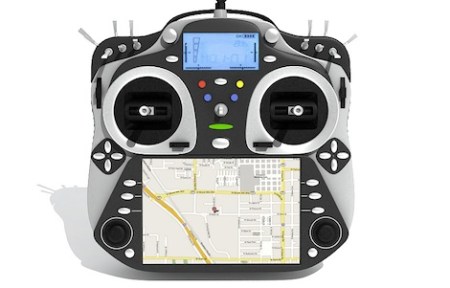
[Demetris] sent in a project he’s been working on over the last year. It’s called the Open Source Radio Control, and promises to be a modular platform for every imaginable remote control transmitter need. If you’d like to control a bipedal android or a 3D aerobatic model plane, the OSRC can do it while transmitting video from the cockpit down to your hands.

Last summer, we caught wind of the OSRC project to build an extensible and open source remote control radio that would do anything; from displaying video from the cockpit to serving as the brain of a UAV rig, the OSRC promised to do everything.

A fully decked out OSRC can be had for about $1400, putting it in the upper echelon of remote control radios. For that price, though, you get a fully customizable radio with your choice of shoulder buttons and a 4.8 inch LCD that receives a video feed from the cockpit of your favorite model. The base unit starts out around $700; still very expensive for a remote control radio, but reasonable when you consider all the possible upgrades.

[Demetris] and the rest of the team put together an outrageously long yet surprisingly beautiful video showing off a few features of the OSRC. You can check that out after the break.

Continue reading “The RC Transmitter That Does Everything”

Working Software-defined Radio With A TV Tuner Card.

[Balint Seeber] just sent in a small yet timely project he’s been working on: a software radio source block for the Realtek RTL2832U. Now with a cheap USB TV tuner card, you can jump right into the world of software-defined radio.

[Balint]’s code comes just a week after hackaday and other outlets posted stories about using a $20 USB TV capture dongle for software defined radio. At the time, these capture cards could only write data directly to a file. With [Balint]’s work, anyone can use a cheap tv tuner dongle with HDSDR, Winrad, or GNU Radio. If you’ve ever thought about trying out software-defined radio, now might be the time.

Elsewhere on the Internet, a surprisingly active RTL-SDR subreddit popped up dedicated to using the Realtek RTL2832U tuner for software defined radio. There’s an awesome compatibility chart listing compatible USB dongles. The cheapest (so far, and subject to change) is the Unikoo UK001T available for $11 on eBay.

With his source block, [Balint] can listen to anything on the radio between 64-1700 MHz. The sample depth is 8 bits and the sample rate can be anything up to 3.2 MHz. You can watch [Balint] testing out his $20 GNU Radio rig after the break.

Continue reading “Working Software-defined Radio With A TV Tuner Card.”

Software Defined Radio From A USB TV Capture Card

With a simple digital TV USB capture card, you can build your own software defined radio or spectrum analyzer. While it may not be as cool as [Jeri Ellsworth]’s SDR, it’s still very useful and only requires $20 in hardware.

The only piece of hardware required for this build is a USB FM/DTV capture device with the Realtek RTL2832U chipset. So far, two USB sticks have been tested and the unit with the largest frequency range (64 – 1700 MHz) is available direct from China for $20.

Turning these cheap capture cards into software defined radios and spectrum analyzers was discovered by [Antti Palosaari] after sniffing the device. These cards demodulate the frequency and send all the data to the computer and is decoded via software. If you have one of these capture cards lying around, you can grab the software and load it up on your *nix box. Right now, the software only writes directly to a file, and may drop a few samples if writing to a hard disk instead of ram. Small problems, but we’re sure this project will pick up steam in the very near future.

via reddit

Wardriving For Zigbee

Wardriving started out as a search for unprotected WiFi access points before hot spots were prevalent. And so this ZigBee protocol wardriving hardware which [Travis Goodspeed] put together really gives us a sense of nostalgia for that time. Don’t get us wrong, we love our pervasive WiFi access and don’t wish to go back to simpler times. But if the radio signals your looking for are scarce, locating them provides a challenge.

Regular readers will recognize that [Travis] is interested in all things RF. One of his projects included sniffing wireless keyboard packets out of thin air and displaying them on the screen of his Nokia N900. This is right along those lines but he’s upgraded to an N9 phone for the display hardware. He switched up the RF hardware, using a TelosB (a board he’s already familiar with) to get on the 802.15.4 ZigBee spectrum. This dev board has an expansion port which let him use an RN42 module for wireless communications with the phone. This means the sniffing hardware can be hidden away in a backpack or jacket. After all, nobody will question someone walking around staring at a smart phone.