50-Year-Old Program Gets Speed Boost

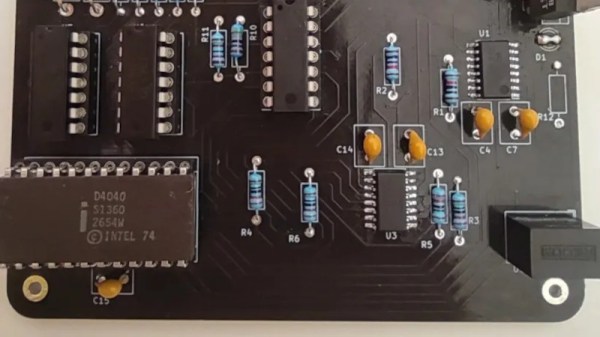
At first glance, getting a computer program to run faster than the first electronic computers might seem trivial. After all, most of us carry enormously powerful processors in our pockets every day as if that’s normal. But [Mark] isn’t trying to beat computers like the ENIAC with a mobile ARM processor or other modern device. He’s now programming with the successor to the original Intel integrated circuit processor, the 4040, but beating the ENIAC is still little more complicated than you might think with a processor from 1974.

For this project, the goal was to best the 70-hour time set by ENIAC for computing the first 2035 digits of pi. There are a number of algorithms for performing this calculation, but using a 4-bit processor and an extremely limited memory of only 1280 bytes makes a number of these methods impossible, especially with the self-imposed time limit. The limited instruction set is a potential bottleneck as well with these early processors. [Mark] decided to use [Fabrice Bellard]’s algorithm given these limitations. He goes into great detail about the mathematics behind this method before coding it in JavaScript. Generating assembly language from a working JavaScript was found to be fairly straightforward.

[Mark] is also doing a lot of work on the 4040 to get this program running as well, including upgrades to the 40xx tool stack, the compiler and linker, and an emulator he’s using to test his program before sending it to physical hardware. The project is remarkably well-documented, including all of the optimizations needed to get these antique processors running fast enough to beat the ENIAC. We won’t spoil the results for you, but as a hint to how it worked out, he started this project using the 4040 since his original attempt using a 4004 wasn’t quite fast enough.
Nixie Tube RPN Calculator Project

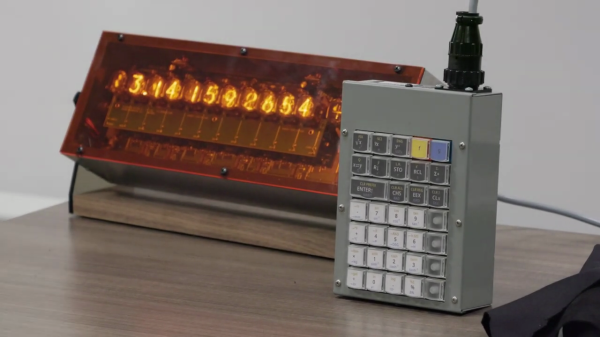
If you like Nixie tubes and/or DIY calculators, checkout this interesting talk from the HP Handheld Conference in Orlando last month by [Eric Smith] from Brouhaha and [John Doran] from Time Fracture. For 20-some years, [Eric] and the late [Richard Ottosen] have been incrementally developing various DIY calculators — this paper from the 2005 HHC conference is an excellent overview of the early project. [John] got one of those early DIY calculators and set about modifying it to use Nixie tubes. However, he got distracted by other things and set it aside — until reviving it earlier this year and enlisting [Eric]’s aid.

This presentation goes over the hardware aspects of the design. Unlike the earlier PIC-based DIY calculators, they decided to use a WCH RISC-V processor this time around. The calculator’s architecture is intentionally modular, with the display and keyboard housed in completely separate enclosures communicating by a serial interface. If the bulkiness alone doesn’t exclude it from being pocket-sized, the 170 VDC power supply and 1/2 W per digit power consumption certainly does. This modularity does lend itself to DIYers replacing the display, or the keyboard, with something different. [Eric] wants to build a mechanical flip-digit display for his unit. As for the software, [Eric] reviews the firmware approach and some future upgrades, such as making it programmable and emulating other flavors of HP calculators.

If you’re embarking on a similar project yourself, check out this talk and take notes — there are a lot of interesting tidbits on using Nixie tubes in the 21st century. If [Eric]’s name sounds familiar, you may know him from the Nonpareil calculator software used on many emulators and DIY calculator projects, one of which we covered some years ago. [John] is also a long-time tinkerer, and we wrote about his gorgeous D16/M HCMOS computer system back in 2012. Thanks to [Stephen Walters] for sending in the tip.

Continue reading “Nixie Tube RPN Calculator Project”

Browsing The WWW On A 1980s IBM PC Using MicroWeb

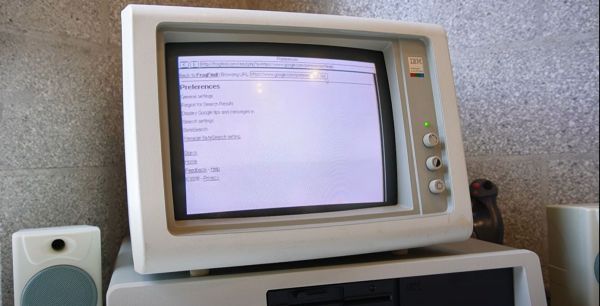
Do you ever sit at your 1981 vintage IBM PC and get the urge to pop onto that newfangled ‘WWW’ to stay up to date on all the goings-on in the world? Fret not, because [Al’s Geek Lab] has you covered with a new video (also embedded below), which you will unfortunately have to watch on a device that was made at the very least in the late 1990s. What makes this feat possible is a miniscule web browser called MicroWeb, created by [jhhoward], that will happily run on an 8088 CPU or compatible, without requiring any fiddling with EMS or similar RAM extensions.

Of course, you do need to have some kind of way to actually connect to the World Wide Web, which can be an ISA network expansion card, EtherSlip, as well as using a thin client as a network bridge with some Serial Line Interface Protocol (SLIP) action. Of course, some limitations exist, in that graphics and CSS are not rendered, JavaScript is totally off-limits, and for HTTPS-only websites a workaround like retro-proxy has to be used as TLS encryption would be completely unusable on a couple-of-MHz-CPU.

There’s also the FrogFind service, which will helpfully strip down a target website down to its barest HTML essentials, along with the 68K News site that strips down Google News, so that you can enjoy the WWW in its text-based glory as it would have looked in the early 1980s.

(Thanks to [Stephen Walters] for the tip)

Continue reading “Browsing The WWW On A 1980s IBM PC Using MicroWeb”

Perfect Dark: Recompiled

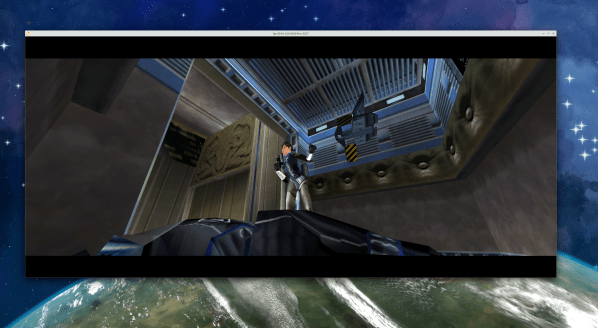
There’s an interesting renaissance of Nintendo 64 gaming, powered by the ability to decompile N64 ROMs back into C code using Ghidra. There are projects around multiple classic games, taking the Ghidra output and renaming the generic function and variable names. There are two approaches to these projects, sometimes happening in parallel. The first is to perfectly recreate the original work, and get a bit-perfect binary that matches the original ROM. The other approach is to fix bugs, optimize the code, and add new features, often porting to new platforms in the process. Right now, we’re seeing the latter happen with 2000’s Perfect Dark.

There is a project by [Ryan Dwyer] to produce a matching C codebase, and that project is functionally complete with an over 99% bit-perfect output. But as impressive as that is, we’re interested in making code even better, and that’s what [fgsfdsfgs] has accomplished with the Perfect Dark port.

The game now runs on Windows or Linux, has mouse support, and runs at a solid 60 frames per second (FPS) at multiple screen resolutions. Want an ultra-widescreen Perfect Dark experience? The upgraded rendering engine handles it wonderfully. Mods? No problem. In the future, the developer is also looking to support high-definition textures.

To play, you do have to provide your own legally sourced copy of the original Perfect Dark game. That is the only way this project is remotely legal, and we suspect that even then it’s in a somewhat grey zone, as a derivative work of a copyrighted game. Big N hasn’t shut the project down, but the Mario 64 port was killed for attempting the same thing. We’ll hope for the best, and enjoy the nostalgia trip in the meanwhile!

An Intel 8008 On A Single-Board Computer

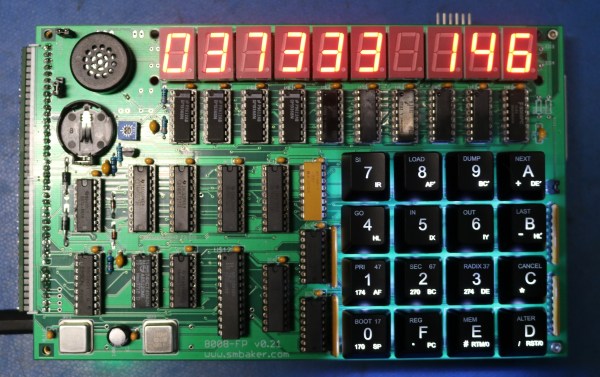
The last time we covered [Dr. Scott M. Baker], he made his Heathkit H8 run on a considerably older processor than it was made for. This time, apparently still not satisfied with the number of 8008 computers, he made an Intel 8008-based single-board computer.

The Mini-08, as [Scott] calls it, is based on his previous endeavour of downgrading the Heathkit H8. Its “CPU board” has even more memory than its predecessor at 128KiB RAM and ROM and an 8251 UART connected to a DB25 serial port. The entirely optional “display board” adds to that 10 digits of 7-segment displays, a backlit Cherry MX Blue hexadecimal keypad, a real-time clock and even a 4-voice sound generator!

[Scott] has also done an impressive job with the software, porting BASIC, FORTH, a clone of Star Trek and some utilities to his Mini-08. He demonstrates both BASIC and FORTH by printing “SCOTT WAS HERE” in a for loop and finishes off by showing how to use some of the display board with FORTH.

Like last time, he published design files and resources for you to enjoy. Overall, an interesting spin on the retro single-board computer concept.

Video after the break.

Continue reading “An Intel 8008 On A Single-Board Computer”

Saving Apollo By Decoding Core Rope

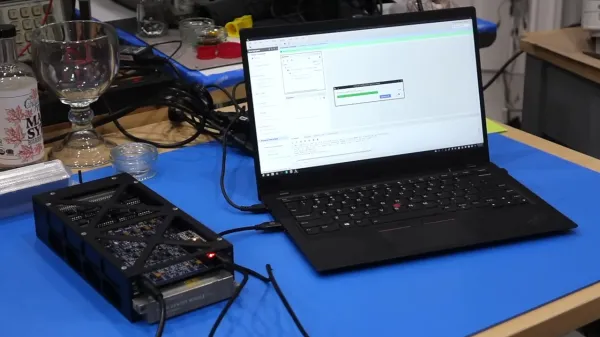
One of our favorite retro hardware enthusiasts, [CuriousMarc], is back with the outstanding tale of preserving Apollo Program software, and building a core rope reader from scratch to do it. We’ve talked about [Marc]’s previous efforts to get real Apollo hardware working again, and one of the by-products of this effort was recovering the contents of the read-only core rope memory modules that were part of that hardware.

The time finally came to hand the now-working Apollo guidance computer back to its owner, which left the team without any hardware to read core rope modules. But the archive of software from the program was still incomplete, and there were more modules to try to recover. So, the wizardly [Mike Stewart] just decided to roll up his sleeves and build his own reader. Which didn’t actually work as expected the first time.

And this leads us into one of [Marc]’s elevator music explainers, where he gives a beautiful rundown on how core rope works. And if you are thinking of core memory based on ferrite cores, get ready for a brain stretch, as core rope is quite a bit different, and is even more complicated to read. Which brings us to the bug in [Mike]’s reader, which is actually a bug in the block II design of the core rope modules.

Reading a byte off the module requires setting multiple inhibit wires to select an individual core. An innovation in block II allowed those inhibit wires to run at half current, but it turns out that didn’t actually work as intended, and partially selected multiple cores on the other half of the module. And [Mike] forget to re-implement that bug — the reader needs to literally be bug-for-bug compatible. A quick recompile of the FPGA code makes everything work again. And the conservation effort can continue. Stay tuned for more in the Apollo story!

Continue reading “Saving Apollo By Decoding Core Rope”

Learn Forth On The Commodore VIC-20

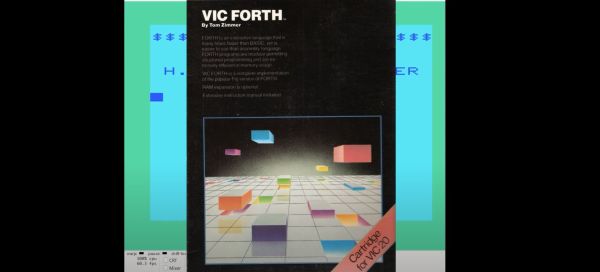
Although BASIC was most commonly used on home computers like the Commodore VIC-20, it was possible to write programs in other languages, such as Forth. Conveniently, all it took to set up a Forth development system was inserting the cartridge into the VIC-20 and powering it on, with the VIC-FORTH cartridge by [Tom Zimmer] being a popular choice for the Commodore VIC-20. In a recent video, the [My Developer Thoughts] YouTube channel covers Forth development using this cartridge.

In addition to the video tutorial, the original VIC-FORTH Instruction Manual is also available, together with the 1541 disk image. In an upcoming video, the Commodore 64 version of the cartridge will also be covered, which is called 64Forth, and which is also readily available to tinker with. For those interested in learning more about [Tom Zimmer] and his Forth-related work, a 2010 interview could be interesting. This covers the other platforms which he developed an implementation for.

As for why Forth might be interesting to developers and users, this comes mostly down to the much lower overhead of Forth compared to BASIC, while avoiding the pitfalls of ASM and resource-intensive nature of developing in C, as the entire Forth development system (compiler, editor, etc.) comfortably fits in the limited memory of the average 8-bit home computer.

(Thanks to [Stephen Walters] for the tip)

Continue reading “Learn Forth On The Commodore VIC-20”