My First Robot: A Simple Demo To Get Kids Excited About Robotics

revoltlab_balloon_popping_robot

[Will] from Revolt Lab needed a project to get the summer campers he supervises interested in electronics, but when your audience is 5 years old, your subject matter had better be simple, yet interesting enough to hold their attention at length. He settled on using a Lego NXT robot to keep their little minds engaged, because who doesn’t like robots?

He picked up a basic Lego NXT kit and paged through the manual. The first “example” robot looked pretty cool so he decided to give it a shot, though he still hadn’t figured out exactly what he would have the robot do. Inspiration struck, and he decided that he could take advantage of the NXT’s color sensor as well as its proximity sensor to construct a balloon hunting robot.

He constructed a “balloon corral” to keep the balloons in place and the kids out of his thumbtack-wielding robot’s reach. He let his creation loose, and as you can see in the video below, the robot hunts down the blue balloon and pops it, much to the children’s delight.

If you’re in the position to introduce a group of young kids to electronics, this balloon popping robot paired with some conductive Play Dough would make for a fun and educational afternoon workshop.

Continue reading “My First Robot: A Simple Demo To Get Kids Excited About Robotics”

Chumby Controlled Mechanum Wheel Robot

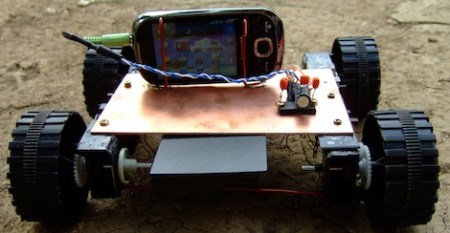
[Madox] gutted an Insignia Infocast to use with this robot. Insignia is Best Buy’s house brand and they partnered with Chumby to make their Infocast line. If you can find a used or clearance model it’s a great way to get yourself and embedded Linux board for a project like this one.

The body and wheels are 3D printed, with design files available at [Madox’s] Thingiverse page. The mechanum wheels work amazingly well, using seven bearings each for smooth operation. The body itself includes a holder for two groups of batteries. One of those battery packs powers the Chumby board while the other is used to power the four servo motors responsible for locomotion. To simplify the electronics [Madox] chose to use a USB servo drive which only set him back about $20.

We’re not sure what the USB dongle on top of the robot is used for. We’d guess it’s a WiFi adapter, since the machine sets up its own access point to act as a controller. But we thought Chumby boards had WiFi built-in. At any rate, check out the video after the break where you can see an Android phone driving the little bugger. There’s a flaw in the code that prevents side-to-side movement, it gets fixed after a video break at about 2:15 and everything is peachy after that.

Continue reading “Chumby Controlled Mechanum Wheel Robot”

[Easton’s] Animatronic Hand Gets 3D Printed Upgrade

[Easton] as been working with [Jeremy Blum] to come up with the newest version of his animatronic hand. You may remember seeing [Easton’s] first animatronic hand, with which he won his regional science fair and made a trip to nations. Since then he’s been working on improvements, and with access to [Jeremy’s] Makerbot he harnessed the power of open source design to make his own printed hand, extending a different Thingiverse project.

He’s still using the original sensor glove as a controller. It sends commands to the Arduino controlling the arm via an Xbee module. From there, five servos inside a fiberglass forearm move each finger and the thumb. The video clip after the break gives [Easton] a chance to show off all of the new design features, and finishes with a demonstration of the hand grasping different objects. We had a chance to chat with him briefly. He’s got big goals for himself, aiming to design a prosthetic arm for under $1000. That’s not a career goal… he’d like to get it done this year.

Continue reading “[Easton’s] Animatronic Hand Gets 3D Printed Upgrade”

shadeydaves_lawnbot

How Not To Build A Robotic Lawnmower

[shadeydave] wanted to build his own Lawnbot, but he had no idea where to start. He purchased some DIY plans online which looked like they would get the job done, but then he strayed from the path in a big way and spent gobs of money in the process.

In his Instructable writeup, he details each misstep he made, explaining why his choices were bad as well as how much each mistake cost him. It sounds like pretty much everything that could go wrong did go wrong, from spending money on unnecessary microcontrollers to choosing the wrong wheels. Our favorite part is where he mentions that he couldn’t figure out how to create a “kill switch” for the Lawnbot in the event that his transmitter loses contact with the speedy whirling death machine.

[shadeydave] is well aware of how poorly his build went, and primarily wrote it up as a cautionary tale to others out there who might decide to take on a similar project. He says that the Lawnbot works for the most part, but with his newfound wisdom he will be revising the bot, having learned from his mistakes.

We actually like to see this kind of writeup as they can be quite beneficial to someone trying to put together a similar project. So if you have some major flubs under your belt, don’t be shy about digging them out and letting us know. As Thomas Edison said, “I have not failed. I have just found 10,000 ways that won’t work.”

Continue reading to see a quick video tour of [shadeydave’s] mostly working Lawnbot.

Continue reading “How Not To Build A Robotic Lawnmower”

Kinect-controlled Delta Robot Has A Magnetic Personality

kinect_controlled_delta_robot

[Malte] is a loyal Hackaday reader and neurobiology PhD candidate with a keen interest in hobby robotics – definitely our kind of guy! He wrote in to share a project he has been working on in his spare time, a Kinect-controlled delta robot (Google translation).

Deltares, as it is called, is pretty straightforward as far as delta robots are concerned. It uses three servos to actuate the arms, which are controlled by an AVR micro running BASCOM. The AVR gets its coordinate data from his computer via a serial connection after it has been captured by the Kinect. [Malte] opted to use Microsoft’s official SDK for the project, processing the Kinect skeletal data using a small C# application he wrote.

The end result is pretty neat as you can see in the pair of videos below. In the first video, [Malte] uses Deltares as a plotter, drawing a crude face on a piece of paper with a marker. In the second, he commands Deltares with his right hand, using his left to activate the magnetic solenoid to pick up the steel spheres.

It looks pretty cool to us, and we’d love to see what sorts of things he puts together if he ever ends up making robotics his career rather than a hobby.

Continue reading “Kinect-controlled Delta Robot Has A Magnetic Personality”

Tree Climbing Bot Climbs Tree

To test his new skills with his Arduino, [Ben] decided that he would build a robot. With no particular need to fill other than the need to build something cool he chose to build himself a tree climbing robot. He designed the body of the robot in Google Sketchup before beginning the build. The body is made mainly from aluminium, with four motors for the gripping legs and one for the spine. [Ben] controlled the motors with the familiar L298 motor driver chip and measured their position and speed using some cleverly mounted potentiometers.  The robot can climb trees of varying diameter by using the speed of the motors driving the legs to determine when the tree has been gripped.

[Ben] was then kind enough to write up a full instructable describing the build, this project includes a bit of everything, from motor control and liner drives to tips on creating a robot frame; a good read for someone wanting to get into robotics. Also check out the video after the break to see the robot in action.

Continue reading “Tree Climbing Bot Climbs Tree”

Basic Animatronics Continued: Servo Actuated Mouth

[Chris] is at it again and this time he has put together a tutorial rounding off his animatronic face by actuating the mouth. His tutorial covers two different styles of robot mouth: an LCD mouth which dims to imply actuation and a servo articulated flap.

[Chris] covers all the aspects of each mouth type, from the basics of human mouth actuation to servo motor control. In this case the LCD mouth is not quite as impressive so it gets installed on a face mock up while the servo mouth goes on the face previously featured in his other tutorials. The entire setup is still controlled using a single PIC 18F452. The circuit diagrams and code for both types of mouth are all available on the site including videos of the actuated mouth and a gif of the LCD mouth in action.

Check out a video of the articulated mouth below throwing down some classic season 6 Jean-Luc. If you are interested in the other parts of the face we have covered [Chris]’s other tutorials on the eyebrows and the eyeballs. These are a great jumping point for your own animatronic face project and do a great  job of setting up all the know how you’d need to build your own emotional puppet.

Continue reading “Basic Animatronics Continued: Servo Actuated Mouth”