Is Your Device Actually USB 3.0, Or Is The Connector Just Blue?

Discount (or even grey market) electronics can be economical ways to get a job done, but one usually pays in other ways. [Majenko] ran into this when a need to capture some HDMI video output ended up with rather less than was expected.

Faced with two similar choices of discount HDMI capture device, [Majenko] opted for the fancier-looking USB 3.0 version over the cheaper USB 2.0 version, reasoning that the higher bandwidth available to a USB 3.0 version would avoiding the kind of compression necessary to shove high resolution HDMI video over a more limited USB 2.0 connection.

The device worked fine, but [Majenko] quickly noticed compression artifacts, and interrogating the “USB 3.0” device with lsusb -t revealed it was not running at the expected speeds. A peek at the connector itself revealed a sad truth: the device wasn’t USB 3.0 at all — it didn’t even have the right number of pins!

A normal USB 3.0 connector is blue inside, and has both sets of pins for backward compatibility (five in the rear, four in the front) like the one shown here.

A USB 3.0 connection requires five conductors, and the connectors are blue in color. Backward compatibility is typically provided by including four additional conductors, as shown in the image here. The connector on [Majenko]’s “USB 3.0” HDMI capture device clearly shows it is not USB 3.0, it’s just colored blue.

Most of us are willing to deal with the occasional glitch or dud in exchange for low prices, but when something isn’t (and never could be) what it is sold as, that’s something else. [Majenko] certainly knows that as well as anyone, having picked apart a defective power bank module to uncover a pretty serious flaw.

Talking To A Texas Instruments Calculator

Texas Instruments is a world-class semiconductors company, but unfortunately what they are best known for among the general public is dated consumer-grade calculators thanks to entrenched standardized testing. These testing standards are so entrenched, in fact, that TI has not had to update the hardware in these calculators since the early 90s. They still run their code on a Z80 microcontroller, but [Ben Heck] found himself in possession of one which has a modern ARM coprocessor in it and thus can run Python.

While he’s not sure exactly what implementation of Python the calculator is running, he did tear it apart to try and figure out as much as he could about what this machine is doing. The immediately noticeable difference is the ARM coprocessor that is not present in other graphing calculators. After some investigation of test points, [Ben] found that the Z80 and ARM chips are communicating with each other over twin serial lines using a very “janky” interface. Jankiness aside, eventually [Ben] was able to wire up a port to the side of the calculator which lets him use his computer to send Python commands to the device when it is in its Python programming mode.

While there are probably limited use cases for 1980s calculators to run Python programs, we can at least commend TI for attempting to modernize within its self-built standardized testing prison. Perhaps this is the starting point for someone else to figure out something more useful to put these machines to work with beyond the classroom too. We’ve already seen some TI-84s that have been modified to connect to the Internet, for example.

Thanks to [Nikša] for the tip!

Continue reading “Talking To A Texas Instruments Calculator”

Cheap Spot Welder Teardown

It used to be hard to dump enough electricity through two pieces of metal to meld them together. But a lithium-ion battery can do it. The question is, should it? [The Signal Path] takes a cheap battery-based spot welder apart to see what’s inside and tries to answer that question. You can see the teardown in the video below.

The cheap welder has some obvious safety problems so the first thing was to trim down some wires and also retinning some of the PCB traces to ensure they are the lowest possible resistance. Of course, the less resistance in the wiring, the more current is available for welding.

Continue reading “Cheap Spot Welder Teardown”

Mustool Scopemeter Review And Teardown

There was a time when calculators became so powerful it was hard to tell them from little computers. The same thing seems to be happening now with multimeters. They now often have large screens and basic oscilloscope functionality. The specs keep getting better. While early cheap scopemeters were often relatively low frequency, many are now claiming bandwidths that would have cost quite a bit a few decades ago. A case in point is the Mustool MDS8207 which [IMSAI Guy] reviews and does a teardown of in the videos you can see below. It claims a 40 MHz bandwidth with 200 megasamples per second on a single channel.

The only downside in the claimed specifications is that the sensitivity isn’t great given that the lowest setting is 500 mV per division. Then again for a meter that runs under $100, any scope function would seem to be a bonus. The meter does all the other things you expect a meter to do these days, such as reading voltage, frequency, capacitors, temperature, etc. The response time of the meter is relatively slow, but you can get used to that.

Continue reading “Mustool Scopemeter Review And Teardown”

Beautiful Engineering In This Laser Unit From A Tornado Jet Fighter

Those of use hailing from the UK may be quite familiar with the Royal Air Force’s Tornado fighter jet, which was designed to fight in a theoretical nuclear war, and served the country for over 40 years. This flying deathtrap (words of an actual serving RAF fighter pilot this scribe met a few years ago) was an extremely complex machine, with state-of-the-art tech for its era, but did apparently have a bit of a habit for bursting into flames occasionally when in the air!

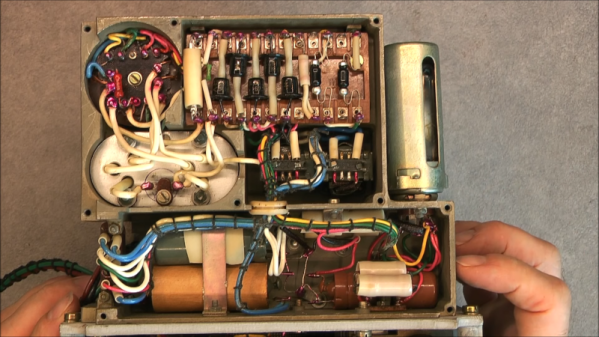
Anyway, the last fleet is now long retired and some of the tech inside it is starting to filter down into the public domain, as some parts can be bought on eBay of all places. [Mike] of mikeselectricstuff has been digging around inside the Tornado’s laser head unit,  which was part of the bomber’s laser-guided missile subsystem, and boy what a journey of mechanics and electronics this is!

Pulse-mode optically pumped YAG laser

This unit is largely dumb, with all the clever stuff happening deep in an avionics bay, but there is still plenty of older high-end tech on display. Using a xenon-discharge-tube pumped yttrium aluminum garnet (YAG) laser, operating in pulsed mode, the job of the unit is to illuminate the ground target with an IR spot, which the subsequently fired missiles will home on to.

Designed for ground-tracking, whilst the aircraft is operating at speed, the laser head has three degrees of moment, which likely is synchronized with the aircraft movement to keep the beam steady. The optical package is quite interesting, with the xenon tube and YAG rod swimming in a liquid cooling bath, inside a metal housing. The beam is bounced around inside the housing using many prisms, and gated with a Q-switch which allows the beam to build up in intensity, before be unleashed on the target. Also of note is the biggest photodiode we’ve ever seen — easily over an inch in diameter, split into four quadrants, enabling the sensor to resolve direction changes in the reflected IR spot and track its error. A separate photodiode receiver forms part of the time-of-flight optical range finder, which is also important information to have when targeting.

There are plenty of unusual 3-phase positioning motors, position sensors, and rate gyros in the mix, with the whole thing beautifully crafted and wired-up military spec. It is definitely an eye opener for what really was possible during the cold war years, even if such tech never quite filtered down to civilian applications.

We’ve seen a few bits about the Tornado before, like this over-engineered attitude indicator, and here’s the insides of an old aircraft QAR (Quick Access Recorder)

Continue reading “Beautiful Engineering In This Laser Unit From A Tornado Jet Fighter”

retro breadboard

Retro Breadboard Gives Up Its 1960s Secrets

When we see [Ken Shirriff] reverse engineering something, it tends to be on the microscopic level. His usual forte is looking at die photos of strange and obsolete chips and figuring out how they work. And while we love those efforts, it’s nice to see him in the macro world this time with a teardown and repair of a 1960s-era solderless breadboard system.

If you’d swear the “Elite 2 Circuit Design Test System” featured in [Ken]’s post looks familiar, it’s probably because you caught his partner-in-crime [CuriousMarc]’s video on the very same unit, an eBay score that arrived in non-working condition. The breadboard, which retailed for $1,300 in 1969 — an eye-watering $10,000 today — was clearly not aimed at the hobbyist market. Truth be told, we didn’t even know that solderless breadboards were a thing until the mid-70s, but live and learn. This unit has all the bells and whistles, including three variable power supplies, an array of switches, buttons, indicator lamps, and jacks for external connections, and a pulse generator as well as a legit function generator.

Legit, that would be, if it actually worked. [Ken]’s contribution to the repair was a thorough teardown of the device followed by reverse-engineering the design. Seeing how this thing was designed around the constraints of 1969 technology is a real treat; the metal can transistor and ICs and the neat and tidy PCB layout are worth the price of admission alone. And the fact that neon lamps and their drivers were cheaper and easier to use than LEDs says a lot about the state of the art at the time.

As for the necessary repairs, [Marc]’s video leaves off before getting there. That’s fine, we’re sure he’ll put [Ken]’s analysis to good use, and we always enjoy [Marc]’s video series anyway. The Apollo flight comms series was a great one, too. Continue reading “Retro Breadboard Gives Up Its 1960s Secrets”

Reflow Hotplate Teardown Uncovers The Bare Minimum

[EEforEveryone] is trying to find a good hot plate for reflow soldering. After trying one cheap unit, he got another one. He was a bit underwhelmed. The grounding was suspect and the bed wasn’t totally flat. He tore it apart and was surprised that there was very little inside. While the construction wasn’t perfect, it was better than the previous unit. You can see a video of the teardown and review below.

Before powering it up, the first order of business was to rewire the ground system. After that, it was time to try it. However, by confusing Fahrenheit and Centigrade, he set the temperature much higher than necessary which creating a little smoke. Fixing the temperature helped, but there was still a bit of a smoky smell that eventually subsided.

The verdict? The hot plate worked well enough, but you probably do want to check the ground wiring before using it. That’s often a good idea where cheap equipment is concerned, anyway. But the real takeaway is that it looks like you could homebrew something equivalent without much trouble. The controller is an off-the-shelf module. A switch and a plug aren’t hard to figure out. The heating element could be a silicone heater or PCB heater meant for a 3D printer.

Of course, there are other options. You could use a wok. Or why not a waffle iron? You can also make a custom PCB.

Continue reading “Reflow Hotplate Teardown Uncovers The Bare Minimum”