Adding Auto-off To A Cheap Multimeter

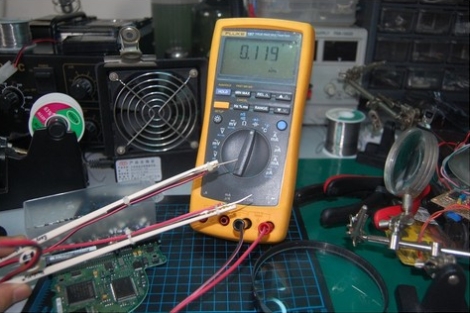
[Florin] picked up a cheap multimeter in order to make multiple measurements at one time. Unfortunately, he wasn’t very good at remembering to turn it off when he was finished so he burned through some batteries. Why an auto-off feature wasn’t the first thing coded into the firmware we’ll never know, but [Florin] developed his own hardware-based auto-off circuit.

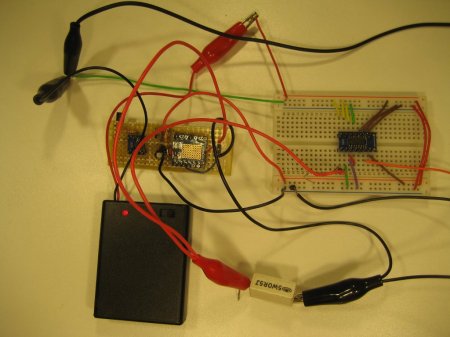
It sounds like he had all of the components necessary for this on hand already. He grabbed an AVR ATtiny25 in a surface mount package. To keep the board small, he didn’t include an ISP header, but instead made long pads that could have wires soldered to them for flashing the firmware. The microcontroller drives an NPN transistor that can cut off the ground path between the multimeter and its battery. A tactile switch is connected to one of the external interrupt pins and, when pressed, gives you 15 minutes of time to use the meter. After that, the chip kills the power and goes into sleep mode. Simple, and small enough to fit inside the case.

[via Dangerous Prototypes]

CircuitBee Makes Sharing Schematics And Circuit Diagrams Easy

circuit_bee_schematic_hosting

When looking for things to write about, there is nothing we like to see more than well-documented schematics and code available for download. In the case of schematics, we realize that they can be a bit of a pain to publish. Many times we see them in the form of blurry JPEGs or humungous PDF files, neither of which are incredibly convenient to use. The folks over at CircuitBee thought the same thing, and have been working diligently to make it easier for everyone to share their awesome ideas with the world.

Their free service requires registration, and not much else. Once you’re in, you are free to upload your Eagle or KiCAD circuit diagrams, which are then run through CircuitBee’s servers. They convert your drawings into embeddable objects which allow others to view your project without a lot of fuss. Their embeddable schematic window can be rendered in full screen mode, and gives users the ability to zoom in on any portion of the drawing to see the circuit’s finer details.

[Ben Delarre] from CircuitBee says that the product is in the alpha stages right now, so there are plenty of features and useful tools coming in the near future. If you like to build and share, it’s definitely something worth checking out!

[via Make]

[Thanks, Sanchoooo]

Component Storage Roundup

It’s been suggested that the first self-replicating computer virus was a single IC that eventually expanded into multiple plastic component storage boxes. Organizing components by their values is a huge PITA as well. Here’s some solutions we’ve found:

Photo Boxes

[Mathew] sent in his organization scheme that uses 4×6 photo boxes. Better get those boxes while they’re hot – we can’t remember the last time we used film.

Use a binder

This instructables uses binders for storage. Good for passives, but unless someone can find anti-static bags for a binder, we’ll keep our ICs separate.

The only way to organize resistors

[Johannes] stores his resistors on a sheet of styrofoam. The grid has the first color band on the left side and the second color band on the top. Extremely, extremely clever. We’re wondering why we Radio Shack didn’t come up with this in the 70s. The grid could be laid out on a log scale, though.

If Susan is lazy, why does she do all the work?

[D.C. Boyce] hacked up a couple of lazy susans, built frames out of 2x4s and mounted plastic component drawers on them. The result is probably more space than we’ll ever need. To keep things simple, he wrote a database program to keep track of everything.

Adding USB Connectivity To Old Benchtop Tools

frequency_counter_hacked_for_usb_connectivity

[Scott] was recently given a frequency counter, and once he brought it home, he started contemplating how he could possibly make it better. While the counter worked well as-is, he wanted to find a way to record data readings over a reasonably long period of time. He figured that interfacing it with his computer would be the best way to do this, but he had to find a way to connect the devices first.

He started poking around inside the frequency counter and stumbled upon a possible data source when taking a closer look at the display board. He found that he could read the frequency data as it was being written to the display, and send that data to his computer. He used an ATMega48 to intercept the data and code from the V-USB project to bit-bang the data to his PC over USB.

Now, anything he sees on the frequency counter can be easily collected and graphed on his computer with little fuss.

Stick around to see a quick video demonstration of his hack in action.

Continue reading “Adding USB Connectivity To Old Benchtop Tools”

Arduino Powered 2.4 GHz Spectrum Analyzer

[Fred] dropped a note in our tip line to let us know about arduino forum user [bilbo]’s latest project: A 3-in-one spectrum analyzer, oscilloscope, volt-meter combo. The build consists of an Arduino, radio board and Nokia 5110 LCD breakout board.  The (thin) video after the jump shows the rig in action. Though soldered to a full sized perf-board we can see later, smaller, battery powered versions prove useful in rooting out wayward bluetooth signals, or just finding that lost microwave oven. Although [bilbo] uses the same radio board as similar builds  his creation boasts several different display modes, as well as doubling as a volt meter and miniature-oscilloscope. There is no shortage of previous spectrum analyzer builds, but this one is the first one we have seen running on an Arduino.

Thanks for the tip [Fred]! If you feel like wedging some frequency scanning capabilities into your next project don’t forget to check out [bilbo]’s forum posts for source code!

Continue reading “Arduino Powered 2.4 GHz Spectrum Analyzer”

Resistor Substitution Box

[Vincent] on the EEVblog forums had an idea for an inexpensive resistor substitution decade box.

The build uses cheap decimal thumbwheel switches he bought on eBay. Each switch is wired up with resistors for each digit, and each switch is wired up in series. The result is a small, easy to read resistor box with a range of 1 Ω to 10 MΩ.

Continue reading “Resistor Substitution Box”

DIY Robot Remote Control

[Patrick] wanted a remote control to control some of the robots he’s built. He also wanted to get some data back from his robots, so an inexpensive off-the-shelf solution wouldn’t be up to the task. Like all good geeks, [Patrick] decided to build what he needed.

For analog control, [Patrick] decided to use a Wiimote nunchuck. This turned out to be a very good choice – the nunchuck has a 2-axis joystick and 3-axis accelerometer in one small, easy to interface package . The wireless radio is taken care of with an XBee module. For the microcontroller, custom “lcd backpack” was created that provides an I2C port for the nunchuck, inputs for the buttons and the single pot, and 2 serial ports for the FTDI and XBee.

Continue reading “DIY Robot Remote Control”