Wiping An IPhone (more Thoroughly)


You may be hoping to subsidize the purchase of an iPhone 3G with the sale of your old one, but since you should wipe all your personal data from the old one first, we brought you [Rich Mogull]’s method for wiping all your private data off of an iPhone. The method, which involves overwriting your data with music, is slightly flawed, mainly because of live files that can’t be deleted while the phone’s OS is working and because the OS reserves a portion of the hard drive as unwritable space, which will make it impossible to completely fill it with music.

For those looking to annihilate every scrap of personal information, check out [Jonathan Zdziarski]’s method. It involves restoring the phone as a new phone, then jailbreaking it. Once the user has shell access, umount is used to force the two mount points into read-only mode. Now the partitions can be overwritten with /dev/zero, which should wipe them clean. The phone should then be forced into recovery mode to perform another full system restore, and the process is complete. As [Zdziarski] notes, several iterations of the process with /dev/random should prevent even NAND recovery, but there is an even better way of ensuring full data destruction: “simply take a sledgehammer to the device.” If you are unfamiliar with the command line though, chances are [Rich Mogull]’s method will be easier for you to handle, but don’t blame us if you sell your phone and the Feds get wise to the evidence you left on it.

[via Engadget]

New Vs. Old IPhone Apps


You’ve probably never heard of this obscure new device called the iPhone 3G from no-name manufacturer Apple, but we decided to give a rundown of some of its newest apps anyway. We’ll be comparing them to non-SDK third-party apps that only work on jailbroken iPhones.

Continue reading “New Vs. Old IPhone Apps”

Hackit: What To Do With A 1st Gen IPhone?


There’s a new iPhone 3G coming out in July. If that statement shocks you, you might want to check your connection. We love new shiny hardware, but what we’re really interested in is the number of “old” iPhones that are going to be hitting the market. Many people will be ditching their 1st generation iPhones just to get GPS and 3G. This abundance plus the new $200 price tag is bound to depress the price for used phones.

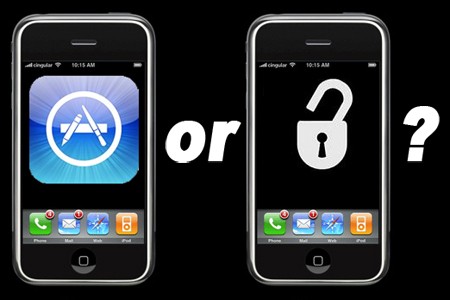
A used 1st generation iPhone is actually a pretty attractive device. It’s already been laid wide open by hackers so you can run pretty much anything you want on it instead of waiting for the App Store to tell you what you can and can’t do. You could use it as a WiFi Voip phone, a simple web pad, run an NES emulator, use it as a musical instrument, or build an army of robots.

What will you do when the price of used iPhones bottoms out?

Erase An IPhone Properly


A fundamental problem with flash memory has just gone mainstream. A detective successfully recovered data from a refurbished iPhone purchased from Apple. Flash memory controllers write to blocks randomly so using standard secure erase techniques are no guarantee that all of the storage space will be written.

[Rich Mogull] has posted a method that should wipe out almost all remnants of your personal data. You start by restoring the iPhone in iTunes and turning off all the syncing options. Next you create 3 playlists large enough to consume all of the phone’s storage space. Sync each playlist in turn and your residual personal data should be obliterated. All that’s left to do is sit back and wonder when the first article about the MacBook Air SSD being impossible to securely erase will be published…

Upgrade Your In-ear Headphones


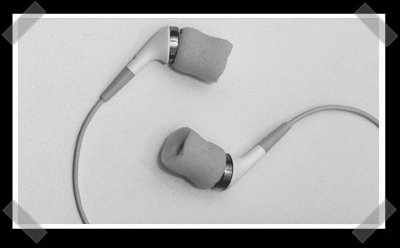
I’m a fan of my Etymotic er6i (which have mysteriously vanished…) headphones, so this simple hack caught my eye. [James C] sent in this simple method of upgrading the more affordable apple in ear headphones. The idea is simple, use a small hole punch to cut out the center of some cheap foam earplugs. Then replace the soft surrounds on the headphones with them. I’m guessing that this trick would work for quite a few in ear headphones that I’ve seen lately.

Investigating The Leopard Firewall


Our friend [Rich Mogull] has been flipping the switches on Leopard’s new firewall and scanning it to see what’s actually going on. There is some good and some bad. The new application signing is a mixed bag. It breaks Skype and a commenter pointed out that automatically trusting Apple installed apps like NetCat isn’t a good idea either. You can roll your own firewall using user friendly tools like WaterRoof since ipfw is still included.

IPhone Eve’ Extra


The guys at I-hacked put up a how-to on giving your windows mobile phone some iPhone skinned powers, but later in the day they decided to make it login required. Thanks to [Katrina] for the tip. (requiring logins for contributed content just doesn’t sit well with me.)

[chris] sent in his own round up of his personal projects.

[Chris Coleman] let me know about hacktherazr. They’ve got some decent guides on customizing just about everything on the things.

[Ben Heck] got sick of emails, so he’s offering to build one more xbox 360 laptop, if you give him a pile of money.

Staring sunday, I’ll be ripping the hell out of my new house (and re-doing most of the upstairs). Do me a favor and keep the tips line brimming over.

[David] has some interesting ideas involving wireless AP antennas and wireless keyboards. How about a cantenna…