Automate Repetitive PC Actions With A Foot Pedal

foot_pedal

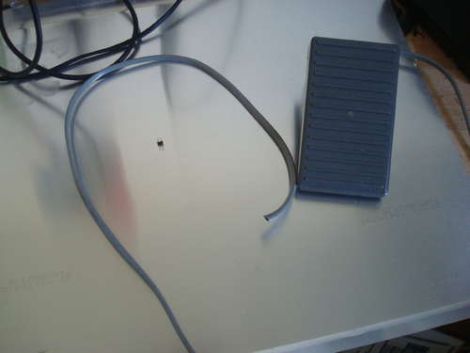
Instructables user [bkovac] was sick of clicking the terminal icon on his desktop whenever he wanted to launch a terminal window. Keyboard shortcuts aside, he figured the easiest way to take the tedium out of the process would be to launch terminal windows with a foot pedal.

He grabbed a pedal that he had sitting around in his workshop and took it apart to ensure the switch contacts were configured for his particular use. The wires were run to an Arduino which talks to the computer over serial using a Python script.

While the setup works just fine, it’s definitely not the most efficient or simplest way of getting the job done. In fact, we have seen other methods that are quite a bit simpler, though they lack the potential versatility of this particular modification.

Rather than simply loading a terminal window on his computer, we would love to see this pedal enhanced to perform multiple functions – at which point the Arduino would be a pretty decent choice. We would probably start out by swapping out the full-sized Arduino for a Teensy, mounting it inside the pedal. Multiple foot presses could be used to trigger different events, based upon the number of presses that occur within a given time period. It could be made even more useful by using it to trigger gesture-based events, similar to those seen in plug-ins for Chrome and Firefox.

How would you enhance [bkovac’s] pedal interface? Let us know in the comments.

Real-time Robotic Arm Control With Blender

robotic_arm

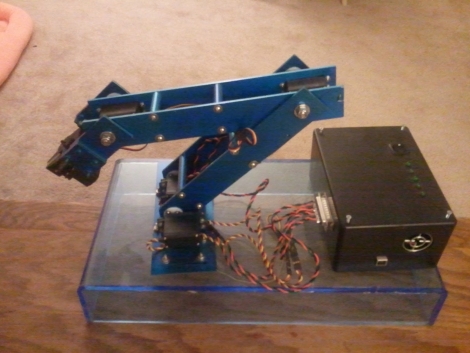
Last year, [Justin Dailey] was coming down the home stretch of his senior year as a Computer Engineering student and needed to build a final design project. He always wanted to construct a robotic arm, and figured that there was no better way to legitimize such a project, than to claim that it was “homework”.

While he originally wanted to control the arm with a joystick, he had been messing with Blender quite a bit leading up to his final project, and thought it would be pretty cool to let Blender do the work. He started out by testing his ability to control a single servo with Blender, then slowly increased the complexity of the project. He prototyped the arm using cardboard, and satisfied with his progress thus far, began constructing the arm out of aluminum.

Once he had all six of his servos attached to the arm’s joints and wired to his Roboduino, he got busy constructing a 3D model in Blender. Using a few Python scripts, the movements inside Blender are translated to serial data in real-time, which is relayed to the Roboduino in order to control the arm.

Check out his site if you get a chance – there’s plenty of code to be had, as well as several videos of the arm in various stages of construction and testing.

Large Remote-controlled Game Of Life Display

game_of_life

Sometimes it’s just plain fun to over-engineer. [Stephanie] gets a warm fuzzy feeling when she successfully adds way more electronics components to a project than she really needs – just because she can. We can’t really argue with her if that is the intended goal, nor can we find fault with the sweet Game of Life display she put together.

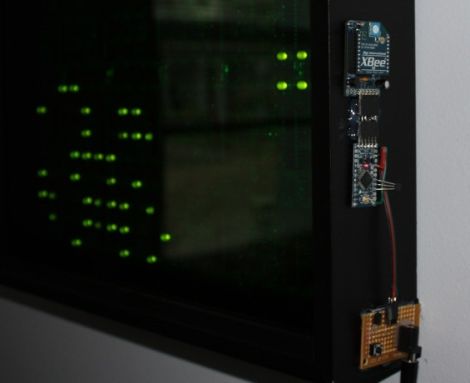
She started off with six Game of Life kits from Adafruit, but she quickly caught the LED bug and her collection grew until she had 20 kits (that’s 320 LEDs for those of you keeping count). After piecing them all together, they were mounted in a wooden frame and placed behind a dark piece of acrylic. It looked great and worked just fine, but it wasn’t overdone enough for her tastes.

In the end, she added a small Arduino and Xbee module to the Game of Life display, which enables it to be controlled by her network-enabled thermostat we featured a few weeks back. The thermostat was fitted with an Xbee unit as well, which allows it to turn the Game of Life on and off at whatever times [Stephanie] specifies.

We’ll take two please.

[via Adafruit Blog]

rc_car

Racing Wheel Guided R/C Car With Video Feed

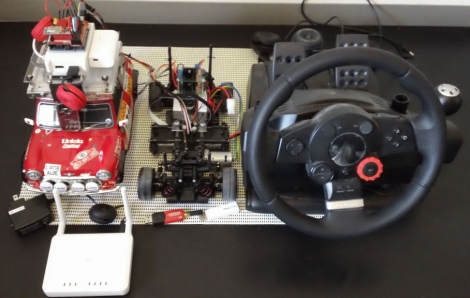
Instructables user [Kaeru no Ojisan] enjoys constructing R/C kit cars and wanted to build one that could be driven using a PC racing wheel he had on hand. Not satisfied with simply guiding it with the racing wheel, he added a web cam to the car so that he can monitor its location from the comfort of his desk chair.

The car is loaded down with all sorts of electronics to get the job done, requiring four separate battery packs to keep them online. An Arduino controls the motor and the steering servos, receiving its commands wirelessly via a Bluetooth add-on. The camera connects to a USB to Ethernet converter, which enables the car’s video feed to be transmitted via the onboard wireless router.

The racing wheel interface seems to work just fine, though we don’t doubt that the whole setup can be easily simplified, reducing both weight and battery count. While [Kaeru no Ojisan] says that the car is in its concept stages and there are a few bugs to work out, we think it’s a good start.

Stick around to see a quick video of the car in testing.

Continue reading “Racing Wheel Guided R/C Car With Video Feed”

Real-time Digital Puppetry

digital_puppet_show

If it sometimes seems that there is only a finite amount of things you can do with your kids, have you ever considered making movies? We don’t mean taking home videos – we’re talking about making actual movies where your kids can orchestrate the action and be the indirect stars of the show.

Maker [Friedrich Kirchner] has been working on an application called MovieSandbox, which is an open-source realtime animation tool. A couple of years in the making, the project is cross-platform compatible on both Windows and Apple computers (with Linux in the works), making it accessible to just about everyone.

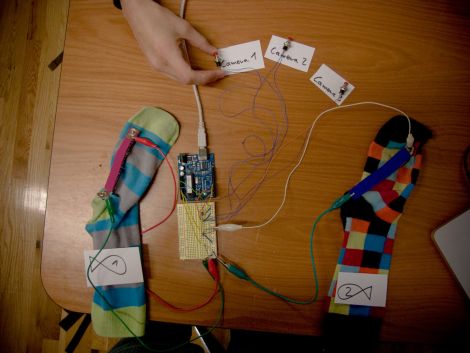
His most recent example of the software’s power is a simple digital puppet show, which is sure to please young and old alike. Using sock puppets fitted with special flex sensors, he is able to control his on-screen cartoon characters by simply moving his puppets’ “mouths”. An Arduino is used to pass the sensor data to his software, while also allowing him to dynamically switch camera angles with a series of buttons.

Obviously something like this requires a bit of configuration in advance, but given a bit of time we imagine it would be pretty easy to set up a digital puppet stage that will keep your kids happily occupied for hours on end.

Continue reading to see a quick video of his sock puppet theater in action.

[via Make]

Continue reading “Real-time Digital Puppetry”

The Start To Finish Of An Interactive Exhibit

[Andrew & Deborah O’Malley] were tapped to created an interactive exhibit. The mission was to show that social problems take continual support from a lot of people before they can be solved. The piece needed to be architectural in nature, and they ended up building this touch-sensitive model building with individually lighted windows.

The project log that the [O’Malleys] posted shows a well executed battle plan. They used tools we’re all familiar with to achieve a highly polished and pleasing result. The planning stages involved a virtual mock-up using Google SketchUp. The details needed to order the shell from a fabricator were pulled from this early work, while the team set their sights on the electronics that shed light and that make the piece interactive. The former is provided by a Shiftbrite module for each window, the latter comes from the Capacitive Sensing Library for Arduino. Despite some difficulty in tuning the capacitive grid, and getting all of those Shiftbrites to talk to each other, the exhibit went swimmingly. It’s not hard to imagine how easy it is to start a conversation once attendees are attracted by the seductive powers of touch sensitive blinky lights.

The Concepts Behind Robotic Maze Solving

[Patrick McCabe’s] latest offering is a well-built maze-solving bot. This take on the competitive past-time is a little more approachable for your common mortal than the micro-bot speed maze solving we’ve seen. Don’t miss seeing the methodical process play out in the clips below the fold.

The playing field that [Patrick’s] robot is navigating is made up of a electrical-tape track on a white background. The two-inch tall double-decker bot is every economical. It uses an RBBB Arduino board to read an optical reflectance sensor array made by Pololu, then it drives a couple of geared motors using an L293D h-bridge breakout board. But we already know that [Patrick’s] a talented robot builder, this time around we’re happy to see his in-depth discussion of how to program a robot to solve a maze. In it he covers all of the different situations your robot might face and how to deal with them. Once you’ve dug through all of the concepts, dust off that bot you’ve got lying in the corner and start writing some new firmware.

Continue reading “The Concepts Behind Robotic Maze Solving”