The Maths Behind A Chord Recognition Engine

A key part of any tertiary musical education is learning about all the wonderful (and less wonderful) types of chords out there. Typically this involves a great deal of exercises involving the identification of a given chord from its component notes. But how would you do this programmatically? Well, thankfully, the developers behind the WhatChord tool are happy to explain just how it’s done.

The problem with classifying chords is that the way musicians use them and construct them can be quite varied. Names can also be applied somewhat differently depending on the musical context of a given set of notes. To suit the musical reality of real players and composers, WhatChord uses a specially-developed scoring algorithm to try and nut out what a chord is actually supposed to be.

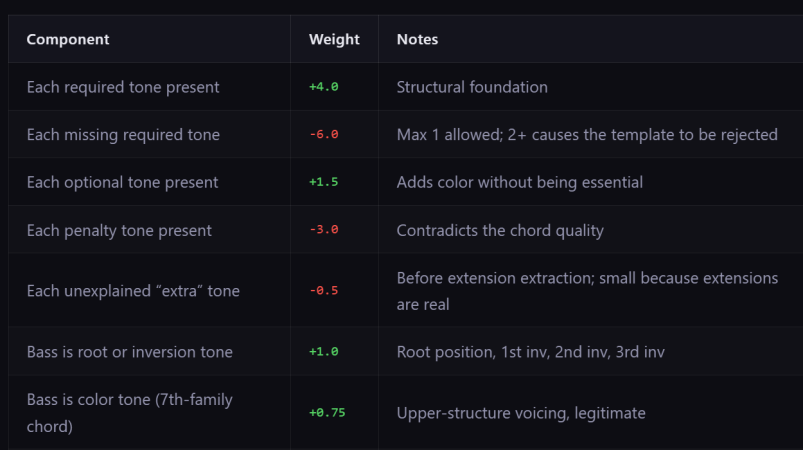
As an example, a major chord must require a root note and a major third interval. It can optionally include a perfect fifth. However, if there is a minor third, minor seventh, or major seventh present, then you’re almost certainly not looking at a simple major chord. WhatChord takes these things into account by weighting the different tones present and seeing which chord gets the highest score. The required notes add weight, while notes that shouldn’t be there add a penalty to the score. Then there are extra penalties for ambiguous “unexplained” tones, extensions, and a few other parameters to disambiguate edge cases.

If you’d like to see how it works in practice, you can check out the WhatChord app and see how good it is for yourself. Alternatively, explore some of the other chord-focused projects we’ve featured over the years, or send your best musical projects into the tipsline.

[Thanks to baschwar for the tip!]
Compose Any Song With Twelve Buttons

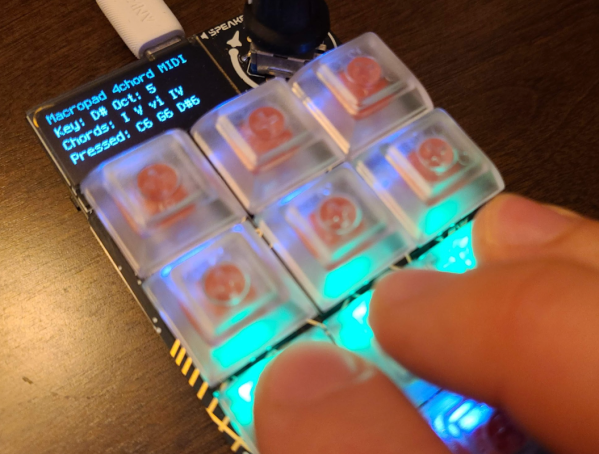
Limitations placed on any creative process often paradoxically create an environment in which creativity flourishes. A simple overview of modern pop, rock, or country music illustrates this principle quite readily. A bulk of these songs are built around a very small subset of music theory, often varying no more than the key or the lyrics. Somehow, almost all modern popular music exists within this tiny realm. [DeckerEgo] may have had this idea in mind when he created this tiny MIDI device which allows the creation of complex musical scores using a keyboard with only 12 buttons.

The instrument is based around the Adafruit MacroPad, which is itself built on the RP2040 chip. As a MIDI device, it needs to be connected to a computer running software which can support MIDI instruments, but once its assembled and given its firmware, it’s ready to rock. A musician can select one of any number of musical scales to operate within, and the 12 keys on the pad are mapped to the 12 chromatic notes within that scale. It can also be used to generate drum tracks or other backing tracks to loop before being used to create melodies as well.

[DeckerEgo] took a bit of inspiration from an even simpler macro pad we featured before which is based around the idea that a shockingly high number of songs use the same four chords. His macro pad includes creation of chord progressions as well, but expands on that idea to make more complete compositions possible. And, for those looking to build their own or expand on this project, he has also made all of the source code available on his GitHub page.

Continue reading “Compose Any Song With Twelve Buttons”

Bottle Organ Breakdown

A keen-eyed commenter pointed us to a homemade bottle organ that plays like a piano. The complexity gets turned up with foot-powered bellows and custom keys, but the magic of [Mike] and [Simon Haisell]’s garage-built instrument is not lost in the slightest. We also have the video below the break and there is a bottle organ performance by [Coyote Merlot].

The working concepts are explained well in the video, and that starts with the bellows. In the first few seconds of the video, we see an organist swaying as he plays, and it would be accurate to say the music moves him. The wobbling is to pedal a couple of levers that squeeze a pair of air sacs and slide under wheels that look like a hardware store purchase. The spring-return mechanism is a repurposed bungee cord and you know we dig that kind of resourcefulness. Each bellow valve is made with traditional leather flaps of the type that predate bungee cords and camera phones. These air pumps inflate a big reservoir in the back that provides continuous pressure to a manifold where each of the thirty-six keys control a valve responsible for one bottle. The pair built every wooden part we mentioned with the explicit purpose of creating this organ.

Continue reading “Bottle Organ Breakdown”

Tiptoe Through The Tulips In No Time With Ukule-LED

Take it from someone who has played at the guitar for over 20 years: reading sheet music can be a big stumbling block to musical enjoyment. Playing by ear is somewhat unreliable, tablature only works well if you’re already familiar with the tune and tempo, and pulling melody from chord charts is like weaving fiction from the dictionary. A lot can be said for knowing basic chord formations, but it can be difficult get your fingers to mimic what you see on the page, the screen, or someone else’s fretboard. Enter Ukule-LED, a learning tool and all-around cool project by [Raghav and Jeff] at Cornell.

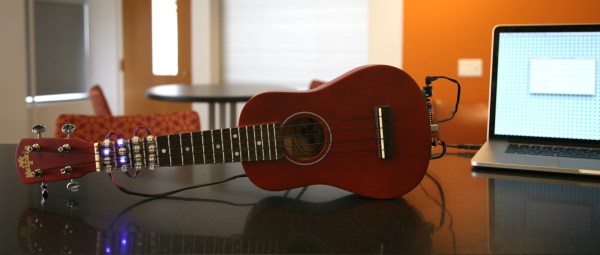
Ukule-LED uses 16 NeoPixels across the first four positions of the fretboard to teach chord positions. All 16 NeoPixels are connected in series to a single pin on an ATMega1284P, which sits on a board mounted to the bottom of the uke along with power and serial. [Raghav and Jeff] set the NeoPixels below the surface so as not to interrupt playability. The uke can operate in either of two modes, ‘play’, and ‘practice’. In ‘play’ mode, the user feeds it a text file representing a song’s chords, tempo, and time signature. The LEDs show the chord changes in real-time, like a karaoke teleprompter for fingers. In ‘practice’ mode, the user enters a chord through the CLI, and the lights hold steady until they get a new assignment. Knowing which fingers to use where is up to the user.

To add another layer of learning, major chords alight in green, minor chords in red, and 7th chords in blue. These are the currently supported chord types, but the project was built with open, highly extendable Python sorcery available for download and subsequent tinkering. Go on tour after the break.

Continue reading “Tiptoe Through The Tulips In No Time With Ukule-LED”

Guitar Teaches You To Play Using LEDs

guitarduino

[Andrew] is an electrical engineering student at UIC, and decided that he would build a MIDI guitar for his senior design project. After tinkering for awhile, things were not looking good, and the MIDI guitar idea was scrapped. With his deadline creeping up, he came up with a new idea, the Guitarduino. His new project is a guitar that teaches you how to play chords and scales by showing you the proper notes to play via LEDs embedded in the guitar’s neck.

He removed the neck, and carefully drilled the holes that would eventually house his 130+ LEDs. The LEDs were wired to his Arduino via some multiplexing circuitry that resides on the back of the guitar’s body. The Arduino was mounted on the front of the guitar along with a shield used for communicating with his LED array. He built another shield that serves as the LCD display as well as the input board for his guitar.

The final result of all his work is fantastic. The user simply needs to dial in the chord or scale that he wants to learn, and the guitar lights up, showing the proper finger positions on the fretboard. We could see this coming in quite handy for anyone just starting to learn how to play.

Check out the video below to see a demonstration and walkthrough [Andrew] put together highlighting his guitar’s features.

Continue reading “Guitar Teaches You To Play Using LEDs”