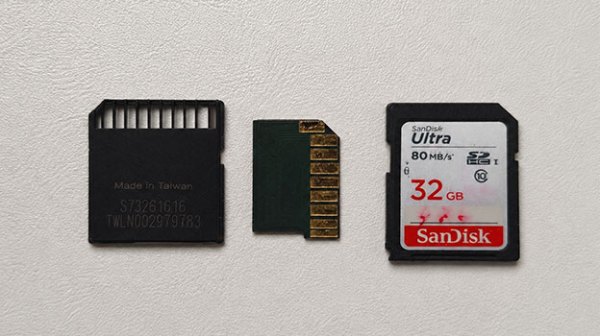
Reviving An SD Card With Shorted Capacitors

A nice thing about SD cards is that even in their non-micro format they are conveniently small. This is however a bit of a problem when an SD card stops working, as they are not exactly designed to be easy to service, or to recover data from. There is however a very good chance that the Flash memory and controller are still fine, and it’s actually one of the passives on the tiny PCB that failed, as with the 32 GB SD card that [Yevgeniy Kapishon] recently diagnosed and recovered data from for a customer.
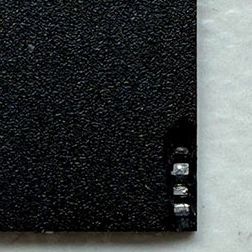
Tiny capacitors in an SD card package. (Credit: Aeson Labs)

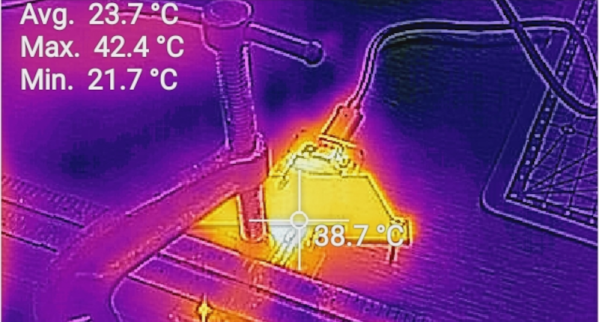
A big hint during initial diagnostics was a clear short between the supply rail and ground, but as became clear when taking the SD card apart, this one was built as a monolithic package, without exposed components on a PCB as in older SD cards. Correspondingly an X-ray machine and thermal camera were used to figure out what was inside the package, and where the short was located.

By combining the hot spot image with the X-ray it was determined that the problem was with some passives near the edge of the package. Some careful material removal later two miniscule capacitors were found to be the culprit and gently removed. With this the short on the power rail vanished, and the SD card started working again.

Having a shorted MLCC or similar passive component is a very common failure mode in general which can cripple even the most expensive device. Even if SD cards still aren’t really repairable, it’s at least reassuring to know that in many cases the data is fairly easy to recover once you have identified and removed the offending part.

Recovering A Physically Broken SD Card

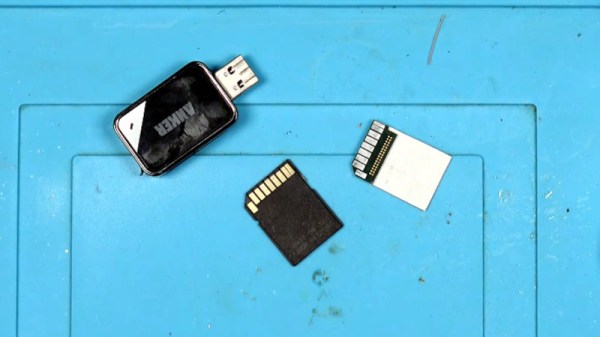
There is much to be found online about recovering data from corrupt SD cards, but [StezStix Mix] had an entirely different problem with his card. He’d filmed an important video to it, then dropped it and ran his office chair over it, snapping it almost in half. He’s put up a couple of videos showing how he recovered the data, and we’ve put them below the break.

A modern SD card is mostly just plastic, as in the decades since the format was created, the size of the circuitry on it has decreased dramatically. So his stroke of luck was that the card circuitry was a tiny PCB little bigger than the contact pad area on a full size SD card. There was a problem though, it wouldn’t be easy to fit in an SD card socket. So in the first video he goes through physically wiring it to a USB card reader, which results in reading the data after a false start in remembering that an SD card activates a switch.

This however is not the end of the story, because he had viewers asking why he didn’t simply attach an SD card shaped bit of cardboard. So the second video below goes through this, trying both card, and an SD to micro SD adapter. We find that making something to fit an SD socket is a lot less easy than it looks, but eventually he manages it.

Meanwhile those of you with long memories may recall this isn’t the first SD surgery we’ve brought you.

Continue reading “Recovering A Physically Broken SD Card”

Preserving Floppy Disks

Time is almost up for magnetic storage from the 80s and 90s. Various physical limitations in storage methods from this era are conspiring to slowly degrade the data stored on things like tape, floppy disks, and hard disk drives, and after several decades data may not be recoverable anymore. It’s always worth trying to back it up, though, especially if you have something on your hands like critical evidence or court records on a nearly 50-year-old floppy disk last written to in 1993 using a DEC PDP-11.

This project all started when an investigation unit in Maryland approached the Bloop Museum with a request to use their antique computer resources to decode the information on a 5.25″ floppy disk. Even finding a floppy disk drive of this size is a difficult task, but this was further compounded not just by the age of the disk but that the data wasn’t encoded in the expected format. Using a GreaseWeazle controlled by a Raspberry Pi, they generated an audio file from the data on the disk to capture all available data, and then used that to work backwards to get to the usable information.

After some more trials with converting the analog information to digital and a clue that the data on the disk was not fragmented, they realized they were looking at data from a digital stenography machine and were finally able to decode it into something useful. Of course, stenography machines are dark magic in their own right so just getting this record still requires a stenographer to make much sense out of it.

Data Recovery In The Woodshed

A 1TB drive fails. How do you recover the data? If you are like us, you imagine a high-tech lab with serious-looking technicians and engineers. [John Graham-Cumming] managed it in his woodworking shop. Granted, it was a solid-state drive, so a clean room wasn’t necessary, but we still found it an unexpected story.

[John’s] gaming rig had two Seagate Firecuda 530 SSDs and decided not to boot. A quick analysis found one of the drives failed — it happens. However, the drive showed some signs of life after cooling off. A 30-minute trip to the freezer made the drive work again until it got warm again.

Continue reading “Data Recovery In The Woodshed”

When The Professionals Trash Your Data Tape, Can It Still Be Recovered?

People trying to preserve digital artifacts held on old media often not only have to contend with the media themselves decaying, but also with obscure media formats for which there’s seemingly little chance of finding a working reader. [Kneesnap] had this problem with a tape containing the only known copy of all the assets for the game Frogger 2: Swampy’s Revenge, and the tale of how the data was recovered is a dive into both the shady side of the data recovery industry and some clever old-format hacking.

The tape was an Onstream cartridge, a short-lived format from a company whose first product hit the market at the end of the ’90s and who went bust in 2004. An old drive was found, but it proved to have a pinch roller melted with age, so in desperation the tape was sent to a data recovery company.

We admire the forbearance in not naming and shaming the data recovery company, because far from recovering the data they sent it back with the tape damaged and spliced — something you can do with an analogue tape but not a digital one without compromising the data. Then faced with an unrecoverable tape and a slightly different Onstream cartridge, how could anything be salvaged?

The answer came in overriding the drive’s sensors and initializing it with a known-good tape, then swapping out the tapes so that the drive, unaware anything had changed, could read whatever data it could find. In the event the vast majority of the archive was retrieved, making it a win for the preservation of that game.

This may be more involved than some recovery stories, but it’s not the first we’ve covered.

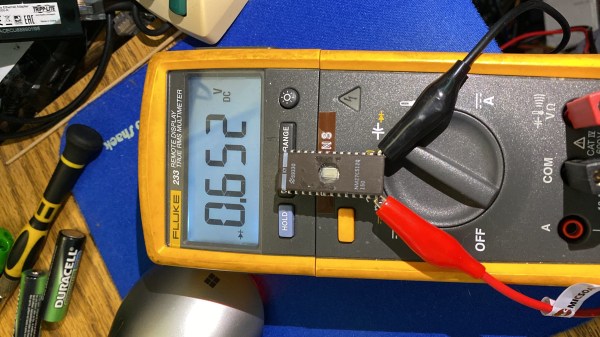
A multimeter connected to the EEPROM chip with crocodile clips, showing that there's a 0.652V diode drop between GND and one of the IO pins

Dead EPROM Dumped With Help Of Body Diodes

[Jason P], evidently an enjoyer of old reliable laser printing tech, spilled a drink (nitter) onto his Panasonic KX-P5400 SideWriter. After cleanup, everything worked fine — except that the PSU’s 5 V became 6.5 V during the accident, and the EPROM with LocalTalk interface firmware died, connection between VCC and GND seemingly interrupted inside the chip. Understandably, [Jason] went on Twitter, admitted the error of his ways, and sheepishly asked around for EPROM dumps.

Instead, [Manawyrm] wondered — would the chip have anti-ESD body diodes from GND to IO pins, by any chance? A diode mode multimeter check confirmed, yes! It was time for an outlandish attempt to recover the firmware. [Manawyrm] proposed that [Jason] connect all output pins but one to 5 V, powering the EPROM through the internal VCC-connected body diodes – reading the contents one bit at a time and then, combining eight dumps into a single image.

After preparing a TL866 setup, one hour of work and some PHP scripting later, the operation was a success. Apparently, in certain kinds of cases, dead ROM chips might still tell their tales! It’s not quite clear what happened here. The bond wires looked fine, so who knows where the connection got interrupted – but we can’t deny the success of the recovery operation! Need a primer on dumping EPROMs that are not dead? Here you go.

Continue reading “Dead EPROM Dumped With Help Of Body Diodes”

An EMMC Gives Up Its Secrets

An increasing phenomenon over the years since mobile phones morphed from simply telephones into general purpose pocket computers has been that of the dead device taking with it some treasured digital resource. In most cases this means the device has died, but doesn’t necessarily mean that that the data has completely gone. Inside the device will be an eMMC flash chip, and if that can be read then the data is safe. This applies to some single board computers too, and thus [Jeffmakes]’ adventures in recovering an eMMC from a dead Raspberry Pi CM4 are particularly interesting.

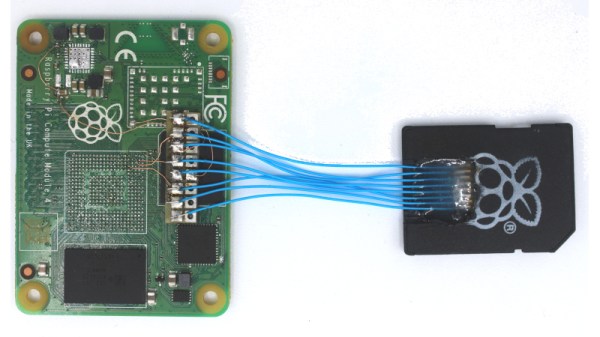
The whole thing relies on the eMMC presenting the same interface as an SD card, so while it comes in a multi-pin BGA package it can be addressed with surprisingly few wires. Using the PCB from another dead CM4 he traced the relevant connections from eMMC to SoC pads, and was thus able with some very fine soldering to construct an interface for an SD card reader. The disk could then be imaged in its entirety.

This work will be of huge use to experimenters who’ve fried their Compute Modules, but of course the information it contains will also be of use to retrieve those photos from the phone that fell in the bath. It’s not the first time we’ve taken a look at someone’s efforts in this area.