Raspberry Pi Case Roundup

raspberry-pi-case-roundup

If you haven’t heard of it yet, the [Raspberry Pi] is all the rage on [HAD] these days, so why not a round up of some of the excellent cases available?

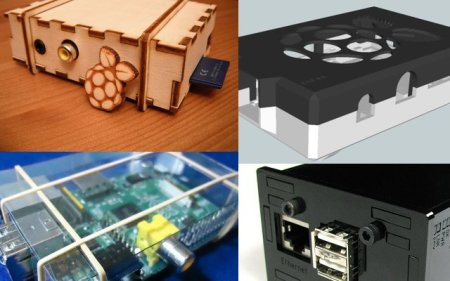
[Nhslzt] wrote in to tell us about his laser cut Bramble Pi finger jointed case.  These are available for only 12 Euros, or roughly $14.95 in the US. Sure, the exchange rate may not be in America’s favor these days, but it’s cheaper than a trip to Dresden, Germany where some of the profits from this are to go towards setting up a makerspace there!

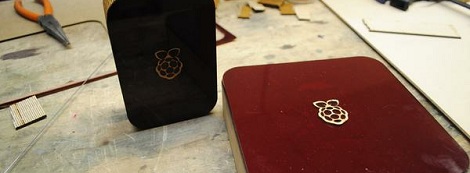
If you’re feeling more into the additive 3D printing DIY process, why not just download one and make it on your printer? [Thingiverse] has an excellent selection of cases many featuring, as you may have guessed, a picture of a Raspberry on the top!  (Here’s the printed case pictured).

Finally for something more colorful (see the pic after the break), you can’t get much better than the [Pibow]. If you’re looking for something colorful, and very solid (as described) this may be the case for you! You can order one here or use the unique design to inspire your own case (Thx Brian!).

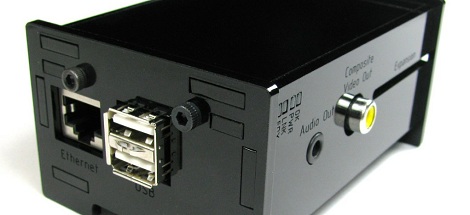
As for stuff that we’ve already written about at HAD, this case looks quite slick made out of black acrylic, as does this one, combining the use of a laser cutter and 3D printer. Of course, if you’re going for the strictly utilitarian model, you can always go with one held together with rubber bands and tape!

Continue reading “Raspberry Pi Case Roundup”

Raspberry Pi Enclosure Turns It Into A Desktop PC

While you’re still waiting for your Raspberry Pi to be delivered, why not build an enclosure for it? This build comes from the fruitful workshop of [builttospec], and gives the Raspi a very nice case well-suited for being placed on your desktop.

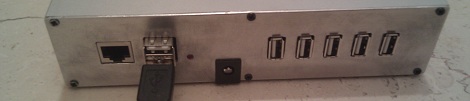
Like most of [builttospec]’s case builds, this enclosure was made on a laser cutter out of acrylic and features everything you would expect in a good Raspi enclosure. All the hardware ports are available, and there’s also a slot for a GPIO ribbon cable, perfect for connecting an enclosed Raspi to whatever hardware project you’re working on.

One thing we’re loving about [builttospec]’s enclosure is the tasteful use of light pipes that funnel the light from the LED indicators on the Raspi to the surface of the case. Sure, they’re just a few bits of laser-cut polycarbonate, but its little touches like this that transform a good case build into a great one.

Files available on Thingiverse.

Building Better Cases With A Laser Cutter

[Ryan] just got his Raspberry Pi, and what better way to add a new toy to your workbench than by building a case for it? Using a laser cutter and 3D printer, [Ryan] managed to make a case that is sure to be the envy of all the other tinkerers at his hackerspace.

The build started off with a piece of dark red acrylic in a laser cutter. After cutting the Raspberry Pi logo out of this acrylic, [Ryan] cut the same logo – a little bit larger – out of plywood. Because he was very careful to measure the kerf (or the width of the laser beam/saw blade/what have you), the wooded version of the Raspi logo fit snugly inside the acrylic cut out.

The sides of the enclosure are a single piece of plywood with a kerf bend, making for a very attractive rounded case. Finally, the Raspberry Pi is mounted on a Pi plate printed on a Ultimaker.

For as many builds we see using a laser cutter here on Hackaday, there’s surprisingly little information on exploiting the true potential of these machines with marquetry, intarsia, or fretwork. Enclosures are always cool, so if you have a very elegant laser cut box, send it in and we’ll put it up.

Make Your Next Enclosure Out Of Stone

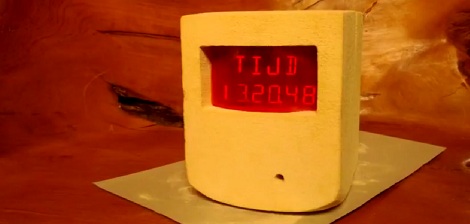
Sure, a laser-cut plywood enclosure adds a lot of maker cred, and custom plastic or cast aluminum enclosure belies an engineering and design prowess. [ardiyno] didn’t want one of these run-of-the-mill enclosures, so he made one from scratch out of limestone.

The stone [ardiyno] used comes from the southern bit of his native Netherlands. It’s a very nice limestone, easily carvable and capable of very fine detail as seen in [ardiyno]’s scary/creepy carved limestone bookends.

Inside the enclosure, [ardiyno] has a calendar/clock/environmental sensor displaying the current date, time, relative humidity, and light level on twelve 14-segment displays. [ardiyno] admits the enclosure is a bit oversized for how much space his project takes up, but the extra space is meant for future internal expansions.

After the break, you can check out [ardiyno]’s method of using a screw driver to carve the limestone. Normally, we’d call foul over someone abusing tools, but the limestone is so soft (the pyramids were made out of limestone using soft copper tools), there’s most likely very little damage to the screwdriver.

via reddit

Continue reading “Make Your Next Enclosure Out Of Stone”

8-bit Computer Project Lands In A Philco Radio Case

We’ve enjoyed seeing the development progress of Veronica, [Quinn Dunki’s] 8-bit computer project. It started out on a breadboard, then moved to edge-connected PCBs, and now [Quinn] has given Veronica a body of her own.

The donor is a Philco Model 42-327T and was produced in 1942. It was chosen because it is non-functional and missing several pieces. We wonder about the collector’s value of the piece but since [Quinn] snagged it from eBay there can’t be in huge demand right now. The teardown images are priceless. There seems to be no reasoning behind component placement for the beast. It looks more like a junk drawer packed full of relic components than something that actually worked once upon a time.

But we digress. After gutting the retro wooden case [Quinn] set out to fabricate her own face plate. Since she’s comfortable working with copper clad, she whipped up a negative design and etched the dashboard seen above. It mounts in the original dial opening, and hosts all of the controls she needs to work with the 8-bit computer. Just below is where the present buttons used to be located. You can just see the hexout display for reading data from the registers mounted in that void.

Laser Cutting Technique Makes Plywood Bendable

Here’s a laser cutting technique that makes thin plywood bendable. By cutting away elongated diamond shapes from the material, a lattice of strips connected minimally by alternating tabs is left over. The wood is then bendable, and it must be somewhat durable since the idea came from a product that uses the technique as a hinged notebook enclosure.

We don’t have much interest in it as an often used pivot point as surely it must be a problem with long-term use. But we love the look of it as a rounded corner on an enclosure like the Arduino project box seen above. The side walls are one continuous piece, with identical top and bottom sections which receive the alignment tabs. The whole thing is held together with just four bolt/washer/nut combinations.

But if you don’t have access to a laser cutter, we guess you’ll have to stick to altering pre-made enclosures for now.

Aluminum Bending Tutorial And A DIY Brake

What makes a project really exceptional? Part of it is a, ‘gee, that’s clever’ angle with a little bit of, ‘that’s actually possible.’ One thing the Hack a Day crew really appreciates is awesome enclosures. Altoids tins will get you far, but to step up to the big leagues you’ve got to bend some aluminum. Luckily, [Rupert] sent in a great tutorial on bending aluminum sheets for enclosures.

To make his press brake, [Rupert] scavenged a few pieces of 38mm bamboo worktop scraps. After assembling a few of these pieces with some hinges, he was ready to bend some aluminum.

One trick [Rupert] picked up is scoring the sheet metal on the inside of a future bend. For [Rupert]’s project, he sent his 3mm aluminum sheet through a table saw set to cut 1mm deep. Of course this should only be done with a blade designed for non-ferrous metals with as many carbide teeth as possible. Judging from [Rupert]’s homebuilt Hi-Fi that used this construction technique, the results are phenomenal.