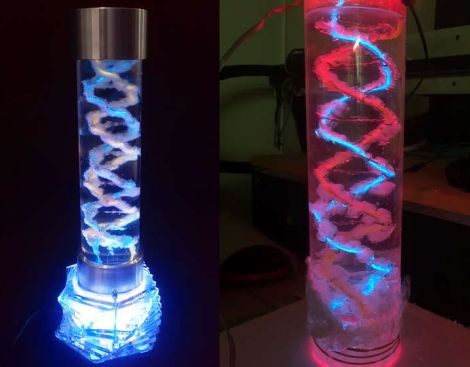
How To Grow Your Own EL Wire DNA Helix Lamp

el-wire-helix-lamp

[LucidMovement] was looking for some crystal-based artwork and just couldn’t seem to find anything that fit the bill, so he decided to build something himself.

The inspiration for his desk lamp came from something we’re all familiar with, a DNA double-helix. To grow the crystals he built a helix-shaped growing substrate out of nichrome and EL wires, submerging them in a warm alum solution. Once he had a nice set of crystals, he mounted it in an acrylic tube, filling the air space with clear silicone to seal off the display. He then mounted the silicone-filled tube on top of a rotating acrylic stand that he had cut for the project. The stand is made from several sheets of acrylic and contains both the gearing for movement as well as RGB LEDs to light the display from the bottom.

The lamp looks great when sitting idle, but when he powers it on it really shines (no pun intended). [LucidMovement] put a ton of work into the lamp, and offers up all sorts of tips, tricks, and considerations for anyone looking to build their own. Be sure to check out his writeup for plenty more details, and stick around to see a short video of the lamp in action.

Continue reading “How To Grow Your Own EL Wire DNA Helix Lamp”

led-contacts

[Ben Krasnow] Sticks LEDs In His Contacts Just For Kicks

[Ben Krasnow] wrote in, saying that every so often, a news story appears covering a project in which researchers embed a single-pixel LED display inside a contact lens. The most recent article he saw featured a contact-wearing rabbit, and not being one to shy away from damaging his own body in the name of science, he decided to try the experiment on himself.

He started out by soldering a tiny 0402 SMD LED to a hand-wound coil, laminating the display between a pair of regular contact lenses. After trying to adhere the lenses to one another using water, he opted to tack the edges together with a pair of hot tweezers, making for a more secure but uncomfortable piece of eyewear. The LED is powered by a simple inductive coil he put together, which uses a spark gap transmitter to flash the LED on and off.

If you’re not freaked out by people sticking things in their eyes, be sure to check out the video below to see [Ben’s] augmented contact lens in action. While it might not give him Terminator-like vision, it’s pretty awesome considering he pieced it together in his workshop in his spare time.

Continue reading “[Ben Krasnow] Sticks LEDs In His Contacts Just For Kicks”

Head-mounted Light Display Takes Holiday Cheer On The Go

hat-mounted-light-display

Most holiday light displays we see this time of year are stationary, or at least confined to somebody’s home. [Marco Guardigli] wanted to take his lights on the go, and thought that a light up winter hat would be perfect for showing off his holiday spirit.

In the winter he sports a sturdy wool felt hat, which was ideal for mounting LEDs. He picked up a basic LilyPad Arduino that uses a small LiPo battery as its power source, mounting it inside the hat with a bit of glue. He wired up a series of SMD LEDs around the perimeter of the hat which blend in quite well in the felt, leaving them nearly invisible to the naked eye when powered off. When he flips the LilyPad on however, there’s no missing the bright blue LEDs nor the music emanating from the tiny speaker he also mounted in the hat.

We think that [Marco’s] display is great, and if we were to build one, we would likely include a copious amount of red and green LEDs in ours. Do any of you take your Christmas light display on the go? We’d love to see them, so be sure to let us know in the comments.

Stick around to see a short video of [Marco’s] hat in action.

Continue reading “Head-mounted Light Display Takes Holiday Cheer On The Go”

Xbee Remote Sensors Tell You When Someone Enters Your Home

[Bill Porter] is helping a friend out by designing a simple security system for her home. It relies on Xbee modules to alert a base station when doors are opened, or a pressure mat is stepped on.

The door sensors are quite simple, and you’re probably already familiar with them. One part mounts to the door and has a magnet in it, the mating part mounts to the jamb and has a reed switch that closes a contact when the magnet is in place. The floor mat uses two sheets of conductive material separated by bits of foam. When it is stepped on a circuit is completed and can be sensed by the Xbee as a button press.

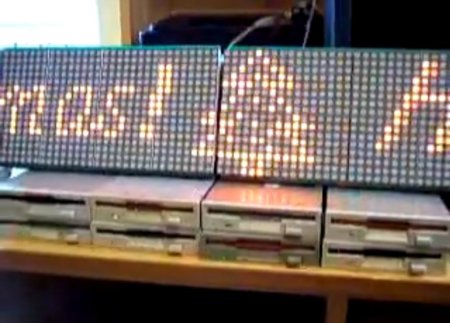
These sensors report back to an Arduino base station that has a buzzer and three 8×8 LED modules to scroll a message saying which sensor was tripped. [Bill] does a good job of showing what goes into configuring an Xbee network if you’ve never worked with the hardware before.

You’ll find his demo video after the break.

Continue reading “Xbee Remote Sensors Tell You When Someone Enters Your Home”

Smother Yourself In Addressable LEDs

Guess where this guy’s headed in his suit of many colors? If you said Burning Man give your self a pat on the back. After making a half-hearted EL suit for the festival in 2010 [Sander] decided he needed to step it up this year. He bought and affixed 200 LED modules to this suit so that he could light up the night.

They’re mounted in a grid, and in order to keep the changing patterns orderly he mapped the physical location of each in his code using a two-dimensional array. The controller uses an Arduino nano to push the patterns out to the array via SPI.

[Sander] included several different visual effects for the controller. One strobes the suit starting from the right cuff when he shakes someone’s hand. There’s also an audio spectrum analyzer chip and microphone that let him pulse the lights to music. You can see how bright this thing is in the image above, but to get the full effect shouldn’t skip the video after the break.

He’s entered the project into the Full Spectrum Laser Cutter giveaway. If he wins, we expect laser cut goodness for next year’s festival!

Continue reading “Smother Yourself In Addressable LEDs”

Adding HTTP To Ikea DIODER

[Alex] sent in a neat Ikea DIODER build that controls strings of RGB LEDs with HTTP requests.

We’ve seen Ikea DIODERs controlled wirelessly and over USB, but using the Internet with a DIODER is new to us. For his build, [Alex] used a Nanode, a small Arduino-like board that has built-in web connectivity.

The hardware portion of the build is very simple. A MOSFET controls each LED strip on the DIODER. The stock controller of the DIODER was ditched, meaning [Alex] needed to figure out how to convert an RGB color space to a Hue, Saturation, and Lightness color space “for super-classy fading.” Once that was figured out, [Alex] implemented a 1D Perlin noise function to blend between two colors.

Finally, the great EtherCard library was used to turn HTTP requests into dancing LEDs. [Alex] is thinking about building a JQuery webpage so he won’t have to muck around with entering commands like 192.168.1.25/hsl?i=0&h=135&s=90&l=50 into a browser. Without a nice web interface, it’s not as futuristic as [Alex] would like, but it’s still cool to us.

Pee-light Gives Guidance For Nocturnal Tinkles

This light is a rather dim LED module whose purpose is to give you a very small bit of illumination when using the restroom at night. If you rely on it instead of using the overhead lighting in the bathroom, you’ll be able to find your way back to bed with your night-vision undisturbed.

[Fred] built the project as a way to learn more about using MSP430 microcontrollers. The protoboard seen above has a pair of female pin headers designed to accept an MSP430-PIR board, which uses the low-power microcontroller to monitor a PIR motion sensor. The chip can be reprogrammed and [Fred] did just that, using the USB dongle side of the eZ430-F2013 dev stick. Now when the sensor detects motion the chip first checks the light-dependent resistor on the protoboard to see if it’s dark in the bathroom. If so, it switches on the LED and sets a timer to shut if off again.

The system runs on a 9V battery, which is a bit under-powered for the 12V-spec’ed LED module. But [Fred] says the light it produces is just the right intensity.

[Thanks Jeremy]